### Author:  [@Wim\_Jansen](https://forum.duplicati.com/u/Wim_Jansen)
#### Post date: [October 20, 2017, 7:11pm UTC](https://forum.duplicati.com/t/synology-nas-version-sqlite-db-location/1089/3 "2017-10-20T19:11:03Z")
On my synology I moved the databases for each backup to a user folder. You can move it manually (ssh) and update the path in the gui.
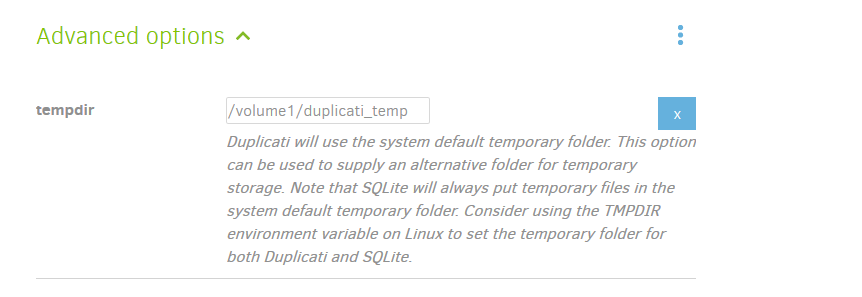
I also moved the temp location as I believe I had some space issues in the original location. This can be done via the advanced options.
The db that holds the configuration is at the original location as the launch script can’t be updated (won’t start if i change even a single bit. Guess that is safety measure of synology)
I can’t share my configuration now, as my laptop screen is broken…
---
### Author:  [@drwtsn32](https://forum.duplicati.com/u/drwtsn32)
#### Post date: [October 21, 2017, 3:54am UTC](https://forum.duplicati.com/t/synology-nas-version-sqlite-db-location/1089/4 "2017-10-21T03:54:04Z")
> [@JonMikelV](#):
>
> update the service to include the --server-datafolder=\ parameter
This part I’m not sure how to do with Synology. I am pretty new to their hardware so am not sure how apps are launched exactly. I am quite familiar with regular Linux but ultimately dind’t know how to modify this without it being undone by future package installs.
So for now I just made a symlink to where I moved the database files to. Will see if it works.
But what about my second question… how do I know that the database is OK after these out-of-space issues?
---
### Author:  [@Wim\_Jansen](https://forum.duplicati.com/u/Wim_Jansen)
#### Post date: [October 21, 2017, 5:55am UTC](https://forum.duplicati.com/t/synology-nas-version-sqlite-db-location/1089/5 "2017-10-21T05:55:42Z")
You can’t update the launch script. The package does not start if you update the script.
Take a copy of the db to be safe, run verify to see if all is OK. Run a backup afterwards.
---
### Author:  [@Wim\_Jansen](https://forum.duplicati.com/u/Wim_Jansen)
#### Post date: [October 21, 2017, 6:21am UTC](https://forum.duplicati.com/t/synology-nas-version-sqlite-db-location/1089/6 "2017-10-21T06:21:48Z")
Don’t forget to change the temp location. It was an issue for me as the default location was not big enough.
---
### Author:  [@kenkendk](https://forum.duplicati.com/u/kenkendk)
#### Post date: [October 23, 2017, 12:56pm UTC](https://forum.duplicati.com/t/synology-nas-version-sqlite-db-location/1089/7 "2017-10-23T12:56:25Z")
> [@Wim\_Jansen](#):
>
> You can’t update the launch script. The package does not start if you update the script.
I have not had this problem myself, but maybe I disabled some safeguards during development. Unfortunately I do not have a clean Synology box for testing with.
---
### Author:  [@drwtsn32](https://forum.duplicati.com/u/drwtsn32)
#### Post date: [October 23, 2017, 1:34pm UTC](https://forum.duplicati.com/t/synology-nas-version-sqlite-db-location/1089/8 "2017-10-23T13:34:05Z")
> [@Wim\_Jansen](#):
>
> Don’t forget to change the temp location.
How is that accomplished?
Edit- never mind, I see you mentioned it’s in advanced options!
I checked and the default appears to be `/volume1/@appstore/Duplicati/temp/`. On my system that would be fine since volume1 is the big array.
---
### Author:  [@Wim\_Jansen](https://forum.duplicati.com/u/Wim_Jansen)
#### Post date: [October 23, 2017, 1:36pm UTC](https://forum.duplicati.com/t/synology-nas-version-sqlite-db-location/1089/9 "2017-10-23T13:36:16Z")
---
### Author:  [@JonMikelV](https://forum.duplicati.com/u/JonMikelV)
#### Post date: [October 23, 2017, 1:36pm UTC](https://forum.duplicati.com/t/synology-nas-version-sqlite-db-location/1089/10 "2017-10-23T13:36:45Z")
> [@kenkendk](#):
>
> I have not had this problem myself, but maybe I disabled some safeguards during development.
So you’ve somehow been able to run Duplicati on Synology DSM with custom parameters such as `--server-datafolder`?
---
### Author:  [@kenkendk](https://forum.duplicati.com/u/kenkendk)
#### Post date: [October 30, 2017, 11:43am UTC](https://forum.duplicati.com/t/synology-nas-version-sqlite-db-location/1089/11 "2017-10-30T11:43:47Z")
> [@JonMikelV](#):
>
> So you’ve somehow been able to run Duplicati on Synology DSM with custom parameters such as --server-datafolder?
AFAIK, yes. My NAS box is offline at the moment so I cannot verify, but will do so when i gets back up (not sure when that will happen … )
---
### Author:  [@b8Ha](https://forum.duplicati.com/u/b8Ha)
#### Post date: [January 14, 2018, 12:57pm UTC](https://forum.duplicati.com/t/synology-nas-version-sqlite-db-location/1089/12 "2018-01-14T12:57:58Z")
I had this problem too and manually changed the location to: /volume1/@appstore/Duplicati/SQLite-datafolder/RCTIOGLGOX.sqlite
> Mono.Data.Sqlite.SqliteException (0x80004005): Insertion failed because the database is full
> database or disk is full
> at Mono.Data.Sqlite.SQLite3.Reset (Mono.Data.Sqlite.SqliteStatement stmt) [0x00096] in \<62e44d67e13348a795e30fd7dd8622df\>:0
> at Mono.Data.Sqlite.SQLite3.Step (Mono.Data.Sqlite.SqliteStatement stmt) [0x00046] in \<62e44d67e13348a795e30fd7dd8622df\>:0
> at Mono.Data.Sqlite.SqliteDataReader.NextResult () [0x00129] in \<62e44d67e13348a795e30fd7dd8622df\>:0
> at Mono.Data.Sqlite.SqliteDataReader…ctor (Mono.Data.Sqlite.SqliteCommand cmd, System.Data.CommandBehavior behave) [0x00051] in \<62e44d67e13348a795e30fd7dd8622df\>:0
> at (wrapper remoting-invoke-with-check) Mono.Data.Sqlite.SqliteDataReader:.ctor (Mono.Data.Sqlite.SqliteCommand,System.Data.CommandBehavior)
> at Mono.Data.Sqlite.SqliteCommand.ExecuteReader (System.Data.CommandBehavior behavior) [0x00006] in \<62e44d67e13348a795e30fd7dd8622df\>:0
> at Mono.Data.Sqlite.SqliteCommand.ExecuteNonQuery () [0x00000] in \<62e44d67e13348a795e30fd7dd8622df\>:0
> at Duplicati.Library.Main.Database.ExtensionMethods.ExecuteNonQuery (System.Data.IDbCommand self, System.String cmd, System.Object values) [0x0004e] in \<118ad25945a24a3991f7b65e7a45ea1e\>:0
> at Duplicati.Library.Main.Database.LocalDatabase.Vacuum () [0x0000c] in \<118ad25945a24a3991f7b65e7a45ea1e\>:0
> at Duplicati.Library.Main.Database.LocalDatabase.PurgeLogData (System.DateTime threshold) [0x00072] in \<118ad25945a24a3991f7b65e7a45ea1e\>:0
> at Duplicati.Library.Main.Operation.BackupHandler.Run (System.String sources, Duplicati.Library.Utility.IFilter filter) [0x0082a] in \<118ad25945a24a3991f7b65e7a45ea1e\>:0
---
### Author:  [@JonMikelV](https://forum.duplicati.com/u/JonMikelV)
#### Post date: [January 14, 2018, 3:08pm UTC](https://forum.duplicati.com/t/synology-nas-version-sqlite-db-location/1089/13 "2018-01-14T15:08:31Z")
> [@b8Ha](#):
>
> I had this problem too and manually changed the location
Thanks for sharing that!
I don’t have a Synology NAS myself so just for my own clarity, once you changed the location for the .sqlite file your “database or disk is full” errors went away, right?
Do you recall what steps you took to move the file?
---
### Author:  [@b8Ha](https://forum.duplicati.com/u/b8Ha)
#### Post date: [January 17, 2018, 1:55pm UTC](https://forum.duplicati.com/t/synology-nas-version-sqlite-db-location/1089/14 "2018-01-17T13:55:13Z")
I just created the folder “SQLite-datafolder” in /volume1/@appstore/Duplicati/ (default installation location of Duplicati) and then changed the “Local database path:” to this (/volume1/@appstore/Duplicati/SQLite-datafolder/RCTIOGLGOX.sqlite) location in the backup task settings.
The .sqlite file is around 500MB now for me.
---
### Author:  [@JonMikelV](https://forum.duplicati.com/u/JonMikelV)
#### Post date: [January 18, 2018, 6:33am UTC](https://forum.duplicati.com/t/synology-nas-version-sqlite-db-location/1089/15 "2018-01-18T06:33:25Z")
Thanks for sharing that!
---
### Author:  [@drwtsn32](https://forum.duplicati.com/u/drwtsn32)
#### Post date: [January 20, 2018, 12:38am UTC](https://forum.duplicati.com/t/synology-nas-version-sqlite-db-location/1089/16 "2018-01-20T00:38:46Z")
> [@b8Ha](#):
>
> /volume1/@appstore/Duplicati/
I was a bit hesitant to put my database there because I don’t know how Synology handles package uninstalls. Like if I uninstall to put on a newer version, I’d hate for it to wipe out the whole folder. I might test this when I upgrade my Synology Duplicati version. Place an extra dummy file there to see if it gets nuked.
---
### Author:  [@Wim\_Jansen](https://forum.duplicati.com/u/Wim_Jansen)
#### Post date: [January 20, 2018, 7:12am UTC](https://forum.duplicati.com/t/synology-nas-version-sqlite-db-location/1089/17 "2018-01-20T07:12:53Z")
You can put it in any other location as well. I created a dedicated shared folder for my db and for temp files.
---
### Author:  [@drwtsn32](https://forum.duplicati.com/u/drwtsn32)
#### Post date: [January 20, 2018, 6:55pm UTC](https://forum.duplicati.com/t/synology-nas-version-sqlite-db-location/1089/18 "2018-01-20T18:55:49Z")
Yeah I put it in a different folder from appstore/Duplicati just to be safe.
---
### Author:  [@galance](https://forum.duplicati.com/u/galance)
#### Post date: [November 3, 2018, 12:08am UTC](https://forum.duplicati.com/t/synology-nas-version-sqlite-db-location/1089/19 "2018-11-03T00:08:50Z")
I have been reading through this thread and what I am not sure of is after you manually move the database, how do you get Duplicati to find it? Here is my scenario. I could not run Duplicati and my Synology was failing to run properly because my backup databases in the default location were taking up too much space. I manually moved them out of the default location to a /volume1/ directory. However, all of my configured backups no longer show on the Home tab and I would prefer to not rebackup everything? How do I get Duplicati to find the DBs where I moved them? Or do I just need to start from scratch?
---
### Author:  [@drwtsn32](https://forum.duplicati.com/u/drwtsn32)
#### Post date: [November 3, 2018, 12:44am UTC](https://forum.duplicati.com/t/synology-nas-version-sqlite-db-location/1089/20 "2018-11-03T00:44:15Z")
I created a symlink… when Duplicati tries to access the data files in the original location, it gets silently redirected to the actual data location on volume1 (where I moved the data files).