# Sucessful backup, but always 3 warnings

**URL:** https://forum.duplicati.com/t/sucessful-backup-but-always-3-warnings/1563
**Category:** Support
**Created:** [November 27, 2017, 5:08am UTC](https://forum.duplicati.com/t/sucessful-backup-but-always-3-warnings/1563 "2017-11-27T05:08:30Z")
**Posts on this page:** 16
**Page:** 1

<div class="post-metadata">

### Author: ![Matthias](https://forum.duplicati.com/letter_avatar_proxy/v4/letter/m/cdc98d/32.png) [@Matthias](https://forum.duplicati.com/u/Matthias)
#### Post date: [November 27, 2017, 5:08am UTC](https://forum.duplicati.com/t/sucessful-backup-but-always-3-warnings/1563/1 "2017-11-27T05:08:30Z")

</div>

Hello,

I have a configuration, to backup a USB-stick (G:) to my local NAS System.  
The backup is done, Looks good, but always three warnings:

Warnings: [

```
Failed to process metadata for "G:\System Volume Information\", storing empty metadata => Es wurde versucht, einen nicht autorisierten Vorgang auszuführen.,

Error reported while accessing file: G:\System Volume Information\ => Der Zugriff auf den Pfad "G:\System Volume Information" wurde verweigert.,

Error reported while accessing file: G:\System Volume Information\ => Der Zugriff auf den Pfad "G:\System Volume Information" wurde verweigert.

```

]

May I ask for some tips, tricks, what´s wrong, or how to avoid these messages.

Thank You!

Matthias.

#

---

<div class="post-metadata">

### Author: ![tophee](https://forum.duplicati.com/user_avatar/forum.duplicati.com/tophee/32/21_2.png) [@tophee](https://forum.duplicati.com/u/tophee)
#### Post date: [November 27, 2017, 8:57am UTC](https://forum.duplicati.com/t/sucessful-backup-but-always-3-warnings/1563/2 "2017-11-27T08:57:48Z")

</div>

The easiest way to solve this is probably to exclude `G:\System Volume Information\` from your backup. You don’t want that backed up anyway:

> <https://serverfault.com/questions/462447/is-it-necessary-to-back-up-the-system-volume-information-folder>

Edit: I realize that I may have made a wrong assumption here, namely that you/duplicati is trying to backup the contents of `G:\System Volume Information\` but it may well be the case that you have `--snapshot-policy = on` in which case (I think) duplicati would be trying to access that folder in order to create a Volume Shadow Copy. According to the help text, it should fail silently if it fails and create a warning in the logs:

```
  --snapshot-policy = off
    This setting controls the usage of snapshots, which allows Duplicati to
    backup files that are locked by other programs. If this is set to "off",
    Duplicati will not attempt to create a disk snapshot. Setting this to
    "auto" makes Duplicati attempt to create a snapshot, and fail silently if
    that was not allowed or supported. A setting of "on" will also make
    Duplicati attempt to create a snapshot, but will produce a warning
    message in the log if it fails. Setting it to "required" will make
    Duplicati abort the backup if the snapshot creation fails. On windows
    this uses the Volume Shadow Copy Services (VSS) and requires
    administrative privileges. On Linux this uses Logical Volume Management
    (LVM) and requires root privileges.

```

In any case, you might want to turn ¨–snapshot-policy = off` as I don’t think it makes sense for USB drives. But others here may be able to provide a more generic solution…

---

<div class="post-metadata">

### Author: ![drwtsn32](https://forum.duplicati.com/user_avatar/forum.duplicati.com/drwtsn32/32/2591_2.png) [@drwtsn32](https://forum.duplicati.com/u/drwtsn32)
#### Post date: [November 27, 2017, 7:11pm UTC](https://forum.duplicati.com/t/sucessful-backup-but-always-3-warnings/1563/3 "2017-11-27T19:11:03Z")

</div>

> [@tophee](#):
>
> duplicati would be trying to access that folder in order to create a Volume Shadow Copy

I don’t think so. Duplicati would just be triggering the VSS API to create the snapshot, and Windows itself is responsible for doing the actual work and putting data in System Volume Information.

I bet the OP has the entire G:\ drive selected for backup. Excluding System Volume Information would be the right approach to solving this problem. As you stated you do not want to back up this area anyway.

---

<div class="post-metadata">

### Author: ![Matthias](https://forum.duplicati.com/letter_avatar_proxy/v4/letter/m/cdc98d/32.png) [@Matthias](https://forum.duplicati.com/u/Matthias)
#### Post date: [November 28, 2017, 4:43am UTC](https://forum.duplicati.com/t/sucessful-backup-but-always-3-warnings/1563/4 "2017-11-28T04:43:50Z")

</div>

Good Morning,

in short words …  
perfect help… Thanks.

My itension/aim is to backup all “user data” from the stick. I am not interested in an other information, maybe the operation system need this.

With a modification of my backup configuration, the backup will be done, without error and warnings.  
I’m a bit ashamed that I did not find the solution myself.

high time, and spend a round … hmmmm, how … donate the project is possible  
or you come to south germany (Bayern) … 🙂

For me, duplicati is a very useful, helpful powerful tool.

Regards

PS: what means the abbravation OP …

---

<div class="post-metadata">

### Author: ![JonMikelV](https://forum.duplicati.com/letter_avatar_proxy/v4/letter/j/439d5e/32.png) [@JonMikelV](https://forum.duplicati.com/u/JonMikelV)
#### Post date: [November 28, 2017, 3:47pm UTC](https://forum.duplicati.com/t/sucessful-backup-but-always-3-warnings/1563/5 "2017-11-28T15:47:34Z")

</div>

It’s good to hear things are working for you now! If there was a particular post that gave you the “fix” feel free to check the Solution box ![image](https://forum.duplicati.com/uploads/default/original/1X/fc1e2e252304eff2962abd9f2b04c278b2c5a511.png). 🙂

> [@Matthias](#):
>
> what means the abbravation OP

OP means “original post” or “original poster” - it’s just a shortcut way to refer to the first post or the person who made the first post.

---

<div class="post-metadata">

### Author: ![tophee](https://forum.duplicati.com/user_avatar/forum.duplicati.com/tophee/32/21_2.png) [@tophee](https://forum.duplicati.com/u/tophee)
#### Post date: [November 30, 2017, 9:53pm UTC](https://forum.duplicati.com/t/sucessful-backup-but-always-3-warnings/1563/6 "2017-11-30T21:53:07Z")

</div>

Yesterday, I experienced the same issue (3 warnings about not being able to access `Z:\System Volume Information\`)

```
29 Nov 2017 23:25: Message
Error reported while accessing file: Z:\System Volume Information\
System.UnauthorizedAccessException: Access to the path 'Z:\System Volume Information' is denied.
   at System.IO.__Error.WinIOError(Int32 errorCode, String maybeFullPath)
   at System.IO.FileSystemEnumerableIterator`1.CommonInit()
   at System.IO.Directory.GetFiles(String path)
   at Duplicati.Library.Snapshots.NoSnapshotWindows.ListFiles(String folder)
   at Duplicati.Library.Utility.Utility.<EnumerateFileSystemEntries>d__22.MoveNext()
29 Nov 2017 23:25: Message
Error reported while accessing file: Z:\System Volume Information\
System.UnauthorizedAccessException: Access to the path 'Z:\System Volume Information' is denied.
   at System.IO.__Error.WinIOError(Int32 errorCode, String maybeFullPath)
   at System.IO.FileSystemEnumerableIterator`1.CommonInit()
   at System.IO.Directory.GetDirectories(String path)
   at Duplicati.Library.Snapshots.NoSnapshotWindows.ListFolders(String folder)
   at Duplicati.Library.Utility.Utility.<EnumerateFileSystemEntries>d__22.MoveNext()
29 Nov 2017 23:25: Message
Failed to process metadata for "Z:\System Volume Information\", storing empty metadata
System.UnauthorizedAccessException: Attempted to perform an unauthorized operation.
   at System.Security.AccessControl.Win32.GetSecurityInfo(ResourceType resourceType, String name, SafeHandle handle, AccessControlSections accessControlSections, RawSecurityDescriptor& resultSd)
   at System.Security.AccessControl.NativeObjectSecurity.CreateInternal(ResourceType resourceType, Boolean isContainer, String name, SafeHandle handle, AccessControlSections includeSections, Boolean createByName, ExceptionFromErrorCode exceptionFromErrorCode, Object exceptionContext)
   at System.Security.AccessControl.FileSystemSecurity..ctor(Boolean isContainer, String name, AccessControlSections includeSections, Boolean isDirectory)
   at System.Security.AccessControl.DirectorySecurity..ctor(String name, AccessControlSections includeSections)
   at Duplicati.Library.Snapshots.SystemIOWindows.GetAccessControlDir(String path)
   at Duplicati.Library.Snapshots.SystemIOWindows.GetMetadata(String path, Boolean isSymlink, Boolean followSymlink)
   at Duplicati.Library.Main.Operation.BackupHandler.GenerateMetadata(ISnapshotService snapshot, String path, FileAttributes attributes)

```

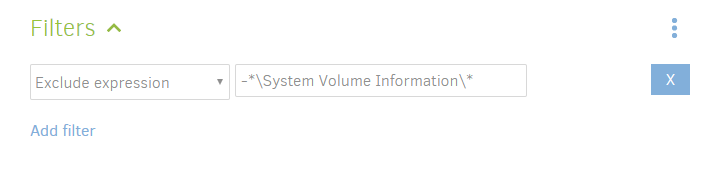
So I excluded any `System Volume Information` directory like this:
 ![image](https://forum.duplicati.com/uploads/default/original/1X/55dd169904051ecf0585d36c505ce2af3531d220.png)

But when the job ran today, I got the same 3 warnings again. Am I doing something wrong?

---

<div class="post-metadata">

### Author: ![JonMikelV](https://forum.duplicati.com/letter_avatar_proxy/v4/letter/j/439d5e/32.png) [@JonMikelV](https://forum.duplicati.com/u/JonMikelV)
#### Post date: [December 1, 2017, 4:18am UTC](https://forum.duplicati.com/t/sucessful-backup-but-always-3-warnings/1563/7 "2017-12-01T04:18:21Z")

</div>

IIRC, ending the exclude with anything other than \ or / treats the filter like a file.

If that’s correct then your rule will exclude all contents of the folder, but will still try to access the folder, thus causing the error.

I’m not where I can check, but I also think the “Exclude expression” selection automatically adds the leading dash, in which case it’s trying to exclude “anything in the folder found at dash followed by anything followed by \System Volume Information”

Try putting `-*\System Volume Information\` in the “edit as text field”.

---

<div class="post-metadata">

### Author: ![tophee](https://forum.duplicati.com/user_avatar/forum.duplicati.com/tophee/32/21_2.png) [@tophee](https://forum.duplicati.com/u/tophee)
#### Post date: [December 2, 2017, 6:09pm UTC](https://forum.duplicati.com/t/sucessful-backup-but-always-3-warnings/1563/8 "2017-12-02T18:09:20Z")

</div>

> [@JonMikelV](#):
>
> Try putting -\*\System Volume Information\ in the “edit as text field”.

Unfortunately, this didn’t help either. Still getting the warning.  
Wait a minute, I am starting to understand what you are saying here:

> [@JonMikelV](#):
>
> I also think the “Exclude expression” selection automatically adds the leading dash, in which case it’s trying to exclude “anything in the folder found at dash followed by anything followed by \System Volume Information”

You are basically saying that what you suggested will probably not work, right? Well you were right. So I have to try `*\System Volume Information\` then?

@Matthias, how exactly did you get rid of the warnings?

Edit: See also here:

> [@Do the filters actually work?](https://forum.duplicati.com/t/do-the-filters-actually-work/657/4):
>
> Personally, I use Exclude Regular Expressions that I figure out in a text file and just past the lot in “Edit as text” mode. For example, this “Edit as text” value should exclude the a users’s “Videos” and “Downloads” folders on either Windows 98/XP (the Documents and Settings stuff) or beyond (the Users stuff): -[.:\\(Users|Documents and Settings)\\[^\\]\*\\(Videos|Downloads)\\] To use it in the regular “Exclude regular expression” field just remove the leading “-” and the surrounding “[]” so…

---

<div class="post-metadata">

### Author: ![Matthias](https://forum.duplicati.com/letter_avatar_proxy/v4/letter/m/cdc98d/32.png) [@Matthias](https://forum.duplicati.com/u/Matthias)
#### Post date: [December 4, 2017, 3:59am UTC](https://forum.duplicati.com/t/sucessful-backup-but-always-3-warnings/1563/9 "2017-12-04T03:59:23Z")

</div>

Good Morning,

I was asked …  
@Matthias, how exactly did you get rid of the warnings?

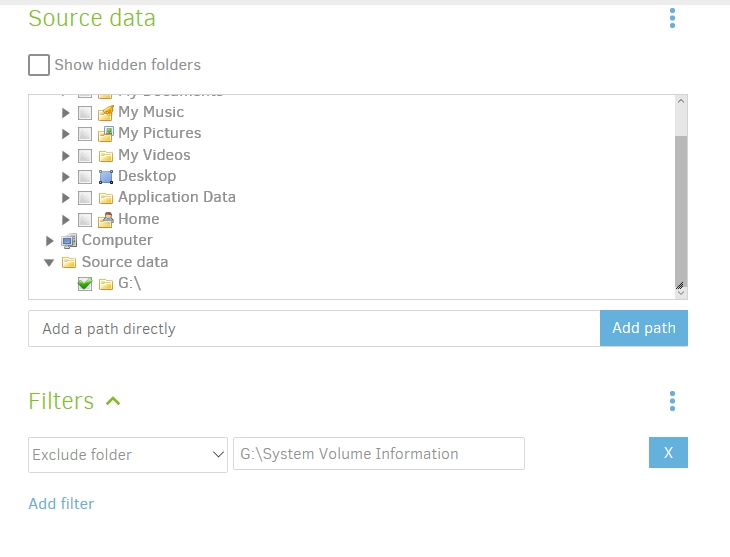
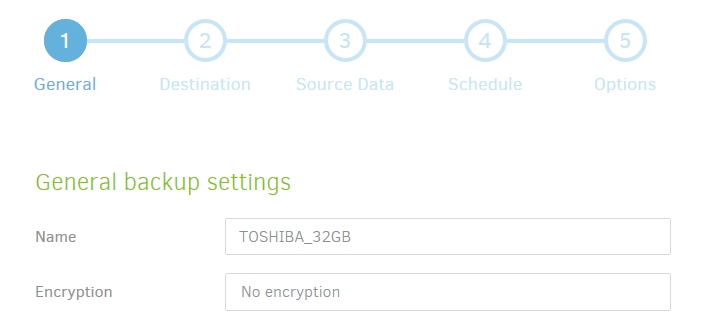
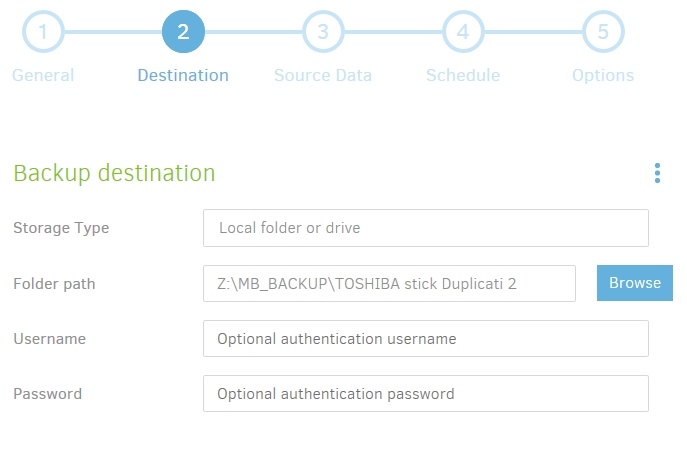
My system:

- Notebook, Windows Operating System 10
- Standard USB Stick 32 GByte, plugged in, connected with G:\
 ![post 1](https://forum.duplicati.com/uploads/default/original/1X/54756b0ddd2218a8ed9615eab2019c15c19a0757.jpg)

![post 2](https://forum.duplicati.com/uploads/default/original/1X/0253da65db46f6eb66ea07667813f2f9af3dfe6a.jpg)

 ![post 3](https://forum.duplicati.com/uploads/default/original/1X/4634225f9e07ad65ed32d7f4032120ff7a007344.jpg)

That´s all …  
Due to the case, that my USB stick is always G:\ … the Exclude Folder Option works fine.

Note: In this backup run, there was only small changes, only 10 files,  
therefore the backup runs very fast …  
and no warnings, errors, and the red (message) box on the screen

Regards

---

<div class="post-metadata">

### Author: ![Matthias](https://forum.duplicati.com/letter_avatar_proxy/v4/letter/m/cdc98d/32.png) [@Matthias](https://forum.duplicati.com/u/Matthias)
#### Post date: [December 4, 2017, 4:00am UTC](https://forum.duplicati.com/t/sucessful-backup-but-always-3-warnings/1563/10 "2017-12-04T04:00:58Z")
</div>

![post 4](https://forum.duplicati.com/uploads/default/original/1X/d1efdc44bb052f6f7ae2c5cdab71eb4e2cafc699.jpg)

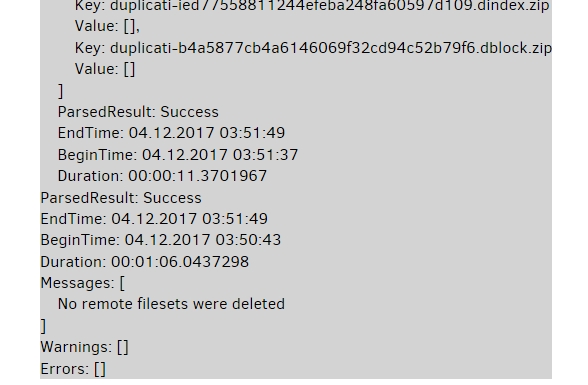
Adding to my last post, the result … no warnings, no errors …

note: new users can only add 3 Images per post … 😑 |

---

<div class="post-metadata">

### Author: ![JonMikelV](https://forum.duplicati.com/letter_avatar_proxy/v4/letter/j/439d5e/32.png) [@JonMikelV](https://forum.duplicati.com/u/JonMikelV)
#### Post date: [December 4, 2017, 5:05pm UTC](https://forum.duplicati.com/t/sucessful-backup-but-always-3-warnings/1563/11 "2017-12-04T17:05:54Z")

</div>

> [@tophee](#):
>
> So I have to try \*\System Volume Information\ then?

Yes. In the two-field setup for “Exclude Folder”, you would put in `*\System Volume Information\` (the “-” is added automatically behind the scenes), but if you’re using the “Edit as text” option (the three dots menu just across from the “Filters” line) then you need to use `-*\System Volume Information\`.

---

<div class="post-metadata">

### Author: ![tophee](https://forum.duplicati.com/user_avatar/forum.duplicati.com/tophee/32/21_2.png) [@tophee](https://forum.duplicati.com/u/tophee)
#### Post date: [December 6, 2017, 8:54pm UTC](https://forum.duplicati.com/t/sucessful-backup-but-always-3-warnings/1563/12 "2017-12-06T20:54:52Z")

</div>

> [@JonMikelV](#):
>
> In the two-field setup for “Exclude Folder”, you would put in \*\System Volume Information\

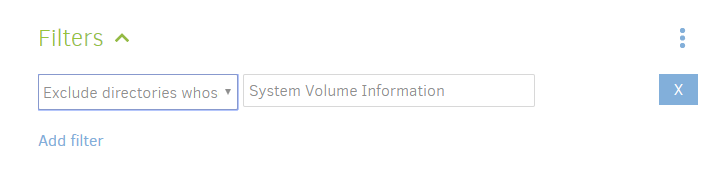
Nope, doesn’t work. Now I was going to try
 ![image](https://forum.duplicati.com/uploads/default/original/1X/8b91968ff20ac03668c6ae2eebacaf9042f7a9a8.png)

But then I thought, since I want to exclude those system volume folders globally anyway, I might aswell go for the global option `--exclude="*\System Volume Information\*"`

But those filters are confusing. So:

> [@Include examples for filters](https://forum.duplicati.com/t/include-examples-for-filters/1662):
>
> Given how much time some people are wasting [trying to figure out how to exclude a certain folder](https://forum.duplicati.com/t/sucessful-backup-but-always-3-warnings/1563/8), I though I’d suggest that whenever you select a filter, you get a quick explanation/example of how to use it:

---

<div class="post-metadata">

### Author: ![tophee](https://forum.duplicati.com/user_avatar/forum.duplicati.com/tophee/32/21_2.png) [@tophee](https://forum.duplicati.com/u/tophee)
#### Post date: [December 7, 2017, 8:19pm UTC](https://forum.duplicati.com/t/sucessful-backup-but-always-3-warnings/1563/13 "2017-12-07T20:19:19Z")

</div>

> [@tophee](#):
>
> I might aswell go for the global option --exclude=“\*\System Volume Information\*”

Doesn’t work either . 😫 It gives me:

```plaintext
Warnings: [
    The supplied option --exclude is not supported and will be ignored
]

```

So, I’m wondering why the GUI accepts that option in the first place if it is not supported at the global settings level.

I also tried ` --exclude=*\System Volume Information\*` but with the same results.

I can’t believe how much time I’m spending at doing a simple thing like excluding a some folders. 😵

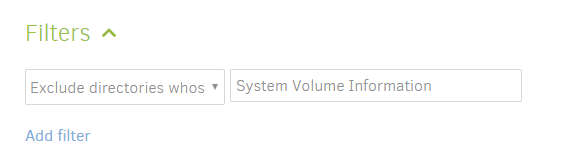
So now I tried this:
![image](https://forum.duplicati.com/uploads/default/original/1X/e667066c477820ac26c7a842bfcc4c823fd3223a.png)

And it finally seems to have worked. The disadvantage is that I have to enter this for every single backup job. Why is it not possible to globally exclude stuff?

---

<div class="post-metadata">

### Author: ![JonMikelV](https://forum.duplicati.com/letter_avatar_proxy/v4/letter/j/439d5e/32.png) [@JonMikelV](https://forum.duplicati.com/u/JonMikelV)
#### Post date: [December 8, 2017, 9:35pm UTC](https://forum.duplicati.com/t/sucessful-backup-but-always-3-warnings/1563/14 "2017-12-08T21:35:10Z")

</div>

It might be worth including `\System Volume Information\` in the standard “System files” Exclude option.

---

<div class="post-metadata">

### Author: ![tophee](https://forum.duplicati.com/user_avatar/forum.duplicati.com/tophee/32/21_2.png) [@tophee](https://forum.duplicati.com/u/tophee)
#### Post date: [December 8, 2017, 9:41pm UTC](https://forum.duplicati.com/t/sucessful-backup-but-always-3-warnings/1563/15 "2017-12-08T21:41:45Z")

</div>

My assumption is that that is covered with this:

> [@Common exclusions and inclusions from %APPDATA%](https://forum.duplicati.com/t/common-exclusions-and-inclusions-from-appdata/807/14):
>
> I made an addition for it here:

But I don’t have that yet since I’m on the beta channel…

---

<div class="post-metadata">

### Author: ![kenkendk](https://forum.duplicati.com/user_avatar/forum.duplicati.com/kenkendk/32/5305_2.png) [@kenkendk](https://forum.duplicati.com/u/kenkendk)
#### Post date: [December 10, 2017, 10:07pm UTC](https://forum.duplicati.com/t/sucessful-backup-but-always-3-warnings/1563/19 "2017-12-10T22:07:37Z")

</div>

> [@JonMikelV](#):
>
> I’m not where I can check, but I also think the “Exclude expression” selection automatically adds the leading dash, in which case it’s trying to exclude “anything in the folder found at dash followed by anything followed by \System Volume Information”
> 
> Try putting -\*\System Volume Information\ in the “edit as text field”.

This should actually work because it will not look in the folder after it has been excluded.

But `*` means “zero or more characters” so the original filter should also work.

> [@tophee](#):
>
> So, I’m wondering why the GUI accepts that option in the first place if it is not supported at the global settings level.

I should fix it …

> [@tophee](#):
>
> Why is it not possible to globally exclude stuff?

Unfortunately it is because “order matters”. As we allow both include and exclude filters, there is no sane way to simply mix two lists of filters without getting a lot of surprises.

Imagine one rule is `exclude *`, putting that first and last has two very different outcomes.