# Startup Problems
**URL:** https://forum.duplicati.com/t/startup-problems/19751
**Category:** Support
**Created:** [December 21, 2024, 10:32am UTC](https://forum.duplicati.com/t/startup-problems/19751 "2024-12-21T10:32:53Z")
**Posts on this page:** 19
**Page:** 1
### Author:  [@toblak](https://forum.duplicati.com/u/toblak)
#### Post date: [December 21, 2024, 10:32am UTC](https://forum.duplicati.com/t/startup-problems/19751/1 "2024-12-21T10:32:53Z")
Hi,
Can somebody help me with the following issue?
I cannot get Duplicati to automatically start, when I boot up Windows. The problem has quite some history. I am using Duplicati for many years now and had it set up as a Windows service. This used to work without problems until sometime this autumn, when the Windows service would not start and could also not be started manually.
Recently, there was a Duplicati-update which required manual installation. In the installer, I chose the option for “Launch Duplicati at startup”. To avoid conflicts, I disabled the Windows service.
I can see an entry on the autostart tab of the task manager. It has the exact same path and executable as the start menu entry, and both entries are configured to run Duplicati tray icon as administrator. However, Duplicati never comes up automatically. Starting it manually via the start menu works without problems.
Is there any log written during Duplicati startup that could give me clues of the problem?
I am running 2.1.0.2\_beta\_2024-11-29 on Windows 10.
Thanks in advance for your suggestions.
---
### Author:  [@ZebCorp](https://forum.duplicati.com/u/ZebCorp)
#### Post date: [December 21, 2024, 11:41am UTC](https://forum.duplicati.com/t/startup-problems/19751/2 "2024-12-21T11:41:36Z")
My solution for autostart Duplicati is using Task Scheduler (i.e. run at log on, via command cmd /c start “Duplicati” “c:\Program Files\Duplicati 2\Duplicati.GUI.TrayIcon.exe”). This way you can also grant correct privileges for Duplicati (handy if you use VSS or usn-policy).
---
### Author:  [@kenkendk](https://forum.duplicati.com/u/kenkendk)
#### Post date: [December 21, 2024, 3:09pm UTC](https://forum.duplicati.com/t/startup-problems/19751/3 "2024-12-21T15:09:56Z")
> [@toblak](#):
>
> To avoid conflicts, I disabled the Windows service.
> I can see an entry on the autostart tab of the task manager. It has the exact same path and executable as the start menu entry, and both entries are configured to run Duplicati tray icon as administrator. However, Duplicati never comes up automatically. Starting it manually via the start menu works without problems.
The WindowsService was changed slightly for the beta build. The fix is to uninstall the service and install it again:
```plaintext
Duplicati.WindowsService.exe UNINSTALL
Duplicati.WindowsService.exe INSTALL
```
> [@toblak](#):
>
> In the installer, I chose the option for “Launch Duplicati at startup”.
That one is different. It places a shortcut in the user start menu, so Windows will automatically start it during login.
Because Duplicati uses the current user to figure out where the settings database is stored, launching as a user vs as a system service causes it to look in different folders.
> [@toblak](#):
>
> However, Duplicati never comes up automatically. Starting it manually via the start menu works without problems.
It is possible to enable/disable statup items in Windows settings. Is it possible that it is disabled?
> [@toblak](#):
>
> Is there any log written during Duplicati startup that could give me clues of the problem?
For the service, there are log entries in the Windows EventViewer. If Duplicati crashes it will usually write a file named `Duplicati-crashlog.txt` either in the settings folder or in the temp folder, depending on where in the startup phase it crashes.
---
### Author:  [@ts678](https://forum.duplicati.com/u/ts678)
#### Post date: [December 21, 2024, 4:49pm UTC](https://forum.duplicati.com/t/startup-problems/19751/4 "2024-12-21T16:49:48Z")
> [@toblak](#):
>
> This used to work without problems until sometime this autumn
Did it fail before upgrading to 2.1.0.2\_beta\_2024-11-29 or after it?
I had assumed before, but technically autumn (here) ended today.
> [@toblak](#):
>
> both entries are configured to run Duplicati tray icon as administrator.
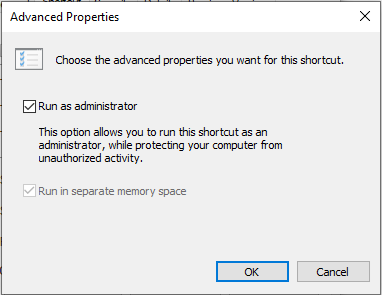
If you did the above to the shortcut, Windows won’t do the automatic start. Unclear why.
Try unchecking it to see if it gets fixed (as a test, as you might actually want it elevated).
Above shortcut image is actually to notepad.exe, just to show that it’s not just Duplicati.
I still have old shortcuts in `shell:startup` and `shell:common startup`. Full testing [here](https://forum.duplicati.com/t/how-to-improve-my-backup-strategy-macrium-duplicati-ram-disk/13603/8).
Task Manager Startup info is below, but they seem to be ignored if Run as administrator:

> [@kenkendk](#):
>
> The WindowsService was changed slightly for the beta build.
What beyond putting SERVER on its command line options? Old entry seemed to work.
I’d hope it behaves properly without a reinstall, except for the [risk of running old update](https://forum.duplicati.com/t/update-recommendation/19673/3).
> [@kenkendk](#):
>
> > [@toblak](#):
> >
> > In the installer, I chose the option for “Launch Duplicati at startup”.
>
> That one is different. It places a shortcut in the user start menu, so Windows will automatically start it during login.
So there’s an example of confusing wording, which has also been in the installer for a long time.
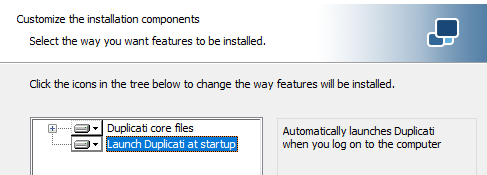
The term “startup” usually means computer startup IMO. The text at right is more accurate IMO.
Technically what it seems to do is place it in
`C:\ProgramData\Microsoft\Windows\Start Menu\Programs\StartUp` so all users get a startup unless one sets `Run as administrator`. For that, I do manual start, and @ZebCorp has a way.
---
### Author:  [@toblak](https://forum.duplicati.com/u/toblak)
#### Post date: [December 21, 2024, 5:16pm UTC](https://forum.duplicati.com/t/startup-problems/19751/5 "2024-12-21T17:16:34Z")
Hi all,
Thanks for all your helpful advice. I tried two things:
1. Uninstall and install the service as described in @kenkendk 's post. The service is now starting without problems. However, when I try to open the web GUI via “[http://localhost:8200/ngax/index.html](http://localhost:8200/ngax/index.html)”, it says “Connection to server was rejected due to invalid authentication.
Log in again, or re-open the page from the TrayIcon (if applicable)”. Subsequently, it does not accept my set passphrase. Also, there is no tray icon, so that I cannot access the web GUI via that way either.
2. Disabled the service and unchecked “Run as Administrator” in the autostart entry. That helped and Duplicati is now starting and the tray icon is displayed, after log on. I remember having had file access issue in the past, when backing up without elevated privileges. Will monitor how this works out now.
---
### Author:  [@ts678](https://forum.duplicati.com/u/ts678)
#### Post date: [December 21, 2024, 6:07pm UTC](https://forum.duplicati.com/t/startup-problems/19751/6 "2024-12-21T18:07:51Z")
> [@toblak](#):
>
> it does not accept my set passphrase.
When (what release) and how was that set? It also needs to be in the service itself.
[Duplicati Access Password](https://docs.duplicati.com/detailed-descriptions/duplicati-access-password)
[Change password with ServerUtil](https://docs.duplicati.com/detailed-descriptions/duplicati-access-password#change-password-with-serverutil)
[Example change with a different context](https://docs.duplicati.com/detailed-descriptions/duplicati-access-password#example-change-with-a-different-context) (might suit you if you never set service up)
> [@toblak](#):
>
> Also, there is no tray icon, so that I cannot access the web GUI via that way either.
You can have a tray icon to go with the service, but start it with `--no-hosted-server`.
[Detached TrayIcon](https://docs.duplicati.com/duplicati-programs/trayicon#detached-trayicon) (This term confuses me between attached to service vs. nothing)
> [@toblak](#):
>
> I remember having had file access issue in the past, when backing up without elevated privileges.
E.g. busy files may complain, which needs VSS (snapshot-policy), which needs elevation. Performance improvements via usn-policy also need elevation. Both are Windows rules…
---
### Author:  [@toblak](https://forum.duplicati.com/u/toblak)
#### Post date: [December 21, 2024, 6:57pm UTC](https://forum.duplicati.com/t/startup-problems/19751/7 "2024-12-21T18:57:48Z")
Thanks. I was not aware of the Windows service having its own password. I found the URL in the event viewer and was able to set a password for the service. I can now access the GUI. However, all my scheduled tasks have disappeared from the home page.
> [@ts678](#):
>
> You can have a tray icon to go with the service, but start it with `--no-hosted-server`.
Could you please explain how I can specify command line options for the Windows service?
---
### Author:  [@ts678](https://forum.duplicati.com/u/ts678)
#### Post date: [December 21, 2024, 7:11pm UTC](https://forum.duplicati.com/t/startup-problems/19751/8 "2024-12-21T19:11:27Z")
> [@toblak](#):
>
> Could you please explain how I can specify command line options for the Windows service?
[WindowsService](https://docs.duplicati.com/duplicati-programs/service#windowsservice) describes. Just type them on the install line, and they get added to service.
I’d note, though, that the “it” in what you quoted meant TrayIcon option saying go elsewhere.
You can right click the right shortcut for your TrayIcon starts, and put options there if you like.
They’re prone to be overwritten on next Duplicati install though, but you can create your own.
> [@toblak](#):
>
> However, all my scheduled tasks have disappeared from the home page.
You’re probably just launching as TrayIcon talking to itself, due to lack of `--no-hosted-server`.
About → System information has a `UserName` value to see if you’re running as you (unwanted).
[Detached TrayIcon](https://docs.duplicati.com/duplicati-programs/trayicon#detached-trayicon) explains how to set this up. It’s like it used to be except for password need.
---
### Author:  [@toblak](https://forum.duplicati.com/u/toblak)
#### Post date: [December 21, 2024, 7:42pm UTC](https://forum.duplicati.com/t/startup-problems/19751/9 "2024-12-21T19:42:35Z")
Ok. I used the following commands to get the tray icon.
C:\Program Files\Duplicati 2\>Duplicati.WindowsService.exe UNINSTALL
Duplicati service delete succeeded.
C:\Program Files\Duplicati 2\>Duplicati.WindowsService.exe INSTALL --no-hosted-server
Duplicati service installation succeeded.
However, still no icon is displayed.
I checked that the Windows service is running under the identity of SYSTEM, while when I start it from the start menu, it is running under my own user identity. I was able to change the user for the Windows service to my own user and can now see my backup jobs on the home page.
If running the service under my own id is unwanted, as you write, I would need advice on how to copy the jobs to the SYSTEM user profile.
---
### Author:  [@ts678](https://forum.duplicati.com/u/ts678)
#### Post date: [December 21, 2024, 7:55pm UTC](https://forum.duplicati.com/t/startup-problems/19751/10 "2024-12-21T19:55:26Z")
> [@toblak](#):
>
> However, still no icon is displayed.
??? WindowsService is not TrayIcon.
> [@toblak](#):
>
> Duplicati.WindowsService.exe INSTALL --no-hosted-server
No. `--no-hosted-server` goes with TrayIcon. Please read the cited `Detached TrayIcon` link.
> `"C:\Program Files\Duplicati 2\Duplicati.GUI.TrayIcon" --no-hosted-server --webservice-password=password`
would be worth trying. Use the password that you set on the server. Directions posted [above](https://forum.duplicati.com/t/startup-problems/19751/6).
---
### Author:  [@toblak](https://forum.duplicati.com/u/toblak)
#### Post date: [December 21, 2024, 8:46pm UTC](https://forum.duplicati.com/t/startup-problems/19751/11 "2024-12-21T20:46:22Z")
Ah. Ok. I did not understand that you need to start the tray icon separately. “Duplicati.GUI.TrayIcon --no-hosted-server --read-config-from-db=true” did the trick.
Do you think it is a problem that I run the windows service under my own user instead of SYSTEM? Looks like everything is working fine now.
---
### Author:  [@ts678](https://forum.duplicati.com/u/ts678)
#### Post date: [December 21, 2024, 8:52pm UTC](https://forum.duplicati.com/t/startup-problems/19751/12 "2024-12-21T20:52:44Z")
> [@toblak](#):
>
> Do you think it is a problem that I run the windows service under my own user instead of SYSTEM?
I think it’s fine, but if your user has a Windows login password, you might need to maintain it.
You also gain less advantage compared to a TrayIcon. You do get backups when logged out.
You also need to be elevated (or SYSTEM will do) if you want to use VSS snapshots or USN.
On the other hand
> [@toblak](#):
>
> Looks like everything is working fine now.
If it works the way you like now, that’s great.
---
### Author:  [@toblak](https://forum.duplicati.com/u/toblak)
#### Post date: [December 21, 2024, 9:02pm UTC](https://forum.duplicati.com/t/startup-problems/19751/13 "2024-12-21T21:02:31Z")
Problem is that I do not see my backup jobs in the GUI, when I run the service as SYSTEM. If there is a way to copy them to the SYSTEM user’s profile, I might give it a try.
Anyway, thanks for all your help.
---
### Author:  [@ts678](https://forum.duplicati.com/u/ts678)
#### Post date: [December 21, 2024, 9:54pm UTC](https://forum.duplicati.com/t/startup-problems/19751/14 "2024-12-21T21:54:27Z")
> [@toblak](#):
>
> If there is a way to copy them to the SYSTEM user’s profile
It’s not much fun, but [Migrating from User to Service install on Windows](https://forum.duplicati.com/t/migrating-from-user-to-service-install-on-windows/660/46) might help.
You might have to adapt recipe some, as I think it’s got TrayIcon to Service in mind.
Copying the Duplicati-server.sqlite database will keep job configs – but old job DBs.
Database screen can move job DBs if you like (probably a good idea to avoid goofs.
---
### Author:  [@xblitz](https://forum.duplicati.com/u/xblitz)
#### Post date: [December 26, 2024, 9:52pm UTC](https://forum.duplicati.com/t/startup-problems/19751/15 "2024-12-26T21:52:48Z")
> [@kenkendk](#):
>
> The WindowsService was changed slightly for the beta build. The fix is to uninstall the service and install it again:
really? I uptade to current beta from the previous beta and I don’t uninstal the windows service. The only trouble for me was the reconfiguring of duplicati.gui.trayicon in order to read the randomly generated password from db.
---
### Author:  [@ts678](https://forum.duplicati.com/u/ts678)
#### Post date: [December 26, 2024, 10:49pm UTC](https://forum.duplicati.com/t/startup-problems/19751/16 "2024-12-26T22:49:04Z")
You can see the change if you uninstall and reinstall, but I think I did your test too, and it worked. Change seems to be to tell the service whether it’s the new agent or not. I’d hope it defaults to a server the way existing service install would have it. There’s a second change post-beta as well:
> [@Release: 2.1.0.102 (Canary) 2024-12-12](https://forum.duplicati.com/t/release-2-1-0-102-canary-2024-12-12/19669/28):
>
> Changed order or arguments
> For .102 and earlier, the event log option `--windows-eventlog=` would be pre-pended to any user supplied arguments. For .103 it is appended instead, because the agent commandline is a bit more picky than the server currently
and again I hope this is just an agent satisfier, and that the regular server won’t care about this.
EDIT 1:
Here’s what I think is the change since 2.0.8.1. That `SERVER` wasn’t present in 2.0.8.1, I believe:

EDIT 2:
To clarify (or correct), I think the “order of arguments” is the Server arguments, not Service config.
This is most easily seen in Task Manager with `Command line` column turned on, but Sysinternals Process Explorer shows it better (if you’re willing to install it). Mouse over process or view Image:
> `"C:\Duplicati\duplicati-2.1.0.103_canary_2024-12-21-win-x64-gui\Duplicati.Server.exe" --webservice-port=8200 "--windows-eventlog=Duplicati 2:Duplicati Server" --ping-pong-keepalive=true`
I installed with the below just to get a pointless user-supplied argument in to see the result from it:
> `Duplicati.WindowsService install --webservice-port=8200`
---
### Author:  [@xblitz](https://forum.duplicati.com/u/xblitz)
#### Post date: [December 27, 2024, 9:34am UTC](https://forum.duplicati.com/t/startup-problems/19751/17 "2024-12-27T09:34:10Z")
mmh… my machines are desktop or laptop: I don’t use the agent (if I understand what this mean) indeed I downlaod \*-gui package instead of \*-agent package. Anyway, in these days I test it and everything seems to work properly.
---
### Author:  [@ts678](https://forum.duplicati.com/u/ts678)
#### Post date: [December 27, 2024, 1:17pm UTC](https://forum.duplicati.com/t/startup-problems/19751/18 "2024-12-27T13:17:22Z")
> [@xblitz](#):
>
> my machines are desktop or laptop
I don’t think it matters, but I didn’t design this.
> [@xblitz](#):
>
> I downlaod \*-gui package instead of \*-agent package.
[Package options
This page describes the different packages offered by Duplicati](https://docs.duplicati.com/installation-details/package-options)
> Because every Windows version includes a desktop component, there are only two options for the usage type: [GUI](https://docs.duplicati.com/duplicati-programs/trayicon) and [Agent](https://docs.duplicati.com/duplicati-programs/agent).
> The **Agent** form is a reduced version of Duplicati, usable for integrating with the [Duplicati Console](https://docs.duplicati.com/duplicati-console/organizations-and-sub-organizations) and is intended to run without any local access possible.
[Agent
This page describes the Agent executable](https://docs.duplicati.com/duplicati-programs/agent)
> The Agent needs to connect to a remote control destination from wher it can be controlled
Ignoring the typo, this is for remote control of the backup. May be especially good in business.
[WindowsService support](https://docs.duplicati.com/duplicati-programs/agent#windowsservice-support) suggests that the Service must know what it’s supposed to be doing.
Because Agent is new, this wasn’t needed before, but now maybe it’s why `SERVER` got added.
I haven’t tried this before, but from my .zip install, let me look at how agent configures service:
```plaintext
C:\Duplicati\duplicati-2.1.0.103_canary_2024-12-21-win-x64-gui>Duplicati.WindowsService help
This is a Windows Service wrapper tool that hosts the Duplicati.Server.exe process, letting it run as a windows service.
|To run from a console, run the Duplicati.Server.exe instead of Duplicati.WindowsService.exe
Supported commands (Must be run as Administrator):
install:
Installs and starts the service
install-only:
Installs the service
uninstall:
Uninstalls the service
install-agent:
Installs and starts the agent service
install-only-agent:
Installs the agent service
uninstall-agent:
Uninstalls the agent service
It is possible to pass arguments to Duplicati.Server.exe, simply add them to the commandline:
Duplicati.WindowsService.exe install --webservice-interface=loopback --log-retention=3M
To see supported options, run Duplicati.Server.exe:
Duplicati.Server.exe help
To debug the WindowsService setup, add the --debug-service:
Duplicati.WindowsService.exe install --debug-service
C:\Duplicati\duplicati-2.1.0.103_canary_2024-12-21-win-x64-gui>Duplicati.WindowsService uninstall
Duplicati service delete succeeded.
C:\Duplicati\duplicati-2.1.0.103_canary_2024-12-21-win-x64-gui>Duplicati.WindowsService install-only-agent
Duplicati agent service installation succeeded.
C:\Duplicati\duplicati-2.1.0.103_canary_2024-12-21-win-x64-gui>
```
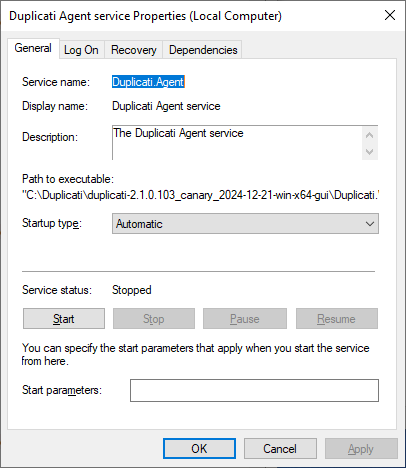
and the full Path to executable is
> “C:\Duplicati\duplicati-2.1.0.103\_canary\_2024-12-21-win-x64-gui\Duplicati.WindowsService.exe” AGENT run
Throwing caution to the wind, I tried a service start anyway, and (maybe not surprisingly) got
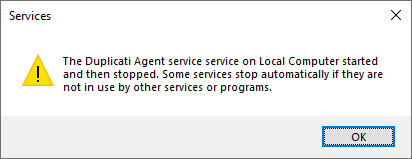
Anyway, that’s my take on the “really?” question. Additions/corrections from devs are welcome.
---
### Author:  [@kenkendk](https://forum.duplicati.com/u/kenkendk)
#### Post date: [December 28, 2024, 3:41pm UTC](https://forum.duplicati.com/t/startup-problems/19751/19 "2024-12-28T15:41:22Z")
> [@xblitz](#):
>
> really? I uptade to current beta from the previous beta and I don’t uninstal the windows service. The only trouble for me was the reconfiguring of duplicati.gui.trayicon in order to read the randomly generated password from db.
It is supposed to work the same, but there were some reports of minor changes to the executable install path, some permission stuff, etc.
The intention is that everything works the same, but if there are issues, they should be fixed by uninstall/install.
> [@ts678](#):
>
> Here’s what I think is the change since 2.0.8.1. That `SERVER` wasn’t present in 2.0.8.1, I believe:
Yes, that was added to support running the agent with the same WindowsServer.exe. No arguments will default back to running as in 2.0.8.1 (which should work).
> [@ts678](#):
>
> To clarify (or correct), I think the “order of arguments” is the Server arguments, not Service config.
Yes, correct. This change was needed because the agent uses a modern commandline parser, which requires the arguments to be before the options:
```plaintext
Duplicati.Agent.exe --example=1 run #does not work
Duplicati.Agent.exe run --example=1 #works
```
Previously, Duplicati.WindowsService.exe would prepend `--ping-pong-keepalive=true` causing the agent to fail with a parsing error. The update now appends the argument to make it run correctly.
> [@ts678](#):
>
> Throwing caution to the wind, I tried a service start anyway, and (maybe not surprisingly) got
The tool `Duplicati.WindowsService.exe` is the same binary that is used to install/uninstall the service for both the Server and Agent, so you can ask it to install it, but since the`Duplicati.Agent.exe` file is missing, this will not work.
It would be a bit easier to understand if `Duplicati.WindowsService.exe` would check what is installed and change the options it reports based on that.