# \[SOLVED\] SFTP/SSH backups without password (pubkey only)?
**URL:** https://forum.duplicati.com/t/solved-sftp-ssh-backups-without-password-pubkey-only/667
**Category:** Support
**Created:** [September 16, 2017, 10:12am UTC](https://forum.duplicati.com/t/solved-sftp-ssh-backups-without-password-pubkey-only/667 "2017-09-16T10:12:39Z")
**Posts on this page:** 10
**Page:** 1
### Author:  [@fred](https://forum.duplicati.com/u/fred)
#### Post date: [September 16, 2017, 10:12am UTC](https://forum.duplicati.com/t/solved-sftp-ssh-backups-without-password-pubkey-only/667/1 "2017-09-16T10:12:39Z")
Dear all,
I’ve just started playing with duplicati. Looks very good!
The issue I’m running into is backing up files using storage type SFTP (SSH) without a password using pubkey (keyfile) only. I’ve searched the forum, spend time on it but perhaps I did not look in the right area’s.
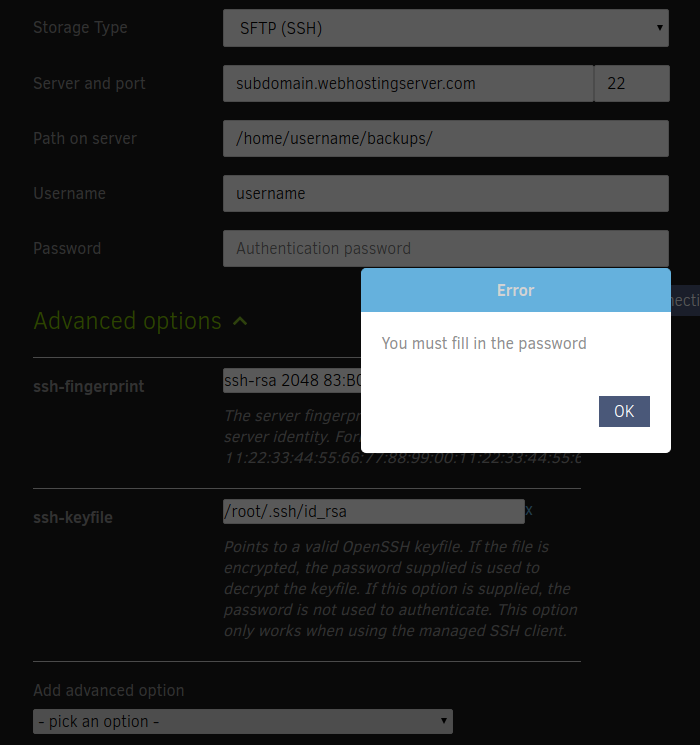
In the UI when creating a new backup under the ‘backup destination’ there is a ‘password’ field requiring ‘authentication password’, even though that should not be needed when using **pubkey based authentication** and when the correct keyfile has been set. In the **webinterface** I’m forced to enter a password, even though I’ve selected the correct keyfile (/root/.ssh/id\_rsa) and using the correct the ssh-fingerprint. A ‘test connection’ gives ‘ **you must fill in the password** ’.
How can I make backups over SSH without password?
Background info:
- I’m using an unencrypted private key. I’ve tried both the ssh-key option as well as the keyfile options.
- Manual backup works using rsync and the provided information. So permissions, server address, port, key paths etc. are correct.
- Screenshot:
Thanks @JonMikelV for helping clarify the question.
Kind regards,
Fred
---
### Author:  [@JonMikelV](https://forum.duplicati.com/u/JonMikelV)
#### Post date: [September 16, 2017, 12:51pm UTC](https://forum.duplicati.com/t/solved-sftp-ssh-backups-without-password-pubkey-only/667/2 "2017-09-16T12:51:20Z")
> [@fred](#):
>
> The issue I’m running into is backing up files using storage type SFTP (SSH) without a password using pubkey (keyfile) only.
Did you try the `--ssh-key` or `--ssh-keyfile` parameters listed under “SFTP (SSH)” section of Advanced options in step 5 (Options) of creating/editing a backup set?
---
### Author:  [@fred](https://forum.duplicati.com/u/fred)
#### Post date: [September 16, 2017, 12:53pm UTC](https://forum.duplicati.com/t/solved-sftp-ssh-backups-without-password-pubkey-only/667/3 "2017-09-16T12:53:23Z")
Yes I have tried both. That should suffice, based on how SSH works. However, a password is required according to the UI. I’m currently trying to get the private key in the proper encoding as per [SSH Guide or How-To Request](https://forum.duplicati.com/t/ssh-guide-or-how-to-request/343/8).
---
### Author:  [@JonMikelV](https://forum.duplicati.com/u/JonMikelV)
#### Post date: [September 16, 2017, 12:58pm UTC](https://forum.duplicati.com/t/solved-sftp-ssh-backups-without-password-pubkey-only/667/4 "2017-09-16T12:58:31Z")
Ah, my apologies - I didn’t realize the issue was using pubkey without a password, not just HOW to use a pubkey.
Let us know whether or not the “SSH Guide or How-To Request” works out for you.
---
### Author:  [@fred](https://forum.duplicati.com/u/fred)
#### Post date: [September 16, 2017, 1:01pm UTC](https://forum.duplicati.com/t/solved-sftp-ssh-backups-without-password-pubkey-only/667/5 "2017-09-16T13:01:04Z")
The ‘SSH Guide or How-To Request’ only describes how to add a ‘ssh-key’ using proper encoding. It does not describe how to use ‘ssh-keyfile’ without a password, so that seems irrelevant for now.
---
### Author:  [@dcurrey](https://forum.duplicati.com/u/dcurrey)
#### Post date: [September 16, 2017, 1:58pm UTC](https://forum.duplicati.com/t/solved-sftp-ssh-backups-without-password-pubkey-only/667/6 "2017-09-16T13:58:17Z")
As far as I can tell if using the ssh keys to connect the password is ignored. I just entered random password into the password field.
My linux box doesn’t allow password logins so not sure if it actually tries to send the password first or not.
---
### Author:  [@dgcom](https://forum.duplicati.com/u/dgcom)
#### Post date: [September 16, 2017, 3:20pm UTC](https://forum.duplicati.com/t/solved-sftp-ssh-backups-without-password-pubkey-only/667/7 "2017-09-16T15:20:22Z")
You actually might want to have your ssh key encrypted with the password and then use that password in appropriate field - I would think this will be a bit more secure.
---
### Author:  [@warwickmm](https://forum.duplicati.com/u/warwickmm)
#### Post date: [September 16, 2017, 5:25pm UTC](https://forum.duplicati.com/t/solved-sftp-ssh-backups-without-password-pubkey-only/667/8 "2017-09-16T17:25:54Z")
This is a known bug. Just enter random characters into the password field if your key is not password protected.
>
>
> I have:
> searched open and closed issues for duplicates
>
> Version info
> Duplicati Version: 2.0.2.1\_beta\_2017-08-01
> Operating System: Arch Linux with 4.12.8 kernel
> Backend:
> Bug description
> When a password-less...
---
### Author:  [@dcurrey](https://forum.duplicati.com/u/dcurrey)
#### Post date: [September 16, 2017, 6:25pm UTC](https://forum.duplicati.com/t/solved-sftp-ssh-backups-without-password-pubkey-only/667/9 "2017-09-16T18:25:19Z")
> dgcom:
> You actually might want to have your ssh key encrypted with the password and then use that password in appropriate field - I would think this will be a bit more secure.
Just tested this with encrypted key. Works correctly.
---
### Author:  [@fred](https://forum.duplicati.com/u/fred)
#### Post date: [September 16, 2017, 6:28pm UTC](https://forum.duplicati.com/t/solved-sftp-ssh-backups-without-password-pubkey-only/667/10 "2017-09-16T18:28:26Z")
Solved. Thanks @dgcom for the suggestion & @dcurrey for testing. It’s a known bug [to not allow an empty password field when an unencrypted private key is used] apparently. Created a new keypair for this purpose with password and, indeed, that works like a charm.