# Setting up STACK from TransIP
**URL:** https://forum.duplicati.com/t/setting-up-stack-from-transip/719
**Category:** How-To
**Tags:** hosting-services
**Created:** [September 19, 2017, 12:12pm UTC](https://forum.duplicati.com/t/setting-up-stack-from-transip/719 "2017-09-19T12:12:29Z")
**Posts on this page:** 8
**Page:** 1
### Author:  [@kees-z](https://forum.duplicati.com/u/kees-z)
#### Post date: [September 19, 2017, 12:12pm UTC](https://forum.duplicati.com/t/setting-up-stack-from-transip/719/1 "2017-09-19T12:12:30Z")
STACK is a cloud storage solution provided by the Dutch hosting company [TransIP](https://www.transip.nl/). With a free account you can store up to 1000 GB, which makes it a great solution for use as backend in Duplicati.
**STACK is available only for Dutch and Belgium users.**
STACK supports WebDAV (in fact it’s a customized version of OwnCloud), what can be used to configure Duplicati.
This How-to describes the basic steps to configure Duplicati for making backups to STACK.
1. If you do not have a stack account, request an invite at [https://www.transip.nl/stack/](https://www.transip.nl/stack/).
(NOTE: The service is targeted to Dutch and Belgium users. Requests from other countries will be refused).
When your request is acknowledged, you will get an email with instructions for setting up your STACK account.
2. (Optional, but recommended)
Create a STACK subaccount for your backups to separate Duplicati backup volumes from your regular files that you want to store/share in your STACK.
3. (Optional, but recommended)
Create a new folder or folder structure in your STACK, using your subaccount if you created one in step 2.
4. In the Duplicati Web UI, add a new backup.
5. Choose WebDAV as the storage type.
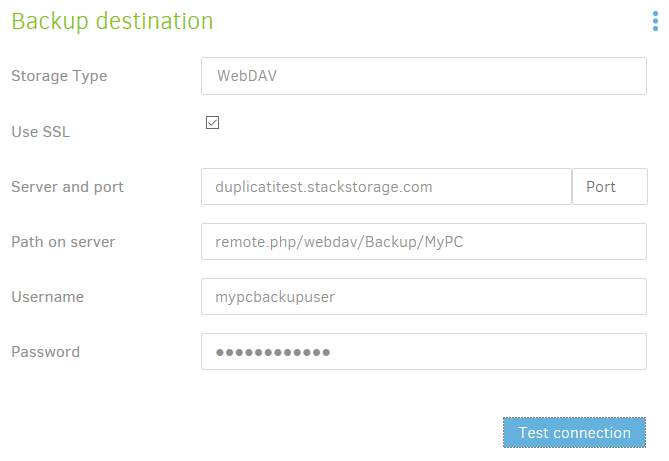
6. Use these settings for your backup job:
- Use SSL: Selected
- Server and port: `youraccountname.stackstorage.com`
Replace _youraccountname_ with the name of your STACK account.
- Path on server: `remote.php/webdav/Foldername/Subfoldername`
If you created a folder `Backup` with a subfolder `MyPC`, the path will be `remote.php/webdav/Backup/MyPC`
- Username and Password: The name and password of the subaccount you created in step 2. If you didn’t create a subaccount, use the main username and password of your STACK account.
All other settings in the wizard are described in the [Getting started guide](https://www.duplicati.com/articles/Getting-Started/).
---
### Author:  [@tophee](https://forum.duplicati.com/u/tophee)
#### Post date: [September 19, 2017, 12:28pm UTC](https://forum.duplicati.com/t/setting-up-stack-from-transip/719/2 "2017-09-19T12:28:13Z")
It’s worth mentioning that in order to set up an account with them, you need an address in the Netherlands or Belgium. If you don’t have that, you’re wasting your time…
---
### Author:  [@kees-z](https://forum.duplicati.com/u/kees-z)
#### Post date: [September 19, 2017, 12:30pm UTC](https://forum.duplicati.com/t/setting-up-stack-from-transip/719/3 "2017-09-19T12:30:15Z")
It is mentioned in step 1.
---
### Author:  [@tophee](https://forum.duplicati.com/u/tophee)
#### Post date: [September 19, 2017, 12:43pm UTC](https://forum.duplicati.com/t/setting-up-stack-from-transip/719/4 "2017-09-19T12:43:17Z")
Sorry about that. 😇
But still: you are being quite tentative about this:
> [@kees-z](#):
>
> Requests from other countries could be refused
The only way I was able to even get an invitation was by using a VPN. Otherwise you get refused straight away.
> [@kees-z](#):
>
> When your request is acknowledged, you will get an email with instructions for setting up your STACK account.
When your request is acknowledged, you still need to enter your address and if that is not from the designated countries, it won’t work. Maybe that selection mechanism wasn’t actually intended because when I entered Sweden as my country, the form simply didn’t work. It was not possible to enter an address. Either way, I think it’s fair to say: it won’t work. Not: it _might_ not work.
---
### Author:  [@kees-z](https://forum.duplicati.com/u/kees-z)
#### Post date: [September 19, 2017, 12:52pm UTC](https://forum.duplicati.com/t/setting-up-stack-from-transip/719/5 "2017-09-19T12:52:51Z")
That makes sense. Never been able to test what happens when you register from outside the Netherlands. Thanks for pointing that out!
Post edited.
---
### Author:  [@Dre](https://forum.duplicati.com/u/Dre)
#### Post date: [September 25, 2017, 7:09pm UTC](https://forum.duplicati.com/t/setting-up-stack-from-transip/719/6 "2017-09-25T19:09:11Z")
Hi,
Great ‘how to’ !!
I would like to propose to add that the latest version of Mono is required.
See my post, using STACK and Duplicati:
> [@GetRequestStream timed out during backup on Linux Mint 18.2](https://forum.duplicati.com/t/getrequeststream-timed-out-during-backup-on-linux-mint-18-2/362):
>
> Hi, I have a dual boot computer, Windows 10 and Linux Mint 18.2. I’m using Windows 10 hardly, just for some specific tasks. So, the Linux Mint 18.2 is my daily used boot partition. To start with, the error message I get with Duplicati (see below) only appears using the Linux Mint 18.2 and NOT when using Windows 10. I have installed Duplicati 2.0.2.1 (latest at the moment) on a Linux Mint 18.2 system. My storage device is in the cloud, using the Webdav from Duplicati. The connection is setu…
May be it is not valid for all Linux distro’s, but it is helpful anyway.
Thanks!
Best regards,
---
### Author:  [@aknobbe](https://forum.duplicati.com/u/aknobbe)
#### Post date: [August 13, 2018, 6:42pm UTC](https://forum.duplicati.com/t/setting-up-stack-from-transip/719/7 "2018-08-13T18:42:54Z")
Hi Kees-z,
As you heard Stack is not accepting new account requests.
However, there is another solution in the Netherlands called Boxu.
When you request an account at [https://www.boxu.nl](https://www.boxu.nl) you can use this howto to connect to your account en create the backup in Boxu Cloud.
The server address in our case will be start.boxu.nl
Also a good thing to mention, at Boxu Cloud you are not limited to the Netherlands.
---
### Author:  [@kees-z](https://forum.duplicati.com/u/kees-z)
#### Post date: [November 10, 2020, 9:13pm UTC](https://forum.duplicati.com/t/setting-up-stack-from-transip/719/8 "2020-11-10T21:13:50Z")
Please note that TransIP has announced that the free 1 terabyte storage plan will be discontinued in the next months and that all accounts that were not converted to a paid account will be deleted, including all stored data. More information in [this post](https://forum.duplicati.com/t/important-transips-stack-free-storage-plan-will-be-disconninued/11100).