# Setting up OneDrive (personal)
**URL:** https://forum.duplicati.com/t/setting-up-onedrive-personal/588
**Category:** How-To
**Tags:** hosting-services
**Created:** [September 12, 2017, 10:42am UTC](https://forum.duplicati.com/t/setting-up-onedrive-personal/588 "2017-09-12T10:42:51Z")
**Posts on this page:** 20
**Page:** 1
### Author:  [@kenkendk](https://forum.duplicati.com/u/kenkendk)
#### Post date: [September 12, 2017, 10:42am UTC](https://forum.duplicati.com/t/setting-up-onedrive-personal/588/1 "2017-09-12T10:42:51Z")
Duplicati can back up your data to [Microsoft OneDrive](https://onedrive.live.com/). Note that this guide only works for personal OneDrive accounts, not for OneDrive for Business.
To set it up, follow these steps:
1. [Configure a new backup](https://www.duplicati.com/articles/Getting-Started/)
2. One the connection options page choose “OneDrive”
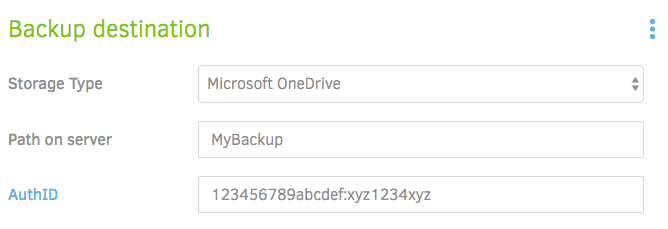
3. Enter the name of a folder where you want to store the backup. If the folder does not exist it will be created for you.
4. Click the [AuthID](https://duplicati-oauth-handler.appspot.com) button to start the OneDrive authentication process. After clicking the link, you will be forwarded to the [Duplicati OAuth handler](https://duplicati-oauth-handler.appspot.com):
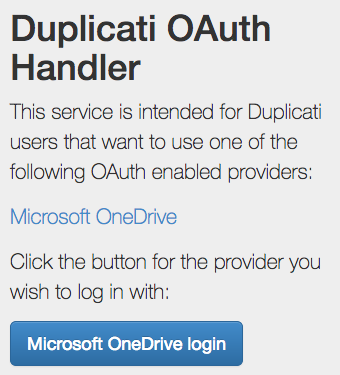
5. Click the blue button, and you will be prompted to login to OneDrive
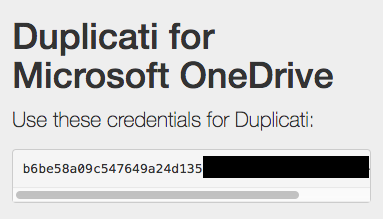
6. After you are logged in, the window will close. If it does not, copy the AuthID value manually, and paste it into the AuthID field in Duplicati:
Thats it, you are now set to backup to OneDrive. The final page should look like this:
---
### Author:  [@JonMikelV](https://forum.duplicati.com/u/JonMikelV)
#### Post date: [September 21, 2017, 4:33pm UTC](https://forum.duplicati.com/t/setting-up-onedrive-personal/588/2 "2017-09-21T16:33:38Z")
This post mentions being suspended due to “suspicious activity” when doing an initial backup to a brand new trial OneDrive account. Has anybody else seen this happening?
> [@Experiences with OneDrive as a backup target](https://forum.duplicati.com/t/experiences-with-onedrive-as-a-backup-target/686/6):
>
> I started my trial subscription, created a separate account for doing backups, starting my 150GB backup and went to sleep. In the morning I found out that my access was cut off after uploading 4.95GB of data due to “suspicious activity”. I went through the dance to reactivate the account and restarted the backup. I will update on what happens next… Marc
---
### Author:  [@Kelly\_Trinh](https://forum.duplicati.com/u/Kelly_Trinh)
#### Post date: [September 22, 2017, 1:03am UTC](https://forum.duplicati.com/t/setting-up-onedrive-personal/588/3 "2017-09-22T01:03:04Z")
My quota is 50gb and I filled it up overnight without issues (was on a gigabit pipe but the effective rate to MS servers probably much less…)
---
### Author:  [@Marc\_Aronson](https://forum.duplicati.com/u/Marc_Aronson)
#### Post date: [September 24, 2017, 3:56pm UTC](https://forum.duplicati.com/t/setting-up-onedrive-personal/588/4 "2017-09-24T15:56:22Z")
> This post mentions being suspended due to “suspicious activity” when doing an initial backup to a brand new trial OneDrive account. Has anybody else seen this happening?
I believe I now understand why this happened to me.
I had recently purchased the 1TB storage plan but [onedrive.live.com](http://onedrive.live.com) was still showing me as limited to the 5GB free plan. It appears to take 10s of minutes until your purchased storage shows up. I confirmed this with a Microsoft chat agent.
I started my upload before the 1TB of storage was shown as available.
Even though it took almost 2-hours to upload the first 5GB, by which time onedrive was showing my 1TB plan, I was still cut off by the system at 5GB.
I went through the dance to unlock my account and I have not had problems since.
Marc
---
### Author:  [@JonMikelV](https://forum.duplicati.com/u/JonMikelV)
#### Post date: [September 24, 2017, 6:58pm UTC](https://forum.duplicati.com/t/setting-up-onedrive-personal/588/5 "2017-09-24T18:58:22Z")
> [@Marc\_Aronson](#):
>
> Even though it took almost 2-hours to upload the first 5GB, by which time onedrive was showing my 1TB plan, I was still cut off by the system at 5GB.
Nice detective work! I wouldn’t be surprised to find out that what plan you’re on is requested during authentication / login and not again until you re-authenticate / login. Since you had almost continuous uploads going that whole time it probably never re-auth’ed so didn’t realize your plan level had changed.
---
### Author:  [@BatterPudding](https://forum.duplicati.com/u/BatterPudding)
#### Post date: [October 17, 2018, 9:23am UTC](https://forum.duplicati.com/t/setting-up-onedrive-personal/588/6 "2018-10-17T09:23:14Z")
A couple of little “gotchas” for anyone reading this who has problems. These are two things I tripped over.
**Unix style Directory slashes**
When typing the “Path on server” the subfolders have non-windows slashes. So you must do **MyBackup/folder/folder** as using “normal for Microsoft” back slashes will fail to write.
**Using alternate Microsoft Accounts**
If you are on Charlie’s PC and setting up a back-up to Fred’s OneDrive then you may get some trouble at the get AuthID stage if Charlie has left himself logged into his Microsoft Account in the webbrowser.
This caught me out when setting up a backup on Charlie’s I was not being asked to log into Fred’s account, but was just being handed an (unusable) AuthID.
I had to open Charlie’s web browser and then LOG OUT from his Microsoft Account. Once I had done that Duplicati then asked me to login to Fred before issuing the correct AuthID.
---
### Author:  [@JonMikelV](https://forum.duplicati.com/u/JonMikelV)
#### Post date: [October 17, 2018, 12:56pm UTC](https://forum.duplicati.com/t/setting-up-onedrive-personal/588/7 "2018-10-17T12:56:09Z")
Thanks for the tips!
When you lifeguar logged out of Charlie’s account on the computer and into Fred’s account in Duplicati, did you have any difficulties with either account after getting the computer back into Charlie’s account?
> [@BatterPudding](#):
>
> do **MyBackup\folder\folder** as using “normal for Microsoft” forward slashes
I thought forward slashes were normal for Linux, not Windows
Also, I believe the original post is a Wiki, so feel free to use the Edit icon beneath the post to update it with your, um… updates, inline. 🙂
---
### Author:  [@BatterPudding](https://forum.duplicati.com/u/BatterPudding)
#### Post date: [October 17, 2018, 1:19pm UTC](https://forum.duplicati.com/t/setting-up-onedrive-personal/588/8 "2018-10-17T13:19:14Z")
Whoops - firstly, typo. I meant to type that the other way around. My meaning was right, but words were wrong. So I have corrected my post above. Folder/Folder/Folder
I would repeat my previous requests of having the GUI clean up the slashes to ones that work automagically. It would make things more ID-10T proof.
As to “_What happened on Charlie’s computer?_” - I’ll tell you tonight when I login to check for problems. At least when I did a quick check it seemed to work. This guy stays “always logged in” on the web browser so he can edit a spreadsheet in his own OneDrive. And after my fiddling - the spreadsheet loaded as Charlie again, and the backup let me “Test Connection” with Fred’s AuthID in place. I will know for sure when I check those logs tonight.
I’ll also find out Tonight if a Win10 PC that is logged into Dave’s Microsoft Account will let me get an AuthID to Fred’s account for backup on there too.
Updated: yep - all is well. Charlie’s backup ran fine and sent data to Fred’s OneDrive. I am connected now and using Firefox to look at the backup I hit Run Now. Backup runs fine. Meanwhile Edge is open logged into OneDrive and editing a document as Charlie.
Double evil test now. Using Edge which is currently open in Charlie’s OneDrive folder editing a document. I now open a new tab for Duplicati’s Control panel to Edit the job. I test the connection to Fred’s OneDrive - still valid. So I press RUN NOW. The backup seems happy to go to Fred’s OneDrive without troubles. Even though I have a different page open in Charlie’s OneDrive. And the OS has OneDrive logged in as Charlie all at the same time. The AuthID clearly punches through that without problem.
---
### Author:  [@kenkendk](https://forum.duplicati.com/u/kenkendk)
#### Post date: [October 20, 2018, 9:08am UTC](https://forum.duplicati.com/t/setting-up-onedrive-personal/588/9 "2018-10-20T09:08:03Z")
> [@BatterPudding](#):
>
> Double evil test now. Using Edge which is currently open in Charlie’s OneDrive folder editing a document. I now open a new tab for Duplicati’s Control panel to Edit the job. I test the connection to Fred’s OneDrive - still valid. So I press RUN NOW. The backup seems happy to go to Fred’s OneDrive without troubles. Even though I have a different page open in Charlie’s OneDrive. And the OS has OneDrive logged in as Charlie all at the same time. The AuthID clearly punches through that without problem.
It should work that way, because Duplicati runs in an non-browser process, meaning that it does not have access to any of the browser tokens. If they would end up crossing, it would be a problem with Microsoft.
> [@JonMikelV](#):
>
> I thought forward slashes were normal for Linux, not Windows
Unfortunately (for Windows users), URL’s use the Unix style slashes, so you also need to use forward slashes for paths that are really URLs.
---
### Author:  [@BatterPudding](https://forum.duplicati.com/u/BatterPudding)
#### Post date: [October 20, 2018, 10:56am UTC](https://forum.duplicati.com/t/setting-up-onedrive-personal/588/10 "2018-10-20T10:56:53Z")
> [@kenkendk](#):
>
> Unfortunately (for Windows users), URL’s use the Unix style slashes, so you also need to use forward slashes for paths that are really URLs.
I have a foot in all OS camps. So don’t confuse me for a Windows Whiner 😉
I assume you process the text from these edit boxes to drop other illegal characters. Is there any way you can you look for these “wrong” slashes and just flip them to the correct direction? This would make this much friendlier and less confusing.
Or put an example path into the text on the dialog? With such an empty box it is not even clear if there should be slashes at the start \ end.
It can be slightly comical when putting in the wrong slashes as the error is misleading.
---
### Author:  [@kenkendk](https://forum.duplicati.com/u/kenkendk)
#### Post date: [October 26, 2018, 6:57am UTC](https://forum.duplicati.com/t/setting-up-onedrive-personal/588/12 "2018-10-26T06:57:52Z")
> [@BatterPudding](#):
>
> So don’t confuse me for a Windows Whiner 😉
I whine over Windows regularly 😄
> [@BatterPudding](#):
>
> I assume you process the text from these edit boxes to drop other illegal characters. Is there any way you can you look for these “wrong” slashes and just flip them to the correct direction? This would make this much friendlier and less confusing.
Are you sure it does not auto correct automatically? There is code here that fixes it:
>
(Note this is for the `OneDrivev2` backend, the `OneDrive` backend using passwords is being shut down by microsoft in 5 days).
> [@BatterPudding](#):
>
> Or put an example path into the text on the dialog? With such an empty box it is not even clear if there should be slashes at the start \ end.
Sure, that is just a matter of editing the “placeholder” tag here:
>
---
### Author:  [@BatterPudding](https://forum.duplicati.com/u/BatterPudding)
#### Post date: [October 26, 2018, 7:55am UTC](https://forum.duplicati.com/t/setting-up-onedrive-personal/588/13 "2018-10-26T07:55:13Z")
> [@kenkendk](#):
>
> Are you sure it does not auto correct automatically? There is code here that fixes it:
Yeah, I am sure it doesn’t auto-correct. Put in slashes in a Windows native manner and I get a “Can’t write” error when pressing the test button. Swap slashes to the correct way and the test then works.
Is that code running when pressing the test button?
---
### Author:  [@BatterPudding](https://forum.duplicati.com/u/BatterPudding)
#### Post date: [October 30, 2018, 12:59pm UTC](https://forum.duplicati.com/t/setting-up-onedrive-personal/588/14 "2018-10-30T12:59:01Z")
I will refine my reply here. When the “wrong” slashes are used I don’t get an error to say no access. I get an error that tells me the folder does not exist and asks me if it should be created.
If I see that error I know to cancel and swap the slashes the opposite way and all will be well.
So I am guessing the error message you are getting when it can’t write is a little confused.
It is especially confusing because if I answer “yes” to creating the folder it creates something somewhere and then merrily carries on as it nothing is wrong… but then fails to backup.
---
### Author:  [@kenkendk](https://forum.duplicati.com/u/kenkendk)
#### Post date: [November 1, 2018, 7:42am UTC](https://forum.duplicati.com/t/setting-up-onedrive-personal/588/15 "2018-11-01T07:42:27Z")
> [@BatterPudding](#):
>
> Is that code running when pressing the test button?
It should, but if it does not work for you, then I guess it does not run.
---
### Author:  [@BatterPudding](https://forum.duplicati.com/u/BatterPudding)
#### Post date: [November 1, 2018, 3:27pm UTC](https://forum.duplicati.com/t/setting-up-onedrive-personal/588/16 "2018-11-01T15:27:04Z")
So what can I do to assist the debugging here? Next time I do this can I turn on more debugging info for you?
Or would it be enough for me to do an exact description of what happens?
To my initial guess it looks like the error coming back is incorrectly being interpreted as “connection fine, folder missing” as I am asked if I want to create a folder. This is my signal to hit cancel and flip the slashes.
(Sorry - can’t remember exactly what happens if I let Duplicati attempt to create the folder. I think it proceeds to tell me it created the folder and stumbles forward… but nothing was created and no access to OneDrive. This bit in brackets I’d need to check)
---
### Author:  [@warwickmm](https://forum.duplicati.com/u/warwickmm)
#### Post date: [November 2, 2018, 3:52am UTC](https://forum.duplicati.com/t/setting-up-onedrive-personal/588/17 "2018-11-02T03:52:22Z")
@BatterPudding, what version are you running? There was a bug in 2.0.3.12 where the `NormalizeSlashes` method that @kenkendk linked to was not run. This was fixed in 2.0.3.13.
---
### Author:  [@BatterPudding](https://forum.duplicati.com/u/BatterPudding)
#### Post date: [November 2, 2018, 8:48am UTC](https://forum.duplicati.com/t/setting-up-onedrive-personal/588/18 "2018-11-02T08:48:00Z")
This was with the beta version last week.
---
### Author:  [@warwickmm](https://forum.duplicati.com/u/warwickmm)
#### Post date: [November 3, 2018, 12:47am UTC](https://forum.duplicati.com/t/setting-up-onedrive-personal/588/19 "2018-11-03T00:47:33Z")
Just to clarify, were you using the OneDrive or OneDrive v2 backend? As @kenkendk mentioned, the `NormalizeSlashes` method is not called in the non-v2 version.
---
### Author:  [@BatterPudding](https://forum.duplicati.com/u/BatterPudding)
#### Post date: [November 8, 2018, 4:46pm UTC](https://forum.duplicati.com/t/setting-up-onedrive-personal/588/20 "2018-11-08T16:46:47Z")
> [@warwickmm](#):
>
> Just to clarify, were you using the OneDrive or OneDrive v2 backend? As @kenkendk mentioned, the `NormalizeSlashes` method is not called in the non-v2 version.
I have no idea. Whatever was last week’s beta is the one I was using.
Sorry, but I don’t follow all the development conversations on here so I have no idea who’s backend was in use.
---
### Author:  [@JonMikelV](https://forum.duplicati.com/u/JonMikelV)
#### Post date: [November 8, 2018, 5:33pm UTC](https://forum.duplicati.com/t/setting-up-onedrive-personal/588/21 "2018-11-08T17:33:24Z")
An experimental (precursor to a beta) release just came out - hopefully a beta won’t be far behind. 🙂
> [@Release: 2.0.4.1 (experimental) 2018-11-08](https://forum.duplicati.com/t/release-2-0-4-1-experimental-2018-11-08/5235):
>
> [2.0.4.1-2.0.4.1\_experimental\_2018-11-08](https://github.com/duplicati/duplicati/releases/tag/v2.0.4.1-2.0.4.1_experimental_2018-11-08) This is a collection release that is based on the 2.0.3.14 canary build. The major changes in this version are: New multi-threaded processing engine New logging system with filter options Better external reporting, with JSON support Filter groups to exclude common unwanted files Ignore filenames and empty folders added USN support on Windows Improved repair and validation Fixed reading password from console UID and GID now correctly restored on Linux/BS…
[Next page](https://forum.duplicati.com/t/setting-up-onedrive-personal/588.md?page=2)