### Author:  [@Bubblesaway](https://forum.duplicati.com/u/Bubblesaway)
#### Post date: [June 20, 2020, 4:01pm UTC](https://forum.duplicati.com/t/restoring-operation-successful-but-dont-see-them/10119/1 "2020-06-20T16:01:27Z")
Hello, I recently tried to do a test restore on my system with a file I explicitly created for that purpose. I go through the full process, choosing to put the restored file in the original location not overwrite the file. The end operation says that the task completed successfully, but the restored file doesn’t exist in the original location. The original file does still exist though. Any ideas what’s happening?
The version of Duplicati is 2.0.5.107\_canary\_2020-05-26 and I’m running it on a QNAP NAS via the Qnapclub package distribution.
---
### Author:  [@ts678](https://forum.duplicati.com/u/ts678)
#### Post date: [June 21, 2020, 8:34pm UTC](https://forum.duplicati.com/t/restoring-operation-successful-but-dont-see-them/10119/2 "2020-06-21T20:34:23Z")
Welcome to the forum @Bubblesaway
> [@Bubblesaway](#):
>
> The end operation says that the task completed successfully, but the restored file doesn’t exist in the original location. The original file does still exist though. Any ideas what’s happening?
The language is kind of confusing, but perhaps you think that “not overwrite” means make another copy.
Another copy is only made if the restored version is different from the original, otherwise no point to it…
In this case, the original file still exists in the original location but the restored file does too. It’s the same.
---
### Author:  [@Bubblesaway](https://forum.duplicati.com/u/Bubblesaway)
#### Post date: [June 22, 2020, 1:50pm UTC](https://forum.duplicati.com/t/restoring-operation-successful-but-dont-see-them/10119/3 "2020-06-22T13:50:34Z")
Ok. I guess it’s possible that the backed-up file could’ve been unaltered for some reason. However, the actual name of the option is “Save different versions with timestamp in file name”, so I was expecting a new file with the timestamp in the name regardless of whether the requested file version changed.
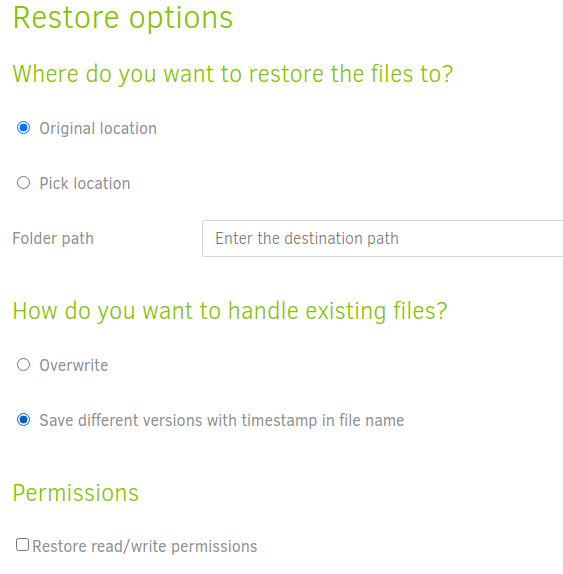
Maybe the name of the option should change if the intended behavior is to only create a file if the file is different. That or a message stating that the file version is the same and hasn’t been restored.
Also, viewing the backup history of a file would be quite nice, but that’s already addressed in
>
>
> \_From \[gabriel....@gmail.com\](https://code.google.com/u/101127840663945176306/) …on May 31, 2009 13:00:32\_
>
> Implement a structure that allows a recover to be done using a structure
> like folder, subfolder, files and all versions of that file, merging all
> files from a backup so that the user can see all files that he has in that
> backup besides of having to search each day that the backup was done.
>
> A tree like:
>
> Folder
> |--- Subfolder
> |---- File
> |--- version at some date
> |--- version at some other date
>
> \_Original issue: http://code.google.com/p/duplicati/issues/detail?id=72\_
> \## \
>
> Want to back this issue? \*\*\[Post a bounty on it!\](https://www.bountysource.com/issues/3559475-show-all-versions-of-a-file-in-the-recovery-tree?utm\_campaign=plugin&utm\_content=tracker%2F4870652&utm\_medium=issues&utm\_source=github)\*\* We accept bounties via \[Bountysource\](https://www.bountysource.com/?utm\_campaign=plugin&utm\_content=tracker%2F4870652&utm\_medium=issues&utm\_source=github).
> \
and
> [@Show file-specific backup history when restoring](https://forum.duplicati.com/t/show-file-specific-backup-history-when-restoring/277/10):
>
> thinking Funny things will happen while restoring a 500GB vhdx file that has been changed in every daily backup.wink
Regardless, I’ve made another change to that file to see if it to ensure there’s a modified version to restore. I’ll update on that attempt in a bit.
---
### Author:  [@Bubblesaway](https://forum.duplicati.com/u/Bubblesaway)
#### Post date: [June 22, 2020, 2:05pm UTC](https://forum.duplicati.com/t/restoring-operation-successful-but-dont-see-them/10119/4 "2020-06-22T14:05:19Z")
Alright, it didn’t work the second time, so I’ll layout the entire process to see if anyone can spot what I’m doing wrong.
1. Change local file.
In this case, it’s a text file called `DuplicatiTest.txt` with some random giberish in it. I deleted a line in the middle of the file and added a new line.
2. Perform Duplicati backup
I performed the backup at 7:52am. After backup has finished, the number of versions increases by one. The last backup was done at 7:40am, so I’m fairly confident the new version is because of the change in the file.
3. Restore file from backup.
If I try and restore from the 7:40am backup, I get the following warning:
```
2020-06-22 08:02:27 -06 - [Warning-Duplicati.Library.Main.Operation.RestoreHandler-NoFilesRestored]: Restore completed without errors but no files were restored
```
If I try and restore from a backup that was made yesterday, I get no warnings. The “restored file” is still not present though.
---
### Author:  [@Bubblesaway](https://forum.duplicati.com/u/Bubblesaway)
#### Post date: [June 22, 2020, 2:08pm UTC](https://forum.duplicati.com/t/restoring-operation-successful-but-dont-see-them/10119/5 "2020-06-22T14:08:47Z")
Additionally, I’ve checked backblaze (the backup destination) and it has new `duplicati*.dlist.zip.aes` and `duplicati*.dblock.zip.aes` files at the 7:40am and 7:52am times.
---
### Author:  [@ts678](https://forum.duplicati.com/u/ts678)
#### Post date: [June 22, 2020, 3:34pm UTC](https://forum.duplicati.com/t/restoring-operation-successful-but-dont-see-them/10119/6 "2020-06-22T15:34:26Z")
Test is not clear in terms of options, but:
`Restore completed without errors but no files were restored`
is the kind of thing you get if there was nothing to fix, meaning requested file is already where requested.
Time order is a bit unclear, but if file edit was between 7:40 and 7:52 backups, restore from 7:40 should:
- have overwritten the edited file back to its earlier version for an “Original location” and “Overwrite”
- have written a new file DuplicatiTest.\.txt for “Original location” and timestamp option.
> [@Bubblesaway](#):
>
> If I try and restore from a backup that was made yesterday, I get no warnings. The “restored file” is still not present though.
This seems like it should go the same way as the 7:40am. Do you know if you edited the file in between?
What happens when you restore any of these versions using “Pick location” to a folder without file there?
What should happen is you get your requested version with its Creation time, Modification time, and data.
Every restored file also gets verified for integrity, but that will also help you see where the file was written.
About → Show log → Live → Verbose done in a tab before Restore would show actions during restore.
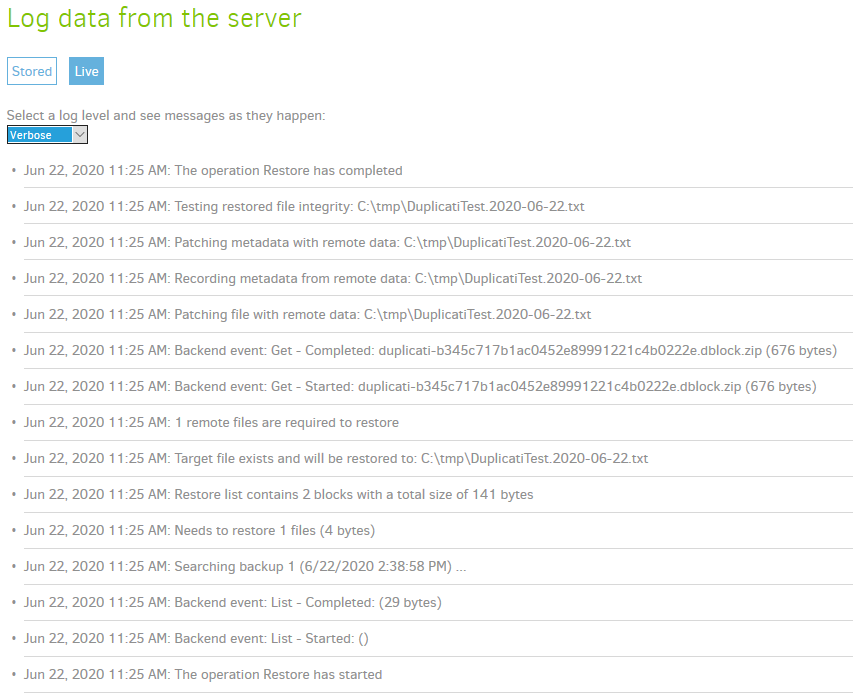
Here’s an example with “Original location” and “timestamp” option of old file restore with new file present.
Result is no overwrite, current new file remains, and timestamped old file is made with old data and time.
---
### Author:  [@Bubblesaway](https://forum.duplicati.com/u/Bubblesaway)
#### Post date: [June 24, 2020, 10:22pm UTC](https://forum.duplicati.com/t/restoring-operation-successful-but-dont-see-them/10119/7 "2020-06-24T22:22:48Z")
Sorry for the late reply. Got caught up in some work stuff.
> [@ts678](#):
>
> This seems like it should go the same way as the 7:40am. Do you know if you edited the file in between?
Yeah, I did verify that the file changed between those times.
So doing the “test” with “Original Location” and “timestamp” we get the following log output:
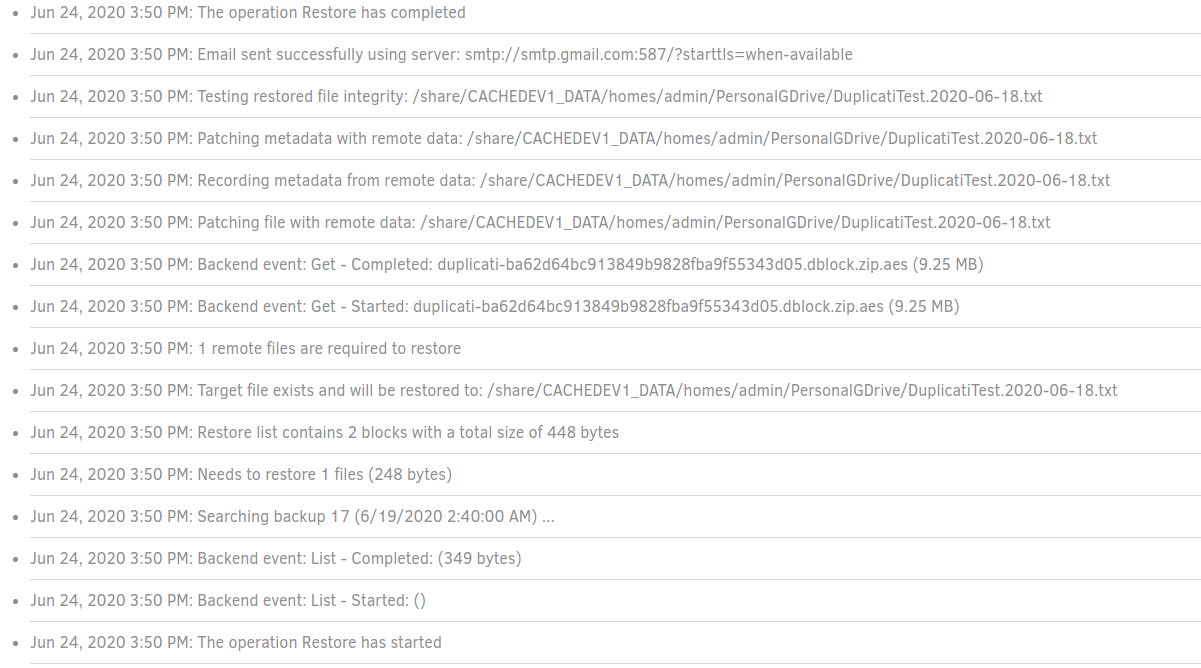
However, when I actually go to the location, the file doesn’t exist:
```plaintext
[admin@server PersonalGDrive]# pwd
/share/CACHEDEV1_DATA/homes/admin/PersonalGDrive
[admin@server PersonalGDrive]# ls Dup*
DuplicatiTest.txt #<-- Original file, not the restored version
```
Doing the same thing, but choosing a different location _does_ restore the file, but it is not in the timestamp format; it’s just `DuplicatiTest.txt`. Here is that restore operations log:
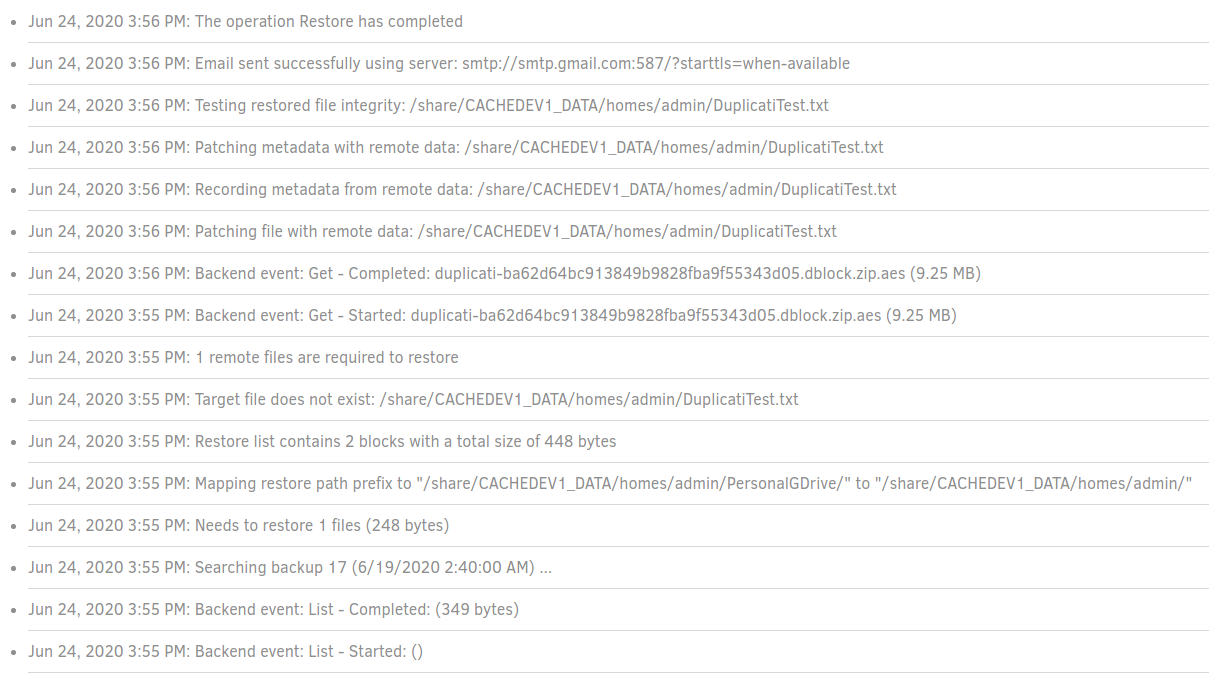
I did the same thing above (specifying a different location), but left a file named `DuplicatiTest.txt` in that new directory. It actually restored it perfectly fine, with the timestamp information:
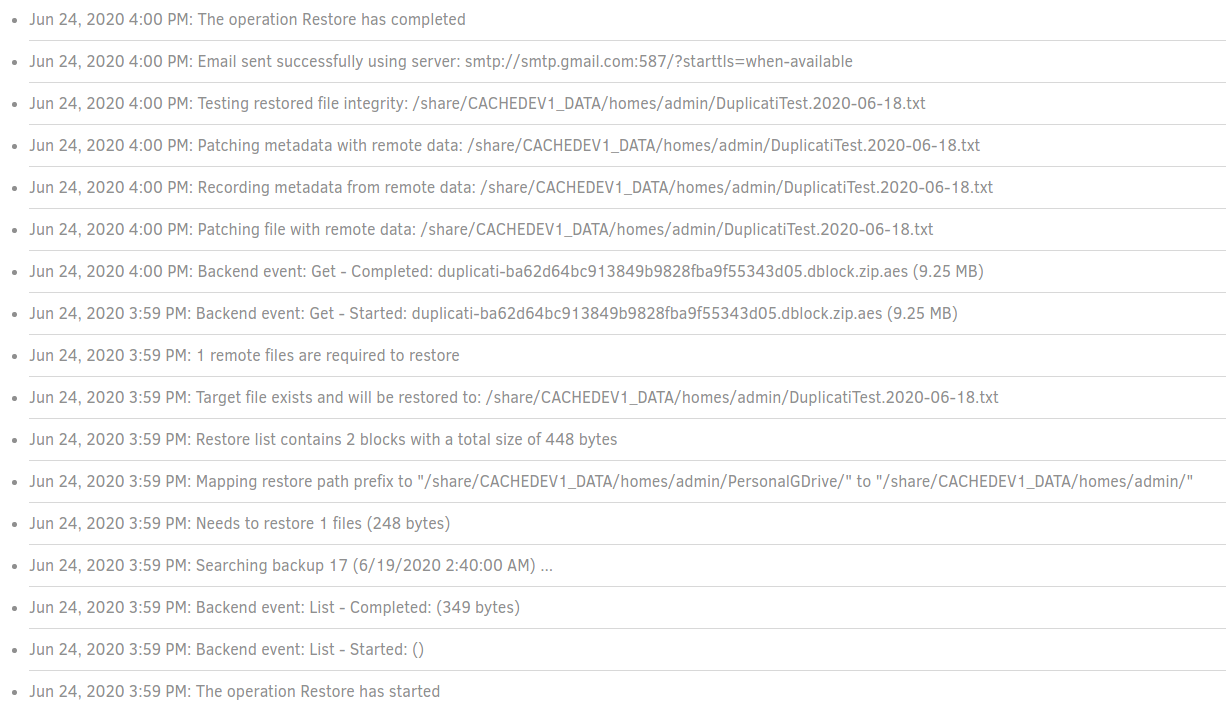
Next, I tried to do a “custom location” recovery, but directed the custom location to actually be the original location (to make sure it was the directory that is the culprit, not the the “Original Location” option itself). That did not restore the file correctly. ie. the same behavior as the first test in this comment:
[See imgur album](https://imgur.com/a/gdDHpZI) since new members can’t post more than 3 images
And lastly, I tried to do “Original Location”, but set it to Overwrite and it still did not actually restore the file:
[See imgur album](https://imgur.com/a/gdDHpZI) since new members can’t post more than 3 images
In Summary:
1. “Original Location”, `DuplicatiText.txt` file present == no restore
2. “Custom Location”, `DuplicatiText.txt` file not present == restored as `DuplicatiText.txt`
3. “Custom Location”, `DuplicatiText.txt` file present == restored as `DuplicatiText.2020-06-18.txt`
4. “Custom Location” (but set to the original directory), `DuplicatiText.txt` file present == no restore
5. “Original Location”, `DuplicatiTest.txt` file present, set to “Overwrite” == no restore
Note all of these runs except for #5 were set to do a “timestamp” file name and none of them had any errors.
I have no idea why it’s having problems restoring to the original directory. The user permissions to the original directory and the other directory I had been selecting are exactly the same (at least as far as `ls -l` is showing). Any ideas what could be causing this?
---
### Author:  [@Bubblesaway](https://forum.duplicati.com/u/Bubblesaway)
#### Post date: [June 29, 2020, 11:54pm UTC](https://forum.duplicati.com/t/restoring-operation-successful-but-dont-see-them/10119/8 "2020-06-29T23:54:59Z")
Any help with the latter? I might submit an issue on GitHub since Duplicati is sending a false-positive on whether the file is added.
---
### Author:  [@ts678](https://forum.duplicati.com/u/ts678)
#### Post date: [June 30, 2020, 1:16am UTC](https://forum.duplicati.com/t/restoring-operation-successful-but-dont-see-them/10119/9 "2020-06-30T01:16:57Z")
I don’t understand how it’s saying it integrity tested the DuplicatiTest.2020-06-18.txt file, but it’s not there.
If you have strace, you could perhaps try to see if it’s accessed the location that it says it integrity tested.
You could try manually copying the date-suffixed file from a different-folder restore into the original folder.
The full path worries me some, but I heard /share/CACHEDEV1\_DATA is just whereQNAP keeps things.
PersonalGDrive still worries me a bit. What’s that, and is there something else (file sync?) managing it?
You could also try an original-location restore similar to this one in the most ordinary spot the QNAP has.
Duplicati team might not have a QNAP, so if a GitHub issue is made, it should be as generic as possible.
EDIT:
Can Duplicati see /share/CACHEDEV1\_DATA/homes/admin/PersonalGDrive/DuplicatiTest.2020-06-18.txt
if you edit the backup job to test that in `Add path directly` on `Source data` screen? Don’t save the edit.
If Duplicati doesn’t see it, it will double-check and ask if you want to add it anyway. If it sees it, that’s weird, given that your `ls Dup*` didn’t see it. Were you and Duplicati both running as root during the 3:50 PM run?
---
### Author:  [@Bubblesaway](https://forum.duplicati.com/u/Bubblesaway)
#### Post date: [June 30, 2020, 2:14am UTC](https://forum.duplicati.com/t/restoring-operation-successful-but-dont-see-them/10119/10 "2020-06-30T02:14:11Z")
> [@ts678](#):
>
> The full path worries me some, but I heard /share/CACHEDEV1\_DATA is just whereQNAP keeps things.
Yeah, that’s just the path to the RAID 1 volume I’ve setup.
> [@ts678](#):
>
> PersonalGDrive still worries me a bit. What’s that, and is there something else (file sync?) managing it?
I think you nailed it. Yes, that is managed by a QNAP utility that does real-time, one-way sync to my personal Google Drive account. Previously, I had just added an empty file to test how the utility would react. It didn’t delete the file, so I thought it was fine.
However, I just tried to see about adding text to the file, and it will be written for a few seconds before being deleted:
```plaintext
[admin PersonalGDrive]# date; cat test
Mon Jun 29 19:26:29 MDT 2020
[admin PersonalGDrive]# echo 'text' > test
[admin PersonalGDrive]# date; cat test
Mon Jun 29 19:27:03 MDT 2020
text
[admin@fourier PersonalGDrive]# echo 'text' > test
```
If I try and add a new file non-empty all together, it get’s deleted very quickly.
But the question still remains as to how Duplicati is getting a positive integrity result. Does it check the file written to the file system, or does it do it in memory? It’s also possibly that since this file is so small it can do the integrity check before QNAP deletes the file.
---
### Author:  [@ts678](https://forum.duplicati.com/u/ts678)
#### Post date: [June 30, 2020, 2:00pm UTC](https://forum.duplicati.com/t/restoring-operation-successful-but-dont-see-them/10119/11 "2020-06-30T14:00:36Z")
> [@Bubblesaway](#):
>
> It’s also possibly that since this file is so small it can do the integrity check before QNAP deletes the file.
Assuming standard Linux semantics hold, it just needs to get the file open before QNAP deletes it. Reads and writes can continue without the file being in the directory. Deletion of file content happens at last close.
FileOpenRead looks like it does [File.OpenRead](https://docs.microsoft.com/en-us/dotnet/api/system.io.file.openread), which opens existing file at the specified path on system:
>
The sequence (as seen in your log) probably gets very quickly through file creation, metadata, and check. Timestamp granularity in live log is unfortunately only minute. If you had a [–log-file](https://duplicati.readthedocs.io/en/latest/06-advanced-options/#log-file), you could see second.