# Restore single file from the command line
**URL:** https://forum.duplicati.com/t/restore-single-file-from-the-command-line/10589
**Category:** Uncategorized
**Created:** [August 24, 2020, 12:25am UTC](https://forum.duplicati.com/t/restore-single-file-from-the-command-line/10589 "2020-08-24T00:25:26Z")
**Posts on this page:** 4
**Page:** 1
### Author:  [@justsomeuser](https://forum.duplicati.com/u/justsomeuser)
#### Post date: [August 24, 2020, 12:25am UTC](https://forum.duplicati.com/t/restore-single-file-from-the-command-line/10589/1 "2020-08-24T00:25:26Z")
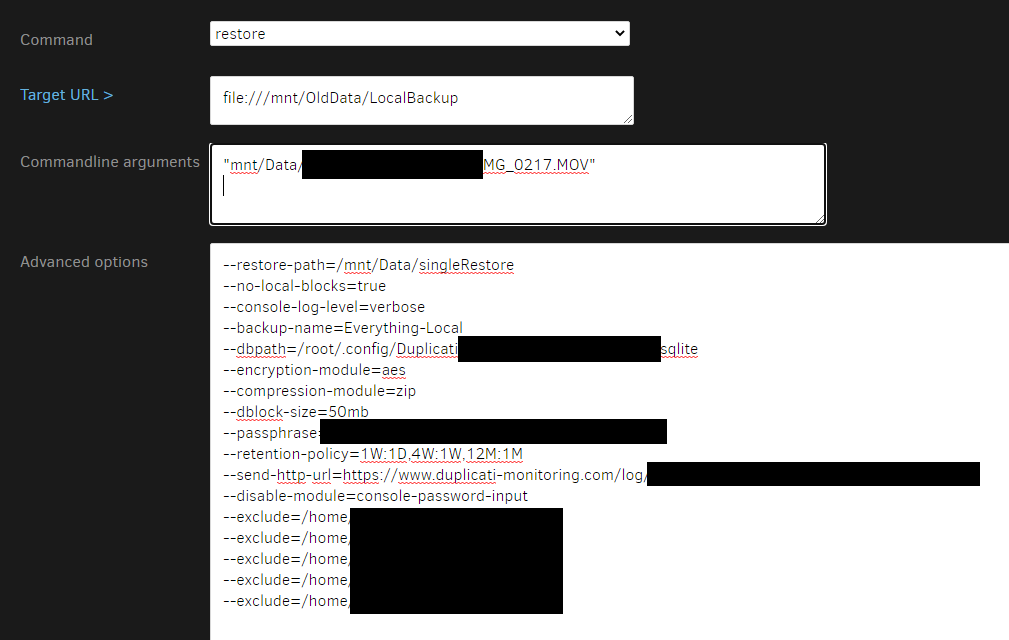
i can’t seem to restore a single file from the command line, it just starts to restore everything…
i tried listing the file as an argument with and without quotes. linux host. no spaces in file name or path, just an underscore.
---
### Author:  [@ts678](https://forum.duplicati.com/u/ts678)
#### Post date: [August 24, 2020, 6:11pm UTC](https://forum.duplicati.com/t/restore-single-file-from-the-command-line/10589/2 "2020-08-24T18:11:12Z")
> [@justsomeuser](#):
>
> it just starts to restore everything
Try getting rid of all the exclude lines. Some [Commands](https://duplicati.readthedocs.io/en/latest/04-using-duplicati-from-the-command-line/) appear to let you specify your file list either explicitly or implicitly by using [–include](https://duplicati.readthedocs.io/en/latest/06-advanced-options/#include) and [–exclude](https://duplicati.readthedocs.io/en/latest/06-advanced-options/#exclude). The latter seem to “win”. I’m not sure of the intended behavior…
I’d hope that the easier (maybe) [GUI Restore](https://duplicati.readthedocs.io/en/latest/03-using-the-graphical-user-interface/#restoring-files-from-a-backup) gets this right. [Commandline](https://duplicati.readthedocs.io/en/latest/03-using-the-graphical-user-interface/#using-the-command-line-tools-from-within-the-graphical-user-interface) leaves it to you to edit as needed.
---
### Author:  [@justsomeuser](https://forum.duplicati.com/u/justsomeuser)
#### Post date: [August 24, 2020, 7:10pm UTC](https://forum.duplicati.com/t/restore-single-file-from-the-command-line/10589/3 "2020-08-24T19:10:02Z")
removing the excludes did the trick. i also wasn’t sure if i had to include “” when listing the file, so i tried it both ways and it worked WITHOUT.
i was previously able to restore a single file with the GUI wizard, but there’s no way to specify options. i was doing a test restore and wanted to add the option --no-local-blocks=true to do a useful test. so that’s why i ended up trying to restore with the command line option.
thanks.
---
### Author:  [@ts678](https://forum.duplicati.com/u/ts678)
#### Post date: [August 24, 2020, 7:30pm UTC](https://forum.duplicati.com/t/restore-single-file-from-the-command-line/10589/4 "2020-08-24T19:30:42Z")
> [@justsomeuser](#):
>
> there’s no way to specify options
> [@justsomeuser](#):
>
> –no-local-blocks=true
You could save that in your job options any time, but I can see why you might prefer not to do that…
[Advanced options cannot be set when restoring files #2185](https://github.com/duplicati/duplicati/issues/2185) is probably the enhancement you want.