# Release: 2.1.0.2 (Beta) 2024-11-29
**URL:** https://forum.duplicati.com/t/release-2-1-0-2-beta-2024-11-29/19577
**Category:** Releases
**Created:** [November 29, 2024, 1:23pm UTC](https://forum.duplicati.com/t/release-2-1-0-2-beta-2024-11-29/19577 "2024-11-29T13:23:59Z")
**Posts on this page:** 20
**Page:** 1
### Author:  [@kenkendk](https://forum.duplicati.com/u/kenkendk)
#### Post date: [November 29, 2024, 1:23pm UTC](https://forum.duplicati.com/t/release-2-1-0-2-beta-2024-11-29/19577/1 "2024-11-29T13:23:59Z")
# [2.1.0.2\_beta\_2024-11-29](https://github.com/duplicati/duplicati/releases/tag/v2.1.0.2_beta_2024-11-29)
This release is a beta release, considered to be stable for general use.
This release is expected to progress to a stable release if no major blockers are found.
**Unlike previoius builds, this one has a major change in the build system, so it now runs on .NET8.**
The builds are self-contained so Mono or .NET installations are not required to install.
Automatic updating to this version is not supported.
**Important changes from last Beta**
- Updated to .NET8 with OS specific builds
- Using Kestrel as the API/UI server
- Mandatory password and new authentication scheme for server
- Settings database version updated to v8
- Backup database updated to v13
# New tool to manage a running server
Due to incompatibility with `duplicati_client` a new tool is included, named `Duplicati.CommandLine.ServerUtil.exe`/`duplicati-server-util`.
# Summary of changes
- Updated to .NET8
- Updated to Kestrel/ASP.NET Core
- Updated the authentication system
- Added support for encrypting database fields
- Updated most packages to the latest version, including SQLite
- Changed to Avalonia for the TrayIcon
- Split into operating system specific packages
- Fixed a number of stability issues
- Updated backends to work with `async`
- Added a Telegram report destination
- Updated WebDAV and FTP backends
- Added support for remote control
- Improved IPv6 support
- Removed 7z compression
- Added secret providers
- Added a new experimental UI
- Added new server-util executable
- Added new Agent executable
- Removed Tardigrade in favor of Storj
- No longer using local blocks for restore by default, and testing more blocks
- Updated blocksize to 1MiB by default
- Removed RC4 database encryption (auto-decrypt)
---
### Author:  [@Niklas](https://forum.duplicati.com/u/Niklas)
#### Post date: [November 30, 2024, 4:15am UTC](https://forum.duplicati.com/t/release-2-1-0-2-beta-2024-11-29/19577/2 "2024-11-30T04:15:19Z")
One of my backup has “took 00:00:60” for “Last successful backup”.
Is this 60 seconds? Should it be 00:01:00?
---
### Author:  [@kenkendk](https://forum.duplicati.com/u/kenkendk)
#### Post date: [November 30, 2024, 7:31am UTC](https://forum.duplicati.com/t/release-2-1-0-2-beta-2024-11-29/19577/3 "2024-11-30T07:31:32Z")
Hi Niklas, I think this is a rounding error.
Most likely the backup took `00:00:59.6..` and this is rounded up to 60s which looks weird.
---
### Author:  [@Lerrissirrel](https://forum.duplicati.com/u/Lerrissirrel)
#### Post date: [November 30, 2024, 6:37pm UTC](https://forum.duplicati.com/t/release-2-1-0-2-beta-2024-11-29/19577/4 "2024-11-30T18:37:13Z")
> [@kenkendk](#):
>
> Automatic updating to this version is not supported.
Curious if supporting an automatic upgrade from the 2.0.x betas is planned or if this jump will always be a manual process?
---
### Author:  [@kenkendk](https://forum.duplicati.com/u/kenkendk)
#### Post date: [December 1, 2024, 2:45pm UTC](https://forum.duplicati.com/t/release-2-1-0-2-beta-2024-11-29/19577/5 "2024-12-01T14:45:12Z")
> [@Lerrissirrel](#):
>
> Curious if supporting an automatic upgrade from the 2.0.x betas is planned or if this jump will always be a manual process?
This will always be a manual process. The reason is that prior to 2.1.0.2, the installation was not aware of how it was installed. Because this information is lacking, newer versions cannot figure out how to update automatically.
Besides this, the change from a common OS-independent package to OS-dependent packages makes it harder to do.
Currently, there is no automatic updater for 2.1.x, so you will only be notified of the update, and have to manually upgrade the installation package.
---
### Author:  [@drwtsn32](https://forum.duplicati.com/u/drwtsn32)
#### Post date: [December 1, 2024, 11:59pm UTC](https://forum.duplicati.com/t/release-2-1-0-2-beta-2024-11-29/19577/6 "2024-12-01T23:59:57Z")
I have upgraded a few Windows machines, a Linux machine, and my Synology NAS (docker image) to this version. So far everything is working well!
Nice to see a new “beta” release!
---
### Author:  [@Sami\_Lehtinen](https://forum.duplicati.com/u/Sami_Lehtinen)
#### Post date: [December 2, 2024, 11:32am UTC](https://forum.duplicati.com/t/release-2-1-0-2-beta-2024-11-29/19577/7 "2024-12-02T11:32:36Z")
Uh oh, this version breaks FTP.
Error message made me laugh and cry:
> Uploading file duplicati-b59754efd474c4d36bb048f2dbb9bedf6.dblock.zip.aes (3.87 MB) …
> Fatal error =\> Please call Connect() before trying to read the Capabilities!
> The operation Backup has failed with error: One or more errors occurred. (Please call Connect() before trying to read the Capabilities! (Please call Connect() before trying to read the Capabilities!) (One or more errors occurred. (Please call Connect() before trying to read the Capabilities!))) =\> One or more errors occurred. (Please call Connect() before trying to read the Capabilities! (Please call Connect() before trying to read the Capabilities!) (One or more errors occurred. (Please call Connect() before trying to read the Capabilities!)))
---
### Author:  [@kenkendk](https://forum.duplicati.com/u/kenkendk)
#### Post date: [December 2, 2024, 12:20pm UTC](https://forum.duplicati.com/t/release-2-1-0-2-beta-2024-11-29/19577/8 "2024-12-02T12:20:51Z")
> [@Sami\_Lehtinen](#):
>
> Uh oh, this version breaks FTP.
I have tested with SFTPGo and ProFPTD and others reported it working, so I imagine this is something with FluentFTP not being fully compatible with your FTP server.
Can you share what FTP server software you are connecting to?
I will make a patch release if I can reproduce+fix this.
---
### Author:  [@kevinfilipe](https://forum.duplicati.com/u/kevinfilipe)
#### Post date: [December 3, 2024, 1:05am UTC](https://forum.duplicati.com/t/release-2-1-0-2-beta-2024-11-29/19577/9 "2024-12-03T01:05:49Z")
Hi.
I have a private CA that generates certificates for Duplicati GUI. After upgrade a random installation to 2.1.0.2\_beta\_2024-11-29 (from 2.0.8.1\_beta\_2024-05-07) browsers starts showing invalid certificate warning (net::ERR\_CERT\_AUTHORITY\_INVALID). The certificate chain listed in browsers is incomplete (does not include root and intermediate CA’s). The server is running Ubuntu Server 24.04.
I have others linux servers (Ubuntu Server 22.04) running Duplicati (2.0.8.1\_beta\_2024-05-07) with certificates generated by the same CA and everything works like expected.
What am i doing wrong? How can i debug such cases?
Thanks.
---
### Author:  [@Sami\_Lehtinen](https://forum.duplicati.com/u/Sami_Lehtinen)
#### Post date: [December 3, 2024, 5:43am UTC](https://forum.duplicati.com/t/release-2-1-0-2-beta-2024-11-29/19577/10 "2024-12-03T05:43:50Z")
> Can you share what FTP server software you are connecting to?
Thanks for reaction, of course.
`2024-11-11 FileZilla Server 1.9.4 on Windows` with `Explicit FTP over TLS`
---
### Author:  [@kenkendk](https://forum.duplicati.com/u/kenkendk)
#### Post date: [December 3, 2024, 10:45am UTC](https://forum.duplicati.com/t/release-2-1-0-2-beta-2024-11-29/19577/11 "2024-12-03T10:45:29Z")
> [@kevinfilipe](#):
>
> I have a private CA that generates certificates for Duplicati GUI. After upgrade a random installation to 2.1.0.2\_beta\_2024-11-29 (from 2.0.8.1\_beta\_2024-05-07) browsers starts showing invalid certificate warning (net::ERR\_CERT\_AUTHORITY\_INVALID). The certificate chain listed in browsers is incomplete (does not include root and intermediate CA’s). The server is running Ubuntu Server 24.04.
My best guess is that this is related to the slightly convoluted way that Duplicati handles the certificates. The goal is to avoid having the certificates stored on disk, so Duplicati will parse them and store them in the internal database, so they can be used on later launches.
If my guess is correct, then this process strips the intermediate certificates and this causes the verification errors you see. I have registered [an issue for investigating/fixing the missing intermediate certificates](https://github.com/duplicati/duplicati/issues/5729).
Unfortunately, there is currently no way to force the original certificate to be used, so you would have to proxy the server, which is a bit of a hassle.
> [@Sami\_Lehtinen](#):
>
> Thanks for reaction, of course.
>
> `2024-11-11 FileZilla Server 1.9.4 on Windows` with `Explicit FTP over TLS`
Thanks! I have registered [an issue for fixing FTP support here](https://github.com/duplicati/duplicati/issues/5730).
---
### Author:  [@Sami\_Lehtinen](https://forum.duplicati.com/u/Sami_Lehtinen)
#### Post date: [December 4, 2024, 6:32am UTC](https://forum.duplicati.com/t/release-2-1-0-2-beta-2024-11-29/19577/12 "2024-12-04T06:32:41Z")
> [@kenkendk](#):
>
> Thanks! I have registered [an issue for fixing FTP support here](https://github.com/duplicati/duplicati/issues/5730).
I did check the server side logs this morning when it was quiet, and it might be slightly more confusing than I thought.
```plaintext
Info [Type] Message
<4.12.2024 8:28:04> FTP Session 33362 X.X.X.X [Response] 220-FileZilla Server 1.9.4
<4.12.2024 8:28:04> FTP Session 33362 X.X.X.X [Response] 220 Please visit https://filezilla-project.org/
<4.12.2024 8:28:04> FTP Session 33362 X.X.X.X [Command] USER Backup
<4.12.2024 8:28:04> FTP Session 33362 X.X.X.X [Response] 503 Use AUTH first.
<4.12.2024 8:28:04> FTP Session 33362 X.X.X.X [Command] QUIT
```
But this is the plain message from the server side, without being masked by .NET exception handling.
I don’t have to dig into details, but this seems like the whole TLS part of FTP(S) might be failing / lacking. - Which is not unexpected, I’ve had so many problems with this with different servers and clients over the years. Bad protocol in general FTP(S).
---
### Author:  [@kenkendk](https://forum.duplicati.com/u/kenkendk)
#### Post date: [December 4, 2024, 7:35am UTC](https://forum.duplicati.com/t/release-2-1-0-2-beta-2024-11-29/19577/13 "2024-12-04T07:35:07Z")
> [@Sami\_Lehtinen](#):
>
> I did check the server side logs this morning when it was quiet, and it might be slightly more confusing than I thought.
I am trying to piece together exactly how this was working before.
I _think_ the [previous FTP client was using Explicit TLS](https://learn.microsoft.com/en-us/dotnet/api/system.net.ftpwebrequest.enablessl?view=net-9.0), but the [new client is using “Auto”](https://github.com/robinrodricks/FluentFTP/wiki/FTP-Connection#important-ftp-server-settings).
This would explain why it tries to send the username before enabling TLS.
If my assumption is correct, it should be possible to fix it by:
- Remove the `--use-ssl` flag
- Add `--ftp-encryption-mode=Explicit`
The reason why the `--use-ssl` flag must be removed, is that it will otherwise overwrite the `--ftp-encryption-mode` flag with `Auto`.
Is it possible for you to test this change? If I can get confirmation that this is working, it is a [one-line code change](https://github.com/duplicati/duplicati/pull/5736) to get the new FTP client to behave the same as before.
---
### Author:  [@Sami\_Lehtinen](https://forum.duplicati.com/u/Sami_Lehtinen)
#### Post date: [December 4, 2024, 8:08am UTC](https://forum.duplicati.com/t/release-2-1-0-2-beta-2024-11-29/19577/14 "2024-12-04T08:08:29Z")
> [@kenkendk](#):
>
> If my assumption is correct, it should be possible to fix it by:
>
> - Remove the `--use-ssl` flag
> - Add `--ftp-encryption-mode=Explicit`
Yet that works, then there are secondary problems, server would prefer TLSv1.3 and we’ll get cipher suite error and so on. - But excluding FTPS/TLS generic protocol issues, it seems that from Duplicati’s part it’s fine. - Unfortunately I don’t have time to deal with this endless mess right now. But maybe some day, it works fine if I drop TLS requirement from both ends.
Someday when it’s quiet, I’ll go through the whole mess in detail. It seems that FTPS and AFTP are also both in parallel supported, with slightly different feature sets. I opted at one point for AFTP because the FTPS at that time had different problems.
This setup requires setting up some test environment, where I can restart both systems repeatedly and change configuration until working combination is found.
After thinking it for a while. I guess I’ll get rid of the FTPS competely, it’s out dated and very problematic protocol as we all (whom uses it) well knows. Let’s go for SFTP and forget this pain.
---
### Author:  [@kenkendk](https://forum.duplicati.com/u/kenkendk)
#### Post date: [December 4, 2024, 4:08pm UTC](https://forum.duplicati.com/t/release-2-1-0-2-beta-2024-11-29/19577/15 "2024-12-04T16:08:17Z")
> [@Sami\_Lehtinen](#):
>
> Yet that works, then there are secondary problems, server would prefer TLSv1.3 and we’ll get cipher suite error and so on
Great! I have merged the PR, so a point release will include this fix.
To get TLSv1.3, you can add:
```plaintext
--ftp-ssl-protocols=Tls13
```
> [@Sami\_Lehtinen](#):
>
> Let’s go for SFTP and forget this pain.
🙏
> [@kevinfilipe](#):
>
> I have a private CA that generates certificates for Duplicati GUI. After upgrade a random installation to 2.1.0.2\_beta\_2024-11-29 (from 2.0.8.1\_beta\_2024-05-07) browsers starts showing invalid certificate warning (net::ERR\_CERT\_AUTHORITY\_INVALID). The certificate chain listed in browsers is incomplete (does not include root and intermediate CA’s). The server is running Ubuntu Server 24.04.
~~I have been digging deep to get to the root of this. It turns out it is “as designed”.~~
EDIT: Nope, it turns out that I was testing with a `.pfx` file that had root+leaf certificate, but no intermediate certificate. 😫
After fixing the `.pfx` file, it works as expected with only [a little extra code to provide the certificate chain](https://github.com/duplicati/duplicati/pull/5739).
---
### Author:  [@SirFritz](https://forum.duplicati.com/u/SirFritz)
#### Post date: [December 10, 2024, 2:28am UTC](https://forum.duplicati.com/t/release-2-1-0-2-beta-2024-11-29/19577/16 "2024-12-10T02:28:23Z")
I updated to this beta from the previous old (mono) beta. Now I have a problem where I can’t backup to my smb share on my home server. I get the error
> System.UnauthorizedAccessException: Access to the path ‘/mnt/nasbackup/AlexPC-Fedora/Sync/duplicati-ib171e56ea53c4ce5aae2df6d46359bae.dindex.zip.aes’ is denied.
> —\> System.IO.IOException: Permission denied
The smb share is mounted using an systemd mount in fstab. I have duplicati running as a systemd service which should be running as root. I can confirm that running as root I can create and modify files on the share.
Was working fine on previous beta.
Both my desktop and my home server run Fedora and I have duplicati gui installed using the RPM.
---
### Author:  [@kenkendk](https://forum.duplicati.com/u/kenkendk)
#### Post date: [December 10, 2024, 9:50pm UTC](https://forum.duplicati.com/t/release-2-1-0-2-beta-2024-11-29/19577/17 "2024-12-10T21:50:56Z")
> [@SirFritz](#):
>
> System.UnauthorizedAccessException: Access to the path ‘/mnt/nasbackup/AlexPC-Fedora/Sync/duplicati-ib171e56ea53c4ce5aae2df6d46359bae.dindex.zip.aes’ is denied.
> —\> System.IO.IOException: Permission denied
From the error message it looks like a standard permission issue, but I am guessing that you did not suddenly change permissions. The `file://` backend (which I assume you are using) should just use the operation system `open(...)` call with regular permissions.
The only thing I can think of is that this is somehow a locking issue that is incorrectly reported as a permission issue. Can you try running Duplicati with the environment variable:
```plaintext
DOTNET_SYSTEM_IO_DISABLEFILELOCKING=true
```
This should slightly change the way the open call is made, and bypass the check for locking.
---
### Author:  [@ts678](https://forum.duplicati.com/u/ts678)
#### Post date: [December 10, 2024, 10:32pm UTC](https://forum.duplicati.com/t/release-2-1-0-2-beta-2024-11-29/19577/18 "2024-12-10T22:32:29Z")
> [@SirFritz](#):
>
> duplicati-ib171e56ea53c4ce5aae2df6d46359bae.dindex.zip.aes
I find it odd (but maybe not impossible) that it didn’t fail on the dblock that tries to upload first.
There’s not much context on what’s being tried, but you can view job → Show log → Remote.
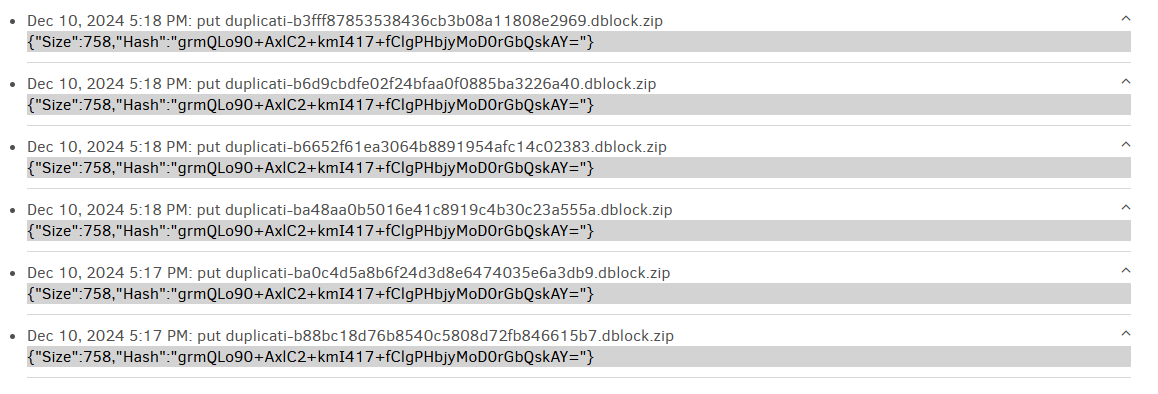
is what I get on 2.0.8.1 if I have a folder that can be read but not written (because I set it so).
A new name is used for each of the default 5 retries, but files hash shows files are the same.
A better view would be About → Show log → Retry, but you can read 2.1.0.2 logs on 2.0.8.1.
---
### Author:  [@SirFritz](https://forum.duplicati.com/u/SirFritz)
#### Post date: [December 11, 2024, 12:48am UTC](https://forum.duplicati.com/t/release-2-1-0-2-beta-2024-11-29/19577/19 "2024-12-11T00:48:13Z")
> [@kenkendk](#):
>
> `DOTNET_SYSTEM_IO_DISABLEFILELOCKING=true`
I tried this and had the same result.
> [@ts678](#):
>
> There’s not much context on what’s being tried, but you can view job → Show log → Remote.
Since updating I only have “list” events listed here. No “put” or “get”
> [@ts678](#):
>
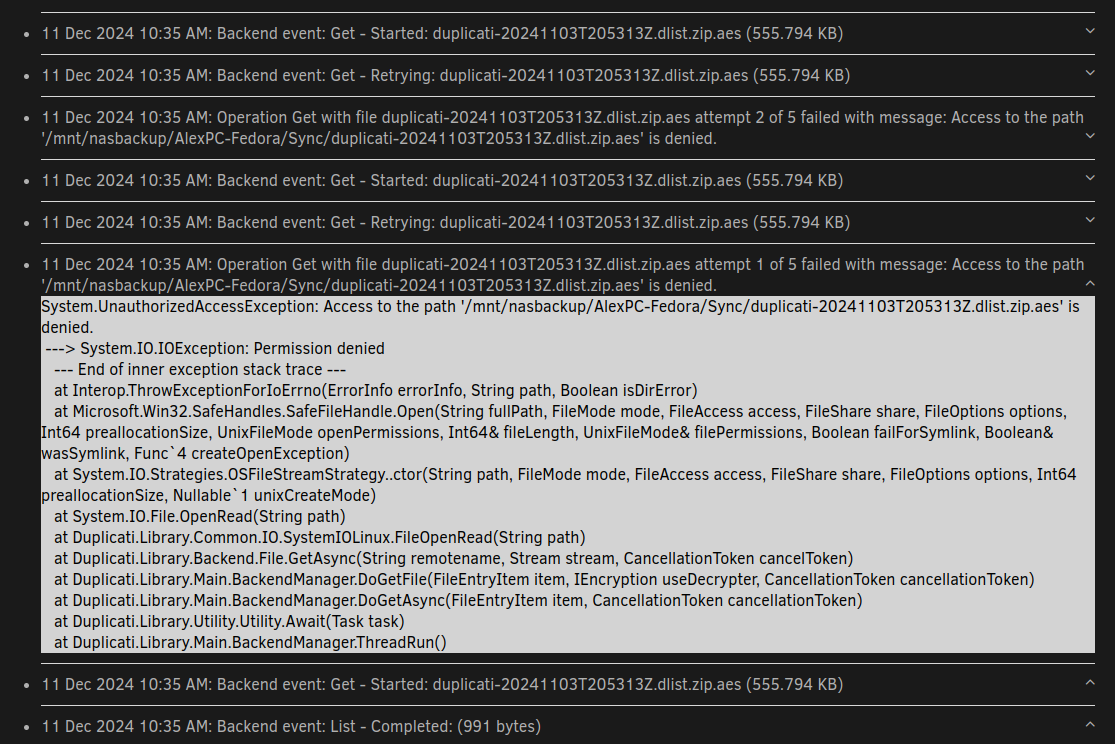
> A better view would be About → Show log → Retry, but you can read 2.1.0.2 logs on 2.0.8.1.
---
### Author:  [@ts678](https://forum.duplicati.com/u/ts678)
#### Post date: [December 11, 2024, 1:14am UTC](https://forum.duplicati.com/t/release-2-1-0-2-beta-2024-11-29/19577/20 "2024-12-11T01:14:26Z")
So now instead of a dindex, a dlist is failing. It’s an old one per date, and just barely below the bottom of the screenshot you might see a backup working. I “think” fail is in the [test at the end](https://docs.duplicati.com/community-docs/community-docs-using-the-graphical-user-interface#verifying-backend-files). Below is a live log of a small full backup. You can scroll your view down to see what’s below it.
```plaintext
Dec 10, 2024 7:59 PM: The operation Backup has completed
Dec 10, 2024 7:59 PM: Successfully verified 3 remote files
Dec 10, 2024 7:59 PM: Backend event: Get - Completed: duplicati-b1d9e6a6fbdd74f9cacf2b0d243bdda57.dblock.zip (758 bytes)
Dec 10, 2024 7:59 PM: Backend event: Get - Started: duplicati-b1d9e6a6fbdd74f9cacf2b0d243bdda57.dblock.zip (758 bytes)
Dec 10, 2024 7:59 PM: Backend event: Get - Completed: duplicati-i4b661295f561443c8ade062130dbdd15.dindex.zip (608 bytes)
Dec 10, 2024 7:59 PM: Backend event: Get - Started: duplicati-i4b661295f561443c8ade062130dbdd15.dindex.zip (608 bytes)
Dec 10, 2024 7:59 PM: Backend event: Get - Completed: duplicati-20241211T005919Z.dlist.zip (644 bytes)
Dec 10, 2024 7:59 PM: Backend event: Get - Started: duplicati-20241211T005919Z.dlist.zip (644 bytes)
Dec 10, 2024 7:59 PM: Backend event: List - Completed: (3 bytes)
Dec 10, 2024 7:59 PM: Backend event: List - Started: ()
Dec 10, 2024 7:59 PM: Compacting not required
Dec 10, 2024 7:59 PM: Backend event: Put - Completed: duplicati-20241211T005919Z.dlist.zip (644 bytes)
Dec 10, 2024 7:59 PM: Backend event: Put - Started: duplicati-20241211T005919Z.dlist.zip (644 bytes)
Dec 10, 2024 7:59 PM: Backend event: Put - Completed: duplicati-i4b661295f561443c8ade062130dbdd15.dindex.zip (608 bytes)
Dec 10, 2024 7:59 PM: Backend event: Put - Started: duplicati-i4b661295f561443c8ade062130dbdd15.dindex.zip (608 bytes)
Dec 10, 2024 7:59 PM: Backend event: Put - Completed: duplicati-b1d9e6a6fbdd74f9cacf2b0d243bdda57.dblock.zip (758 bytes)
Dec 10, 2024 7:59 PM: Backend event: Put - Started: duplicati-b1d9e6a6fbdd74f9cacf2b0d243bdda57.dblock.zip (758 bytes)
Dec 10, 2024 7:59 PM: Backend event: List - Completed: ()
Dec 10, 2024 7:59 PM: Backend event: List - Started: ()
Dec 10, 2024 7:59 PM: The operation Backup has started
```
I don’t know why your read is failing, but earlier you didn’t specifically say a manual read works.
[Next page](https://forum.duplicati.com/t/release-2-1-0-2-beta-2024-11-29/19577.md?page=2)