# Release: 2.1.0.110 (Canary) 2025-02-28
**URL:** https://forum.duplicati.com/t/release-2-1-0-110-canary-2025-02-28/20245
**Category:** Releases
**Created:** [February 28, 2025, 3:31pm UTC](https://forum.duplicati.com/t/release-2-1-0-110-canary-2025-02-28/20245 "2025-02-28T15:31:17Z")
**Posts on this page:** 1
**Showing post:** 10
### Author:  [@ts678](https://forum.duplicati.com/u/ts678)
#### Post date: [March 12, 2025, 2:46pm UTC](https://forum.duplicati.com/t/release-2-1-0-110-canary-2025-02-28/20245/10 "2025-03-12T14:46:05Z")
> [@jberry02](#):
>
> I have been seeing this on an earlier Canary release and was hoping this was fixed in 2.1.0.110.
Canary releases are testing releases. Problems should be reported to allow fixes.
Please check for existing reports of course. Thanks for this report. Cause may be:
>
>
> This commit adds a check to verify that the remote database is up-to-date before… proceeding to repair the remote storage.
>
> Without this check it is possible to start repairs with an old database, and this will cause the remote data to be deleted.
>
> This fixes #4579
>
> Thanks to @Jojo-1000 for \[suggesting the low-impact fix\](https://forum.duplicati.com/t/prevent-data-loss-when-repairing-outdated-local-database/16389/1).
which went into 2.1.0.109 and seems to have some time zone confusion. I can do:
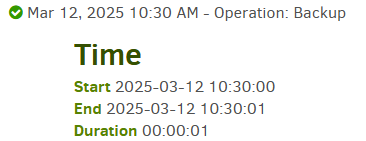

in the UTC-4 timezone, and have Repair say:
> The remote files are newer (3/12/2025 2:30:00 PM) than the local database (3/12/2025 10:30:00 AM), this is likely because the database is outdated. Consider deleting the local database and run the repair operation again.
Remote file times are 4 hours ahead, likely due to UTC. Local 2:30 isn’t here yet.
I’m not sure what time zone the unit tests run in, e.g. UTC+1 might not see this…
EDIT 1:
> [@jberry02](#):
>
> Found 2 files that are missing from the remote storage
I’m not certain about this (need developer help), but the Canary and Beta releases lack some of the urgent fixes that led to 2.1.0.5 Stable. Not sure if that will be fixed.
```plaintext
C:\Duplicati\duplicati-2.1.0.110_canary_2025-02-28-win-x64-gui>Duplicati.CommandLine help read-write-timeout
--read-write-timeout (Timespan): Set the read/write timeout for the connection
The read/write timeout is the maximum amount of time to wait for any activity during a transfer. If no activity is detected for this period, the connection is considered broken and the transfer is
aborted. Set to 0s to disabled
* default value: 30s
```
has caused silent upload failures. 2.1.0.5 set that to a larger time (but not disabled):
> [@Release: 2.1.0.5 (Stable) 2025-03-04](https://forum.duplicati.com/t/release-2-1-0-5-stable-2025-03-04/20279/1):
>
> Increased default value for `--read-write-timeout` to 10 min to counter timeouts on large sets
Possibly a manual config (maybe in Settings, to be a default for all jobs) would help.
As for putting you backup back together, Repair will probably be willing to run when its time confusion ends, but it might not help. You can try to find what variety of files are missing with About → Show log → Live → Warning and click on `Verify files`. Timeouts (if that’s the issue) are probably unfortunately more likely on `dblock` files.
[Duplicati didn’t stop on dblock Put fail, and Put dlist using it. Later on, some successful B2 Put didn’t actually leave files](https://forum.duplicati.com/t/duplicati-didnt-stop-on-dblock-put-fail-and-put-dlist-using-it-later-on-some-successful-b2-put-didnt-actually-leave-files/20167)
is me hitting the timeout problem on 2.1.0.107. I do have some ideas on recovering, and might try them soon (getting tired of downtime). If they work, maybe you can try.
---
_[View the full topic](https://forum.duplicati.com/t/release-2-1-0-110-canary-2025-02-28/20245)._