# Password - error
**URL:** https://forum.duplicati.com/t/password-error/14877
**Category:** Uncategorized
**Created:** [August 26, 2022, 1:27am UTC](https://forum.duplicati.com/t/password-error/14877 "2022-08-26T01:27:06Z")
**Posts on this page:** 2
**Page:** 1
### Author:  [@elmernet](https://forum.duplicati.com/u/elmernet)
#### Post date: [August 26, 2022, 1:27am UTC](https://forum.duplicati.com/t/password-error/14877/1 "2022-08-26T01:27:06Z")
Am I the only one having problems with the icon on the taskbar, when registering a password?
Duplicati is installed as a service, and the icon is triggered with --no-hosted-server . Everything works, but if I register a password, the icon stops being loaded at startup. Even after starting, activating the desktop icon with two clicks also does not make it appear on the taskbar. I see the process appear in the task manager, and disappear in a moment.
So I go straight to the browser, open localhost:8200 , remove the password, and everything is back to normal.
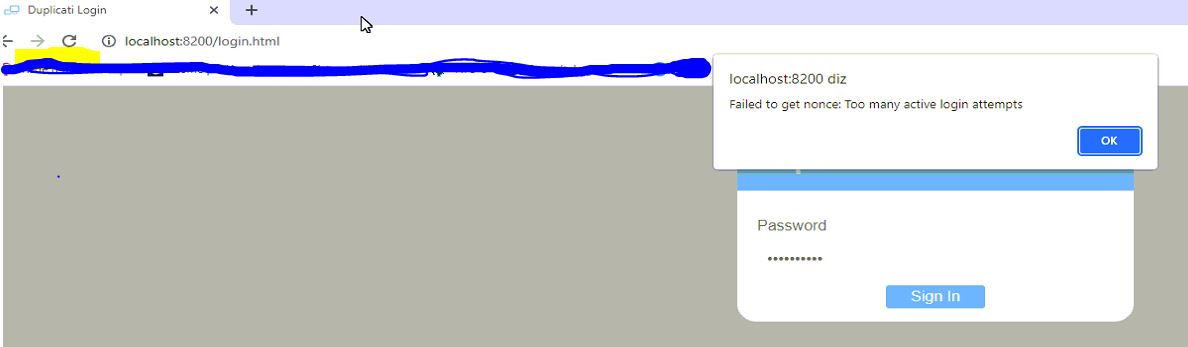
An error occurs after registering the password and saving - figure 1.
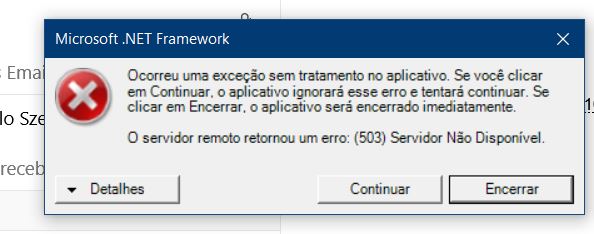
When calling the interface through the taskbar icon, I get a second error - figure 2. (only the first time, after even restarting the machine, this second error no longer occurs).
Could it be something on my machine, remove and reinstall? is not! this is happening on 3 others, with windows 10 and Windows Server 2012 R2.
Any suggestion?
1-
2-
---
### Author:  [@drwtsn32](https://forum.duplicati.com/u/drwtsn32)
#### Post date: [August 26, 2022, 1:02pm UTC](https://forum.duplicati.com/t/password-error/14877/2 "2022-08-26T13:02:39Z")
Maybe this post will help:
> [@TrayIcon does not work with password and Duplicati as service](https://forum.duplicati.com/t/trayicon-does-not-work-with-password-and-duplicati-as-service/8912/2):
>
> [Tray Icon does not start after setting a UI password (Service Mode)](https://forum.duplicati.com/t/tray-icon-does-not-start-after-setting-a-ui-password-service-mode/4679)[Duplicati Tray Icon Silently Dies with --no-hosted-server arg #3137](https://github.com/duplicati/duplicati/issues/3137#issuecomment-466855597) describe some of the things that can go wrong. Your situation sounds like a permission problem, where TrayIcon running as your user is unable to read Duplicati-server.sqlite in the SYSTEM account profile in C:\Windows\System32\config\systemprofile\AppData\Local\Duplicati Possibly you can change the ACL, but I’m not sure how well protected it is. SYSTEM is pre…