# No TrayIcon on Linux
**URL:** https://forum.duplicati.com/t/no-trayicon-on-linux/20238
**Category:** Installation
**Created:** [February 27, 2025, 10:19pm UTC](https://forum.duplicati.com/t/no-trayicon-on-linux/20238 "2025-02-27T22:19:29Z")
**Posts on this page:** 5
**Page:** 1
### Author:  [@Gotit](https://forum.duplicati.com/u/Gotit)
#### Post date: [February 27, 2025, 10:19pm UTC](https://forum.duplicati.com/t/no-trayicon-on-linux/20238/1 "2025-02-27T22:19:29Z")
Hi - I’m having trouble getting the TrayIcon to show in Linux EndeavourOS (EOS) XFCE and Cinnamon DEs. I installed KDE 6 on EOS last week and the TrayIcon showed after starting and enabling duplicati, but it did require a reboot, then all was well. But, I can’t seem to get the TrayIcon now.
In XFCE and Cinnamon I can see that Duplicati is running:
`$ sudo systemctl status duplicati
● duplicati.service - Duplicati
Loaded: loaded (/usr/lib/systemd/system/duplicati.service; enabled; preset: disabled)
Active: active (running) since Thu 2025-02-27 17:03:11 EST; 1min 21s ago
Invocation: 9eb71413a7834b7d970a39702b92dc22
Main PID: 809 (duplicati-serve)
Tasks: 17 (limit: 18544)
Memory: 174.6M (peak: 176.2M)
CPU: 2.006s
CGroup: /system.slice/duplicati.service
└─809 /opt/duplicati/duplicati-server --webservice-port=8200`
`
`
`Feb 27 17:03:11 Lenovo-Y systemd[1]: Started Duplicati.
Feb 27 17:03:11 Lenovo-Y duplicati-server[809]: No database encryption key was found. The database will be stored>
Feb 27 17:03:12 Lenovo-Y duplicati-server[809]: Server has started and is listening on port 8200
Feb 27 17:03:12 Lenovo-Y duplicati-server[809]: Use the following link to sign in: http://localhost:8200/signin.h>`
When I go to [http://localhost:8200](http://localhost:8200). It asks for a Log in or re-open from the TrayIcon.
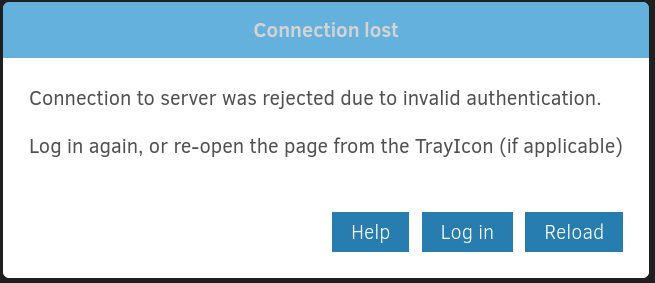
I’m using Duplicati on another XFCE machine, so I know the TrayIcon works (old install).
Also, after installing Duplicati, I don’t have the local duplicati folder in /home/.config. Not sure if that gets created during install, or after logging into Duplicati. This could be a red herring…
I’ve tried installing all different channels of Duplicati one at a time that are in the repos:
`duplicati-bin 2.1.0.4-1
duplicati-beta-bin 2.1.0.3-1
duplicati-canary-bin 2.1.0.109-1`
but no joy.
My current configuration is:
OS: EndeavourOS
Current DE: XFCE 4.20
GTK: 3.24.48
Kernel: 6.12.16-1lts
Windowing: X11
Autostart command: mono /opt/duplicati/duplicati
Any thoughts will be appreicated.
---
### Author:  [@ts678](https://forum.duplicati.com/u/ts678)
#### Post date: [February 27, 2025, 11:50pm UTC](https://forum.duplicati.com/t/no-trayicon-on-linux/20238/2 "2025-02-27T23:50:04Z")
> [@Gotit](#):
>
> duplicati-beta-bin 2.1.0.3-1
[2.1.0.3\_beta\_2025-01-22](https://github.com/duplicati/duplicati/releases/tag/v2.1.0.3_beta_2025-01-22)
> **Unlike 2.0.8.1 and earlier Duplicati now runs on .NET8.**
> The builds are self-contained so Mono or .NET installations are not required to install.
> [@Gotit](#):
>
> Autostart command: mono /opt/duplicati/duplicati
won’t work on any 2.1 release, however which way did you mean to run Duplicati?
The systemd version runs as root, so can backup more. The TrayIcon runs as you.
One nice thing about it is that it bypasses the GUI password other run styles need.
[Duplicati Access Password](https://docs.duplicati.com/detailed-descriptions/duplicati-access-password)
It’s possible to attach it to the systemd server, but that needs some options such as
`--no-hosted-server` and `--webservice-password=` or another way in.
Previously in the `mono` era it would have still needed at least `--no-hosted-server`.
---
### Author:  [@Gotit](https://forum.duplicati.com/u/Gotit)
#### Post date: [March 1, 2025, 3:54pm UTC](https://forum.duplicati.com/t/no-trayicon-on-linux/20238/3 "2025-03-01T15:54:21Z")
@ts678 Thanks for the quick response.
With your assistance I finally got the TrayIcon to run by executing:
`./duplicati`
in /opt/duplicati.
My autostart command echos the above with:
`/opt/duplicati/“./duplicati”`
I don’t seem to need the option `–no-hosted-server`
Is it still recommended that add that option if I want to run like the old mono era?
---
### Author:  [@ts678](https://forum.duplicati.com/u/ts678)
#### Post date: [March 1, 2025, 4:00pm UTC](https://forum.duplicati.com/t/no-trayicon-on-linux/20238/4 "2025-03-01T16:00:12Z")
> [@Gotit](#):
>
> Is it still recommended that add that option if I want to run like the old mono era?
I’m still asking you how you want to run. If you just want TrayIcon as you, then you might as well disable systemd server that you’re not using. If you want TrayIcon plus that, you need the option.
The previous autostart looks like you just run TrayIcon as you. If that’s the desire, no new option.
---
### Author:  [@Gotit](https://forum.duplicati.com/u/Gotit)
#### Post date: [March 1, 2025, 4:17pm UTC](https://forum.duplicati.com/t/no-trayicon-on-linux/20238/5 "2025-03-01T16:17:22Z")
@ts678 Yes, looking to run TrayIcon as me, the user, sorry.
I’ve disabled duplicati in systemd and kept the autostart command and all seem right as rain.
Thanks again!!