# Migrating from User to Service install on Windows
**URL:** https://forum.duplicati.com/t/migrating-from-user-to-service-install-on-windows/660
**Category:** How-To
**Created:** [September 16, 2017, 4:18am UTC](https://forum.duplicati.com/t/migrating-from-user-to-service-install-on-windows/660 "2017-09-16T04:18:54Z")
**Posts on this page:** 1
**Showing post:** 59
### Author:  [@Alk](https://forum.duplicati.com/u/Alk)
#### Post date: [September 3, 2022, 1:24am UTC](https://forum.duplicati.com/t/migrating-from-user-to-service-install-on-windows/660/59 "2022-09-03T01:24:10Z")
**If you use the Tray Icon and have password protection on the web user interface** , then you will need to add additional parameters to the Tray Icon shortcut for it to work, after migrating Duplicati to a service.
Open the folder: `C:\ProgramData\Microsoft\Windows\Start Menu\Programs\StartUp`
Right-click the ‘Duplicati 2’ Shortcut → Properties → Remove what is currently in the _‘Target’_ field and replace it with (adjust the path accordingly between the quotes of --server-datafolder=“”):
```nohighlight
Duplicati.GUI.TrayIcon.exe --no-hosted-server --server-datafolder="" --read-config-from-db
```
So, for example, in the [latest instructions in post 46](https://forum.duplicati.com/t/migrating-from-user-to-service-install-on-windows/660/46) from @johnvk , the Duplicati Data Folder is now at “C:\ProgramData\Duplicati\Data” (where the sqlite files now are), so the ‘Target’ field of the ‘Duplicati 2’ shortcut should be:
```nohighlight
Duplicati.GUI.TrayIcon.exe --no-hosted-server --server-datafolder="C:\ProgramData\Duplicati\Data" --read-config-from-db
```
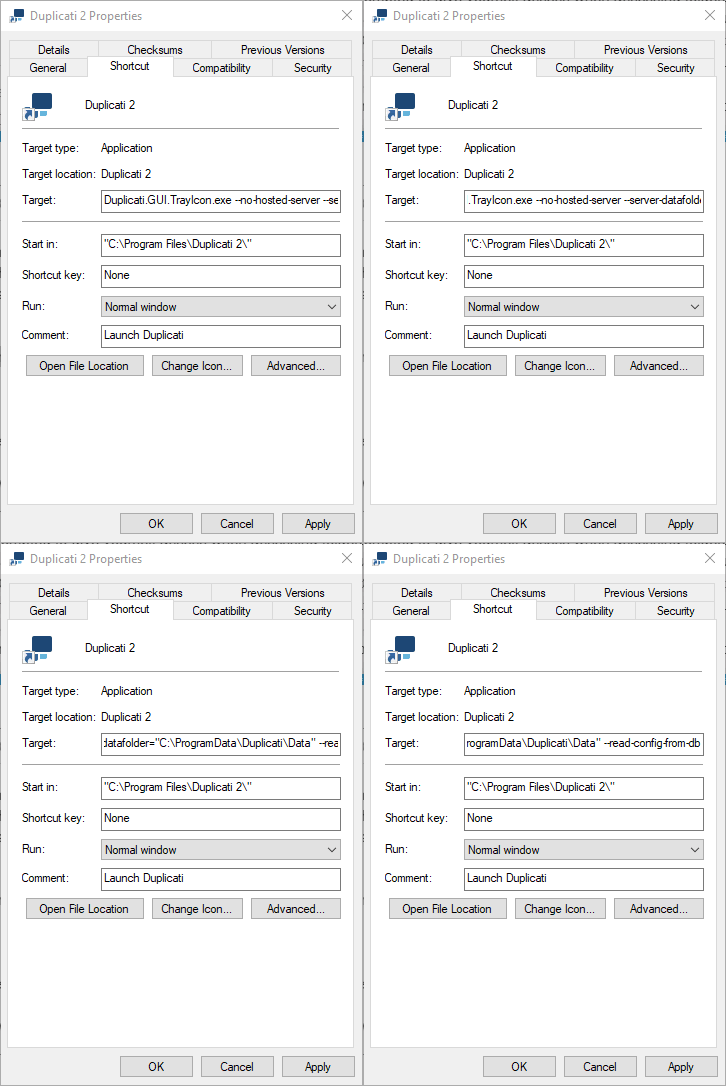
Furthermore, as @JimboJones points out, in the same way, don’t forget to also correct the (actual) Start Menu shortcut in the folder of: `C:\ProgramData\Microsoft\Windows\Start Menu\Programs` (scroll to find it in there!)
…and you may also find a shortcut on your Desktop, which also requires correcting in the same way (located in: `C:\Users\Public\Desktop`).
(Thanks to @kees-z for [originally posting the shortcut fix](https://forum.duplicati.com/t/tray-icon-service-mode-windows/13911/10) and also to @johnvk for the service migration instructions).
---
_[View the full topic](https://forum.duplicati.com/t/migrating-from-user-to-service-install-on-windows/660)._