# Maximum backup versions?
**URL:** https://forum.duplicati.com/t/maximum-backup-versions/1029
**Category:** Support
**Created:** [October 15, 2017, 7:29pm UTC](https://forum.duplicati.com/t/maximum-backup-versions/1029 "2017-10-15T19:29:48Z")
**Posts on this page:** 19
**Page:** 2
### Author:  [@drwtsn32](https://forum.duplicati.com/u/drwtsn32)
#### Post date: [October 19, 2017, 1:57pm UTC](https://forum.duplicati.com/t/maximum-backup-versions/1029/21 "2017-10-19T13:57:01Z")
Well this is disconcerting!
I only have 175 versions right now on one machine and in the restore process it takes 45 each time I drill down into a deeper folder. Is this time a function of version count, # of files backed up, or both?
---
### Author:  [@JonMikelV](https://forum.duplicati.com/u/JonMikelV)
#### Post date: [October 19, 2017, 2:30pm UTC](https://forum.duplicati.com/t/maximum-backup-versions/1029/22 "2017-10-19T14:30:20Z")
> [@drwtsn32](#):
>
> Is this time a function of version count, # of files backed up, or both?
Just for fun I tried opening two web interfaces to Duplicati, one to the Live Log (Profiling) and the other to a backup job in which I clicked Restore.
The sum of the “took” times reported in the profiler was definitely less than the time it took for the browser to display the results, so there may be a third slowdown - the UI itself.
I know historically I’ve run into issues with browser performance when dealing with very large or complex select lists. One way to test this could be to try @mr-flibble’s idea and run the same thing in the command line to see if it spits out results any faster.
---
### Author:  [@tuzo](https://forum.duplicati.com/u/tuzo)
#### Post date: [October 20, 2017, 6:01am UTC](https://forum.duplicati.com/t/maximum-backup-versions/1029/23 "2017-10-20T06:01:15Z")
> [@drwtsn32](#):
>
> I only have 175 versions right now on one machine and in the restore process it takes 45 each time I drill down into a deeper folder.
I had a similar approach as you – backing up files every hour. I maxed out around 289 versions. At that time the backup time had increased by an hour (to 1h15m) and the time to render every click in the restore UI was around 29 minutes. I think the CPU usage of the service had also increased during backups as well.
At that point I decided that the 1 hour backup interval was not a practical configuration at this time. The volatile files are for work and if a restore was needed it would probably be a time sensitive issue so the prospect of waiting hours to find and restore a file was not acceptable. In the end I reverted to a once per day interval.
---
### Author:  [@Athep](https://forum.duplicati.com/u/Athep)
#### Post date: [October 20, 2017, 9:58am UTC](https://forum.duplicati.com/t/maximum-backup-versions/1029/24 "2017-10-20T09:58:45Z")
I wonder if it is possible to apply retention policy in order to reduce the versions in the backup? Or is a “new” policy only applied to backups taken after the retention policy is defined ?
---
### Author:  [@Tekki](https://forum.duplicati.com/u/Tekki)
#### Post date: [October 20, 2017, 10:04am UTC](https://forum.duplicati.com/t/maximum-backup-versions/1029/25 "2017-10-20T10:04:57Z")
It will be applied on old backups as well.
Just keep in mind, that if the retention policy you defined leads to deleteing a lot of backups, depending on your settings Duplicati might start compacting your backup files.
If your backup location is somewhere online and your download and uploadspeed is rather slow, then this might take a “while”
---
### Author:  [@Athep](https://forum.duplicati.com/u/Athep)
#### Post date: [October 20, 2017, 10:59am UTC](https://forum.duplicati.com/t/maximum-backup-versions/1029/26 "2017-10-20T10:59:34Z")
When is the policy executed? When starting the next backup? or is it possible to run a command like “apply policy and compact now” ?
---
### Author:  [@kees-z](https://forum.duplicati.com/u/kees-z)
#### Post date: [October 20, 2017, 11:26am UTC](https://forum.duplicati.com/t/maximum-backup-versions/1029/27 "2017-10-20T11:26:05Z")
`--keep-time`, `--keep-versions` and `--retention-policy` are part of the backup job configuration.
They are defined in step 5 of the Add/Edit Backup wizard.
`--keep-time` and `--keep-versions` can be supplied under “General Options”:
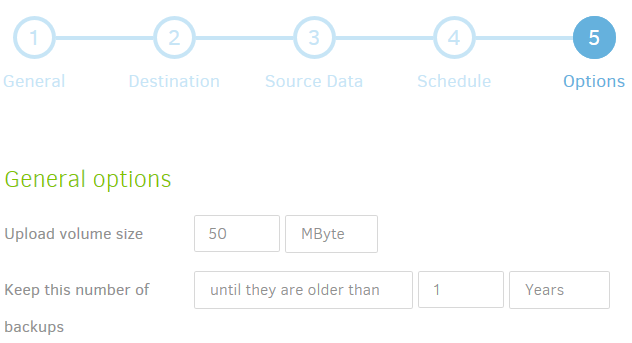
`--retention-policy` is an advanced option.
The `--keep-time`, `--keep-versions` and `--retention-policy` options are applied after completion of each backup job. Compacting is started automatically when needed. You can set thresholds for compacting the advanced options `--small-file-max-count` and `--small-file-size`.
---
### Author:  [@Athep](https://forum.duplicati.com/u/Athep)
#### Post date: [October 21, 2017, 2:57pm UTC](https://forum.duplicati.com/t/maximum-backup-versions/1029/28 "2017-10-21T14:57:47Z")
I have made some tests on this backup set now. The first backup was done 2015.
I applied an acceptable retention policy and reduced the versions from 502 to 20. There is 130 000 files in the backup. Time for the initial listing on restore is now reduced from 40 min to 20 sec. Listing the next folder takes about the same time, 20 sec.
---
### Author:  [@kees-z](https://forum.duplicati.com/u/kees-z)
#### Post date: [October 21, 2017, 4:54pm UTC](https://forum.duplicati.com/t/maximum-backup-versions/1029/29 "2017-10-21T16:54:23Z")
> [@Athep](#):
>
> reduced from 40 min to 20 sec.
Wow, that’s a serious improvement!
Looks to me that the local database is the bottleneck for large backups with many source files.
You significantly reduced the number of snapshots from 502 to 20. Did the used space at the backend reduced a lot also? If there is not much changed between 2 backup operations, deleting backups should not have much effect on the data used at the backend.
If only new data is added between 2 backups (for example if you backup a folder with pictures from your camera), deleting backups shouldn’t have any effect to the storage space used.
If browsing through folders in Duplicati improves in situations like these, I suppose it’s safe to say that queries to the local DB are causing the performance issues, not the number of blocks or the number of files backed up.
---
### Author:  [@Athep](https://forum.duplicati.com/u/Athep)
#### Post date: [October 21, 2017, 6:24pm UTC](https://forum.duplicati.com/t/maximum-backup-versions/1029/30 "2017-10-21T18:24:56Z")
It was several months since this backup set was in use. The source data in the backup was 275 GB and at the backend 255 GB / 502 versions.
After the run now with retention applied, the data in the backend has in fact increased. It is now 288 GB / 21 versions. The source data has decreased to 224 GB. (51 GB is removed).
---
### Author:  [@JonMikelV](https://forum.duplicati.com/u/JonMikelV)
#### Post date: [October 21, 2017, 10:13pm UTC](https://forum.duplicati.com/t/maximum-backup-versions/1029/31 "2017-10-21T22:13:16Z")
Thanks for doing (and logging) the testing!
I’m curious if you noticed whether or not any of the huge file browsing improvements due to fewer versions translated to faster backup times in any way.
---
### Author:  [@saviodsouza](https://forum.duplicati.com/u/saviodsouza)
#### Post date: [October 22, 2017, 9:27am UTC](https://forum.duplicati.com/t/maximum-backup-versions/1029/32 "2017-10-22T09:27:39Z")
can you also share what was the database size before and now?
---
### Author:  [@Athep](https://forum.duplicati.com/u/Athep)
#### Post date: [October 22, 2017, 5:30pm UTC](https://forum.duplicati.com/t/maximum-backup-versions/1029/33 "2017-10-22T17:30:55Z")
I have looked at some old logs and tried to compare similar situations with the backup runs, and yes, I would say that there is a huge performance improvement after reducing the versions.
But also to be noted is that it has been performance improvements in the software since then. So the comparison might not be really fair when it comes to the time duration for the backup runs.
---
### Author:  [@Athep](https://forum.duplicati.com/u/Athep)
#### Post date: [October 22, 2017, 5:34pm UTC](https://forum.duplicati.com/t/maximum-backup-versions/1029/34 "2017-10-22T17:34:29Z")
The size of the local database was 3,3 GB. I did not log exactly how much the change was after the “retention run”, but it did not change much. I did a “vacuum run” afterwards and after that it shrunk to 766 MB.
---
### Author:  [@drwtsn32](https://forum.duplicati.com/u/drwtsn32)
#### Post date: [October 23, 2017, 10:22pm UTC](https://forum.duplicati.com/t/maximum-backup-versions/1029/35 "2017-10-23T22:22:48Z")
> [@Athep](#):
>
> I did a “vacuum run” afterwards and after that it shrunk to 766 MB.
Doesn’t Duplicati automatically do that at the end of the job? I was watching the profiling live log and saw VACUUM executed at the end.
---
### Author:  [@kees-z](https://forum.duplicati.com/u/kees-z)
#### Post date: [October 23, 2017, 10:34pm UTC](https://forum.duplicati.com/t/maximum-backup-versions/1029/36 "2017-10-23T22:34:38Z")
Probably you are in the Beta Update channel, v2.0.2.1 is the latest (and still only) beta version.
In v2.0.2.2 Canary, performing automatic VACUUM was dropped, because this could result in waiting for a long time after a backup has been completed and the local database is large.
Usually there is not much space released by the VACUUM operation, so starting from v2.0.2.2 this is a manual operation.
---
### Author:  [@drwtsn32](https://forum.duplicati.com/u/drwtsn32)
#### Post date: [October 23, 2017, 10:41pm UTC](https://forum.duplicati.com/t/maximum-backup-versions/1029/37 "2017-10-23T22:41:41Z")
Yep I’m on the beta version. Thanks for clarifying!
---
### Author:  [@runmode](https://forum.duplicati.com/u/runmode)
#### Post date: [April 28, 2023, 12:08pm UTC](https://forum.duplicati.com/t/maximum-backup-versions/1029/38 "2023-04-28T12:08:25Z")
> [@Tekki](#):
>
> If you ultimately want to remove all backups older than a certain age, you ALSO have to add the `keep-time` option.
Trying this with Duplicati version 2.0.6.3\_beta\_2021-06-17 results in an error “Setting multiple retention options (–keep time, --retention-policy) is not permitted”.
Just for reference, I found another discussion, that --retention-policy was changed 2018 as follows:
- `--retention-policy` now deletes backups that are outside of any time frame. No need to specify `--keep-time` as well. Help text was changed accordingly.
- `--retention-policy` is now mutual exclusive to the other retention options `--keep-time` and `--keep-version`. Help text was changed accordingly.
- `--retention-policy` now complies with `--allow-full-removal`, deleting even the most recent backup, if it’s outside of any time frame
Refer to [https://forum.duplicati.com/t/removing-files-from-backup/13014/3](https://forum.duplicati.com/t/removing-files-from-backup/13014/3)
P.S. It is a good practise to let old threads stay unclosed, allowing to add such referrals years later.
---
### Author:  [@ts678](https://forum.duplicati.com/u/ts678)
#### Post date: [April 28, 2023, 3:09pm UTC](https://forum.duplicati.com/t/maximum-backup-versions/1029/39 "2023-04-28T15:09:17Z")
Yes, it changed. Don’t believe everything you see in old threads, because that happens sometimes.
> [@runmode](#):
>
> P.S. It is a good practise to let old threads stay unclosed, allowing to add such referrals years later.
I suppose that’s the counter-argument to the argument [here](https://forum.duplicati.com/t/jottacloud-error-401-unauthorized/3929/245) that they be closed after long inactivity… Some forums seem to go that way, some leave them open, and there are pros and cons to each way.
I’m not aware of any problem referencing closed thread in an open one. If you mean referencing from ancient topic to bring it up to date, thank you for updating, as it may save someone from being misled.
There’s no specific goal to keep 60,000 posts in 6,000 topics updated though. It’s way too much work.
[Previous page](https://forum.duplicati.com/t/maximum-backup-versions/1029.md?page=1)