# Integrated Wake on LAN
**URL:** https://forum.duplicati.com/t/integrated-wake-on-lan/9932
**Category:** Features
**Created:** [May 24, 2020, 11:16am UTC](https://forum.duplicati.com/t/integrated-wake-on-lan/9932 "2020-05-24T11:16:19Z")
**Posts on this page:** 6
**Page:** 1
### Author:  [@pprossi](https://forum.duplicati.com/u/pprossi)
#### Post date: [May 24, 2020, 11:16am UTC](https://forum.duplicati.com/t/integrated-wake-on-lan/9932/1 "2020-05-24T11:16:19Z")
Hi,
it would be nice if some little helper like [https://www.gammadyne.com/cmdline.htm#wol](http://WOL) could be integrated in the core functionality.
I think WOL is some real basic core feature for Backups.
I know that it could be done over an pre execution script but, the integration of some very small utility like that one would be a real nice feature. 🙂
So i can select inside the backup setting -\> prepare wake on lan… enter some MAC Address and may be some timeout to wait and thats it.
Im sure there are similar comandline utilities for Linux and Mac.
---
### Author:  [@ts678](https://forum.duplicati.com/u/ts678)
#### Post date: [May 24, 2020, 12:20pm UTC](https://forum.duplicati.com/t/integrated-wake-on-lan/9932/2 "2020-05-24T12:20:49Z")
Welcome to the forum @pprossi
> [@pprossi](#):
>
> Im sure there are similar comandline utilities for Linux and Mac.
Linux runs on a huge number of incompatible CPUs. Even [Mac has done CPU changes](https://en.wikipedia.org/wiki/List_of_Macintosh_models_grouped_by_CPU_type).
If this is ever done, it would be best if it could be in portable code (but it’s a bit low-level).
[https://www.nuget.org](https://www.nuget.org) seems to show some libraries that can be used for Wake on LAN.
> [@pprossi](#):
>
> I think WOL is some real basic core feature for Backups.
As a side note, Duplicati does best when backing up local drives, and local is already on.
Remotely powering on a system seems like you’d probably next have to scan it remotely.
This can be slow, and can’t benefit from FS features like [–snapshot-policy](https://duplicati.readthedocs.io/en/latest/06-advanced-options/#snapshot-policy) or [–usn-policy](https://duplicati.readthedocs.io/en/latest/06-advanced-options/#usn-policy)
You also don’t want to error out or hang forever if the system doesn’t wake (unplugged?).
Something like a [ping](https://docs.microsoft.com/en-us/windows-server/administration/windows-commands/ping) command (or better) can test remote, then tell Duplicati what to do:
>
I’m not sure how remote backup solves the problem of source computer going down mid-backup.
---
### Author:  [@pprossi](https://forum.duplicati.com/u/pprossi)
#### Post date: [May 25, 2020, 7:22am UTC](https://forum.duplicati.com/t/integrated-wake-on-lan/9932/3 "2020-05-25T07:22:04Z")
Hello, i was actually thinking less of waking up the client than waking up the backup target.
Usually my backup server is off / in standby.
If backups are made there every day for a few minutes and weekly for an hour, it does not have to run all the time.
This reduces electricity consumption and protects nature. 🙂
---
### Author:  [@pmoser76](https://forum.duplicati.com/u/pmoser76)
#### Post date: [November 22, 2020, 5:07pm UTC](https://forum.duplicati.com/t/integrated-wake-on-lan/9932/4 "2020-11-22T17:07:38Z")
hello,
I am also working on waking up my backup server (which consumes lot of energy…) only when Duplicati starts a backup job.
I’m running Duplicati as a Docker container on unraid.
I have successfully run a “run-script-before-required” - but I run into following problem:
=\> there is no “etherwake” command in Duplicati-Docker
=\> there ist no “ssh” command - this would have been my plan B …
How do you others wake up remote servers in a Duplicati-Docker??
Thanx a lot for your help!!
---
### Author:  [@Hessi](https://forum.duplicati.com/u/Hessi)
#### Post date: [June 10, 2022, 11:07am UTC](https://forum.duplicati.com/t/integrated-wake-on-lan/9932/5 "2022-06-10T11:07:14Z")
I agree. A backup software should be able to wake up a NAS.
---
### Author:  [@drwtsn32](https://forum.duplicati.com/u/drwtsn32)
#### Post date: [June 10, 2022, 9:29pm UTC](https://forum.duplicati.com/t/integrated-wake-on-lan/9932/6 "2022-06-10T21:29:58Z")
> [@pmoser76](#):
>
> there is no “etherwake” command in Duplicati-Docker
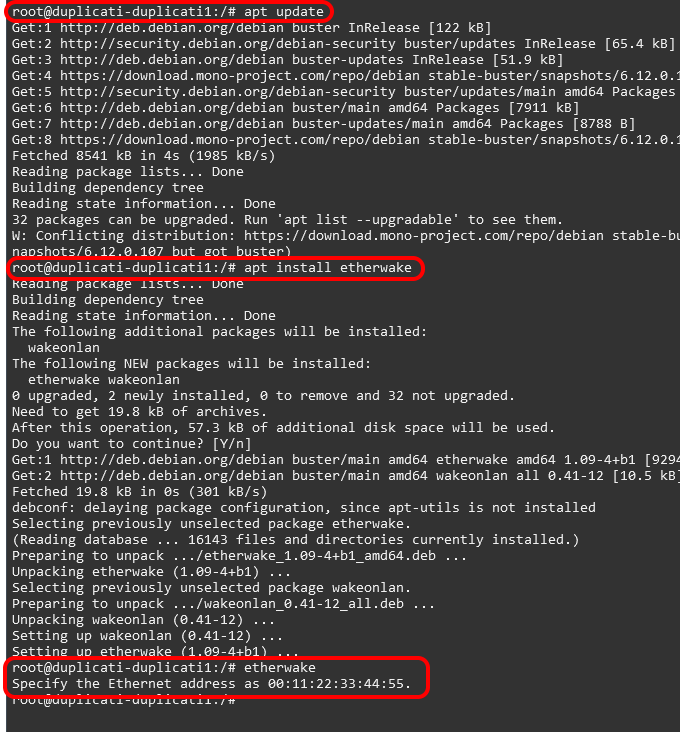
You could install etherwake in the container.
```plaintext
# apt update
# apt install etherwake
```
I’m not sure this is the best approach as changes to containers will be wiped out when you upgrade the container. It is simple to reproduce the steps, though.