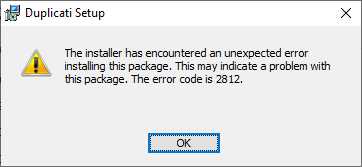
What is wrong here, I just downloaded the latest Duplicati installation file but when starting the installation I get an unexpected error with error code 2812.
Is there a problem with this installation package or is Windows 11 playing tricks again?
I assume you mean you upgraded to 2.4.0.0 ?
If Duplicati crashes, it should show a crash window now (at least for the TrayIcon).
If not, look in the datafolder for a file named crashlog.txt that should tell what happened.
Yes, I meant 2.4.0.0.
It seems that when the setup shows the path window it defaults to the default location, but I installed it on a different path. Clicking on the Browse button to select my Duplicati program folder gives the error 2812. When I manually enter my path the installation goes okay.
Seems to me a bug in the installation script.
For me the problem is solved.
On my Linux Mint machine upgrading went flawless at once.
Thanks!
So the “Browse” button is essentially not working in the MSI?
Correct.
After manually inserting my path, it seemed to work but it turns out the files in that pat were still from the previous version.
So I did a new install and left the default path intact and after checking this install was successful so I deleted my old version in the user defined path and continue standard now.
msiexec debug log from when I clicked at 9:07 and looked ended with:
Action 9:06:55: InstallOptionsDlg. Dialog created
MSI (c) (E8:34) [09:07:01:058]: Note: 1: 2262 2: Error 3: -2147287038
DEBUG: Error 2812:  The event SelectionBrowse is not recognized
The command prompt run was done as Administrator. That didn’t help.
Ah, that means I didn’t do anything wrong but the installscript has a problem.
Well for me the problem is solved by installing in the default location, luckily my C-drive has enough space so no big problem installing there.