# "@" in local Destination path changes backup location to Duplicati install folder
**URL:** https://forum.duplicati.com/t/in-local-destination-path-changes-backup-location-to-duplicati-install-folder/3648
**Category:** Support
**Tags:** bug
**Created:** [May 25, 2018, 9:14am UTC](https://forum.duplicati.com/t/in-local-destination-path-changes-backup-location-to-duplicati-install-folder/3648 "2018-05-25T09:14:51Z")
**Posts on this page:** 2
**Page:** 1
### Author:  [@GitHubror](https://forum.duplicati.com/u/GitHubror)
#### Post date: [May 25, 2018, 9:14am UTC](https://forum.duplicati.com/t/in-local-destination-path-changes-backup-location-to-duplicati-install-folder/3648/1 "2018-05-25T09:14:52Z")
I have used the target path to a local connected USB storage. This is the part of
the exported configuration:
“Backup”: {
“ID”: “1”,
“Name”: “CorsAir”,
“Tags”: ,
“TargetURL”: “file://E:\@Ba\CA\”,
“DBPath”: “C:\Users\currentUser\AppData\Local\Duplicati\RJDAPMNBFO.sqlite”,
“Sources”: [
“F:\”
],
The first backup runs without any error reported. But I see no file in the target folder.
So I try to restore a big file from the backup. This seams to be done without an error but after a while
a message pops up:

Surprisely there is a connection to the target path within the installation folder.
No files are here.
I look to the Command of the backup:
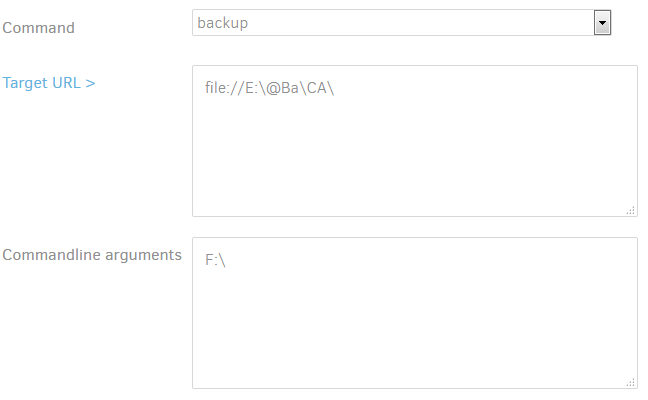
It seams to be there is a special handling of the character @ within the folder name. This
character leads the system to use parts of this name as user and password:
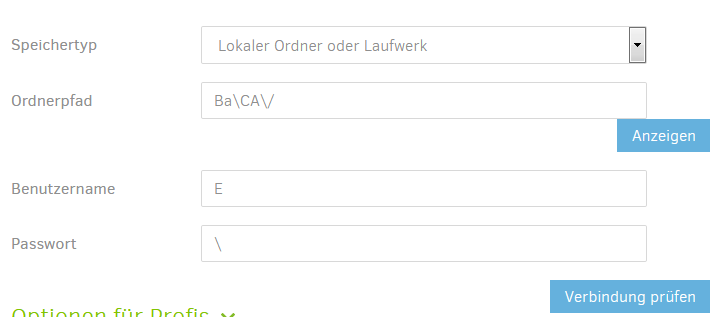
This must be corrected. A character @ is legal within a folder or file name.
I am sure you will find a solution for those special chars in names.
Regards
FPSt
---
### Author:  [@JonMikelV](https://forum.duplicati.com/u/JonMikelV)
#### Post date: [May 29, 2018, 4:32pm UTC](https://forum.duplicati.com/t/in-local-destination-path-changes-backup-location-to-duplicati-install-folder/3648/2 "2018-05-29T16:32:04Z")
Hi @GitHubror, welcome to the forum!
You are correct that there is an issue when using a local folder path that includes “@” in Windows. Specifically, Duplicati is trying to parse it as if it were an FTP or FILE connection that includes username and password (`ftp://username:password@hostname/`). If you go back and edit your job Destination you’ll likely see:
- `Folder path` = `BA\CA\/` (anything after “@” appears here)
- `Username` = `E` (anything before the “:” appears here)
- `Password` = `` (if you had any subfolders between “E:” and “@” they would appear here)
The issue has been reported on GitHub but unfortunately does not yet appear to have been resolved.
>
* * *
I tested the following on step 2 (Destination) in version 2.0.3.6 canary running on Windows 10:
- “Test connection” button incorrectly says “Connection worked!” with a path to a non-existing folder of `C:\_Backups\Duplicati\@Test`.
What I expected was the usual “`The folder xxxx does not exist. Create it now?`” message.
- “Test connection” correctly shows “`The folder xxxx does not exist. Create it now?`” with a path to a non-existing folder of `C:\_Backups\Duplicati\@Test\Test2` HOWEVER clicking the “Yes” button incorrectly shows the “Connection worked!” message even though no folder was created.
What I expected was for the “Yes” button to created the folder OR to report that the folder was NOT created.
- Manually creating the folder does NOT resolve the issue
- Running the job DOES work (at least for me) but files are dropped into `C:\Program Files\Duplicati 2` subfolder just as they were for GitHubror. My guess is it “worked” for me because of my 2nd test above.
* * *
Try to set local destination path to `C:\_Backups\Duplicati\@Test\` and you’ll get this when you come back to edit it:
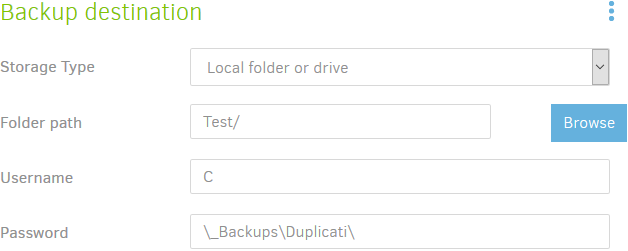
* * *
(By the way, I edited the topic title to better reflect the cause of the issue.)