### Author:  [@Sinocelt](https://forum.duplicati.com/u/Sinocelt)
#### Post date: [May 8, 2025, 8:14am UTC](https://forum.duplicati.com/t/i-can-no-longer-delete-old-backups/20644/1 "2025-05-08T08:14:06Z")
I used to [prune my backups](https://forum.duplicati.com/t/delete-old-versions-of-backup-without-running-a-new-backup/11658) using the “delete” command and an argument like this one: `--version=10,12,14,16,18,20,22,24,26,28,30,32,34,36,38,40`
Now I get this error:
> 2025-05-07 22:36:41 +08 - [Error-Duplicati.Library.Main.Controller-FailedOperation]: The operation Delete has failed with error: You have attempted to remove the passphrase on an existing backup, which is not supported. Please configure a new clean backup if you want to remove the passphrase. UserInformationException: You have attempted to remove the passphrase on an existing backup, which is not supported. Please configure a new clean backup if you want to remove the passphrase.
This is probably due to my recently(ish) [encrypting the database](https://forum.duplicati.com/t/encrypting-the-database/20095).
What can I do now?
[Edit:] It said it failed, but versions seem to have been deleted anyway. I had about 150 versions and have only 89 left. The overall size of the backup doesn’t seem to have changed, though.
---
### Author:  [@kenkendk](https://forum.duplicati.com/u/kenkendk)
#### Post date: [May 12, 2025, 9:31am UTC](https://forum.duplicati.com/t/i-can-no-longer-delete-old-backups/20644/2 "2025-05-12T09:31:14Z")
> [@Sinocelt](#):
>
> This is probably due to my recently(ish) [encrypting the database](https://forum.duplicati.com/t/encrypting-the-database/20095).
Those two are not related. The error message is for the remote data encryption, and the post you link to is encrypting the settings database. The two are fully unrelated.
> [@Sinocelt](#):
>
> [Error-Duplicati.Library.Main.Controller-FailedOperation]: The operation Delete has failed with error: You have attempted to remove the passphrase on an existing backup, which is not supported.
This error message is shown if you do the following:
- Run one or more backups with encryption enabled
- Run a command with `--no-encryption=true`
In this case, Duplicati infers that you would like to remove the encryption of the remote files. This is not supported because it would require rewriting all remote files.
(In case someone actually wants this, the `RecoveryTool`/`duplicati-recovery-tool` can do this with the `recompress` command).
> [@Sinocelt](#):
>
> [Edit:] It said it failed, but versions seem to have been deleted anyway. I had about 150 versions and have only 89 left. The overall size of the backup doesn’t seem to have changed, though.
That sounds odd… The delete command verifies the database before attempting to delete anything:
>
Line 58 does the encryption change check and refuses to go any further, so it never gets to line 60, which will (eventually) delete remote files.
> [@Sinocelt](#):
>
> What can I do now?
Do you have the option `--no-encryption` set somewhere? If so, it needs to be removed, and then everything should work as expected.
---
### Author:  [@Sinocelt](https://forum.duplicati.com/u/Sinocelt)
#### Post date: [May 13, 2025, 2:06pm UTC](https://forum.duplicati.com/t/i-can-no-longer-delete-old-backups/20644/3 "2025-05-13T14:06:15Z")
> [@kenkendk](#):
>
> Do you have the option `--no-encryption` set somewhere?
Not that I can see. And why would it suddenly “appear”? I had no problem pruning my versions until recently-ish. I would know if I’d added `--no-encryption` somewhere.
> [@kenkendk](#):
>
> Line 58 does the encryption change check and refuses to go any further, so it never gets to line 60, which will (eventually) delete remote files.
That _is_ odd. Some versions _have_ disappeared. A lot of versions, actually. But usually deleting versions takes more time than took place here before the error appeared, I believe. Can they have been “falsely deleted”?
(I’m beginning to think that I have a gift for breaking Duplicati.)
[Edit:] I tried to delete just one version this time (`--version=1`), and there was no issue.
---
### Author:  [@ts678](https://forum.duplicati.com/u/ts678)
#### Post date: [May 19, 2025, 1:21pm UTC](https://forum.duplicati.com/t/i-can-no-longer-delete-old-backups/20644/4 "2025-05-19T13:21:49Z")
> [@Sinocelt](#):
>
> (I’m beginning to think that I have a gift for breaking Duplicati.)
You [switched to Canary](https://forum.duplicati.com/t/problem-after-update-to-2-1-0-2-beta/19788) on December 30. If it’s still Canary, please say so on reports.
Canary is sometimes rather easy to break. Bug reports are great, but say it’s Canary.
> [@kenkendk](#):
>
> Do you have the option `--no-encryption` set somewhere?
Canary imagines it in the new UI, when Commandline is used, as doing such delete requires.
Steps for similar 2.1.0.118 Canary bug:
Run an encrypted backup of a short file.
Use Commandline to run same backup.
Developer tools shows its request to be:
```plaintext
`["backup", "file://C:\Duplicati\duplicati-2.1.0.118_canary_2025-05-12-win-x64-gui\RUN\test 2\",…]
0
:
"backup"
1
:
"file://C:\\Duplicati\\duplicati-2.1.0.118_canary_2025-05-12-win-x64-gui\\RUN\\test 2\\"
2
:
"C:\\backup source\\short.txt"
3
:
"--backup-name=test 2"
4
:
"--dbpath=C:\\Duplicati\\duplicati-2.1.0.118_canary_2025-05-12-win-x64-gui\\RUN\\UBPLTGPKJZ.sqlite"
5
:
"--backup-id=2"
6
:
"--no-encryption=True"
7
:
"--dblock-size=50MB"
8
:
"--compression-module=zip"
9
:
"--disable-module=console-password-input"
```
Output Window says:
```plaintext
Backup started at 5/19/2025 9:12:54 AM
Checking remote backup ...
The operation Backup has failed with error: You have attempted to remove the passphrase on an existing backup, which is not supported. Please configure a new clean backup if you want to remove the passphrase. => You have attempted to remove the passphrase on an existing backup, which is not supported. Please configure a new clean backup if you want to remove the passphrase.
ErrorID: PassphraseRemovalNotSupported
You have attempted to remove the passphrase on an existing backup, which is not supported. Please configure a new clean backup if you want to remove the passphrase.
Return code: 100
```
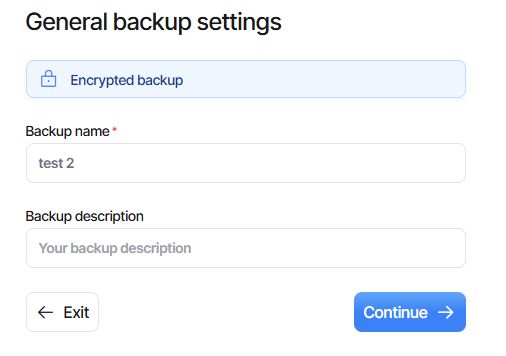
New UI shows different view than was originally set up::
NGAX (is there a better name coming?) shows correctly:
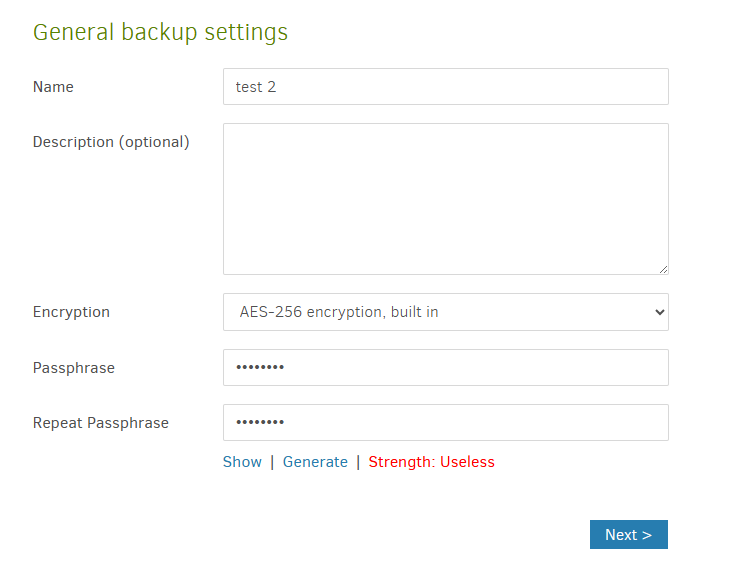
and its Commandline looks good (unlike new UI which is very empty) and runs successfully.
---
### Author:  [@Sinocelt](https://forum.duplicati.com/u/Sinocelt)
#### Post date: [May 24, 2025, 8:49am UTC](https://forum.duplicati.com/t/i-can-no-longer-delete-old-backups/20644/5 "2025-05-24T08:49:13Z")
> [@ts678](#):
>
> You [switched to Canary](https://forum.duplicati.com/t/problem-after-update-to-2-1-0-2-beta/19788) on December 30. If it’s still Canary, please say so on reports.
> Canary is sometimes rather easy to break. Bug reports are great, but say it’s Canary.
Sorry. I’ll try to remember.
> [@ts678](#):
>
> and its Commandline looks good (unlike new UI which is very empty) and runs successfully
So I should be fine as long as I use the “old” UX?
---
### Author:  [@kenkendk](https://forum.duplicati.com/u/kenkendk)
#### Post date: [May 24, 2025, 9:47am UTC](https://forum.duplicati.com/t/i-can-no-longer-delete-old-backups/20644/6 "2025-05-24T09:47:18Z")
> [@ts678](#):
>
> New UI shows different view than was originally set up::
The idea here is that you cannot really change the encryption settings after running the first backup, so the UI prevents you from doing that. Good for most users, but power users may dislike it. Feel free to register an issue so it is possible to “unlock” the UI.
> [@ts678](#):
>
> NGAX (is there a better name coming?)
Sadly, that is the name I came up with back then. NG for Angular and AX for Alex who did the initial design.
> [@ts678](#):
>
> and its Commandline looks good (unlike new UI which is very empty) and runs successfully.
Sounds like ngclient (also poor name?) has a bug? Can you describe the steps to reproduce?
The plan is to implement these commands with proper UIs, so you can go in and select versions to delete without having to resort to using the commandline.
---
### Author:  [@ts678](https://forum.duplicati.com/u/ts678)
#### Post date: [May 24, 2025, 3:55pm UTC](https://forum.duplicati.com/t/i-can-no-longer-delete-old-backups/20644/7 "2025-05-24T15:55:36Z")
> [@kenkendk](#):
>
> Can you describe the steps to reproduce?
Already did. Click the uparrow in your quote.
> [@kenkendk](#):
>
> select versions to delete
I think I found the ngclient issue, but “1 is the newest” version had me confused. Typo?
---
### Author:  [@kenkendk](https://forum.duplicati.com/u/kenkendk)
#### Post date: [May 30, 2025, 2:43pm UTC](https://forum.duplicati.com/t/i-can-no-longer-delete-old-backups/20644/8 "2025-05-30T14:43:08Z")
> [@ts678](#):
>
> Already did. Click the uparrow in your quote.
I did not see it for some reason. I have [reproduced and created a ticket](https://github.com/duplicati/ngclient/issues/253).