# Howto delete the oldest backup?
**URL:** https://forum.duplicati.com/t/howto-delete-the-oldest-backup/12766
**Category:** How-To
**Created:** [July 24, 2021, 2:26pm UTC](https://forum.duplicati.com/t/howto-delete-the-oldest-backup/12766 "2021-07-24T14:26:01Z")
**Posts on this page:** 3
**Page:** 1
### Author:  [@georgy](https://forum.duplicati.com/u/georgy)
#### Post date: [July 24, 2021, 2:26pm UTC](https://forum.duplicati.com/t/howto-delete-the-oldest-backup/12766/1 "2021-07-24T14:26:01Z")
```
(duplicati-2.0.6.3-2.0.6.3_beta_20210617.noarch.rpm)
```
In my backup set, I have defined the backup retention as “Keep a specific number of backups: 200”. Now, the free space on the local backup filesystem is nearly 0 though the current number of kept backups is just 193. The next backup will likely run out of free space on the backup filesystem. So I could change the specific number of backups to be kept to 192.
BUT: Will duplicati free the oldest backup **at the beginning** of its next regular backup job? Or will it free the oldest backup **at the end** (in which case it could be too late)?
Additionally, is there a possibility to tell duplicati (GUI variant) to just delete the oldest backup and do nothing else, such that I can see in advance if there will be enough free space on the backup filesystem for the next regular backup job?
Thanks for your help,
–Georg
---
### Author:  [@drwtsn32](https://forum.duplicati.com/u/drwtsn32)
#### Post date: [July 25, 2021, 2:28pm UTC](https://forum.duplicati.com/t/howto-delete-the-oldest-backup/12766/2 "2021-07-25T14:28:03Z")
Older backup versions are pruned at the end of the backup job.
You can manually remove versions with the [DELETE](https://duplicati.readthedocs.io/en/latest/04-using-duplicati-from-the-command-line/#the-delete-command) command. Click your backup set in the web UI, then click Command Line, select Delete from the dropdown, and then REPLACE the contents of the Command Line Arguments box with:
`--version=X`
where X is the version number to delete. You can also delete a range of versions by using `--version=X-Y`
`0` (zero) is the most recent version, and if you have 192 versions right now, `191` would be the oldest version, so you could put this in the Command line field:
`--version=191`
example:
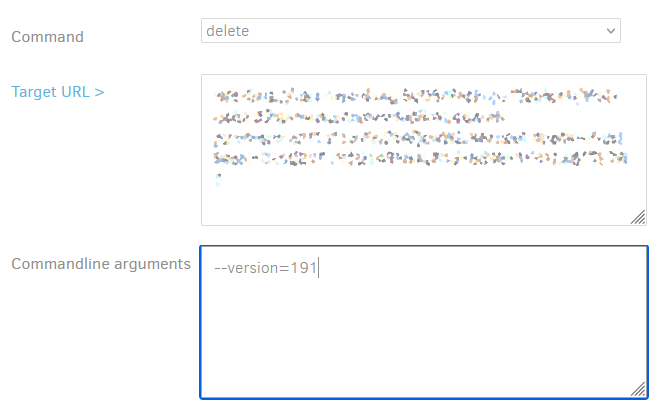
Then click the “Run delete command now” button at the bottom.
Important - Note that because of deduplication, this may free up very little space. Each version really only contains the changed blocks/bytes. So the only space that could be freed up are blocks/bytes of files that are not referenced by any other version.
ALSO note that free space isn’t reclaimed until a [COMPACT](https://duplicati.readthedocs.io/en/latest/04-using-duplicati-from-the-command-line/#the-compact-command) operation runs. Duplicati normally decides when to do this operation on its own, and the operation usually does require some free space!! Is there any way you can increase free space on the back end while you work to delete some backup versions?
---
### Author:  [@ts678](https://forum.duplicati.com/u/ts678)
#### Post date: [July 25, 2021, 4:28pm UTC](https://forum.duplicati.com/t/howto-delete-the-oldest-backup/12766/3 "2021-07-25T16:28:10Z")
> [@georgy](#):
>
> The next backup will likely run out of free space
Try not to get that. If backup has a schedule, maybe you can uncheck today and a few upcoming days.
While it’s tricky working in an almost-out-of-space environment (what is free now?), all-out is tricky too.