# How to install Duplicati on Synology / DSM

**URL:** https://forum.duplicati.com/t/how-to-install-duplicati-on-synology-dsm/5145
**Category:** How-To
**Created:** [October 31, 2018, 3:21pm UTC](https://forum.duplicati.com/t/how-to-install-duplicati-on-synology-dsm/5145 "2018-10-31T15:21:15Z")
**Posts on this page:** 15
**Page:** 5

<div class="post-metadata">

### Author: ![ts678](https://forum.duplicati.com/letter_avatar_proxy/v4/letter/t/8491ac/32.png) [@ts678](https://forum.duplicati.com/u/ts678)
#### Post date: [May 21, 2021, 9:23pm UTC](https://forum.duplicati.com/t/how-to-install-duplicati-on-synology-dsm/5145/83 "2021-05-21T21:23:31Z")

</div>

> [@steveedmonds](#):
>
> the mount point in the system file area filled up with the backup volumes

Do file system and [chattr](https://linux.die.net/man/1/chattr) command let you set mount point to be immutable to prevent future fill-ups?

---

<div class="post-metadata">

### Author: ![steveedmonds](https://forum.duplicati.com/letter_avatar_proxy/v4/letter/s/e95f7d/32.png) [@steveedmonds](https://forum.duplicati.com/u/steveedmonds)
#### Post date: [May 21, 2021, 10:24pm UTC](https://forum.duplicati.com/t/how-to-install-duplicati-on-synology-dsm/5145/84 "2021-05-21T22:24:25Z")

</div>

I don’t know, but I suppose this could happen on any Linux system where the target is mounted to a local directory (cifs/usb/nfs) within the root file system and the mount point gets umounted somehow. I have never had a cifs or USB mount drop from a desktop or server before so not sure why the DSM dropped it.

---

<div class="post-metadata">

### Author: ![ErikZ](https://forum.duplicati.com/user_avatar/forum.duplicati.com/erikz/32/6927_2.png) [@ErikZ](https://forum.duplicati.com/u/ErikZ)
#### Post date: [May 23, 2021, 6:21pm UTC](https://forum.duplicati.com/t/how-to-install-duplicati-on-synology-dsm/5145/85 "2021-05-23T18:21:31Z")

</div>

I’ve seen the same happening on a DS412+ (upgraded to 2GB of memory). After a week of running an initial backup to Jottacloud it managed to fill up the /dev/md0 partition. Wow. No package EVER should put a 1.1GB SQLite Dbase on /dev/md0 imho (this is the volume where DSM is installed!). Tried to stop Duplicati, move and symlink the Dbase but that wouldn’t work. I was quick on giving up as I managed to get Duplicati installed using a Docker container instead (I used duplicati-duplicati). This has been WAY better, externalized the container’s /data to /volume1/docker/duplicati and all is running smoothly now (although the Synology has issues pushing bandwidth, probably because of its tiny CPU).

The issue with the “missing XSRF Token” is still alive and kicking; in an attempt to push more bandwidth I fired up a second container. When I do, both instances start giving me the missing token even though memory isn’t nearly full (around 66%) ☹

---

<div class="post-metadata">

### Author: ![ts678](https://forum.duplicati.com/letter_avatar_proxy/v4/letter/t/8491ac/32.png) [@ts678](https://forum.duplicati.com/u/ts678)
#### Post date: [May 25, 2021, 4:22pm UTC](https://forum.duplicati.com/t/how-to-install-duplicati-on-synology-dsm/5145/86 "2021-05-25T16:22:49Z")

</div>

Welcome to the forum @ErikZ

> [@ErikZ](#):
>
> I’ve seen the same happening on a DS412+

Filling by DB is different than filling by backup volumes, just above. Filling by DB is closer to [far above](https://forum.duplicati.com/t/how-to-install-duplicati-on-synology-dsm/5145/71).  
[Synology: warn if server data folder in /root? #3143](https://github.com/duplicati/duplicati/issues/3143) is still open and may need a Synology user’s help.

> [@ErikZ](#):
>
> /dev/md0 imho (this is the volume where DSM is installed!)

which also (according to far above post), makes it subject to being wiped out by major DSM upgrades.

If there is an always-right place such data should go, and if there is a reliable test for Synology, please  
post at the GitHub issue in the hope that a developer will solve the issue and find a Synology to test on.

The reliable test for Synology might not be needed if anything that can install from `.spk` fits the answer.  
[Add packages for WD in MyCloudOS 5 #4494](https://github.com/duplicati/duplicati/issues/4494) might be a question for a Synology-specific approach…

Although I don’t know Synology install or usage, It might be possible to solve this somewhere in install procedures or scripting, rather than hardcoding it in program logic which is probably far less flexible…

[Duplicati.Server.exe](https://duplicati.readthedocs.io/en/latest/07-other-command-line-utilities/#duplicatiserverexe) or similar is presumably what’s running, and it has some options for DB location:

> `--server-datafolder`  
> Duplicati needs to store a small database with all settings. Use this option to choose where the settings are stored. This option can also be set with the environment variable `DUPLICATI_HOME`.

> `--portable-mode`  
> Activates portable mode where the database is placed below the program executable.

> [@ErikZ](#):
>
> The issue with the “missing XSRF Token” is still alive and kicking; in an attempt to push more bandwidth I fired up a second container. When I do, both instances start giving me the missing token

I generally see these if I try to open multiple Duplicati in one browser. I don’t know if you can avoid that in your setup, but if so, please give it a test. I’m not a web developer, but I suspect cookie confusion due to multiple use of what looks like the same site (I use localhost or 127.0.0.1) and path, but at different ports.

---

<div class="post-metadata">

### Author: ![conrad](https://forum.duplicati.com/letter_avatar_proxy/v4/letter/c/ebca7d/32.png) [@conrad](https://forum.duplicati.com/u/conrad)
#### Post date: [May 25, 2021, 5:37pm UTC](https://forum.duplicati.com/t/how-to-install-duplicati-on-synology-dsm/5145/87 "2021-05-25T17:37:40Z")

</div>

Yeah I still run it from `.spk` on my Synology, but I launch it manually, ssh’ed in as root, using _two_ tricks:

1. `export TMPDIR=/volume1/somewhere/safe` (because the sqlite library ignores Duplicati’s `--tempdir` command line switch)
2. `--server-datafolder=/volume1/somewhere/else/safe` in order to keep DSM from wiping your configuration during an upgrade.

So the overall command line to run with GUI is something like this:

```
TMPDIR=/spacious/tmp/dir \
    /volume1/@appstore/mono/bin/mono-sgen \
    /volume1/@appstore/Duplicati/Duplicati.Server.exe \
    --server-datafolder=/persistent/data/dir \
    --webservice-interface=any --webservice-port=<port> \
    --webservice-password=<password>

```

… and yes passing the password like this is security insanity, _plus_ you should also note that historically there have been some shell quoting issues which prevent certain password characters from being correctly communicated from the command line to the server. These can now be safely set in the configuration GUI, but you may find the command line switches useful while getting started.

---

<div class="post-metadata">

### Author: ![BackupEverything](https://forum.duplicati.com/letter_avatar_proxy/v4/letter/b/f08c70/32.png) [@BackupEverything](https://forum.duplicati.com/u/BackupEverything)
#### Post date: [June 8, 2021, 7:15am UTC](https://forum.duplicati.com/t/how-to-install-duplicati-on-synology-dsm/5145/88 "2021-06-08T07:15:11Z")

</div>

@drwtsn32 If I may ask… You’ve been most helpful (thanks again), and it has been working flawlessly for two months now, but now there is an update for Duplicati, says the Duplicati GUI.  
Are there default steps for Duplicati in Docker on Synology, to update Duplicati without breaking it?  
Many Thanks.

---

<div class="post-metadata">

### Author: ![drwtsn32](https://forum.duplicati.com/user_avatar/forum.duplicati.com/drwtsn32/32/2591_2.png) [@drwtsn32](https://forum.duplicati.com/u/drwtsn32)
#### Post date: [June 8, 2021, 9:16pm UTC](https://forum.duplicati.com/t/how-to-install-duplicati-on-synology-dsm/5145/89 "2021-06-08T21:16:09Z")

</div>

> [@BackupEverything](#):
>
> Are there default steps for Duplicati in Docker on Synology, to update Duplicati without breaking it?

If you set up the docker container properly (all important data is stored outside of the container), then it’s very easy! Go to the Registry and download the latest duplicati image:
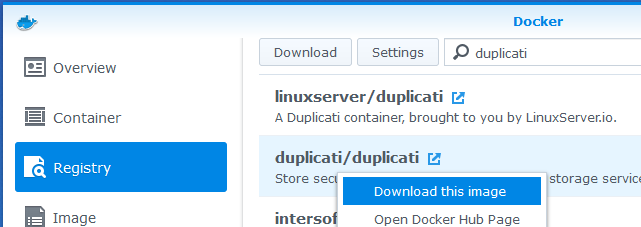
![cap1](https://forum.duplicati.com/uploads/default/original/2X/3/303fd888d505707bc609c20cf6818ad6c8579091.png)

![cap2](https://forum.duplicati.com/uploads/default/original/2X/0/0e8d22b61ce269c9bd08db4df6561da4ec49d930.png)

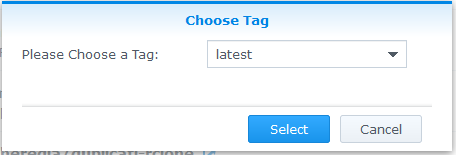
The only complicating factor is if the “tag” is different from what you are currently running:

 ![cap3](https://forum.duplicati.com/uploads/default/original/2X/1/19c5c64941416535045f516425872f11f29eba98.png)

Once you get the notification that the download is complete, you can Stop the current container, then use the Clear command. This resets the container to the newest downloaded version. Then you just Start the container again.

It’s critical that you are storing your configuration information outside the container before doing this, otherwise you may lose important data! For the official duplicati docker image, you want to make sure `/data` is mapped to somewhere else on your NAS, as we discussed above.

---

<div class="post-metadata">

### Author: ![BackupEverything](https://forum.duplicati.com/letter_avatar_proxy/v4/letter/b/f08c70/32.png) [@BackupEverything](https://forum.duplicati.com/u/BackupEverything)
#### Post date: [July 14, 2021, 8:44pm UTC](https://forum.duplicati.com/t/how-to-install-duplicati-on-synology-dsm/5145/90 "2021-07-14T20:44:41Z")

</div>

@drwtsn32 Wow. That was way easier than expected. Again: many thanks. It worked. And I learned something new 👍

---

<div class="post-metadata">

### Author: ![avp](https://forum.duplicati.com/letter_avatar_proxy/v4/letter/a/e47c2d/32.png) [@avp](https://forum.duplicati.com/u/avp)
#### Post date: [November 15, 2021, 8:19pm UTC](https://forum.duplicati.com/t/how-to-install-duplicati-on-synology-dsm/5145/91 "2021-11-15T20:19:16Z")

</div>

I was running this docker version of duplicati for a couple of months with no issues at all. I recently upgraded DSM to 7.0.1 and now duplicati is no longer working. When I browse to IP:8200, i get nothing. The container is running fine, apparently. There are no logs from the container, and when I go to a terminal for the container I just get a blank screen.

I’ve tried recreating the container, but exactly the same result.

Yes, my data for duplicati is stored outside the container.

Any ideas would be greatly appreciated.

Thanks

---

<div class="post-metadata">

### Author: ![BackupEverything](https://forum.duplicati.com/letter_avatar_proxy/v4/letter/b/f08c70/32.png) [@BackupEverything](https://forum.duplicati.com/u/BackupEverything)
#### Post date: [November 15, 2021, 8:39pm UTC](https://forum.duplicati.com/t/how-to-install-duplicati-on-synology-dsm/5145/92 "2021-11-15T20:39:54Z")

</div>

I’m running DSM 7.0.1-42218 over here, and do not experience the problem you’re describing.  
Did you also update Docker itself in the Package Center? I’m running 20.10.3-1239.

Also, is the screen (browser window) really _completely_ blank? Or do see just the Duplicati menu, but all tasks seem to be gone? (I’ve had this happen to me a couple of times before, was unable to reproduce it though.)

---

<div class="post-metadata">

### Author: ![drwtsn32](https://forum.duplicati.com/user_avatar/forum.duplicati.com/drwtsn32/32/2591_2.png) [@drwtsn32](https://forum.duplicati.com/u/drwtsn32)
#### Post date: [November 15, 2021, 10:17pm UTC](https://forum.duplicati.com/t/how-to-install-duplicati-on-synology-dsm/5145/93 "2021-11-15T22:17:43Z")

</div>

I also upgraded from DSM 6.x to 7.0.1 recently. No issues with Docker for me though, it just continued to work. Can you confirm that it is still set to listen on port 8200? Click Details on your docker container and look here:

 ![1](https://forum.duplicati.com/uploads/default/original/2X/f/f734d296a2479357a04df18208c4298eb042ccb9.png)

---

<div class="post-metadata">

### Author: ![avp](https://forum.duplicati.com/letter_avatar_proxy/v4/letter/a/e47c2d/32.png) [@avp](https://forum.duplicati.com/u/avp)
#### Post date: [November 16, 2021, 12:14pm UTC](https://forum.duplicati.com/t/how-to-install-duplicati-on-synology-dsm/5145/94 "2021-11-16T12:14:33Z")

</div>

@BackupEverything @drwtsn32 Thanks for getting back to me.

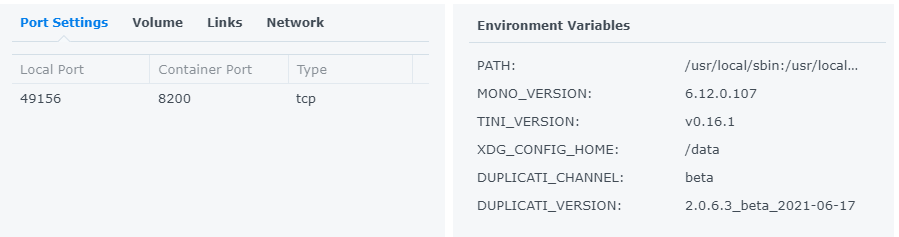
The browser is not connecting on port 8200. Yes 8200 is set as the port in the container.

The container version:
 ![image](https://forum.duplicati.com/uploads/default/original/2X/8/84d3330a67df5534b03d96e059a69f8090362647.png)

This may not be a 7.0.1 issue, but might be a first reboot since installing issue…?

 ![image](https://forum.duplicati.com/uploads/default/original/2X/f/f8da5c153a0f1e0866342aebddaf2c4d596a1738.png)

![image](https://forum.duplicati.com/uploads/default/original/2X/b/b4b93ddde268fc45764867edc29043529b45132e.png)

My duplicati config is in /data - did I screw up the config somehow? Does Duplicati not know how to find it?

Any other suggestions?

Thanks!

---

<div class="post-metadata">

### Author: ![drwtsn32](https://forum.duplicati.com/user_avatar/forum.duplicati.com/drwtsn32/32/2591_2.png) [@drwtsn32](https://forum.duplicati.com/u/drwtsn32)
#### Post date: [November 16, 2021, 12:52pm UTC](https://forum.duplicati.com/t/how-to-install-duplicati-on-synology-dsm/5145/95 "2021-11-16T12:52:18Z")

</div>

> [@avp](#):
>
> Yes 8200 is set as the port in the container.

Your local port is actually 49156. Try going to `http://<nas-ip>:49156` in your browser and see if the Duplicati UI shows up.

The 8200 in your screen shot is the port number from the container’s point of view. The local port is how you access it on your NAS, and it maps the traffic to the container at 8200. If you notice my screen shot I use 8200 for both. You can change this mapping if you stop Duplicati container and click the Edit button then go to the Port Settings tab.

> [@avp](#):
>
> My duplicati config is in /data - did I screw up the config somehow?

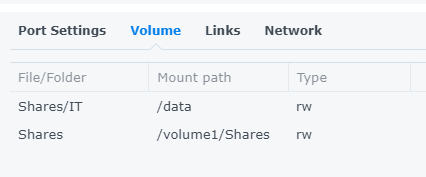
If you want the docker files in “Shares/IT” on your NAS, then it’s ok. I leave my /data mapping set to “docker/duplicati” (I think that’s the default). But my preference is for each container to store its settings in the top level “docker” folder.

---

<div class="post-metadata">

### Author: ![avp](https://forum.duplicati.com/letter_avatar_proxy/v4/letter/a/e47c2d/32.png) [@avp](https://forum.duplicati.com/u/avp)
#### Post date: [November 16, 2021, 11:13pm UTC](https://forum.duplicati.com/t/how-to-install-duplicati-on-synology-dsm/5145/96 "2021-11-16T23:13:15Z")

</div>

oohhh I feel dumb now ☹

You are exactly right… Silly me

Thanks for the help!

---

<div class="post-metadata">

### Author: ![drwtsn32](https://forum.duplicati.com/user_avatar/forum.duplicati.com/drwtsn32/32/2591_2.png) [@drwtsn32](https://forum.duplicati.com/u/drwtsn32)
#### Post date: [November 16, 2021, 11:14pm UTC](https://forum.duplicati.com/t/how-to-install-duplicati-on-synology-dsm/5145/97 "2021-11-16T23:14:26Z")

</div>

No problem - glad I could help!

[Previous page](https://forum.duplicati.com/t/how-to-install-duplicati-on-synology-dsm/5145.md?page=4)