# How to fix inconsistency error
**URL:** https://forum.duplicati.com/t/how-to-fix-inconsistency-error/15677
**Category:** Support
**Created:** [February 6, 2023, 9:19am UTC](https://forum.duplicati.com/t/how-to-fix-inconsistency-error/15677 "2023-02-06T09:19:37Z")
**Posts on this page:** 20
**Page:** 1
### Author:  [@Breat](https://forum.duplicati.com/u/Breat)
#### Post date: [February 6, 2023, 9:19am UTC](https://forum.duplicati.com/t/how-to-fix-inconsistency-error/15677/1 "2023-02-06T09:19:37Z")
Hi,
I’m on version 2.0.6.3\_beta\_2021-06-17 and I got this error:
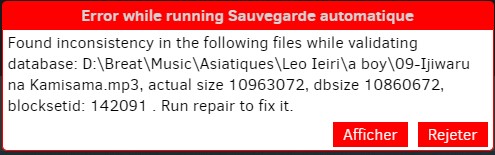
That tell me to run repair but I havn’t this button.
How can I fix it without deleting my save and create again ?
Regards,
---
### Author:  [@gpatel-fr](https://forum.duplicati.com/u/gpatel-fr)
#### Post date: [February 6, 2023, 10:06am UTC](https://forum.duplicati.com/t/how-to-fix-inconsistency-error/15677/2 "2023-02-06T10:06:04Z")
Hello
Select the job, then click the database button.
---
### Author:  [@Breat](https://forum.duplicati.com/u/Breat)
#### Post date: [February 6, 2023, 6:59pm UTC](https://forum.duplicati.com/t/how-to-fix-inconsistency-error/15677/3 "2023-02-06T18:59:32Z")
Hi,
Thanks i didn’t saw i try and i let you know if that work tomorrow
---
### Author:  [@Breat](https://forum.duplicati.com/u/Breat)
#### Post date: [February 7, 2023, 12:32pm UTC](https://forum.duplicati.com/t/how-to-fix-inconsistency-error/15677/4 "2023-02-07T12:32:46Z")
Hi,
I still get the same error. Any other idea to fix it ?
---
### Author:  [@gpatel-fr](https://forum.duplicati.com/u/gpatel-fr)
#### Post date: [February 7, 2023, 12:42pm UTC](https://forum.duplicati.com/t/how-to-fix-inconsistency-error/15677/5 "2023-02-07T12:42:55Z")
Could you be more specific ? did you got the same error as a result of running repair, or did you run a repair successfully (without error) and then after starting a new backup you get the same error ?
---
### Author:  [@Breat](https://forum.duplicati.com/u/Breat)
#### Post date: [February 7, 2023, 1:16pm UTC](https://forum.duplicati.com/t/how-to-fix-inconsistency-error/15677/6 "2023-02-07T13:16:19Z")
yes sorry 🙂
no error with repair but i got with backup
---
### Author:  [@gpatel-fr](https://forum.duplicati.com/u/gpatel-fr)
#### Post date: [February 7, 2023, 1:29pm UTC](https://forum.duplicati.com/t/how-to-fix-inconsistency-error/15677/7 "2023-02-07T13:29:44Z")
In this case this looks like a not so precise error message. Maybe it would be more useful to try purge-broken-files.
---
### Author:  [@ts678](https://forum.duplicati.com/u/ts678)
#### Post date: [February 7, 2023, 1:50pm UTC](https://forum.duplicati.com/t/how-to-fix-inconsistency-error/15677/8 "2023-02-07T13:50:39Z")
> [@Breat](#):
>
> i got with backup
Is this a newly added file or an old one? Do you think it has multiple versions, e.g. due to some editing?
One noteworthy thing here is that the size error is 102400 bytes, which is 100 KiB the default [blocksize](https://duplicati.readthedocs.io/en/latest/06-advanced-options/#blocksize).
>
makes me wonder if one block got lost during initial backup, or maybe later during destination [compact](https://duplicati.readthedocs.io/en/latest/03-using-the-graphical-user-interface/#compacting-files-at-the-backend).
Log for this backup (when it was working) might show if a compact was run just before the issue began.
Any other history would also be welcome, and some details might also be in a [DB bug report](https://duplicati.readthedocs.io/en/latest/03-using-the-graphical-user-interface/#creating-a-bug-report) if you like. You could upload one somewhere and post a link to it. That file should be 107.06125 blocks, but is less.
> [@gpatel-fr](#):
>
> purge-broken-files
I think this is most useful for a lost `dblock`, which might not be the case here. Generally one also does
[list-broken-files](https://duplicati.readthedocs.io/en/latest/04-using-duplicati-from-the-command-line/#the-list-broken-files-command) (maybe from GUI [Commandline](https://duplicati.readthedocs.io/en/latest/03-using-the-graphical-user-interface/#using-the-command-line-tools-from-within-the-graphical-user-interface)) first. This one possibly will wind up in [purge](https://duplicati.readthedocs.io/en/latest/04-using-duplicati-from-the-command-line/#the-purge-command) instead…
I’d still like to know its history. Ideally I’d like lots of detailed logfiles, but usually people don’t set options.
EDIT:
Another question is whether the backup was known to be interrupted by hand, reboot, etc. before issue.
Basically, I’m trying to figure out what caused the problem, so any available clues might be helpful here.
---
### Author:  [@Breat](https://forum.duplicati.com/u/Breat)
#### Post date: [February 7, 2023, 4:34pm UTC](https://forum.duplicati.com/t/how-to-fix-inconsistency-error/15677/9 "2023-02-07T16:34:59Z")
@gpatel-fr i forgot to say i did only repair and i don’t try yet delete and repair
@ts678 it’s an old file and with only one version.
here the bugreport : [Proton Drive](https://drive.proton.me/urls/XYER8T6GZ8#2EDKwwjOotSa)
---
### Author:  [@ts678](https://forum.duplicati.com/u/ts678)
#### Post date: [February 7, 2023, 8:38pm UTC](https://forum.duplicati.com/t/how-to-fix-inconsistency-error/15677/10 "2023-02-07T20:38:17Z")
```plaintext
I found the possible block, which sometimes is there, but sometimes not.
For those who do SQL, does following make any sense? Is the DB confused?
SELECT * FROM Block WHERE ID = 1051649
ID Hash Size VolumeID
1051649 ib32tmMA3yPoCm8qUAlNOomUW5wGzyOvClPTprWor7w= 102400 1698
SELECT * FROM Block WHERE Hash IS NULL
ID Hash Size VolumeID
1051649 NULL NULL NULL
SELECT * FROM Block WHERE Size IS NULL
ID Hash Size VolumeID
1051649 NULL NULL NULL
SELECT * FROM Block WHERE VolumeID IS NULL
ID Hash Size VolumeID
1051649 NULL NULL NULL
That was using DB Browser for SQLite on bug report. I ran filters first.
They were slow sometimes. I don't know why, as I think it's a query too.
Block table column Filter results differ, but 1051649 oddity first seen:
Hash =NULL finds 1051649 but ID=1051649 looks OK
Size =NULL finds nothing
VolumeID =NULL finds nothing
I thought about dropping some INDEX, but it wasn't obvious it's related.
```
---
### Author:  [@ts678](https://forum.duplicati.com/u/ts678)
#### Post date: [February 7, 2023, 9:07pm UTC](https://forum.duplicati.com/t/how-to-fix-inconsistency-error/15677/11 "2023-02-07T21:07:25Z")
>
If I take the above, change double double quotes to single double quotes, run it, and look, a line says
```plaintext
BlocksetID CalcLen Length
142091 10860672 10963072
```
so matches the popup error numbers reported by the earlier code quote which follows below this one.
This one took extra tracing because `BlocksetEntry` with filter =142091 had 108 blocks, as expected.
Numbers were sequential. Last block at 1051785 was length 6272. 107 \* 102400 + 6272 = 10963072 which made everything seem nice and tidy and normal until I found that a block was behaving oddly…
EDIT:
DELETE INDEX on all 4 Block table index didn’t fix the odd SQL query result. I didn’t retry calculation.
EDIT 2:
I had SQLite “Copy as SQL” on the offending block, modified it into an UPDATE. Not sure I got syntax correct, but it didn’t help. I then tried to use SQL to DELETE the row, SELECT verified, ran an INSERT.
Problem persists. Took DB Browser for SQLite up on its offers for quick\_check and integrity\_check, got
told about NULL values that I knew about. Looking up error found source talks of NOT NULL columns.
That’s how these are defined, so NULL snuck in somehow. Closed and reopened database, tried again.
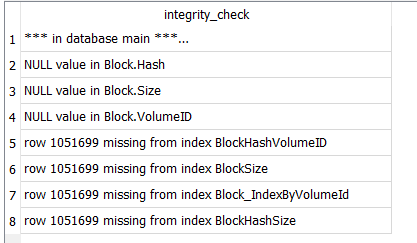
I probably didn’t get index complaints before because I had deleted them. Opening anew, they’re back.
---
### Author:  [@gpatel-fr](https://forum.duplicati.com/u/gpatel-fr)
#### Post date: [February 7, 2023, 10:46pm UTC](https://forum.duplicati.com/t/how-to-fix-inconsistency-error/15677/12 "2023-02-07T22:46:31Z")
@ts678
I can’t repro your odd query about this block using sqlite3 tool on Linux. It could be a special behaviour of your graphical tool. With sqlite3, select \* from block where size is null returns nothing in this database, for example.
About the size difference you see, it does not match the blocksetid for this block. This 1051649 block is part of the blocksetentry for the 142089 blocksetid.
select \* from blocksetentry where blockid=1051649;
142089|19|1051649
there is no size mismatch for this blockset.
The mismatch for the blockset 142091 comes from a missing blocksetentry (index=21).
I have no idea about the reason at the moment. The process to add entries to the blocksetentry table is a bit hairy I’m afraid.
To get back to the problem, it seems that the normal repair can’t see this kind of problem and fix it. To be fair, it seems a trouble in the ‘should not happen’ class, maybe a hardware glitch.
I’d guess that deleting the database and recreating it should fix it, unfortunately for a database this size the process could be slow if the backend is damaged too. If the backend is correct it should be fast, but if there are missing files, it could be easily go to more than half a day or even worse.
EDIT: looking at your own edit, indeed the index 21 exists for the blocksetentry, it’s the block 1051699 that is missing from the database.
select \* from blocksetentry where blocksetid=142091 and “index”=21;
142091|21|1051699
sqlite\> select \* from block where id=1051699;
sqlite\>
and yes, the db is not consistent:
select \* from block where id between 1051690 and 1051702;
1051690|bL5r6WcMoN385n1rfigOWBRBDUNe52kvhndbEry5Z9E=|102400|1700
1051691|uwrE+kWNH01LBgmx+SXWYskLRHqM81u2h0iKhTgx7Sg=|102400|1698
1051692|KRk8GZtpkh1EjVgsbJBDDdTVGs5Fw34O4wPOqi9Zbt8=|102400|1697
1051693|rsE1afxNHy4nmMBfIlcQJ2liWzoy7HOYdOSyPyHX/8Q=|102400|1702
1051694|G/hP2Lp6qZGeTWcKIcpv3RhOHxKvgmexxz/GooFQt2s=|102400|1692
1051695|peL//K4pqqEVrHZdKRS4gK+z8jLOzYq0W6703zmjKoI=|102400|1695
1051696|genj2uQA8KNkbkewOvPhn2f5mzKCCxx8zeOU2lgjL2s=|102400|1700
1051697|nWKViPsuRjXzkSR8SOzk1Kq2EkdWyJi68wd95KPt14Y=|102400|1698
1051698|oUrSHbC2MwcAA8ySTkIkJX800dZDU/xDi27Si9aSBw4=|102400|1697
1051649|||
1051700|g7BQA6eYvGTu1R4hVb+gjoUjk4Jrnp4fEFmNT41ZIlk=|102400|1692
1051701|SdgVbjQdPkbRPUxeAD/jIMTFnGpE0bUaPaALTdftqIg=|102400|1695
1051702|Rp16raD2zCmES589YjDMZD/MeRD0Pf095zUe5HBojcc=|102400|1697
sqlite\>
bad memory or disk maybe ?
---
### Author:  [@ts678](https://forum.duplicati.com/u/ts678)
#### Post date: [February 7, 2023, 11:02pm UTC](https://forum.duplicati.com/t/how-to-fix-inconsistency-error/15677/13 "2023-02-07T23:02:32Z")
Can you VACUUM? My attempt says
```plaintext
Execution finished with errors.
Result: UNIQUE constraint failed: Block.ID
At line 1:
VACUUM
```
You can also check PRAGMA integrity\_check to see if yours complains similarly. A possible recovery:
[11. Recover Data From a Corrupted Database](https://sqlite.org/cli.html#recover_data_from_a_corrupted_database)
and see if it fixes it for you, but in terms of a user doing this (if it helps), it’s painful. Recreate is as well.
EDIT: … sometimes. For Breat, what we’re talking about is on the Database screen, do something like
move the database to a different name as a backup using File Explorer, then do a Repair to recreate it.
Watch progress bar, and if it gets to 70% then watch About → Show log → Live → Verbose to see how much more is needed. The entire 70% to 100% range (if it starts, but ideally it doesn’t) is a long search.
Basically this should not have happened IMO in spite of anything Duplicati did, yet SQLite did it anyway.
Maybe we’ll find some tool or technique that you can use, but fixing a database at this level is very “iffy”.
---
### Author:  [@ts678](https://forum.duplicati.com/u/ts678)
#### Post date: [February 7, 2023, 11:36pm UTC](https://forum.duplicati.com/t/how-to-fix-inconsistency-error/15677/14 "2023-02-07T23:36:14Z")
I suppose prices could also factor in. The things done here looked like a big backup then small updates.
That’s per Operation table and RemoteOperation table which didn’t show a delete, so maybe the goal is mostly a current backup, not for going back in versions. If so, fresh backup would also be an option, e.g. should the repair get into the heavy-download phase past 70%, it potentially could download all its files.
Anyway, unless time is urgent, maybe some better plan will emerge. I don’t think I have one right now…
---
### Author:  [@gpatel-fr](https://forum.duplicati.com/u/gpatel-fr)
#### Post date: [February 8, 2023, 12:13am UTC](https://forum.duplicati.com/t/how-to-fix-inconsistency-error/15677/15 "2023-02-08T00:13:32Z")
@ts678
after recover, the database structure is now correct… from the sqlite point of view. Lost data is still lost, so the database would have still to be fixed by Duplicati. It seems that bug report creation is done through copy, so the corruption probably inherited from the original database.
I think that you talked about vacuum since the bug report code does a vacuum if auto-vacuum option is set. This option seems to default to false so database corruption is not a blocker to bug report creation.
Sqlite is an embedded database, so if the application crashes at the wrong moment, or the computer is rebooted/crashes while the database is open, bad things can happen.
It would be great if Duplicati could do the integrity check itself and advise the user that it can’t fix the problem with a simple repair.
And yes delete database / recreate seems the only way forward now.
---
### Author:  [@ts678](https://forum.duplicati.com/u/ts678)
#### Post date: [February 8, 2023, 12:58am UTC](https://forum.duplicati.com/t/how-to-fix-inconsistency-error/15677/16 "2023-02-08T00:58:32Z")
> [@gpatel-fr](#):
>
> Lost data is still lost
So you think it discarded the bad row, which seemed to have a good version and a bad (with NULL) one?
Another way to test would be to run [above](https://forum.duplicati.com/t/how-to-fix-inconsistency-error/15677/11) query which had previously shown the popup’s size mismatch.
> [@gpatel-fr](#):
>
> I think that you talked about vacuum since
I talked about it because I hadn’t found `recover` yet, but I knew that [VACUUM](https://www.sqlite.org/lang_vacuum.html) did some copying of data. Perhaps the copy would be done in a way that it picked up the right (not wrong) data to put into new DB?
> [@gpatel-fr](#):
>
> And yes delete database / recreate seems the only way forward now.
OK, well there it is, although it’s still up to @Breat whether to try that first to see how it goes, or head for fresh start by delete of DB and destination, then fresh backup, or do new one first before deleting the old.
My guess since I didn’t spot any rough treatment is that the DB will recreate nicely, but one never knows.
---
### Author:  [@gpatel-fr](https://forum.duplicati.com/u/gpatel-fr)
#### Post date: [February 8, 2023, 8:51am UTC](https://forum.duplicati.com/t/how-to-fix-inconsistency-error/15677/17 "2023-02-08T08:51:58Z")
> [@ts678](#):
>
> Another way to test would be to run [above](https://forum.duplicati.com/t/how-to-fix-inconsistency-error/15677/11) query
That’s what I did, and why I said that Duplicati would still have had to fix it.
---
### Author:  [@Breat](https://forum.duplicati.com/u/Breat)
#### Post date: [February 8, 2023, 9:15am UTC](https://forum.duplicati.com/t/how-to-fix-inconsistency-error/15677/18 "2023-02-08T09:15:57Z")
i forgot to say too i run duplicati on my computer but my “save” folder is a pcloud folder.
sorry guys i’m not good in sql so i’m completly lost in your answers.
@gpatel-fr I checked my disk with crystal diskinfo dans all are green for my hdd and ssd.
---
### Author:  [@gpatel-fr](https://forum.duplicati.com/u/gpatel-fr)
#### Post date: [February 8, 2023, 9:21am UTC](https://forum.duplicati.com/t/how-to-fix-inconsistency-error/15677/19 "2023-02-08T09:21:33Z")
@breat
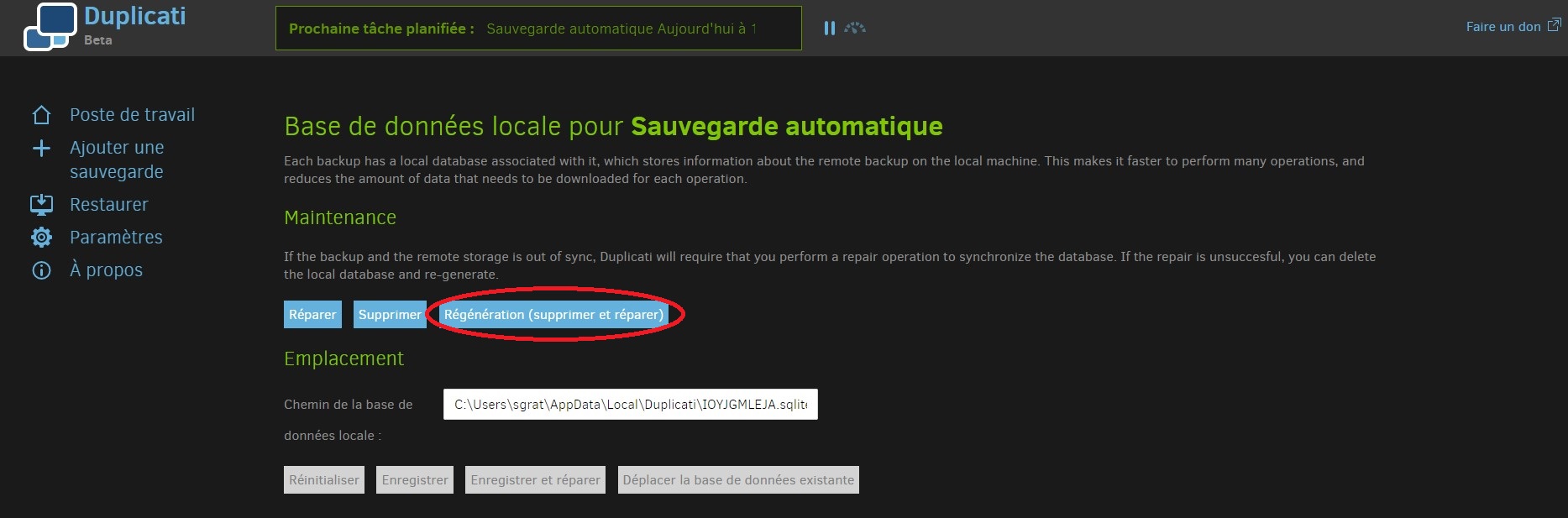
the consensus is that trying to delete the database and recreate it is the best option.
the corruption problem on Sqlite database can come from defective hardware (memory, disk, controller - that is, motherboard), or an uncontrolled shutdown such as a task killing or reboot while the database is in a critical state.
---
### Author:  [@Breat](https://forum.duplicati.com/u/Breat)
#### Post date: [February 8, 2023, 9:52am UTC](https://forum.duplicati.com/t/how-to-fix-inconsistency-error/15677/20 "2023-02-08T09:52:57Z")
@gpatel-fr so i need try this button (delete and repair) ?
[Next page](https://forum.duplicati.com/t/how-to-fix-inconsistency-error/15677.md?page=2)