# How backups work
**URL:** https://forum.duplicati.com/t/how-backups-work/9773
**Category:** Uncategorized
**Created:** [May 4, 2020, 4:39pm UTC](https://forum.duplicati.com/t/how-backups-work/9773 "2020-05-04T16:39:10Z")
**Posts on this page:** 14
**Page:** 1
### Author:  [@lagethomas](https://forum.duplicati.com/u/lagethomas)
#### Post date: [May 4, 2020, 4:39pm UTC](https://forum.duplicati.com/t/how-backups-work/9773/1 "2020-05-04T16:39:10Z")
I have a doubt. I made some settings that I’m testing, in one of them is one that apparently deletes the files that were removed locally as well. Today I have a paid software that allows me to set a time for the remote files to be removed when the locations are also, this is possible here or it just works the way I tested it, when deleting the location it already erases in the backup. Another thing, I did a Full backup, put it to keep the last 5 backups, when he goes to do the sixth, he deletes the oldest one that would be Full, how does it work?
I went to restore the most recent backup and it brought me only what was changed on the date, that’s cool, but what if I need Full, The first backup should never be removed.
* * *
My configs
* * *
–use-block-cache=true
–snapshot-policy=Auto
–allow-full-removal=false
–auto-cleanup=true
–exclude-empty-folders=true
–index-file-policy=Full
–restore-permissions=true
–synchronous-upload=true
–send-mail-level=all
–send-mail-to=email@email.com.br
–send-mail-body=%RESULT%
–send-mail-subject=%backup-name% - %OPERATIONNAME% - %PARSEDRESULT%
–asynchronous-upload-limit=0
–auto-vacuum=true
–changed-files=1
–upload-verification-file=true
---
### Author:  [@drwtsn32](https://forum.duplicati.com/u/drwtsn32)
#### Post date: [May 4, 2020, 8:54pm UTC](https://forum.duplicati.com/t/how-backups-work/9773/2 "2020-05-04T20:54:18Z")
Welcome to the forum!
With Duplicati, every backup is effectively a “full” backup from a restore perspective. You can restore any file that was present at the time a backup was taken, even if that file is old. Duplicati is also an “incremental forever” type of backup in that it only processes new and changed files each backup job.
These terms carry a lot of baggage and it can cause confusion because backup products use the terms differently. Rest assured, there is no problem with deleting the first backup because with Duplicati there is no dependency chain among backup versions.
See [this thread](https://forum.duplicati.com/t/backup-type-is-incremental/8786) where it was discussed recently.
---
### Author:  [@lagethomas](https://forum.duplicati.com/u/lagethomas)
#### Post date: [May 5, 2020, 1:43am UTC](https://forum.duplicati.com/t/how-backups-work/9773/3 "2020-05-05T01:43:29Z")
Cool, I’m time to use the tool, trying to learn a little more with some problems I had. One was that he lost his source mapping that was mapped in Linux and with that lost the count of the data. Other thing, has some configuration that makes it felt faster? I found it a bit slow about some other software.
---
### Author:  [@ts678](https://forum.duplicati.com/u/ts678)
#### Post date: [May 6, 2020, 12:44am UTC](https://forum.duplicati.com/t/how-backups-work/9773/4 "2020-05-06T00:44:18Z")
> [@lagethomas](#):
>
> –changed-files=1
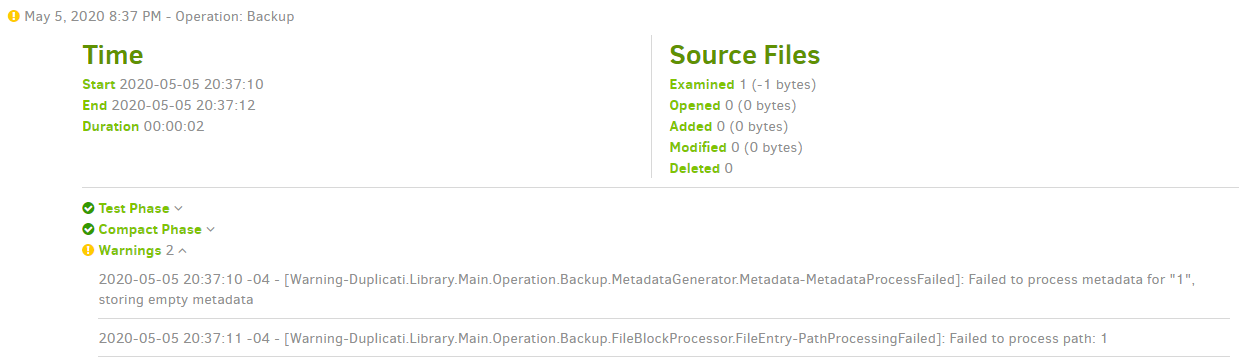
Does this actually work for you? It’s supposed to be a file list supplied by your filesystem watcher.
When I just hardcode `1` there, it gets upset because there’s no such file for it to put in the backup:
---
### Author:  [@lagethomas](https://forum.duplicati.com/u/lagethomas)
#### Post date: [May 6, 2020, 2:15am UTC](https://forum.duplicati.com/t/how-backups-work/9773/5 "2020-05-06T02:15:06Z")
It doesn’t work, I put it to test and see if it gave any effect. I’m not sure how to use this option and others that you have in the system.
---
### Author:  [@ts678](https://forum.duplicati.com/u/ts678)
#### Post date: [May 6, 2020, 12:23pm UTC](https://forum.duplicati.com/t/how-backups-work/9773/6 "2020-05-06T12:23:08Z")
> [@lagethomas](#):
>
> It doesn’t work, I put it to test and see if it gave any effect.
What does this mean? Yours was completely ignored? Mine broke my backup, because it’s wrong.
The original post had it in use. I especially worried about the “source mapping” issue you [mention](https://forum.duplicati.com/t/how-backups-work/9773/3).
I’m afraid the language there is vague enough that I don’t follow it, so I mention the suspect option.
> [@lagethomas](#):
>
> I’m not sure how to use this option and others that you have in the system.
Generally (especially when starting out), sticking close to the defaults is likely to invite less trouble.
The [–changed-files](https://duplicati.readthedocs.io/en/latest/06-advanced-options/#changed-files) option is missing some key information on its use, which you can find in forum:
> [@Real-time backup](https://forum.duplicati.com/t/real-time-backup/263/12):
>
> The implementation is based on the two options `--changed-files` and `--deleted-files` options. Using the commandline, you can set these two to a path separated list (using `;` on Windows and `:` on others). Once they are set, the file scanner is not used, and it only scans the `--changed-files` and removes the `--deleted-files` .
It would be nice if someone could confirm this, enhance the help text, then get the manual updated.
Possibly a [GitHub issue](https://github.com/duplicati/duplicati/issues) will be needed to get it in the queue for a developer. Sometimes that’s so…
---
### Author:  [@lagethomas](https://forum.duplicati.com/u/lagethomas)
#### Post date: [May 6, 2020, 1:30pm UTC](https://forum.duplicati.com/t/how-backups-work/9773/7 "2020-05-06T13:30:25Z")
I don’t know how to use these options and I didn’t find anything specific, but I’m using them because the alerts generate in backups.
---
### Author:  [@ts678](https://forum.duplicati.com/u/ts678)
#### Post date: [May 6, 2020, 1:54pm UTC](https://forum.duplicati.com/t/how-backups-work/9773/8 "2020-05-06T13:54:47Z")
> [@lagethomas](#):
>
> I don’t know how to use these options and I didn’t find anything specific
[Advanced Options](https://duplicati.readthedocs.io/en/latest/06-advanced-options/) has basically the same maybe-imperfect help text that the web UI shows you.
If in doubt, avoid `Advanced options`, or ask about specific ones in the forum, for additional help.
> [@lagethomas](#):
>
> I’m using them because the alerts generate in backups.
Too vague. Original post had 12 options (ignoring those that send mail). What alert, what option?
---
### Author:  [@lagethomas](https://forum.duplicati.com/u/lagethomas)
#### Post date: [May 6, 2020, 2:14pm UTC](https://forum.duplicati.com/t/how-backups-work/9773/9 "2020-05-06T14:14:22Z")
I am using these settings for now, they are how I managed to understand a little better.
–use-block-cache = true
–snapshot-policy = Automatic
–allow-full-removal = false
–auto-cleanup = true
–exclude-empty-folders = true
–index-file-policy = Full
–restore-Permissions = true
–synchronous-upload = true
–send-mail-level = all
–send-mail-to=username@backup.com.br
–send-mail-body =% RESULT%
–send-mail-subject =% backup-name% -% OPERATIONNAME %% PARSEDRESULT%
–auto-vacuum = true
–upload-verification-file = true
–send-mail-from = Lorenpet | Duplicate [backup@backup.com.br](mailto:backup@backup.com.br)
–disable-file-scanner = true
–log-retention = 15D
I was wondering how these changed files and deleted files work and how to use.
---
### Author:  [@ts678](https://forum.duplicati.com/u/ts678)
#### Post date: [May 6, 2020, 2:45pm UTC](https://forum.duplicati.com/t/how-backups-work/9773/10 "2020-05-06T14:45:22Z")
> [@lagethomas](#):
>
> I was wondering how these changed files and deleted files work and how to use.
I linked to the syntax, and I linked to the help which says you supply a filesystem watcher.
If you have none (which is quite likely), then it’s there in case somebody else may have it.
> [@Will --changed-files use macOS' fsevents service?](https://forum.duplicati.com/t/will-changed-files-use-macos-fsevents-service/5485/7):
>
> The `--changed-files` option is planned to be used with a monitoring service. The idea is that “some program” (i.e. the Duplicati server) is running all the time and monitors the source directories. This monitor process then records a list of changed files, and when a backup is executed it inputs this argument to avoid the lengthy scanning process.
If you do have a filesystem monitor, then how to get it to feed the option in is the next hurdle.
[–run-script-before](https://duplicati.readthedocs.io/en/latest/06-advanced-options/#run-script-before) changing options might work. Example script is on your system, and [here](https://github.com/duplicati/duplicati/blob/master/Duplicati/Library/Modules/Builtin/run-script-example.bat).
> [@lagethomas](#):
>
> I am using these settings for now, they are how I managed to understand a little better.
Some are either a little risky ([–auto-cleanup](https://duplicati.readthedocs.io/en/latest/06-advanced-options/#auto-cleanup)) or may slow the backup ([–synchronous-upload](https://duplicati.readthedocs.io/en/latest/06-advanced-options/#synchronous-upload)).
Some are also at default value (see GUI for default), which can be good, but pointless to say.
If you like [–auto-vacuum](https://duplicati.readthedocs.io/en/latest/06-advanced-options/#auto-vacuum), you might consider using [–auto-vacuum-interval](https://duplicati.readthedocs.io/en/latest/06-advanced-options/#auto-vacuum-interval) to limit its run rate.
If the system is a bit tight on memory, [–use-block-cache](https://duplicati.readthedocs.io/en/latest/06-advanced-options/#use-block-cache) might make the memory load higher.
---
### Author:  [@lagethomas](https://forum.duplicati.com/u/lagethomas)
#### Post date: [May 6, 2020, 2:50pm UTC](https://forum.duplicati.com/t/how-backups-work/9773/11 "2020-05-06T14:50:42Z")
I defined it now, what about these settings?
–use-block-cache=true
–snapshot-policy=Auto
–allow-full-removal=false
–exclude-empty-folders=true
–index-file-policy=Full
–restore-permissions=true
–synchronous-upload=false
–send-mail-level=all
–send-mail-to=username@backup.com.br
–send-mail-body=%RESULT%
–send-mail-subject=%backup-name% - %OPERATIONNAME% %PARSEDRESULT%
–upload-verification-file=true
–send-mail-from=Lorenpet | Duplicati [backup@backup.com.br](mailto:backup@backup.com.br)
–disable-file-scanner=true
–log-retention=15D
–auto-vacuum-interval=10m
–changed-files and --deleted-files can I only use if I have an active monitoring service? I won’t even try to use that option.
---
### Author:  [@ts678](https://forum.duplicati.com/u/ts678)
#### Post date: [May 6, 2020, 3:12pm UTC](https://forum.duplicati.com/t/how-backups-work/9773/12 "2020-05-06T15:12:29Z")
> [@lagethomas](#):
>
> what about these settings?
[–index-file-policy](https://duplicati.readthedocs.io/en/latest/06-advanced-options/#index-file-policy) default is Full, so you don’t really need to say it again.
[–allow-full-removal](https://duplicati.readthedocs.io/en/latest/06-advanced-options/#allow-full-removal) similarly redundant.
[–auto-vacuum-interval](https://duplicati.readthedocs.io/en/latest/06-advanced-options/#auto-vacuum-interval) limiting the run rate to once every 10 minutes seems fast, but it’s your choice…
[–snapshot-policy](https://duplicati.readthedocs.io/en/latest/06-advanced-options/#snapshot-policy)=Auto is (on Windows) only useful if running as a Windows service ([special install](https://duplicati.readthedocs.io/en/latest/07-other-command-line-utilities/#duplicatiwindowsserviceexe)), or running as a user with Administrator privilege that is actually using them. It’s used to backup open files.
For the --send-mail-\* options, there’s usually more needed. [–send-mail-url](https://duplicati.readthedocs.io/en/latest/06-advanced-options/#send-mail-url) is probably always needed. Unless this is your private server, your ISP may need [–send-mail-username](https://duplicati.readthedocs.io/en/latest/06-advanced-options/#send-mail-username) and [–send-mail-password](https://duplicati.readthedocs.io/en/latest/06-advanced-options/#send-mail-password) however possibly you just didn’t post those (instead of posting them and redacting the personal parts).
> [@lagethomas](#):
>
> can I only use if I have an active monitoring service?
Well, you could certainly hardcode the file lists, but most people would need the file monitoring service.
---
### Author:  [@drwtsn32](https://forum.duplicati.com/u/drwtsn32)
#### Post date: [May 6, 2020, 3:28pm UTC](https://forum.duplicati.com/t/how-backups-work/9773/13 "2020-05-06T15:28:24Z")
> [@lagethomas](#):
>
> –auto-vacuum-interval=10m
Yeah this is almost certainly unnecessary. The idea behind this interval option is to keep it from running vacuum too frequently. Are your backups scheduled for every 10 minutes? If so you can just leave the option off if you want it to vacuum each time.
On my system I back up every 4 hours and have the vacuum interval set to 1W (one week). I only want to vacuum once a week.
---
### Author:  [@lagethomas](https://forum.duplicati.com/u/lagethomas)
#### Post date: [May 6, 2020, 4:37pm UTC](https://forum.duplicati.com/t/how-backups-work/9773/14 "2020-05-06T16:37:12Z")
I get it, I do 1 of the plans every 4 hours, I will do the same, per week.