# Found 2 commands but expected 1 error during Repair
**URL:** https://forum.duplicati.com/t/found-2-commands-but-expected-1-error-during-repair/484
**Category:** Support
**Created:** [September 7, 2017, 4:42pm UTC](https://forum.duplicati.com/t/found-2-commands-but-expected-1-error-during-repair/484 "2017-09-07T16:42:42Z")
**Posts on this page:** 8
**Page:** 1
### Author:  [@JonMikelV](https://forum.duplicati.com/u/JonMikelV)
#### Post date: [September 7, 2017, 4:42pm UTC](https://forum.duplicati.com/t/found-2-commands-but-expected-1-error-during-repair/484/1 "2017-09-07T16:42:42Z")
This isn’t anything critical - I’m just playing around with learning Duplicati and thought I’d try running a `repair` command (via the GUI) on an existing small test Webdav backup and ended up getting the following message:
```
Found 2 commands but expected 1, commands:
"webdavs://mysubdomain.myserver.com:12345//remote.php/webdav/_Backups/Duplicati?auth-username=Me&auth-password=mypassword&accept-specified-ssl-hash=MyMagicHash"
"C:\TestBackupFiles\"
Return code: 200
```
I tried again with an SSH based one and got basically the same message:
```
Found 2 commands but expected 1, commands:
"ssh://mysubdomain.myserver.com:12345//mnt/user/Backups/Duplicati?auth-username=Me&auth-password=mypassword&ssh-fingerprint=ssh-rsa%MymagicHash"
"C:\TestBackupFiles\"
Return code: 200
```
Is this a bug or am I not understanding the message correctly?
---
### Author:  [@kenkendk](https://forum.duplicati.com/u/kenkendk)
#### Post date: [September 11, 2017, 10:54am UTC](https://forum.duplicati.com/t/found-2-commands-but-expected-1-error-during-repair/484/2 "2017-09-11T10:54:58Z")
The repair command only has one argument, the remote destination.
You can try something like:
```
Duplicati.CommandLine.exe help repair
```
Your command should look like:
```
Duplicati.CommandLine.exe repair --dbpath="C:\localdb.sqlite" "webdavs://mysubdomain.myserver.com:12345//remote.php/webdav/_Backups/Duplicati?auth-username=Me&auth-password=mypassword&accept-specified-ssl-hash=MyMagicHash"
```
---
### Author:  [@vmoskalenko](https://forum.duplicati.com/u/vmoskalenko)
#### Post date: [November 24, 2017, 7:54am UTC](https://forum.duplicati.com/t/found-2-commands-but-expected-1-error-during-repair/484/3 "2017-11-24T07:54:30Z")
Hi,
I think it’s a bug in GUI.
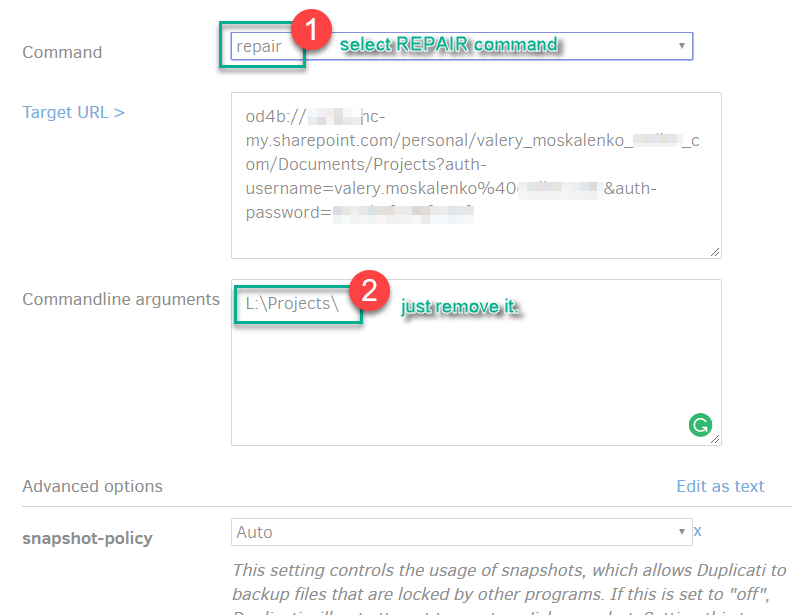
I have found a workaround for it.
Start to the command line from GUI, select repair command and remove value from CommandLine argument. Just make it clean.
---
### Author:  [@JonMikelV](https://forum.duplicati.com/u/JonMikelV)
#### Post date: [November 24, 2017, 7:30pm UTC](https://forum.duplicati.com/t/found-2-commands-but-expected-1-error-during-repair/484/4 "2017-11-24T19:30:32Z")
Thanks! It looks like different commands are happier with the extra parameters than others. 🙂
---
### Author:  [@kenkendk](https://forum.duplicati.com/u/kenkendk)
#### Post date: [December 9, 2017, 8:59pm UTC](https://forum.duplicati.com/t/found-2-commands-but-expected-1-error-during-repair/484/5 "2017-12-09T20:59:03Z")
The problem here is that the UI is set up to run the backup command. When you choose another command, it just keeps everything “as-is”, which is perhaps not the most logical thing to do, as it is very likely to not work.
---
### Author:  [@JonMikelV](https://forum.duplicati.com/u/JonMikelV)
#### Post date: [December 10, 2017, 3:40am UTC](https://forum.duplicati.com/t/found-2-commands-but-expected-1-error-during-repair/484/6 "2017-12-10T03:40:09Z")
> [@kenkendk](#):
>
> When you choose another command, it just keeps everything “as-is”
Yeah, I usually end up removing everything and even editing advanced parameters as text and deleting everything except the ones I want.
---
### Author:  [@kenkendk](https://forum.duplicati.com/u/kenkendk)
#### Post date: [December 10, 2017, 11:09am UTC](https://forum.duplicati.com/t/found-2-commands-but-expected-1-error-during-repair/484/7 "2017-12-10T11:09:43Z")
> [@JonMikelV](#):
>
> Yeah, I usually end up removing everything and even editing advanced parameters as text and deleting everything except the ones I want.
Do you have a good idea for how we can fix this? Maybe have separate fields for the source folders, so they are ignore when not doing a backup?
---
### Author:  [@kobby](https://forum.duplicati.com/u/kobby)
#### Post date: [April 17, 2019, 7:58am UTC](https://forum.duplicati.com/t/found-2-commands-but-expected-1-error-during-repair/484/8 "2019-04-17T07:58:50Z")
Thank you. That workaround also works for me!