, new: False, timestamp changed: True, size changed: False, metadatachanged: False, 9/4/2020 1:07:47 PM vs 9/4/2020 1:07:47 PM\`\`\`
is still open. Did you just disprove it? I thought there was some code that needed a file content change before it would make a new version. There are also time-resolution issues there that might apply here.
---
### Author:  [@gpatel-fr](https://forum.duplicati.com/u/gpatel-fr)
#### Post date: [February 2, 2024, 12:30am UTC](https://forum.duplicati.com/t/files-incorrectly-flagged-as-modified/17368/7 "2024-02-02T00:30:36Z")
> [@ts678](#):
>
> is still open. Did you just disprove it?
I’m not sure at all. The issue thread is very long and it’s late now for me to read it all. I’m wondering why no one suggested to make a change to the manifest file to reflect the change in the backend format ? it could help to solve the backward compatibility problem (well, possibly. That’s just a quick thought)
---
### Author:  [@mewa](https://forum.duplicati.com/u/mewa)
#### Post date: [February 2, 2024, 2:05am UTC](https://forum.duplicati.com/t/files-incorrectly-flagged-as-modified/17368/8 "2024-02-02T02:05:51Z")
Thank you everyone for the detailed advice. I’m going to try to answer all the (very helpful) follow up questions here:
1. The file I highlighted `U:\Movies\Finding Dory (2016).mkv` is a 8.09GB file, and it continues to be backed up daily. For example, here are the entries from the last night’s backup, which duplicates the results on 2024-01-31:
```plaintext
2024-02-01 02:40:29 -05 - [Verbose-Duplicati.Library.Main.Operation.Backup.FilePreFilterProcess.FileEntry-CheckFileForChanges]: Checking file for changes U:\Movies\Finding Dory (2016).mkv, new: False, timestamp changed: False, size changed: False, metadatachanged: True, 1/1/2021 6:22:24 PM vs 1/1/2021 6:22:24 PM
2024-02-01 02:45:25 -05 - [Verbose-Duplicati.Library.Main.Operation.Backup.FileBlockProcessor.FileEntry-FileMetadataChanged]: File has only metadata changes U:\Movies\Finding Dory (2016).mkv
```
1. Upon running the `compare` commandline function with `--full-result`, the same file is listed as one of the 40897 modified entries. So I am pretty sure it’s being backed up repeatedly
2. Windows explorer properties shows the created and modified dates as 2021-01-01 13:22:24, Accessed 2024-02-01 (likely during backup). Nothing seems to indicate any recent modification of file.
3. I don’t think there is anything special about my samba setup, but I have not reconfigured it in years.
4. The file is being backed up to a local store (on the same windows machine that is running duplicati), no encyption. I will create a new backup task for just that file and post the results here.
5. Thank you for sharing the github issue. I will try to parse through it and see if I learn anything, post here.
---
### Author:  [@mewa](https://forum.duplicati.com/u/mewa)
#### Post date: [February 2, 2024, 2:18am UTC](https://forum.duplicati.com/t/files-incorrectly-flagged-as-modified/17368/10 "2024-02-02T02:18:07Z")
> [@gpatel-fr](#):
>
> I’m not sure at all. The issue thread is very long and it’s late now for me to read it all
I just finished reviewing that GitHub issue. Seems like it refers to Duplicati falsely detecting a timestamp change, forcing a re-read/re-hash of the file, then finding that the hash matches and **not** backing up the file. In the issue posted here, duplicati is detecting `timestamp changed: False`, and `metadatachanged: True`, then backing up the file - perhaps the opposite of the GitHub thread.
---
### Author:  [@ts678](https://forum.duplicati.com/u/ts678)
#### Post date: [February 2, 2024, 2:24pm UTC](https://forum.duplicati.com/t/files-incorrectly-flagged-as-modified/17368/11 "2024-02-02T14:24:43Z")
> [@mewa](#):
>
> I just finished reviewing that GitHub issue.
If you were up to that (phew), perhaps an easy approach to deciding what changed is to look in the DB with [DB Browser for SQLite](https://sqlitebrowser.org/) or similar, preferably on a copy of [the database](https://duplicati.readthedocs.io/en/latest/03-using-the-graphical-user-interface/#database-management) to remove chance of harm.
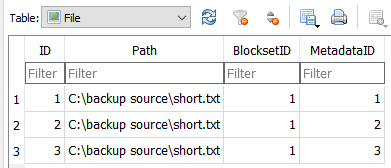
is from me using `attrib +r` and `attrib -r` to see what happens. That’s a more pure test than `touch` (which on Windows I tried just by having notepad save the file again), as touch changes the timestamp.
Here’s how the metadata block looked while that file had the readonly attribute:
> `{"win-ext:accessrules":"[]","CoreAttributes":"ReadOnly, Archive","CoreLastWritetime":"638424781684946339","CoreCreatetime":"637519769445889153"}`
> [@mewa](#):
>
> 8.09GB file
Got anything small that does this? I wouldn’t want to dig for the metadata block in anything that big, but one way to get a clue on whether data actually changed is to follow the image example above, with the `Filter` box helping you search. If `BlocksetID` stayed the same, no additional file data was backed up. `MetadataID` is probably changing, but we don’t know how until you find some, preferably on a short file.
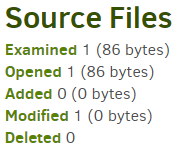
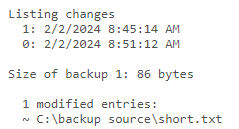
I also ran this experiment to see how job log and the compare show metadata-only change. It is shown.
---
### Author:  [@ts678](https://forum.duplicati.com/u/ts678)
#### Post date: [February 2, 2024, 3:11pm UTC](https://forum.duplicati.com/t/files-incorrectly-flagged-as-modified/17368/12 "2024-02-02T15:11:46Z")
Getting a little further aside from the above (maybe), are your daily backups making new file versions?
The below is the issue I was aiming at, but it might not even be filed as an issue yet. Was it in the one reviewed? It’s probably at least a bit related, because it has to do with the timestamp resolutions used.
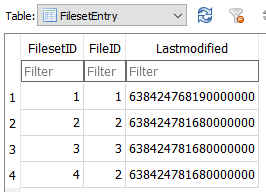
is after a database Recreate, which pulls in the seconds-resolution timestamps from the dlist file, and here they’re 100 nanoseconds, which adds 7 trailing zeros that weren’t there before, and won’t be on next backup, which will declare a timestamp mismatch, show timestamps to the second, and not fix it (assuming nothing else triggers a new backup version).
> `Checking file for changes C:\backup source\short.txt, new: False, timestamp changed: True, size changed: False, metadatachanged: False, 2/2/2024 1:42:48 PM vs 2/2/2024 1:42:48 PM`
One difference in the result is that the job log shows the file as opened (and it’s read) but not modified. Clearing up this read-through after recreate happens (I think) if source gets actual change, likely soon.
---
### Author:  [@mewa](https://forum.duplicati.com/u/mewa)
#### Post date: [February 2, 2024, 10:01pm UTC](https://forum.duplicati.com/t/files-incorrectly-flagged-as-modified/17368/13 "2024-02-02T22:01:06Z")
> [@mewa](#):
>
> I will create a new backup task for just that file and post the results here.
So I created a new, separate backup task just for the same file. The first backup run ran as expected, and on the second backup run, `metadatachanged: True` was detected, the file was flagged as “modified,” but apparently not backed up? Here are the (selected) logs:
```plaintext
2024-02-02 08:00:00 -05 - [Verbose-Duplicati.Library.Main.Operation.Backup.FilePreFilterProcess.FileEntry-CheckFileForChanges]: Checking file for changes U:\Movies\Finding Dory (2016).mkv, new: False, timestamp changed: False, size changed: False, metadatachanged: True, 1/1/2021 6:22:24 PM vs 1/1/2021 6:22:24 PM
2024-02-02 08:02:33 -05 - [Verbose-Duplicati.Library.Main.Operation.Backup.FileBlockProcessor.FileEntry-FileMetadataChanged]: File has only metadata changes U:\Movies\Finding Dory (2016).mkv
2
```
…and the backup summary:
```plaintext
DeletedFiles: 0
DeletedFolders: 0
ModifiedFiles: 1
ExaminedFiles: 1
OpenedFiles: 1
AddedFiles: 0
SizeOfModifiedFiles: 0
SizeOfAddedFiles: 0
SizeOfExaminedFiles: 8688916038
SizeOfOpenedFiles: 8688916038
NotProcessedFiles: 0
AddedFolders: 0
TooLargeFiles: 0
FilesWithError: 0
ModifiedFolders: 0
ModifiedSymlinks: 0
AddedSymlinks: 0
DeletedSymlinks: 0
PartialBackup: False
Dryrun: False
MainOperation: Backup
ParsedResult: Success
Version: 2.0.7.1 (2.0.7.1_beta_2023-05-25)
EndTime: 2/2/2024 8:02:41 AM (1706878961)
BeginTime: 2/2/2024 8:00:00 AM (1706878800)
Duration: 00:02:41.7238272
MessagesActualLength: 19
WarningsActualLength: 0
ErrorsActualLength: 0
LimitedMessages: [
2024-02-02 08:00:00 -05 - [Information-Duplicati.Library.Main.Controller-StartingOperation]: The operation Backup has started,
2024-02-02 08:00:00 -05 - [Information-Duplicati.Library.Main.BasicResults-BackendEvent]: Backend event: List - Started: (),
2024-02-02 08:00:00 -05 - [Information-Duplicati.Library.Main.BasicResults-BackendEvent]: Backend event: List - Completed: (19 bytes),
2024-02-02 08:02:34 -05 - [Information-Duplicati.Library.Main.BasicResults-BackendEvent]: Backend event: Put - Started: duplicati-b52138b761d57426fb24f37660c5c29e6.dblock.zip (640 bytes),
2024-02-02 08:02:34 -05 - [Information-Duplicati.Library.Main.BasicResults-BackendEvent]: Backend event: Put - Completed: duplicati-b52138b761d57426fb24f37660c5c29e6.dblock.zip (640 bytes),
2024-02-02 08:02:34 -05 - [Information-Duplicati.Library.Main.BasicResults-BackendEvent]: Backend event: Put - Started: duplicati-i602015c6381440ed942ea220ec9f4154.dindex.zip (563 bytes),
2024-02-02 08:02:34 -05 - [Information-Duplicati.Library.Main.BasicResults-BackendEvent]: Backend event: Put - Completed: duplicati-i602015c6381440ed942ea220ec9f4154.dindex.zip (563 bytes),
2024-02-02 08:02:34 -05 - [Information-Duplicati.Library.Main.BasicResults-BackendEvent]: Backend event: Put - Started: duplicati-20240202T130000Z.dlist.zip (1.57 KB),
2024-02-02 08:02:34 -05 - [Information-Duplicati.Library.Main.BasicResults-BackendEvent]: Backend event: Put - Completed: duplicati-20240202T130000Z.dlist.zip (1.57 KB),
2024-02-02 08:02:34 -05 - [Information-Duplicati.Library.Main.Operation.DeleteHandler-DeleteResults]: No remote filesets were deleted,
...
]
LimitedWarnings: []
LimitedErrors: []
```
Output of the compare command is:
```plaintext
Listing changes
1: 2/1/2024 9:25:40 PM
0: 2/2/2024 8:00:00 AM
Size of backup 1: 8.09 GB
1 modified entries:
~ U:\Movies\Finding Dory (2016).mkv
Modified files: 1
Size of backup 0: 8.09 GB
Return code: 0
```
So if duplicati appears to be processing the file correctly in the end - even though it flags a metadata change, it’s not actually backing up the file. This confirms the example of @ts678 above (though some of the text appears cut off, I think I get the gist). **This leads me back to my original problem, where every night duplicati is backing up a _lot_ of data for a drive that should be more or less static. What is the best way to find out precisely which files are being re-backed up every night?**
---
### Author:  [@gpatel-fr](https://forum.duplicati.com/u/gpatel-fr)
#### Post date: [February 2, 2024, 10:25pm UTC](https://forum.duplicati.com/t/files-incorrectly-flagged-as-modified/17368/14 "2024-02-02T22:25:20Z")
> [@mewa](#):
>
> `duplicati-b52138b761d57426fb24f37660c5c29e6.dblock.zip`
this is the file you need to unzip, it should hold a file called ‘manifest’ and another with a long coded name, inside this file there is the metadata that triggered the backup. Save this metadata somewhere and trigger again your test backup until it is saving a new backup set. Repeat the operation for the new dblock file and compare the 2 metadata.
---
### Author:  [@mewa](https://forum.duplicati.com/u/mewa)
#### Post date: [February 4, 2024, 6:38pm UTC](https://forum.duplicati.com/t/files-incorrectly-flagged-as-modified/17368/16 "2024-02-04T18:38:47Z")
> [@gpatel-fr](#):
>
> this is the file you need to unzip, it should hold a file called ‘manifest’ and another with a long coded name, inside this file there is the metadata that triggered the backup. Save this metadata somewhere and trigger again your test backup until it is saving a new backup set. Repeat the operation for the new dblock file and compare the 2 metadata.
Here we go - old metadata:
`{"win-ext:accessrules":"[{\"Rights\":1179785,\"ControlType\":0,\"SID\":\"S-1-1-0\",\"Inherited\":false,\"Inheritance\":0,\"Propagation\":0},{\"Rights\":1180063,\"ControlType\":0,\"SID\":\"S-1-5-21-3567941941-338316017-65753321-1000\",\"Inherited\":false,\"Inheritance\":0,\"Propagation\":0},{\"Rights\":1966591,\"ControlType\":0,\"SID\":\"S-1-22-2-1000\",\"Inherited\":false,\"Inheritance\":0,\"Propagation\":0}]","win-ext:accessrulesprotected":"True","CoreAttributes":"Archive","CoreLastWritetime":"637451221445148041","CoreCreatetime":"637451221445148041"}`
New metadata:
`{"win-ext:accessrules":"[{\"Rights\":1179785,\"ControlType\":0,\"SID\":\"S-1-1-0\",\"Inherited\":false,\"Inheritance\":0,\"Propagation\":0},{\"Rights\":1180063,\"ControlType\":0,\"SID\":\"S-1-5-21-3567941941-338316017-65753321-1000\",\"Inherited\":false,\"Inheritance\":0,\"Propagation\":0},{\"Rights\":1966591,\"ControlType\":0,\"SID\":\"S-1-22-2-1000\",\"Inherited\":false,\"Inheritance\":0,\"Propagation\":0}]","win-ext:accessrulesprotected":"True","CoreAttributes":"Archive","CoreLastWritetime":"637451221445148041","CoreCreatetime":"637451221440741761"}`
**The only difference is `CoreCreatetime` changed from `637451221445148041` to `637451221440741761`.** The file has not been accessed in any way other than the backup task. Does this help?
_(in my previous, deleted post, I had outlined how I was unable to reproduce the error, but I tried again and the error is back. Hence this post)_
---
### Author:  [@gpatel-fr](https://forum.duplicati.com/u/gpatel-fr)
#### Post date: [February 4, 2024, 7:12pm UTC](https://forum.duplicati.com/t/files-incorrectly-flagged-as-modified/17368/17 "2024-02-04T19:12:21Z")
> [@mewa](#):
>
> The only difference is `CoreCreatetime` changed from `637451221445148041` to `637451221440741761`.
converted using [https://www.datetimetoticks-converter.com/](https://www.datetimetoticks-converter.com/) both represent 01/01/2021 18:22:24
the difference is about 4 seconds.
This may be Samba related, there is [this thread](https://bugs.launchpad.net/ubuntu/+source/linux/+bug/2007055) for example that shows similar troubles with file dates and Samba.
---
### Author:  [@mewa](https://forum.duplicati.com/u/mewa)
#### Post date: [February 4, 2024, 8:40pm UTC](https://forum.duplicati.com/t/files-incorrectly-flagged-as-modified/17368/18 "2024-02-04T20:40:08Z")
> [@gpatel-fr](#):
>
> the difference is about 4 seconds
Thanks and yes, the difference is 440 milliseconds. Interesting that Duplicati is flagging this as a `metadatachange` and not `timestampchange`.
I’m going to try to force my linux NAS and windows PC to all sync from the same NTP timeserver to see if that helps. Which brings us to the GitHub issue referenced by @ts678 - perhaps limiting timestamp comparisons to second-level resolution may be worth revisiting…
---
### Author:  [@gpatel-fr](https://forum.duplicati.com/u/gpatel-fr)
#### Post date: [February 4, 2024, 9:57pm UTC](https://forum.duplicati.com/t/files-incorrectly-flagged-as-modified/17368/19 "2024-02-04T21:57:11Z")
> [@mewa](#):
>
> Duplicati is flagging this as a `metadatachange` and not `timestampchange`.
Maybe the timestamp refers only to the modification date ? as I understand it, the metadata is a blob read from the OS, that can hold data that Duplicati does not understand (or even try to). As it may be of interest to the file users, it needs to be preserved, and can be restored (if the operating system match at least).
> [@mewa](#):
>
> I’m going to try to force my linux NAS and windows PC to all sync from the same NTP timeserver to see if that helps
It seems very unlikely, since the date is written to disk it should not depend on the current date.
> [@mewa](#):
>
> perhaps limiting timestamp comparisons to second-level resolution may be worth revisiting…
As I said creation date is part of the metadata that Duplicati does not touch or even understand.
What you could consider is to look at the Samba version used on your server. Is it provided by the kernel ? if not, is it possible to update it to an up-to-date userspace version ? if yes, is it possible to try a newer kernel (or even if possible to switch to userspace Samba) ? Also, the thread I linked to is referring to the protocol level. Changing it is easier than updating Samba.
Also you could try to get at the file date in ticks directly without Duplicati using Powershell:
(get-itemproperty -path .\myfile.txt -name creationtime).creationtime.ticks
---
### Author:  [@ts678](https://forum.duplicati.com/u/ts678)
#### Post date: [February 4, 2024, 11:06pm UTC](https://forum.duplicati.com/t/files-incorrectly-flagged-as-modified/17368/20 "2024-02-04T23:06:10Z")
and on the Linux side, you can try `stat`. Not all filesystems support creation time. My `ext4` does, so
```plaintext
$ stat /etc/issue
File: /etc/issue
Size: 32 Blocks: 8 IO Block: 4096 regular file
Device: 803h/2051d Inode: 1310901 Links: 1
Access: (0644/-rw-r--r--) Uid: ( 0/ root) Gid: ( 0/ root)
Access: 2024-01-25 11:43:35.740275219 -0500
Modify: 2023-06-06 05:52:26.000000000 -0400
Change: 2023-11-04 14:27:13.494531228 -0400
Birth: 2023-11-04 14:27:13.494531228 -0400
```
One odd thing is that the difference in your time is not any nice even amount, and new one got older.
```plaintext
old GMT / UTC Date Time: 2021-01-01 18:22:24 + 0.5148041 second
new GMT / UTC Date Time: 2021-01-01 18:22:24 + 0.0741761 second
```
(from [.NET DateTime Ticks Converter Online](https://www.venea.net/web/net_ticks_datetime_converter))
Possibly the least disruptive workaround for bogus metadata changes (whatever the cause) is option
```plaintext
--check-filetime-only (Boolean): Checks only file lastmodified
This flag instructs Duplicati to not look at metadata or filesize when
deciding to scan a file for changes. Use this option if you have a large
number of files and notice that the scanning takes a long time with
unmodified files.
* default value: false
```
---
### Author:  [@gpatel-fr](https://forum.duplicati.com/u/gpatel-fr)
#### Post date: [February 4, 2024, 11:46pm UTC](https://forum.duplicati.com/t/files-incorrectly-flagged-as-modified/17368/21 "2024-02-04T23:46:20Z")
> [@ts678](#):
>
> `--check-filetime-only`
this should work. Obviously the fine details for metadata such as rights will be lost, but as the OP is doing a backup of a Linux computer using a Windows one, the correctness of these details would not be great anyway.
---
### Author:  [@mewa](https://forum.duplicati.com/u/mewa)
#### Post date: [February 4, 2024, 11:47pm UTC](https://forum.duplicati.com/t/files-incorrectly-flagged-as-modified/17368/22 "2024-02-04T23:47:41Z")
> [@gpatel-fr](#):
>
> What you could consider is to look at the Samba version used on your server. Is it provided by the kernel ? if not, is it possible to update it to an up-to-date userspace version ? if yes, is it possible to try a newer kernel (or even if possible to switch to userspace Samba) ? Also, the thread I linked to is referring to the protocol level. Changing it is easier than updating Samba.
Great ideas. I am using the latest version of samba as provided by the kernel (Ubuntu 20.04.06 LTS, kernel 5.4.0-170-generic, Samba version 4.15.13-Ubuntu using protocol/dialect 3.1.1). At present, I’m not ready to move this to the userspace samba (latest version appears to be 4.19.4).
> [@gpatel-fr](#):
>
> As I said creation date is part of the metadata that Duplicati does not touch or even understand.
I’m suggesting (as I think the GitHub thread was, as well) that perhaps Duplicati can modify the way it chooses to flag a file as “different” - move from a 100 nanosecond to a 1 second resolution. I recognize that this may be a big change and will leave it to the smarter people to consider.
> [@ts678](#):
>
> and on the Linux side, you can try `stat`
Here’s the output for the file in question - it appears to exactly match the “old” metadata read. Is it suspicious that the fractional part of the “Change” timestamp (and not the rest of it) is exactly the same as the fractional part of the “new” timestamp?
```plaintext
File: Finding Dory (2016).mkv
Size: 8688916038 Blocks: 16970552 IO Block: 4096 regular file
Device: fd00h/64768d Inode: 39845897 Links: 1
Access: (2674/-rw-rwsr--) Uid: ( 1000/ mw) Gid: ( 1000/ mw)
Access: 2024-02-04 05:13:04.431934651 -0500
Modify: 2021-01-01 13:22:24.514804109 -0500
Change: 2024-02-04 04:50:03.074176120 -0500
Birth: -
```
> [@gpatel-fr](#):
>
> (get-itemproperty -path .\myfile.txt -name creationtime).creationtime.ticks
Output (from windows machine, looking to samba share): `637451041440741761`
[Next page](https://forum.duplicati.com/t/files-incorrectly-flagged-as-modified/17368.md?page=2)