# Failed to connect: Gateway Time-out issue when restoring
**URL:** https://forum.duplicati.com/t/failed-to-connect-gateway-time-out-issue-when-restoring/12666
**Category:** Support
**Created:** [July 2, 2021, 10:04pm UTC](https://forum.duplicati.com/t/failed-to-connect-gateway-time-out-issue-when-restoring/12666 "2021-07-02T22:04:24Z")
**Posts on this page:** 11
**Page:** 1
### Author:  [@the1](https://forum.duplicati.com/u/the1)
#### Post date: [July 2, 2021, 10:04pm UTC](https://forum.duplicati.com/t/failed-to-connect-gateway-time-out-issue-when-restoring/12666/1 "2021-07-02T22:04:24Z")
I got to restore, fill out the information and hit connect. It stays on listing backup dates before failing with Failed to connect: Gateway Time-out
---
### Author:  [@drwtsn32](https://forum.duplicati.com/u/drwtsn32)
#### Post date: [July 2, 2021, 11:31pm UTC](https://forum.duplicati.com/t/failed-to-connect-gateway-time-out-issue-when-restoring/12666/2 "2021-07-02T23:31:34Z")
How are you doing a restore? By saying you “fill out the information”, are you doing “direct restore from backup files”?
---
### Author:  [@the1](https://forum.duplicati.com/u/the1)
#### Post date: [July 3, 2021, 8:48am UTC](https://forum.duplicati.com/t/failed-to-connect-gateway-time-out-issue-when-restoring/12666/3 "2021-07-03T08:48:16Z")
direct restore from backup files, yes. I’m restoring using SFTP. Fill out information is just the SFTP information and the connection works fine when I test that connection.
---
### Author:  [@the1](https://forum.duplicati.com/u/the1)
#### Post date: [July 3, 2021, 10:56pm UTC](https://forum.duplicati.com/t/failed-to-connect-gateway-time-out-issue-when-restoring/12666/4 "2021-07-03T22:56:28Z")
Oh, and both the backup location server and the main server are using ubuntu
---
### Author:  [@ts678](https://forum.duplicati.com/u/ts678)
#### Post date: [July 4, 2021, 2:14am UTC](https://forum.duplicati.com/t/failed-to-connect-gateway-time-out-issue-when-restoring/12666/5 "2021-07-04T02:14:19Z")
> [@the1](#):
>
> It stays on listing backup dates before failing with Failed to connect: Gateway Time-out
Do you recall roughly how long it sat before the error?
Does the error look like a typical Duplicati-generated error, with a box made with the error?
Alternatively, it might look kind of raw, meaning not something nicely formatted by Duplicati.
Is the browser URL to Duplicati direct, e.g. `localhost:8200` (etc.) or via networking gear?
If through networking gear, is there a reverse proxy, or something that might call a timeout?
Using a direct connection and throttling, I got a slow listing (40 minutes), but didn’t time out.
I had another tab in About → Show log → Live → Information watching dlist files download.
I also started a Wireshark capture while it was working. It caught the backup list response,
however it did not capture the request, which makes me think HTTP view was a slow reply.
> [@the1](#):
>
> direct restore from backup files
Is this a test, or did you lose a system? How much are you trying to restore? Most recent?
[The RESTORE command](https://duplicati.readthedocs.io/en/latest/04-using-duplicati-from-the-command-line/#the-restore-command) done in [CLI](https://duplicati.readthedocs.io/en/latest/04-using-duplicati-from-the-command-line/) would bypass web issues but is harder to set up…
---
### Author:  [@the1](https://forum.duplicati.com/u/the1)
#### Post date: [July 4, 2021, 7:41am UTC](https://forum.duplicati.com/t/failed-to-connect-gateway-time-out-issue-when-restoring/12666/6 "2021-07-04T07:41:53Z")
It sits for a few minutes. It looks like a normal error with a box. The domain is pointed to it using nginx. I don’t see anything in the information bit in logs.
This isn’t a test, it’s a small issue but I can look at that restore command.
---
### Author:  [@the1](https://forum.duplicati.com/u/the1)
#### Post date: [July 4, 2021, 3:26pm UTC](https://forum.duplicati.com/t/failed-to-connect-gateway-time-out-issue-when-restoring/12666/7 "2021-07-04T15:26:19Z")
exit 127 when running the restore cmd
---
### Author:  [@ts678](https://forum.duplicati.com/u/ts678)
#### Post date: [July 4, 2021, 4:58pm UTC](https://forum.duplicati.com/t/failed-to-connect-gateway-time-out-issue-when-restoring/12666/8 "2021-07-04T16:58:32Z")
> [@the1](#):
>
> The domain is pointed to it using nginx
The gateway timeout is likely from nginx. You can either try to find a way to not use nginx for Duplicati, or reduce the number of kept backups to a number that can be read before nginx timeout, or raise timeout.
Search finds there are lots of articles on the latter, such as [How to Increase Request Timeout in NGINX](https://ubiq.co/tech-blog/increase-request-timeout-nginx/).
There might be some other workarounds, e.g. one can recreate (by [The REPAIR command](https://duplicati.readthedocs.io/en/latest/04-using-duplicati-from-the-command-line/#the-repair-command)) a database with a specific [version](https://duplicati.readthedocs.io/en/latest/06-advanced-options/#version) (0 would be the latest), and possibly that wouldn’t get a web timeout. You can test. Doing it this way is a little more dangerous if the original system still exists, as you never want a backup running from two different source systems into the same destination folder. They will confuse each other.
EDIT:
> [@the1](#):
>
> I don’t see anything in the information bit in logs.
What is this referring to? If you open a new tab to About → Show log → Information before trying the direct restore, you should be able to see it downloading `dlist` files one by one. It needs all before it can send the response that lists them in the restore dropdown. In your case, it might have still been listing at the timeout.
By the way, if you use F12 developer tools, the request that gets the slow response with the version info is:
`http://localhost:8200/api/v1/backup//filesets`
without my artificial throttle, my backup gives a response in 29 seconds instead of the 40 minutes throttled.
I don’t use nginx, but possibly you can customize the longer timeout around the requests that are too slow.
---
### Author:  [@the1](https://forum.duplicati.com/u/the1)
#### Post date: [July 4, 2021, 5:29pm UTC](https://forum.duplicati.com/t/failed-to-connect-gateway-time-out-issue-when-restoring/12666/9 "2021-07-04T17:29:31Z")
I changed the timeout amount and now I get Failed to connect: Internal Server Error
---
### Author:  [@the1](https://forum.duplicati.com/u/the1)
#### Post date: [July 4, 2021, 7:43pm UTC](https://forum.duplicati.com/t/failed-to-connect-gateway-time-out-issue-when-restoring/12666/10 "2021-07-04T19:43:12Z")
It goes to listing backup dates than this, any ideas?
---
### Author:  [@ts678](https://forum.duplicati.com/u/ts678)
#### Post date: [July 4, 2021, 9:53pm UTC](https://forum.duplicati.com/t/failed-to-connect-gateway-time-out-issue-when-restoring/12666/11 "2021-07-04T21:53:44Z")
> [@the1](#):
>
> It goes to listing backup dates than this
Same question – how long, and did `dlist` file analysis finish before that or was error during downloads?
> [@the1](#):
>
> any ideas?
Do you know how to look at requests and responses with browser web developer tools, commonly F12?
It would be useful to know how far things got. On a similar note, the nginx error log might have some info.
`/var/log/nginx/error.log` is said to be the standard spot, but it can be moved. Note I don’t run nginx.
[How to Fix 500 Internal Server Error in NGINX](https://ubiq.co/tech-blog/fix-500-internal-server-error-nginx/) has some other ideas. Google finds a huge number of hits.
Although I’m not quite sure how nginx fits into the below (is this on Apapche?), the only previous report is:
> [@Failure to restore](https://forum.duplicati.com/t/failure-to-restore/9912/18):
>
> Ok, i have found the problem.
>
> In fact, this came from apache2 with mod\_proxy.
> Before, the apache config file contains :
>
> > ProxyPass / [http://localhost:8200/](http://localhost:8200/)
> > ProxyPassReverse / [http://localhost:8200/](http://localhost:8200/)
>
> I had this line
>
> > AllowEncodedSlashes On
>
> And now it works 🙂
>
> See this post : [Reverse Proxy on NGINX](https://forum.duplicati.com/t/reverse-proxy-on-nginx/1936/7)
The below are some people trying to reverse proxy Duplicati. You can see configurations and the issues.
[Reverse Proxy on NGINX](https://forum.duplicati.com/t/reverse-proxy-on-nginx/1936)
[Support reverse proxying the WebUI #1932](https://github.com/duplicati/duplicati/issues/1932)
EDIT:
These are the requests I got starting from Connect, and stopping when it moves off Listing backup dates:
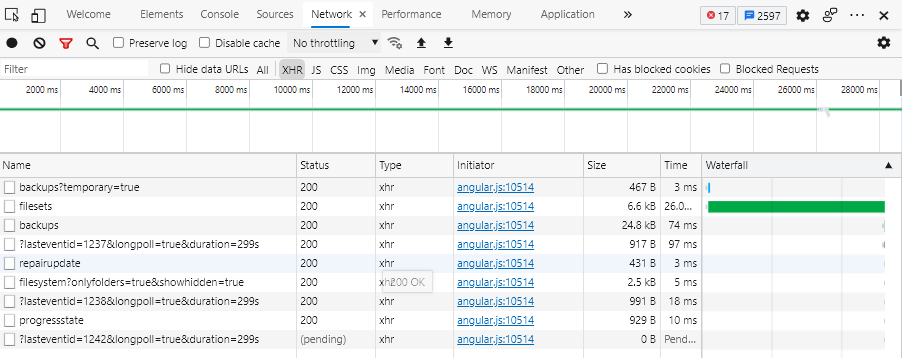
You can see the slow `filesets`. This is from Edge (Chromium-based), but most browsers have similar.