b__ 0(BackupResults result)
at Duplicati.Library.Main.Controller.RunAction[T](T result, String[]& paths, IFilter& filter, Action`1 method)
at Duplicati.Library.Main.Controller.Backup(String[] inputsources, IFilter filter)
at Duplicati.Server.Runner.Run(IRunnerData data, Boolean fromQueue)
```
---
### Author:  [@kenkendk](https://forum.duplicati.com/u/kenkendk)
#### Post date: [June 19, 2024, 12:31pm UTC](https://forum.duplicati.com/t/failed-backup-but-why/18322/2 "2024-06-19T12:31:36Z")
Hello @Richard_DeVito_Jr , welcome to the forum!
> [@Richard\_DeVito\_Jr](#):
>
> Found 404 files that are missing from the remote storage, please run repair
This error message means that the remote storage appears to be wiped, or at least it is no longer reporting 404 of the remote files it had last time.
If the storage appears intact, it is probably an issue with the path to the destination that has changed, so Duplicati is looking in the wrong folder.
---
### Author:  [@Richard\_DeVito\_Jr](https://forum.duplicati.com/u/Richard_DeVito_Jr)
#### Post date: [June 19, 2024, 7:41pm UTC](https://forum.duplicati.com/t/failed-backup-but-why/18322/3 "2024-06-19T19:41:35Z")
Thanks Ken. It copied files…but is it possible that it has settings from a failed previous job that was not configured properly?
The repair seemed to work…but obviously did not. Appreciate any additional thoughts you may have. Cheers, radjr
---
### Author:  [@ts678](https://forum.duplicati.com/u/ts678)
#### Post date: [June 21, 2024, 1:39am UTC](https://forum.duplicati.com/t/failed-backup-but-why/18322/4 "2024-06-21T01:39:55Z")
There is too little information provided to attempt much further guessing at this. Some questions:
What was the history of the backup before original post? Was it a longtime backup that suddenly gave the reported error? Was it on a schedule? Was it new? How large is it (see home screen)?
Were there any known unusual actions seen or done in the backup before the issue appeared? Stack trace says `PreBackupVerify`, but there is also the same verification at each backup end.
There is a lot of information in the job logs (especially if you are on current 2.0.8.1 Beta or later). Missing file names are logged there, although the list is truncated. You could still post a sample, however the names are clues. Source data typically is in dblock files. Each dblock has a dindex.
Repair with an intact database can upload missing dindex and dlist files, but source data is hard.
The `Complete log` gives “KnownFileCount”. This is another way to see if 404 files is everything. Alternatively, maybe part of the destination is not being listed. You can check your actual names, taken from the job log. Is a file that is seen missing really on the destination? If so, it’s a list error.
What is the destination storage type, and is it easy to get a listing sorted chronologically? Backup that completes normally would upload the above-mentioned dblock and dindex files, then at end there is a dlist file uploaded that says what was backed up. Any early ending would not have that.
---
### Author:  [@Richard\_DeVito\_Jr](https://forum.duplicati.com/u/Richard_DeVito_Jr)
#### Post date: [June 21, 2024, 1:15pm UTC](https://forum.duplicati.com/t/failed-backup-but-why/18322/5 "2024-06-21T13:15:41Z")
Thanks.
This was an initial backup onto a remote server that was set up in duplicati.
After wracking my brain, the solution was to delete the backup, remove the database and build a new backup with all the same settings.
---
### Author:  [@ts678](https://forum.duplicati.com/u/ts678)
#### Post date: [June 21, 2024, 1:44pm UTC](https://forum.duplicati.com/t/failed-backup-but-why/18322/6 "2024-06-21T13:44:56Z")
> [@Richard\_DeVito\_Jr](#):
>
> This was an initial backup
Are you sure you didn’t post the results from a second backup, since
> [@Richard\_DeVito\_Jr](#):
>
> Duplicati.Library.Main.Operation.BackupHandler.PreBackupVerify
would have a hard time happening on the very first backup ever done.
It’s comparing database from a backup against files at the destination.
Some files that the prior backup uploaded were not actually seen now.
If Destination silently lost files during initial backup, PostBackupVerify
(`Verifying backend data …` on status bar) would have noticed that.
Next backup run would have quickly noticed in the `PreBackupVerify`.
> [@Richard\_DeVito\_Jr](#):
>
> the solution was to delete the backup, remove the database
I’m glad it worked, but on that point I’d note that deleting the Destination
without deleting the database could also lead to a surprised backup that
is wondering where files in its database went to. Still too little data given.
---
### Author:  [@Richard\_DeVito\_Jr](https://forum.duplicati.com/u/Richard_DeVito_Jr)
#### Post date: [June 21, 2024, 2:55pm UTC](https://forum.duplicati.com/t/failed-backup-but-why/18322/7 "2024-06-21T14:55:05Z")
Thanks for your help.
Now, with the new backup, the system hangs at the following message. To test, I paused and resumed it but no change. Just sits there. Does this code assume that once logged into the remote storage server, the connection will stay open forever? If so, that may be a problem.
**Netware Backup JEM Folders**
**:**
Waiting for upload to finish …
Log text (Yes, that is all there is!)
- Jun 19, 2024 11:38 PM: put duplicati-b55cf8d028bf24c93aeac0895b35d7917.dblock.zip.aes
---
### Author:  [@ts678](https://forum.duplicati.com/u/ts678)
#### Post date: [June 21, 2024, 3:35pm UTC](https://forum.duplicati.com/t/failed-backup-but-why/18322/8 "2024-06-21T15:35:20Z")
> [@ts678](#):
>
> What is the destination storage type
[Storage Providers](https://docs.duplicati.com/en/latest/05-storage-providers/) describes the available choices. What did you put on Destination screen?
EDIT:
> [@Richard\_DeVito\_Jr](#):
>
> Log text (Yes, that is all there is!)
Maybe because you began logging late. Did backup do successful uploads for awhile before?
[Live log](https://docs.duplicati.com/en/latest/03-using-the-graphical-user-interface/#viewing-the-duplicati-server-logs) (if that is what this is) should be set up in advance, though it seems to go back a little.
What is shown depends on the chosen level too. What level is this? Does system seem busy?
Sometimes database operations at end of backup (visible at Profiling level) can run for awhile.
Generally this also shows up in CPU and drive usage, for example in Windows Task Manager.
---
### Author:  [@Richard\_DeVito\_Jr](https://forum.duplicati.com/u/Richard_DeVito_Jr)
#### Post date: [June 21, 2024, 4:25pm UTC](https://forum.duplicati.com/t/failed-backup-but-why/18322/9 "2024-06-21T16:25:25Z")
Storage type: FTP
SSL box checked.
NO Options selected
Test connection works.
Remote volume size 4TB
Keep all backups.
Thanks.
---
### Author:  [@ts678](https://forum.duplicati.com/u/ts678)
#### Post date: [June 21, 2024, 4:28pm UTC](https://forum.duplicati.com/t/failed-backup-but-why/18322/10 "2024-06-21T16:28:13Z")
> [@Richard\_DeVito\_Jr](#):
>
> Remote volume size 4TB
This is way way off. The default is 50 MB. Please read the description linked on the Options screen. You might be trying to put the entire backup in one file, which might be why the upload takes awhile.
EDIT:
OS monitors such as Task Manager can show upload rate, though other things might be sending.
What is Duplicati status bar showing? That has a lot of upload stats, and not-very-human-friendly details are at About → System info where you can see if any of the progress counters are moving.
---
### Author:  [@Richard\_DeVito\_Jr](https://forum.duplicati.com/u/Richard_DeVito_Jr)
#### Post date: [June 21, 2024, 9:25pm UTC](https://forum.duplicati.com/t/failed-backup-but-why/18322/11 "2024-06-21T21:25:17Z")
I am still having issues with this.
I checked the profiling log and got this: Jun 21, 2024 5:16 PM: Cannot open WMI provider \localhost\root\virtualization\v2. Hyper-V is probably not installed.
I verified that the backup was on the remote server. It looks like return status is not getting back to duplicati…
This program is still hung waiting for the upload to finish!
---
### Author:  [@ts678](https://forum.duplicati.com/u/ts678)
#### Post date: [June 21, 2024, 10:02pm UTC](https://forum.duplicati.com/t/failed-backup-but-why/18322/12 "2024-06-21T22:02:41Z")
> [@Richard\_DeVito\_Jr](#):
>
> Cannot open WMI provider \localhost\root\virtualization\v2. Hyper-V is probably not installed.
That’s just an Information level message (I’m not sure how helpful) when you start editing a job.
> [@Richard\_DeVito\_Jr](#):
>
> I verified that the backup was on the remote server.
Not changing in size but about the full size of Source, given your way too large remote volume?
Just seeing a bit of a file means little. You could download it and decrypt it, e.g. with [AES Crypt](https://www.aescrypt.com).
or if you prefer command line with already installed Duplicati software tool, `SharpAESCrypt.exe`
Better is to see About → System info as requested in edit above. If `lastPgEvent` is there, post it.
> [@Richard\_DeVito\_Jr](#):
>
> This program is still hung waiting for the upload to finish!
Are you going through a router? This matters because of the below behavior of the FTP backend:
```plaintext
--ftp-passive (Boolean): Toggles the FTP connections method
If this flag is set, the FTP connection is made in passive mode, which
works better with some firewalls. If the "ftp-regular" flag is also set,
this flag is ignored
* default value: false
```
which means that the router must translate the FTP control connection, and sometimes it drops it because the connection has been open too long. This could prevent return of a completion code.
If you see a huge file on destination now, I suggest you change the remote volume size to default or maybe something somewhat higher depending on how fast your network and FTP can transfer.
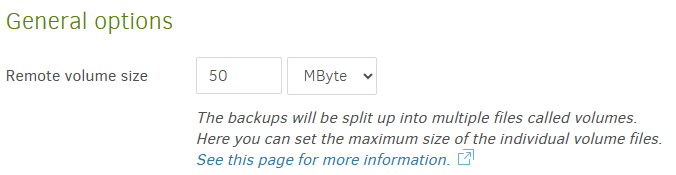
Having fixed the misconfiguration, try again.
---
### Author:  [@Richard\_DeVito\_Jr](https://forum.duplicati.com/u/Richard_DeVito_Jr)
#### Post date: [June 22, 2024, 12:50am UTC](https://forum.duplicati.com/t/failed-backup-but-why/18322/13 "2024-06-22T00:50:19Z")
I could not fix this. I had to restart the computer to get out of this backup.
I will look at the entire config file and post it here when I get back to the office. Thank you!
---
### Author:  [@ts678](https://forum.duplicati.com/u/ts678)
#### Post date: [June 22, 2024, 12:57am UTC](https://forum.duplicati.com/t/failed-backup-but-why/18322/14 "2024-06-22T00:57:08Z")
> [@Richard\_DeVito\_Jr](#):
>
> I had to restart the computer to get out of this backup.
I can’t think of any reason why a Task Manager or similar process kill wouldn’t work instead of that. Duplicati is a little confusing currently (design is being changed), as processes often come in pairs.
Regardless, I guess this will continue later.
---
### Author:  [@Richard\_DeVito\_Jr](https://forum.duplicati.com/u/Richard_DeVito_Jr)
#### Post date: [June 25, 2024, 4:56pm UTC](https://forum.duplicati.com/t/failed-backup-but-why/18322/15 "2024-06-25T16:56:08Z")
The file stored on the server.
duplicati-b55cf8d028bf24c93aeac0895b35d7917.dblock.zip
---
### Author:  [@ts678](https://forum.duplicati.com/u/ts678)
#### Post date: [June 25, 2024, 5:04pm UTC](https://forum.duplicati.com/t/failed-backup-but-why/18322/16 "2024-06-25T17:04:45Z")
> [@Richard\_DeVito\_Jr](#):
>
> The file stored on the server
The one and only ever, the one and only from latest backup? What? And what is the file size?
> [@Richard\_DeVito\_Jr](#):
>
> duplicati-b55cf8d028bf24c93aeac0895b35d7917.dblock.zip.aes
> [@Richard\_DeVito\_Jr](#):
>
> duplicati-b55cf8d028bf24c93aeac0895b35d7917.dblock.zip
Did you decide to stop encrypting? You used to. If it’s now unencrypted `.zip` it’s easier to open.
EDIT:
Or did you decrypt the file, now that I compare and see name is the same except for `.aes` suffix.
---
### Author:  [@ts678](https://forum.duplicati.com/u/ts678)
#### Post date: [June 25, 2024, 5:24pm UTC](https://forum.duplicati.com/t/failed-backup-but-why/18322/17 "2024-06-25T17:24:24Z")
The size of the file stored on the server should be available via your FTP client, or if you prefer:
\ → Show log → Remote, and click on a `list` command to find the file. Format will be like:
> {“Name”:“duplicati-bd7d60337b230420f8dc94be78e0acf47.dblock.zip”,“LastAccess”:“2024-06-21T19:07:16.637831-04:00”,“LastModification”:“2024-06-20T17:16:33.7459731-04:00”,“Size”:677,“IsFolder”:false},
If file is far larger than the [default 50 MB Remote volume size](https://forum.duplicati.com/t/failed-backup-but-why/18322/12), see what size you chose and why.
---
### Author:  [@Richard\_DeVito\_Jr](https://forum.duplicati.com/u/Richard_DeVito_Jr)
#### Post date: [June 25, 2024, 8:12pm UTC](https://forum.duplicati.com/t/failed-backup-but-why/18322/18 "2024-06-25T20:12:34Z")
Thanks. Will check your suggestion.
I ran a new backup with a couple of directories and got this error message. Can you tell me how you are handing extended file open error messages? These files are coming off a mapped network drive that is using the OES Netware Client . It looks like your driver on your side is getting unexpected status from the file call. Is this something you can check please? My guess is that these files are being decompressed on the fly and the driver is saying you have to wait to get it…and your drive is failing. Our network driver is Client for Open Enterprise Server 2 SP7 (IR3). THANKS!
- 2024-06-24 18:31:55 -04 - [Warning-Duplicati.Library.Main.Operation.Backup.FileBlockProcessor.FileEntry-PathProcessingFailed]: Failed to process path: Q:\JEM\Special Issue Mental Health in EM\dreamstime\_xxl\_197002960-Modified.psd IOException: The request is not supported.
- 2024-06-24 18:31:55 -04 - [Warning-Duplicati.Library.Main.Operation.Backup.FileBlockProcessor.FileEntry-PathProcessingFailed]: Failed to process path: Q:\JEM\Special Issue Mental Health in EM\dreamstime\_xxl\_197002960-Modified1024.png IOException: The request is not supported.
- 2024-06-24 18:31:55 -04 - [Warning-Duplicati.Library.Main.Operation.Backup.MetadataPreProcess.FileEntry-TimestampReadFailed]: Failed to read timestamp on “Q:\JEM\Special Issue Mental Health in EM\dreamstime\_xxl\_197002960-Modified\_2000x1333.jpg” IOException: The request is not supported.
- 2024-06-24 18:31:55 -04 - [Warning-Duplicati.Library.Main.Operation.Backup.FileEnumerationProcess-FileAccessError]: Error reported while accessing file: Q:\JEM\Special Issue Mental Health in EM\dreamstime\_xxl\_197002960-Modified\_2000x1333.png IOException: The request is not supported.
- 2024-06-24 18:31:55 -04 - [Warning-Duplicati.Library.Main.Operation.Backup.FileEnumerationProcess-FileAccessError]: Error reported while accessing file: Q:\JEM\Special Issue Mental Health in EM\dreamstime\_xxl\_197002960.jpg IOException: The request is not supported.
- 2024-06-24 18:31:55 -04 - [Warning-Duplicati.Library.Main.Operation.Backup.FileEnumerationProcess-FileAccessError]: Error reported while accessing file: Q:\JEM\Special Issue Mental Health in EM\Ejaz.zip IOException: The request is not supported.
- 2024-06-24 18:31:55 -04 - [Warning-Duplicati.Library.Main.Operation.Backup.FileEnumerationProcess-FileAccessError]: Error reported while accessing file: Q:\JEM\Special Issue Mental Health in EM\Issue Paper - Maximizing Horizontal Integration 10.7.19.docx IOException: The request is not supported.
- 2024-06-24 18:31:55 -04 - [Warning-Duplicati.Library.Main.Operation.Backup.FileEnumerationProcess-FileAccessError]: Error reported while accessing file: Q:\JEM\Special Issue Mental Health in EM\JEM COVID-19 Mental Health Special Cover 2021 edition.indd IOException: The request is not supported.
- 2024-06-24 18:31:55 -04 - [Warning-Duplicati.Library.Main.Operation.Backup.FileEnumerationProcess-FileAccessError]: Error reported while accessing file: Q:\JEM\Special Issue Mental Health in EM\JEM COVID-19 Mental Health Special Cover 2021 edition.pdf IOException: The request is not supported.
- 2024-06-24 18:31:55 -04 - [Warning-Duplicati.Library.Main.Operation.Backup.FileEnumerationProcess-FileAccessError]: Error reported while accessing file: Q:\JEM\Special Issue Mental Health in EM\JEM COVID-19 Mental Health Special Cover 2021 edition\_150dpi.png IOException: The request is not supported.
- 2024-06-24 18:31:55 -04 - [Warning-Duplicati.Library.Main.Operation.Backup.FileEnumerationProcess-FileAccessError]: Error reported while accessing file: Q:\JEM\Special Issue Mental Health in EM\JEM COVID-19 Mental Health Special Cover 2021 edition\_300dpi.png IOException: The request is not supported.
- 2024-06-24 18:31:55 -04 - [Warning-Duplicati.Library.Main.Operation.Backup.FileEnumerationProcess-FileAccessError]: Error reported while accessing file: Q:\JEM\Special Issue Mental Health in EM\JEM COVID-19 Mental Health Special Cover 2022 edition.indd IOException: The request is not supported.
- 2024-06-24 18:31:55 -04 - [Warning-Duplicati.Library.Main.Operation.Backup.FileEnumerationProcess-FileAccessError]: Error reported while accessing file: Q:\JEM\Special Issue Mental Health in EM\JEM COVID-19 Mental Health Special Cover 2022 edition.pdf IOException: The request is not supported.
- 2024-06-24 18:31:55 -04 - [Warning-Duplicati.Library.Main.Operation.Backup.FileEnumerationProcess-FileAccessError]: Error reported while accessing file: Q:\JEM\Special Issue Mental Health in EM\JEM COVID-19 Mental Health Special Cover 2022 edition\_150dpi.png IOException: The request is not supported.
- 2024-06-24 18:31:55 -04 - [Warning-Duplicati.Library.Main.Operation.Backup.FileEnumerationProcess-FileAccessError]: Error reported while accessing file: Q:\JEM\Special Issue Mental Health in EM\JEM COVID-19 Mental Health Special Cover 2022 edition\_300dpi.png IOException: The request is not supported.
- 2024-06-24 18:31:55 -04 - [Warning-Duplicati.Library.Main.Operation.Backup.FileEnumerationProcess-FileAccessError]: Error reported while accessing file: Q:\JEM\Special Issue Mental Health in EM\JEM COVID-19 Mental Health Special Cover.indd IOException: The request is not supported.
- 2024-06-24 18:31:55 -04 - [Warning-Duplicati.Library.Main.Operation.Backup.FileEnumerationProcess-FileAccessError]: Error reported while accessing file: Q:\JEM\Special Issue Mental Health in EM\JEM COVID-19 Mental Health Special Cover.pdf IOException: The request is not supported.
- 2024-06-24 18:31:55 -04 - [Warning-Duplicati.Library.Main.Operation.Backup.FileEnumerationProcess-FileAccessError]: Error reported while accessing file: Q:\JEM\Special Issue Mental Health in EM\JEM COVID-19 Mental Health Special Cover\_150dpi.jpg IOException: The request is not supported.
- 2024-06-24 18:31:55 -04 - [Warning-Duplicati.Library.Main.Operation.Backup.FileEnumerationProcess-FileAccessError]: Error reported while accessing file: Q:\JEM\Special Issue Mental Health in EM\JEM COVID-19 Mental Health Special Cover\_150dpi.png IOException: The request is not supported.
- 2024-06-24 18:31:55 -04 - [Warning-Duplicati.Library.Main.Operation.Backup.FileEnumerationProcess-FileAccessError]: Error reported while accessing file: Q:\JEM\Special Issue Mental Health in EM\JEM COVID-19 Mental Health Special Cover\_300dpi.png IOException: The request is not supported.
---
### Author:  [@ts678](https://forum.duplicati.com/u/ts678)
#### Post date: [June 26, 2024, 1:08am UTC](https://forum.duplicati.com/t/failed-backup-but-why/18322/19 "2024-06-26T01:08:47Z")
> [@Richard\_DeVito\_Jr](#):
>
> Our network driver is Client for Open Enterprise Server 2 SP7 (IR3).
That’s nothing that I have, but if it’s supported, I wonder if they can advise on the problem?
Historically, it looks like Netware was Micro Focus awhile, but now is technically OpenText.
I have no idea how much Netware has evolved, but not supporting things seems plausible.
Figuring out exactly what might require you to run [Sysinternals Process Monitor](https://learn.microsoft.com/en-us/sysinternals/downloads/procmon) to observe.
If everything on `Q:` drive is getting a Warning (I have no idea – do you?), it should be quick.
> [@Richard\_DeVito\_Jr](#):
>
> It looks like your driver on your side is getting unexpected status from the file call.
There is no driver, but if you mean your network driver is causing an error status, seems so.
>
> [@Richard\_DeVito\_Jr](#):
>
> My guess is that these files are being decompressed on the fly
There’s no decompressing by Duplicati going on. This is just enumerating available files.
---
### Author:  [@ts678](https://forum.duplicati.com/u/ts678)
#### Post date: [June 26, 2024, 1:48am UTC](https://forum.duplicati.com/t/failed-backup-but-why/18322/20 "2024-06-26T01:48:32Z")
I suppose you could see if you can get a better stack trace. You said you have no advanced options, so I probably don’t have to worry about VSS snapshots, and therefore an error like:
> - 2024-06-25 21:34:02 -04 - [Warning-Duplicati.Library.Main.Operation.Backup.FileEnumerationProcess-FileAccessError]: Error reported while accessing file: C:\backup source\no\_administrators\ UnauthorizedAccessException: Access to the path ‘\?\C:\backup source\no\_administrators’ is denied.
should make something like this in About → Show log → Live → Warning
> Jun 25, 2024 9:34 PM: Error reported while accessing file: C:\backup source\no\_administrators
> {“ClassName”:“System.UnauthorizedAccessException”,“Message”:“Access to the path ‘\\?\C:\backup source\no\_administrators’ is denied.”,“Data”:null,“InnerException”:null,“HelpURL”:null,“StackTraceString”:" at [System.IO](http://System.IO).\_\_Error.WinIOError(Int32 errorCode, String maybeFullPath)\r\n at System.IO.FileSystemEnumerableIterator`1.CommonInit()\r\n at System.IO.FileSystemEnumerableIterator`1…ctor(String path, String originalUserPath, String searchPattern, SearchOption searchOption, SearchResultHandler`1 resultHandler, Boolean checkHost)\r\n at System.IO.Directory.GetDirectories(String path)\r\n at Duplicati.Library.Snapshots.NoSnapshotWindows.ListFolders(String localFolderPath)\r\n at Duplicati.Library.Utility.Utility.d\_\_23.MoveNext()",“RemoteStackTraceString”:null,“RemoteStackIndex”:0,“ExceptionMethod”:“8\nWinIOError\nmscorlib, Version=4.0.0.0, Culture=neutral, PublicKeyToken=b77a5c561934e089\nSystem.IO.\_\_Error\nVoid WinIOError(Int32, System.String)”,“HResult”:-2147024891,“Source”:“mscorlib”,“WatsonBuckets”:null}
Your error was different (and in its entirety has never been reported, but Netware may be rare).
Your stack trace will possibly be different. Another way to grab these (and less run together) is:
[log-file](https://docs.duplicati.com/en/latest/06-advanced-options/#log-file)=\ will make a file of the Warning and Error messages. It might still not be enough because one would like to find at least the relevant source line – or the Process Monitor failure
[Next page](https://forum.duplicati.com/t/failed-backup-but-why/18322.md?page=2)