# Excluding MS Office temporary files?
**URL:** https://forum.duplicati.com/t/excluding-ms-office-temporary-files/242
**Category:** Support
**Created:** [August 24, 2017, 9:36pm UTC](https://forum.duplicati.com/t/excluding-ms-office-temporary-files/242 "2017-08-24T21:36:29Z")
**Posts on this page:** 14
**Page:** 2
### Author:  [@JonMikelV](https://forum.duplicati.com/u/JonMikelV)
#### Post date: [May 23, 2018, 3:37am UTC](https://forum.duplicati.com/t/excluding-ms-office-temporary-files/242/23 "2018-05-23T03:37:47Z")
Other than suggesting you put an asterisk (\*) after the leading dot (.) resulting in `.*\x7E$[^\]`, nope.
If that doesn’t work and you haven’t ready it yet, maybe this [page on using filters](https://duplicati.readthedocs.io/en/latest/appendix-d-filters/#using-filters) can help.
---
### Author:  [@YMtech](https://forum.duplicati.com/u/YMtech)
#### Post date: [May 23, 2018, 7:45am UTC](https://forum.duplicati.com/t/excluding-ms-office-temporary-files/242/24 "2018-05-23T07:45:20Z")
Yeah, doesn’t work either. I’ve read the link you’ve provided. I’m not sure what I’m missing here but the filter is definitely not working for me. Any other ideas?
---
### Author:  [@JonMikelV](https://forum.duplicati.com/u/JonMikelV)
#### Post date: [May 27, 2018, 3:00pm UTC](https://forum.duplicati.com/t/excluding-ms-office-temporary-files/242/25 "2018-05-27T15:00:48Z")
Can you provide an example path / filename of what you’re trying to exclude? Maybe I can make a similar file on my system and test a few filters.
---
### Author:  [@YMtech](https://forum.duplicati.com/u/YMtech)
#### Post date: [May 27, 2018, 11:28pm UTC](https://forum.duplicati.com/t/excluding-ms-office-temporary-files/242/26 "2018-05-27T23:28:50Z")
Thank you. The interesting part is that it actually filters correctly when I’m testing it with the “Test-filters” in the command line section. But when I’m running the job, it still comes with the same error not excluding these open office ~$ files.
_Error: Failed to process path =\> The process cannot access the file because it is being used by another process._
Here is an example of one of the files **~$Salvation Army 1 x 30 radio 23.5.18.xlsx**
I have more files, they are all under a network location starting with the letter Z (mapped drive on the server)
---
### Author:  [@YMtech](https://forum.duplicati.com/u/YMtech)
#### Post date: [May 29, 2018, 7:01am UTC](https://forum.duplicati.com/t/excluding-ms-office-temporary-files/242/27 "2018-05-29T07:01:40Z")
I finally got it working.
The expression that worked was:
-[._\\x7E$[^\]_]
---
### Author:  [@JonMikelV](https://forum.duplicati.com/u/JonMikelV)
#### Post date: [May 29, 2018, 4:01pm UTC](https://forum.duplicati.com/t/excluding-ms-office-temporary-files/242/28 "2018-05-29T16:01:40Z")
Glad you figured it out! 🙂
Sorry I didn’t notice the missing brackets earlier as they are what Duplicati uses to tell the difference between a regular expression (like what you needed) and a straight plain text file name.
For future readers, the `-[.\\x7E$[^\]]` raw “Edit as text” version you figured out should end up looking like this in the “Edit as list” GUI.

---
### Author:  [@YMtech](https://forum.duplicati.com/u/YMtech)
#### Post date: [June 12, 2018, 11:15pm UTC](https://forum.duplicati.com/t/excluding-ms-office-temporary-files/242/29 "2018-06-12T23:15:13Z")
I found another way that works. I’ve seen it in other forums. Duplicati supports VSS. This will still backup all the files, including the locked ones.
The way to configure it:
Go to settings -\> advanced options -\> snapshot-policy -\> set it to be required (default is off)
Now everything will work without the need of filters or exclusions.
See screenshot attached 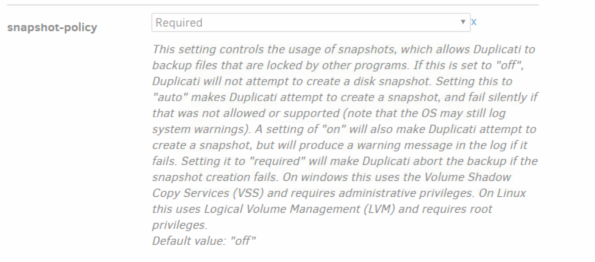
---
### Author:  [@JonMikelV](https://forum.duplicati.com/u/JonMikelV)
#### Post date: [June 13, 2018, 2:51am UTC](https://forum.duplicati.com/t/excluding-ms-office-temporary-files/242/30 "2018-06-13T02:51:24Z")
Thanks for the followup!
Yes, using VSS will allow stop the warnings but it does it in a different way. Where filters will simply not try to backup the files, using VSS (without filters) those same files WILL be backed up. So it does take a little more destination space and bandwidth using VSS.
It should also be noted that some users can’t use VSS due to account permissions, so having the filters as a fallback solution is good. 🙂
---
### Author:  [@zertrin](https://forum.duplicati.com/u/zertrin)
#### Post date: [March 2, 2019, 3:03pm UTC](https://forum.duplicati.com/t/excluding-ms-office-temporary-files/242/31 "2019-03-02T15:03:15Z")
I tried the accepted solution (`-[.\\x7E$[^\]]`), but this doesn’t seem to work, I get this error message:
```
parsing ".\\x7E$[^\]" - Unterminated [] set.
```
EDIT:
Also tried:
> [@kenkendk](#):
>
> `-[.*\\\x7E$[^\\]*]`
This version does not create an error, but doesn’t seem to work at excluding the temp files either:
```
2019-03-02 23:05:35 +08 - [Warning-Duplicati.Library.Main.Operation.Backup.FileBlockProcessor.FileEntry-PathProcessingFailed]: Failed to process path: D:\xxxxx\Documents\xxxxxx\yyyyyy\~$2018-12-21 xxxxx xxxxx yyyyy zzzzzzzzzzz yyyyyyyyyy.xlsx
System.IO.IOException: The process cannot access the file 'D:\xxxxx\Documents\xxxxxx\yyyyyy\~$2018-12-21 xxxxx xxxxx yyyyy zzzzzzzzzzz yyyyyyyyyy.xlsx' because it is being used by another process.
```
---
### Author:  [@zertrin](https://forum.duplicati.com/u/zertrin)
#### Post date: [March 3, 2019, 4:59am UTC](https://forum.duplicati.com/t/excluding-ms-office-temporary-files/242/32 "2019-03-03T04:59:22Z")
Ok the correct filter was buried in the middle of this thread, with plenty of confusing non-working version scattered around.
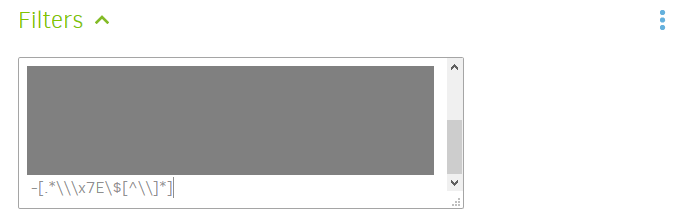
Finally got it working: `-[.*\\\x7E\$[^\\]*]`

or alternatively:
---
### Author:  [@VaudeVillian](https://forum.duplicati.com/u/VaudeVillian)
#### Post date: [March 5, 2020, 12:25am UTC](https://forum.duplicati.com/t/excluding-ms-office-temporary-files/242/33 "2020-03-05T00:25:02Z")
The above filter made my duplicati ignore every file so my last backup after applying this was completely empty.
---
### Author:  [@drwtsn32](https://forum.duplicati.com/u/drwtsn32)
#### Post date: [March 5, 2020, 1:57pm UTC](https://forum.duplicati.com/t/excluding-ms-office-temporary-files/242/34 "2020-03-05T13:57:26Z")
> [@VaudeVillian](#):
>
> The above filter…
Which one? There are lots of filters being discussed above.
---
### Author:  [@VaudeVillian](https://forum.duplicati.com/u/VaudeVillian)
#### Post date: [March 5, 2020, 4:23pm UTC](https://forum.duplicati.com/t/excluding-ms-office-temporary-files/242/35 "2020-03-05T16:23:14Z")
The post I replied to, by Zertin:
> [@zertrin](#):
>
> Ok the correct filter was buried in the middle of this thread, with plenty of confusing non-working version scattered around.
>
> Finally got it working: `-[.*\\\x7E\$[^\\]*]`
>
> 
>
> or alternatively:
>
> 
---
### Author:  [@drwtsn32](https://forum.duplicati.com/u/drwtsn32)
#### Post date: [March 5, 2020, 5:52pm UTC](https://forum.duplicati.com/t/excluding-ms-office-temporary-files/242/36 "2020-03-05T17:52:31Z")
Hmm, the regexp looks OK to me, although I’m not sure why you have to use `\x7E` instead of just `~`.
Are you using any other include or exclude filters?
[Previous page](https://forum.duplicati.com/t/excluding-ms-office-temporary-files/242.md?page=1)