:0
> \`\`\`
>
> I have twice "repaired" the database, but after file verification the errors kept. Might be related to #1583, but in that issue so many different bugs are mentioned I thought to open a fresh/clean new one. I am not sure to recreate the database; will I loose some information about my recent backups?
>
> More relevant information:
>
> 1. Since the backups only run for a few days, I am happy to delete all backup files and start over when necessary. The current risk is not that large
> 2. The backup files are written to a local folder on my system (\`/mnt/nas/backup\`). This is a mount point for a CIFS share, mounted with autofs. So the underlying file system is not ext4 or something, but is a share over SMB. Volume size is set to the default 50MB.
> 3. Currently is backup up my home directory with various exclude filters. 1,89GB source size with backup 165,31 MB / 3 Versions.
>
> \### Steps to reproduce
> \- instantiate backups
> \- run them a few days
> \- notice the failure message in the backup log
>
> \*\*Actual result:\*\* After backup logs contain failure messages
> \*\*Expected result:\*\* No failures should happen during backup process
>
> \### debug log
> I have not a live log available. Can do that when requested, I have only the stored backup log to my availability.
>
> \
> \---
> Want to back this issue? \*\*\[Post a bounty on it!\](https://www.bountysource.com/issues/40712270-failed-to-process-messages-after-backup-the-file-had-size-x-but-was-expected-to-be-y?utm\_campaign=plugin&utm\_content=tracker%2F4870652&utm\_medium=issues&utm\_source=github)\*\* We accept bounties via \[Bountysource\](https://www.bountysource.com/?utm\_campaign=plugin&utm\_content=tracker%2F4870652&utm\_medium=issues&utm\_source=github).
> \
> [@Restore failed 2 files](https://forum.duplicati.com/t/restore-failed-2-files/2859/27):
>
> Important edit: Since I’ve marked this as the solution, I’ve discovered that CIFS with cache=none is extremely slow. I noticed my backups were taking longer than normal. I ran a dd test with one of my shares mounted via NFS and then the same test with CIFS (with cache=none): NFS: (14.3MB/s - not great, but OK): root@home:/media/duplicati\_a# dd if=/mnt/nas/Backup/home-backup.tar.gz of=/media/duplicati\_a/testfile status=progress 816660992 bytes (817 MB, 779 MiB) copied, 57.0038 s, 14.3 MB/s I d…
---
### Author:  [@nraygun](https://forum.duplicati.com/u/nraygun)
#### Post date: [February 24, 2019, 4:55am UTC](https://forum.duplicati.com/t/errors-please-verify-the-sha256-hash/6412/3 "2019-02-24T04:55:11Z")
Thanks for the suggestion. I am using CIFS/Samba so I added the cache=none to my fstab.
How do I clean up the hash problems? Should I just delete the backup and start over?
---
### Author:  [@ts678](https://forum.duplicati.com/u/ts678)
#### Post date: [February 24, 2019, 2:31pm UTC](https://forum.duplicati.com/t/errors-please-verify-the-sha256-hash/6412/4 "2019-02-24T14:31:18Z")
> [@nraygun](#):
>
> How do I clean up the hash problems?
Though @warwickmm has been handling this well (thanks!), I’ve been having the urge to ask whether the wrong-sized file originally mentioned is the same wrong size when viewed from Windows, and also what it looks like when viewed in a hex editor (if you’re into that sort of thing) on either system. We more often see files get truncated to even binary values, and I suspect file system issues. They like to use binary values… Here, though, you had one seemingly expand from (in hex) 31F032D to A00000 which begs the question of whether you got the start of a good file plus extra stuff at its end (somehow). Extra stuff can be removed…
EDIT: Miscounted digits. Never mind the expansion, yours did the usual binary-even shrink, but it might still be good to look at Windows’s view and to see if at least the start looks right. Read the rest of this lightly…
[AES File Format](https://www.aescrypt.com/aes_file_format.html) describes the file format, and gives a hex-viewer example. If you see AES, look at what’s around hex 31F032D, especially after that, although if done right, that should have already been end-of-file.
You can also see if you can find that file’s original upload size and hash, e.g. Job → Show log → Remote then if you can find the `put` of that file, click on it to find the file size and hash that were originally recorded.
---
### Author:  [@nraygun](https://forum.duplicati.com/u/nraygun)
#### Post date: [February 24, 2019, 8:50pm UTC](https://forum.duplicati.com/t/errors-please-verify-the-sha256-hash/6412/5 "2019-02-24T20:50:53Z")
I took one of the flagged files (duplicati-b471d292a4c20498a9b6504cb85de762e.dblock.zip.aes) and found it in the remote server. I tried to jump to 31F032D using a hex editor but there is no such address.
I also looked in the Remote log and there is no “put” entry for this particular file. My warning log says there are 230 entries, but the Remote log doesn’t show this many - it shows only 5 messages.
Note that this went from working one day to showing these warnings the next. Nothing changed on either end.
I’m going to try deleting the whole backup and starting over.
---
### Author:  [@nraygun](https://forum.duplicati.com/u/nraygun)
#### Post date: [February 25, 2019, 2:00pm UTC](https://forum.duplicati.com/t/errors-please-verify-the-sha256-hash/6412/6 "2019-02-25T14:00:22Z")
I tried to start over and got some warnings on some directories so I excluded them. Now I’m down to 2 warnings.
I suppose I could also exclude the “gvfs-metadata/home” directory, but what’s up with the SQL file error?
Starting to think Duplicati is not for me, but I’ll work with it a bit longer.
- 2019-02-25 07:46:04 -06 - [Warning-Duplicati.Library.Main.Operation.Backup.FileBlockProcessor.FileEntry-PathProcessingFailed]: Failed to process path: /home/user/.local/share/gvfs-metadata/home
- 2019-02-25 07:47:45 -06 - [Warning-Duplicati.Library.Main.Operation.Backup.FileBlockProcessor.FileEntry-PathProcessingFailed]: Failed to process path: /home/user/.config/Duplicati/71868281878084798189.sqlite-journal
---
### Author:  [@ts678](https://forum.duplicati.com/u/ts678)
#### Post date: [February 25, 2019, 6:42pm UTC](https://forum.duplicati.com/t/errors-please-verify-the-sha256-hash/6412/7 "2019-02-25T18:42:53Z")
> [@nraygun](#):
>
> what’s up with the SQL file error?
Please use the [Database](https://duplicati.readthedocs.io/en/latest/03-using-the-graphical-user-interface/#database-management) option for your job to see if the `Local database path` is the same as in the warning except for lacking a `-journal` suffix. If so, this is the job’s database [rollback journal](https://www.sqlite.org/tempfiles.html) which is a temporary file which comes and goes and probably tends to be in use (i.e. locked) when it’s there at all.
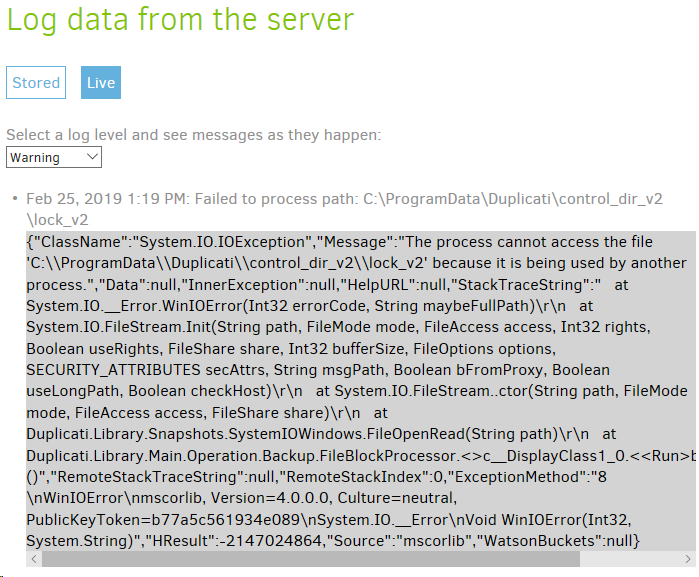
If you want to see the details of the error (not visible in the summary), you can watch the [server log](https://duplicati.readthedocs.io/en/latest/03-using-the-graphical-user-interface/#viewing-the-duplicati-server-logs), i.e. About → Show log → Live → Warning, or set a [–log-file](https://duplicati.readthedocs.io/en/latest/06-advanced-options/#log-file) for the job if you think you might want it again.
Generally, you don’t want a job to back up its own database. Even if not locked, it’s changing, so is stale instantly in terms of content. It tracks the backup which is running. Back it up in a different job, if you like.
For an example of a locked file error in detail, here’s a live log where I click on the warning to see details:
---
### Author:  [@nraygun](https://forum.duplicati.com/u/nraygun)
#### Post date: [February 26, 2019, 3:42am UTC](https://forum.duplicati.com/t/errors-please-verify-the-sha256-hash/6412/8 "2019-02-26T03:42:08Z")
Why doesn’t Duplicati skip backing up it’s own database file if it causes problems?
---
### Author:  [@ts678](https://forum.duplicati.com/u/ts678)
#### Post date: [February 26, 2019, 2:30pm UTC](https://forum.duplicati.com/t/errors-please-verify-the-sha256-hash/6412/9 "2019-02-26T14:30:33Z")
> [@nraygun](#):
>
> Why doesn’t Duplicati skip backing up it’s own database file if it causes problems?
I can’t speak for developers. To me this is a rare and new “nuisance” warning, not a technical problem, so my guess is it’s too new, does too little damage, and has a workaround. Many other problem do not. More:
From a philosophy point of view, Duplicati seems to me (and I am just a user) to be one of those programs that does not force a lot of restrictions on the user, but gives them large latitude to do the backup they want. Some other backup programs take an opposite approach, taking responsibility and capability from the user.
From a problem point of view, this appears to have only become a (rare) warning in the recent 2.0.4.5 beta (with some found in [canary](https://forum.duplicati.com/t/2-0-3-7-on-mac-checkingerrorsforissue1400/3847) releases). It’s often near a #1400 error. Both might be [2.0.3.6](https://forum.duplicati.com/t/release-2-0-3-6-canary-2018-04-23/3309) new-code issues.
[New warnings/errors occurring after updating to 2.0.4.5](https://forum.duplicati.com/t/new-warnings-errors-occurring-after-updating-to-2-0-4-5/5602)
Errors are more serious than warnings, and there are enough still lingering that rare new warnings are not likely high on the priority list for scarce developer time. From a technical point of view, removing this could mean making filters more dynamic, because the database name changes. Current filters appear fixed, but do at least customize several paths to the user. Database path varies and can’t be shown in format below:
```plaintext
C:\Program Files\Duplicati 2>Duplicati.CommandLine.exe help filter-groups
Duplicati has several built-in groups of filters, which include commonly
excluded files and folders for different operating systems. These sets can be
specified via the --include/--exclude parameter by putting their name in
{curly brackets}.
None: Selects no filters.
DefaultExcludes: A set of default exclude filters, currently evaluates to:
DefaultIncludes, SystemFiles,DefaultIncludes,
OperatingSystem,DefaultIncludes, CacheFiles,DefaultIncludes,
TemporaryFiles,DefaultIncludes, Applications.
DefaultIncludes: A set of default include filters, currently evaluates to:
None.
SystemFiles: Files that are owned by the system or not suited to be backed
up. This includes any operating system reported protected files. Most
users should at least apply these filters.
Aliases: Sys,System
*UsrClass.dat*
*\I386*
*\Internet Explorer\
*\Microsoft*\RecoveryStore*
*\Microsoft*\Windows\*.edb
*\Microsoft*\Windows\*.log
*\Microsoft*\Windows\Cookies*
*\MSOCache*
*\NTUSER*
*\ntuser.dat*
*\RECYCLER\
?:\hiberfil.sys
?:\pagefile.sys
?:\swapfile.sys
?:\System Volume Information\
?:\Windows\Installer*
?:\Windows\Temp*
C:\ProgramData\Microsoft\Network\Downloader\*
C:\ProgramData\Microsoft\Windows\WER\*
C:\Users\xxx\AppData\Local\Temp\*
C:\Users\xxx\index.dat
C:\WINDOWS\memory.dmp
C:\WINDOWS\Minidump\*
C:\WINDOWS\netlogon.chg
C:\WINDOWS\softwaredistribution\*.*
C:\WINDOWS\system32\LogFiles\WMI\RtBackup\*.*
C:\Windows\system32\MSDtc\MSDTC.LOG
C:\Windows\system32\MSDtc\trace\dtctrace.log
OperatingSystem: Files that belong to the operating system. These files
are restored when the operating system is re-installed.
Aliases: OS
*\Recent\
?:\autoexec.bat
?:\Config.Msi*
C:\Users\xxx\AppData\Roaming\Microsoft\Windows\Recent\
C:\WINDOWS.old\
C:\WINDOWS\
TemporaryFiles: Files and folders that are known to be storage of
temporary data.
Aliases: Temp,TempFiles,TempFolders,TemporaryFolders,Tmp
*.tmp
*.tmp\
*\$RECYCLE.BIN\
*\AppData\Local\Temp*
*\AppData\Temp*
*\Local Settings\Temp*
?:\Windows\Temp*
C:\Users\xxx\AppData\Local\Temp\
CacheFiles: Files and folders that are known cache locations for the
operating system and various applications
Aliases: Cache,CacheFolders,Caches
*\AppData\Local\AMD\DxCache\
*\AppData\Local\Apple Computer\Mobile Sync\
*\AppData\Local\Comms\UnistoreDB\
*\AppData\Local\ElevatedDiagnostics\
*\AppData\Local\Microsoft\VSCommon\*SQM*
*\AppData\Local\Microsoft\Windows Store\
*\AppData\Local\Microsoft\Windows\Explorer\
*\AppData\Local\Microsoft\Windows\INetCache\
*\AppData\Local\Microsoft\Windows\UPPS\
*\AppData\Local\Microsoft\Windows\WebCache*
*\AppData\Local\Packages\
*\Application Data\Apple Computer\Mobile Sync\
*\Application Data\Application Data*
*\Dropbox\Dropbox.exe.log
*\Dropbox\QuitReports\
*\Duplicati\control_dir_v2\
*\Google\Chrome\*cache*
*\Google\Chrome\*Current*
*\Google\Chrome\*LOCK*
*\Google\Chrome\Safe Browsing*
*\Google\Chrome\User Data\Default\Cookies
*\Google\Chrome\User Data\Default\Cookies-journal
*\iPhoto Library\iPod Photo Cache\
*\Local Settings\History\
*\Mozilla\Firefox\*cache*
*\OneDrive\.849C9593-D756-4E56-8D6E-42412F2A707B
*\Safari\Library\Caches\
*\Temporary Internet Files\
*\Thumbs.db
C:\Users\xxx\AppData\Local\Microsoft\Windows\History\
C:\Users\xxx\AppData\Local\Microsoft\Windows\INetCache\
C:\Users\xxx\AppData\Local\Microsoft\Windows\INetCookies\
[.*\\(cookies|permissions).sqllite(-.{3})?]
Applications: Installed programs and their libraries, but not their
settings.
Aliases: App,Application,Apps
C:\Program Files (x86)\
C:\Program Files\
C:\ProgramData\Microsoft\Windows\Start Menu\Programs\Administrative
Tools\
C:\Users\xxx\AppData\Roaming\Microsoft\Windows\Start
Menu\Programs\Administrative Tools\
C:\Program Files\Duplicati 2>
```
Filtering has been found to cause quite a large loss of performance, but that’s been improved in [2.0.4.10](https://github.com/duplicati/duplicati/releases/tag/v2.0.4.10-2.0.4.10_canary_2018-12-29):
> Improved performance of filters by around 10x, thanks [@warwickmm](https://github.com/warwickmm)
I’m not sure how much performance loss filtering out the job’s own database would cause. If need be, the removal could perhaps be done by special-casing comparison instead of the usual filtering mechanism…
It seems a reasonable idea to me for new users, but if there are users who now backup their database to the extent that backup is possible, these users might be hugely surprised if Duplicati suddenly stops that.
To me, this has more the flavor of an [issue](https://github.com/duplicati/duplicati/issues) than a new [Feature](https://forum.duplicati.com/c/features), but you can make a case for it either way, or possibly someone will read this discussion. Ultimately, some volunteer has to decide to go off and do it.