# Error during auto backup
**URL:** https://forum.duplicati.com/t/error-during-auto-backup/16437
**Category:** Support
**Created:** [July 1, 2023, 3:01pm UTC](https://forum.duplicati.com/t/error-during-auto-backup/16437 "2023-07-01T15:01:56Z")
**Posts on this page:** 20
**Page:** 1
### Author:  [@Breat](https://forum.duplicati.com/u/Breat)
#### Post date: [July 1, 2023, 3:01pm UTC](https://forum.duplicati.com/t/error-during-auto-backup/16437/1 "2023-07-01T15:01:56Z")
hi,
i’m using Duplicati - 2.0.7.1\_beta\_2023-05-25 on windows.
during my auto save today, i got the message:
> Error while running Automatic save
> Failed to decrypt data (invalid passphrase?): Message has been altered, do not trust content
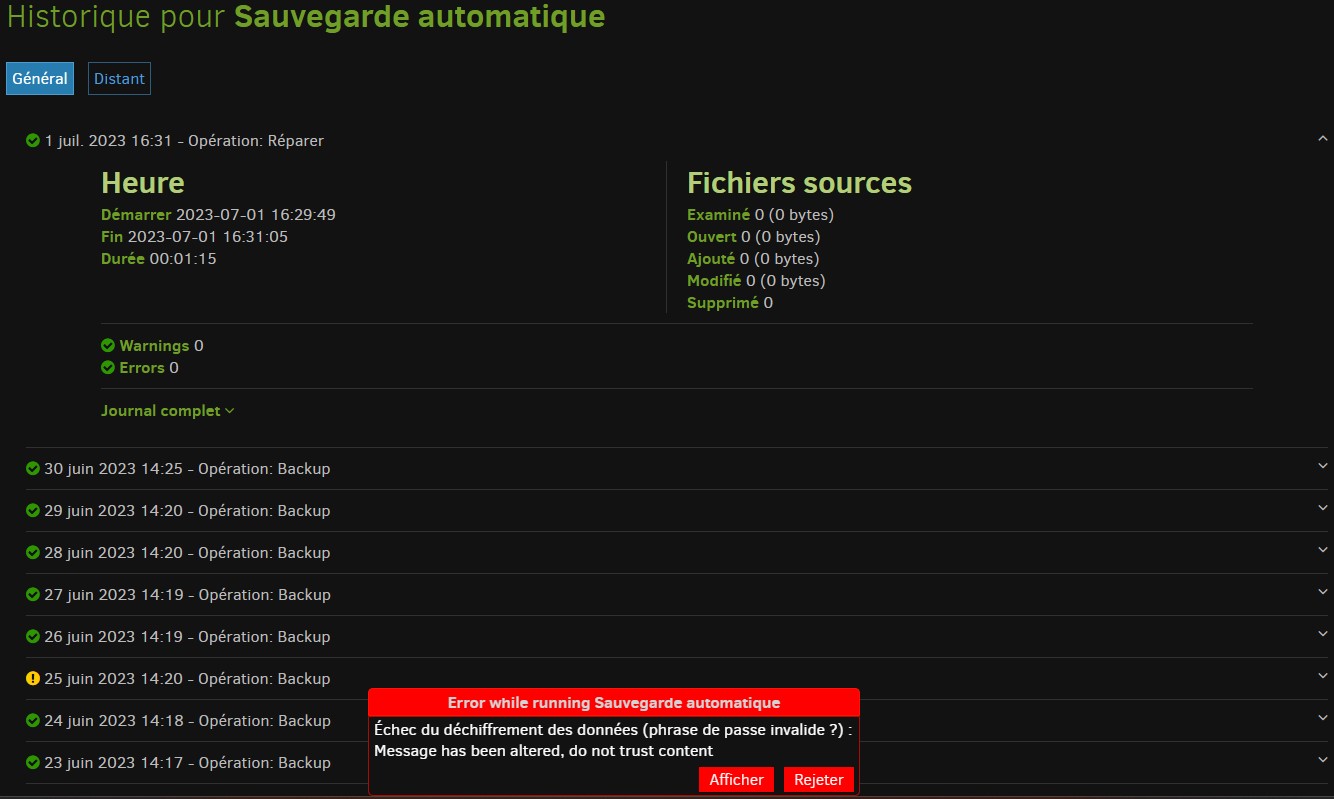
i checked in my auto save settings and the password is the good (i have him saved in my 1password but i put him by copy/paste last time i create the job so some months ago and i didn’t touch him since this moment.
someone have an idea to fix it ?
---
### Author:  [@Jojo-1000](https://forum.duplicati.com/u/Jojo-1000)
#### Post date: [July 1, 2023, 8:30pm UTC](https://forum.duplicati.com/t/error-during-auto-backup/16437/2 "2023-07-01T20:30:57Z")
This seems like there might be some corruption in the backup files.
You can run verify files on the backup if you expand the entry on the main page. If that also returns an error, there is the [`test` command](https://duplicati.readthedocs.io/en/latest/04-using-duplicati-from-the-command-line/#the-test-command) from the command line. You can use it from the UI if you click on Commandline. Then replace all the paths in command line arguments with the number of different files to test. Because it seems like the last version is broken, add `--version=1` to the advanced options to test the previous version.
If only the last version is broken, this might be due to a connection or filesystem error (depends on what backend you use). Then the next backup might work again, although it is a bit concerning.
---
### Author:  [@Breat](https://forum.duplicati.com/u/Breat)
#### Post date: [July 2, 2023, 12:39pm UTC](https://forum.duplicati.com/t/error-during-auto-backup/16437/3 "2023-07-02T12:39:44Z")
the verify didn’t get error but today the backup get the same in my previous post
---
### Author:  [@ts678](https://forum.duplicati.com/u/ts678)
#### Post date: [July 2, 2023, 1:48pm UTC](https://forum.duplicati.com/t/error-during-auto-backup/16437/4 "2023-07-02T13:48:44Z")
> [@Breat](#):
>
> today the backup get the same in my previous post
Did you happen to notice (or is it fast enough that you can look) what the status line at page top said?
For a more relaxed experience, About → Show log → Live → Information might also show where it is.
[Using the Command line tools from within the Graphical User Interface](https://duplicati.readthedocs.io/en/latest/03-using-the-graphical-user-interface/#using-the-command-line-tools-from-within-the-graphical-user-interface) is another way to see the trail.
What destination storage type has the backup files? You might have some bad ones found sometimes when a download is attempted, and there are at least two possible places where files get downloaded:
[Compacting files at the backend](https://duplicati.readthedocs.io/en/latest/03-using-the-graphical-user-interface/#compacting-files-at-the-backend) (which can also be explorered by using the GUI `Compact now` button)
[Verifying backend files](https://duplicati.readthedocs.io/en/latest/03-using-the-graphical-user-interface/#verifying-backend-files) (which is sampled verification, just like [The TEST command](https://duplicati.readthedocs.io/en/latest/04-using-duplicati-from-the-command-line/#the-test-command), so runs may vary).
Both samples can be expanded, but the time it will take for a full check depends on what destination is.
---
### Author:  [@Breat](https://forum.duplicati.com/u/Breat)
#### Post date: [July 2, 2023, 3:53pm UTC](https://forum.duplicati.com/t/error-during-auto-backup/16437/5 "2023-07-02T15:53:32Z")
i have this in About → Show log → Live → Information

the 2 1st expanded are:

the destination is same since i use duplicati : a pcloud drive folder and i have this problem since 2 days.
do you want i try to compatct ?
---
### Author:  [@ts678](https://forum.duplicati.com/u/ts678)
#### Post date: [July 2, 2023, 7:34pm UTC](https://forum.duplicati.com/t/error-during-auto-backup/16437/6 "2023-07-02T19:34:47Z")
> [@Breat](#):
>
> i have this in About → Show log → Live → Information
This is reverse-chronological, so needed clues (before retrying) need you to scroll screen down.
You can possibly get a more compact historical view of history at \ → Show log → Remote.
Seeing it do two dblock `Get` make me think this might be compact, but need some more context.
At least you now know a name of one broken file. You can (if you like) download it for inspection.
[AES Crypt](https://www.aescrypt.com/) is a GUI tool you can use to try to decrypt it, or you can use CLI SharpAESCrypt.exe.
> [@Breat](#):
>
> i have this problem since 2 days.
If it’s compact, that’s only occasional.
> [@Breat](#):
>
> do you want i try to compatct ?
You can try. It might do the same thing on the same file. Or you could backup with [no-auto-compact](https://duplicati.readthedocs.io/en/latest/06-advanced-options/#no-auto-compact).
If that works, then some older file is damaged, but the random sampling hadn’t noticed the issue yet.
Can you easily find the date on the file that wouldn’t download, e.g. from whatever tools pCloud has?
---
### Author:  [@Breat](https://forum.duplicati.com/u/Breat)
#### Post date: [July 3, 2023, 12:36pm UTC](https://forum.duplicati.com/t/error-during-auto-backup/16437/7 "2023-07-03T12:36:56Z")
here the full log with details for items i have i got today when i got the same error:
> 3 juil. 2023 14:23: L’opération Backup a échoué avec l’erreur : Échec du déchiffrement des données (phrase de passe invalide ?) : Message has been altered, do not trust content
> {“ClassName”:“System.Security.Cryptography.CryptographicException”,“Message”:“Échec du déchiffrement des données (phrase de passe invalide ?) : Message has been altered, do not trust content”,“Data”:null,“InnerException”:{“ClassName”:“SharpAESCrypt.SharpAESCrypt+HashMismatchException”,“Message”:“Message has been altered, do not trust content”,“Data”:null,“InnerException”:null,“HelpURL”:null,“StackTraceString”:" à SharpAESCrypt.SharpAESCrypt.Read(Byte buffer, Int32 offset, Int32 count)\r\n à Duplicati.Library.Utility.Utility.CopyStream(Stream source, Stream target, Boolean tryRewindSource, Byte buf)\r\n à Duplicati.Library.Encryption.EncryptionBase.Decrypt(Stream input, Stream output)“,“RemoteStackTraceString”:null,“RemoteStackIndex”:0,“ExceptionMethod”:“8\nRead\nSharpAESCrypt, Version=1.3.3.0, Culture=neutral, PublicKeyToken=null\nSharpAESCrypt.SharpAESCrypt\nInt32 Read(Byte, Int32, Int32)”,“HResult”:-2146233296,“Source”:“SharpAESCrypt”,“WatsonBuckets”:null},“HelpURL”:null,“StackTraceString”:” à Duplicati.Library.Main.AsyncDownloader.AsyncDownloaderEnumerator.AsyncDownloadedFile.get\_TempFile()\r\n à Duplicati.Library.Main.Operation.CompactHandler.DoCompact(LocalDeleteDatabase db, Boolean hasVerifiedBackend, IDbTransaction& transaction, BackendManager sharedBackend)\r\n à Duplicati.Library.Main.Operation.DeleteHandler.DoRun(LocalDeleteDatabase db, IDbTransaction& transaction, Boolean hasVerifiedBackend, Boolean forceCompact, BackendManager sharedManager)\r\n à Duplicati.Library.Main.Operation.BackupHandler.CompactIfRequired(BackendManager backend, Int64 lastVolumeSize)\r\n à Duplicati.Library.Main.Operation.BackupHandler.d\_\_20.MoveNext()\r\n— Fin de la trace de la pile à partir de l’emplacement précédent au niveau duquel l’exception a été levée —\r\n à System.Runtime.ExceptionServices.ExceptionDispatchInfo.Throw()\r\n à CoCoL.ChannelExtensions.WaitForTaskOrThrow(Task task)\r\n à Duplicati.Library.Main.Controller.\<\>c\_\_DisplayClass14\_0.b\_\_0(BackupResults result)\r\n à Duplicati.Library.Main.Controller.RunAction[T](T result, String& paths, IFilter& filter, Action`1 method)\r\n à Duplicati.Library.Main.Controller.Backup(String inputsources, IFilter filter)\r\n à Duplicati.Server.Runner.Run(IRunnerData data, Boolean fromQueue)",“RemoteStackTraceString”:null,“RemoteStackIndex”:0,“ExceptionMethod”:“8\nget\_TempFile\nDuplicati.Library.Main, Version=2.0.7.1, Culture=neutral, PublicKeyToken=null\nDuplicati.Library.Main.AsyncDownloader+AsyncDownloaderEnumerator+AsyncDownloadedFile\nDuplicati.Library.Utility.TempFile get\_TempFile()”,“HResult”:-2146233296,“Source”:“Duplicati.Library.Main”,“WatsonBuckets”:null}
>
> 3 juil. 2023 14:23: Fatal error
> {“ClassName”:“System.Security.Cryptography.CryptographicException”,“Message”:“Échec du déchiffrement des données (phrase de passe invalide ?) : Message has been altered, do not trust content”,“Data”:null,“InnerException”:{“ClassName”:“SharpAESCrypt.SharpAESCrypt+HashMismatchException”,“Message”:“Message has been altered, do not trust content”,“Data”:null,“InnerException”:null,“HelpURL”:null,“StackTraceString”:" à SharpAESCrypt.SharpAESCrypt.Read(Byte buffer, Int32 offset, Int32 count)\r\n à Duplicati.Library.Utility.Utility.CopyStream(Stream source, Stream target, Boolean tryRewindSource, Byte buf)\r\n à Duplicati.Library.Encryption.EncryptionBase.Decrypt(Stream input, Stream output)“,“RemoteStackTraceString”:null,“RemoteStackIndex”:0,“ExceptionMethod”:“8\nRead\nSharpAESCrypt, Version=1.3.3.0, Culture=neutral, PublicKeyToken=null\nSharpAESCrypt.SharpAESCrypt\nInt32 Read(Byte, Int32, Int32)”,“HResult”:-2146233296,“Source”:“SharpAESCrypt”,“WatsonBuckets”:null},“HelpURL”:null,“StackTraceString”:” à Duplicati.Library.Main.AsyncDownloader.AsyncDownloaderEnumerator.AsyncDownloadedFile.get\_TempFile()\r\n à Duplicati.Library.Main.Operation.CompactHandler.DoCompact(LocalDeleteDatabase db, Boolean hasVerifiedBackend, IDbTransaction& transaction, BackendManager sharedBackend)\r\n à Duplicati.Library.Main.Operation.DeleteHandler.DoRun(LocalDeleteDatabase db, IDbTransaction& transaction, Boolean hasVerifiedBackend, Boolean forceCompact, BackendManager sharedManager)\r\n à Duplicati.Library.Main.Operation.BackupHandler.CompactIfRequired(BackendManager backend, Int64 lastVolumeSize)\r\n à Duplicati.Library.Main.Operation.BackupHandler.d\_\_20.MoveNext()\r\n— Fin de la trace de la pile à partir de l’emplacement précédent au niveau duquel l’exception a été levée —\r\n à System.Runtime.ExceptionServices.ExceptionDispatchInfo.Throw()\r\n à CoCoL.ChannelExtensions.WaitForTaskOrThrow(Task task)\r\n à Duplicati.Library.Main.Controller.\<\>c\_\_DisplayClass14\_0.b\_\_0(BackupResults result)\r\n à Duplicati.Library.Main.Controller.RunAction[T](T result, String& paths, IFilter& filter, Action`1 method)\r\n à Duplicati.Library.Main.Controller.Backup(String inputsources, IFilter filter)\r\n à Duplicati.Server.Runner.Run(IRunnerData data, Boolean fromQueue)",“RemoteStackTraceString”:null,“RemoteStackIndex”:0,“ExceptionMethod”:“8\nget\_TempFile\nDuplicati.Library.Main, Version=2.0.7.1, Culture=neutral, PublicKeyToken=null\nDuplicati.Library.Main.AsyncDownloader+AsyncDownloaderEnumerator+AsyncDownloadedFile\nDuplicati.Library.Utility.TempFile get\_TempFile()”,“HResult”:-2146233296,“Source”:“Duplicati.Library.Main”,“WatsonBuckets”:null}
>
> 3 juil. 2023 14:23: Backend event: Get - Started: duplicati-b0e1aeb6f6c024f20abc30db8db6ad710.dblock.zip.aes (99,97 MB)
>
> 3 juil. 2023 14:23: Failed to retrieve file duplicati-b878bdb456f93454ca89844a2dd02f68a.dblock.zip.aes
> {“ClassName”:“System.Security.Cryptography.CryptographicException”,“Message”:“Échec du déchiffrement des données (phrase de passe invalide ?) : Message has been altered, do not trust content”,“Data”:null,“InnerException”:{“ClassName”:“SharpAESCrypt.SharpAESCrypt+HashMismatchException”,“Message”:“Message has been altered, do not trust content”,“Data”:null,“InnerException”:null,“HelpURL”:null,“StackTraceString”:" à SharpAESCrypt.SharpAESCrypt.Read(Byte buffer, Int32 offset, Int32 count)\r\n à Duplicati.Library.Utility.Utility.CopyStream(Stream source, Stream target, Boolean tryRewindSource, Byte buf)\r\n à Duplicati.Library.Encryption.EncryptionBase.Decrypt(Stream input, Stream output)“,“RemoteStackTraceString”:null,“RemoteStackIndex”:0,“ExceptionMethod”:“8\nRead\nSharpAESCrypt, Version=1.3.3.0, Culture=neutral, PublicKeyToken=null\nSharpAESCrypt.SharpAESCrypt\nInt32 Read(Byte, Int32, Int32)”,“HResult”:-2146233296,“Source”:“SharpAESCrypt”,“WatsonBuckets”:null},“HelpURL”:null,“StackTraceString”:” à Duplicati.Library.Main.AsyncDownloader.AsyncDownloaderEnumerator.AsyncDownloadedFile.get\_TempFile()\r\n à Duplicati.Library.Main.Operation.CompactHandler.DoCompact(LocalDeleteDatabase db, Boolean hasVerifiedBackend, IDbTransaction& transaction, BackendManager sharedBackend)\r\n à Duplicati.Library.Main.Operation.DeleteHandler.DoRun(LocalDeleteDatabase db, IDbTransaction& transaction, Boolean hasVerifiedBackend, Boolean forceCompact, BackendManager sharedManager)\r\n à Duplicati.Library.Main.Operation.BackupHandler.CompactIfRequired(BackendManager backend, Int64 lastVolumeSize)\r\n à Duplicati.Library.Main.Operation.BackupHandler.d\_\_20.MoveNext()\r\n— Fin de la trace de la pile à partir de l’emplacement précédent au niveau duquel l’exception a été levée —\r\n à System.Runtime.ExceptionServices.ExceptionDispatchInfo.Throw()\r\n à CoCoL.ChannelExtensions.WaitForTaskOrThrow(Task task)\r\n à Duplicati.Library.Main.Controller.\<\>c\_\_DisplayClass14\_0.b\_\_0(BackupResults result)\r\n à Duplicati.Library.Main.Controller.RunAction[T](T result, String& paths, IFilter& filter, Action`1 method)\r\n à Duplicati.Library.Main.Controller.Backup(String inputsources, IFilter filter)\r\n à Duplicati.Server.Runner.Run(IRunnerData data, Boolean fromQueue)",“RemoteStackTraceString”:null,“RemoteStackIndex”:0,“ExceptionMethod”:“8\nget\_TempFile\nDuplicati.Library.Main, Version=2.0.7.1, Culture=neutral, PublicKeyToken=null\nDuplicati.Library.Main.AsyncDownloader+AsyncDownloaderEnumerator+AsyncDownloadedFile\nDuplicati.Library.Utility.TempFile get\_TempFile()”,“HResult”:-2146233296,“Source”:“Duplicati.Library.Main”,“WatsonBuckets”:null}
>
> 3 juil. 2023 14:23: Backend event: Get - Failed: duplicati-b878bdb456f93454ca89844a2dd02f68a.dblock.zip.aes (99,92 MB)
> 3 juil. 2023 14:23: Backend event: Get - Started: duplicati-b878bdb456f93454ca89844a2dd02f68a.dblock.zip.aes (99,92 MB)
> 3 juil. 2023 14:23: Backend event: Get - Retrying: duplicati-b878bdb456f93454ca89844a2dd02f68a.dblock.zip.aes (99,92 MB)
> 3 juil. 2023 14:23: Backend event: Get - Started: duplicati-b878bdb456f93454ca89844a2dd02f68a.dblock.zip.aes (99,92 MB)
> 3 juil. 2023 14:23: Backend event: Get - Retrying: duplicati-b878bdb456f93454ca89844a2dd02f68a.dblock.zip.aes (99,92 MB)
> 3 juil. 2023 14:23: Backend event: Get - Started: duplicati-b878bdb456f93454ca89844a2dd02f68a.dblock.zip.aes (99,92 MB)
> 3 juil. 2023 14:23: Backend event: Get - Retrying: duplicati-b878bdb456f93454ca89844a2dd02f68a.dblock.zip.aes (99,92 MB)
> 3 juil. 2023 14:22: Backend event: Get - Started: duplicati-b878bdb456f93454ca89844a2dd02f68a.dblock.zip.aes (99,92 MB)
> 3 juil. 2023 14:22: Backend event: Get - Retrying: duplicati-b878bdb456f93454ca89844a2dd02f68a.dblock.zip.aes (99,92 MB)
> 3 juil. 2023 14:21: Backend event: Get - Started: duplicati-b878bdb456f93454ca89844a2dd02f68a.dblock.zip.aes (99,92 MB)
> 3 juil. 2023 14:21: Backend event: Get - Completed: duplicati-b0777d5d0025c48e7823ef8e1f340d322.dblock.zip.aes (99,91 MB)
> 3 juil. 2023 14:21: Backend event: Get - Started: duplicati-b0777d5d0025c48e7823ef8e1f340d322.dblock.zip.aes (99,91 MB)
> 3 juil. 2023 14:21: Compacting because there are 128,22 MB in small volumes and the volume size is 100,00 MB
> 3 juil. 2023 14:18: Deleted 1 remote fileset(s)
> 3 juil. 2023 14:18: Backend event: Delete - Completed: duplicati-20230602T120002Z.dlist.zip.aes (28,29 MB)
> 3 juil. 2023 14:18: Backend event: Delete - Started: duplicati-20230602T120002Z.dlist.zip.aes (28,29 MB)
> 3 juil. 2023 14:15: Deleting 1 remote fileset(s) …
> 3 juil. 2023 14:15: Backend event: Put - Completed: duplicati-20230703T120002Z.dlist.zip.aes (28,36 MB)
> 3 juil. 2023 14:15: Backend event: Put - Started: duplicati-20230703T120002Z.dlist.zip.aes (28,36 MB)
> 3 juil. 2023 14:15: Backend event: Put - Completed: duplicati-i31ad78fbf2514b93851322e4a0770396.dindex.zip.aes (52,76 KB)
> 3 juil. 2023 14:15: Backend event: Put - Started: duplicati-i31ad78fbf2514b93851322e4a0770396.dindex.zip.aes (52,76 KB)
> 3 juil. 2023 14:14: Backend event: Put - Completed: duplicati-b5312772c77a74b5f90740f8836b8152e.dblock.zip.aes (26,99 MB)
> 3 juil. 2023 14:14: Backend event: Put - Started: duplicati-b5312772c77a74b5f90740f8836b8152e.dblock.zip.aes (26,99 MB)
I got the error every day so isn’t occasional and my last backup with success was 30/06/2023.
i create a bug\_report file if you want because i’m not good with database so if need i can share it with you. (about 1Go)
---
### Author:  [@ts678](https://forum.duplicati.com/u/ts678)
#### Post date: [July 3, 2023, 1:05pm UTC](https://forum.duplicati.com/t/error-during-auto-backup/16437/8 "2023-07-03T13:05:20Z")
> [@Breat](#):
>
> here the full log with details
This confirms that it was in the compact after the backup. Good news is you got a backup done. That generally ends with the `dlist` file upload. Bad news is you have at least one seemingly damaged file, meaning backup might have some damage you would find on a restore. This should get taken care of.
[Disaster Recovery](https://duplicati.readthedocs.io/en/latest/08-disaster-recovery/) is an overview. You’re likely in the “corrupted backup files” section, although it’d be slightly more certain if you actually tried to decrypt the file, as described. You could also survey further.
[The TEST command](https://duplicati.readthedocs.io/en/latest/04-using-duplicati-from-the-command-line/#the-test-command) describes that. Most thorough is the “all” if you can stand that long a download…
[Using the Command line tools from within the Graphical User Interface](https://duplicati.readthedocs.io/en/latest/03-using-the-graphical-user-interface/#using-the-command-line-tools-from-within-the-graphical-user-interface) is a convenient place to do that assuming you don’t mind typing up Duplicati GUI (for example no scheduled backups) until it’s finished.
You can think about your backup size and your download speed. Add time for Duplicati’s check as well.
Or you could get warmed up by deleting (or hiding) the known bad file and doing the [list-broken-files](https://duplicati.readthedocs.io/en/latest/04-using-duplicati-from-the-command-line/#the-list-broken-files-command) described to see what’s going to happen when you run [purge-broken-files](https://duplicati.readthedocs.io/en/latest/04-using-duplicati-from-the-command-line/#the-purge-broken-files-command). There’s no telling if there might be other damaged files without looking, but you can look gradually if you don’t mind a lingering hazard and distributed verification slowdowns as opposed to one complete verification. Given history, [backup-test-percentage](https://duplicati.readthedocs.io/en/latest/06-advanced-options/#backup-test-percentage) should probably be raised for awhile in case this sort of damage may repeat.
> [@Breat](#):
>
> I got the error every day so isn’t occasional
That wasn’t the point. The point was that [The COMPACT command](https://duplicati.readthedocs.io/en/latest/04-using-duplicati-from-the-command-line/#the-compact-command) doesn’t always run because it has configurable (as well as default) thresholds. After the thresholds are first met, though, they remain met. Were the compact able to run, it would probably then revert to occasional until thresholds met again…
---
### Author:  [@ts678](https://forum.duplicati.com/u/ts678)
#### Post date: [July 3, 2023, 1:09pm UTC](https://forum.duplicati.com/t/error-during-auto-backup/16437/9 "2023-07-03T13:09:23Z")
> [@Breat](#):
>
> i create a bug\_report file if you want because i’m not good with database so if need i can share it with you. (about 1Go)
You can put it somewhere and post a link. It might show something about how the bad file got that way, however it won’t decrypt the suspect bad file. If it’s genuinely bad, then it’s bad, and some data got lost.
---
### Author:  [@Breat](https://forum.duplicati.com/u/Breat)
#### Post date: [July 3, 2023, 1:26pm UTC](https://forum.duplicati.com/t/error-during-auto-backup/16437/10 "2023-07-03T13:26:41Z")
here the bug report file: [https://drive.proton.me/urls/A10XVEGSPG#XNntos6tsvsI](https://drive.proton.me/urls/A10XVEGSPG#XNntos6tsvsI)
when i expand my backup job and click on command line, I got the setting of my current job but in add option at the end i can’t find list-broken-files or purge-broken-files
---
### Author:  [@ts678](https://forum.duplicati.com/u/ts678)
#### Post date: [July 3, 2023, 1:44pm UTC](https://forum.duplicati.com/t/error-during-auto-backup/16437/11 "2023-07-03T13:44:45Z")
> [@Breat](#):
>
> in add option at the end i can’t find list-broken-files or purge-broken-files
It’s not an option. It’s a Command, available from dropdown at top of page.
---
### Author:  [@Breat](https://forum.duplicati.com/u/Breat)
#### Post date: [July 3, 2023, 2:04pm UTC](https://forum.duplicati.com/t/error-during-auto-backup/16437/12 "2023-07-03T14:04:27Z")
ty 🙂
the list-broken-files give me:
> Found 8 commands but expected 1, commands:
> "file://E:\Backups\MSI"
> "C:\User Manual"
> "C:\Users\Breat.1password"
> "C:\Users\Breat.config"
> "C:\Users\Breat.VirtualBox"
> "C:\Users\Breat.vscode"
> "C:\Users\Breat\AppData"
> "D:\Breat"
> Return code: 200
---
### Author:  [@ts678](https://forum.duplicati.com/u/ts678)
#### Post date: [July 3, 2023, 2:08pm UTC](https://forum.duplicati.com/t/error-during-auto-backup/16437/13 "2023-07-03T14:08:58Z")
> [@Breat](#):
>
> Found 8 commands but expected
Syntax of different commands varies. When changing the command, match new syntax.
In this case, clear out the listed items. They are in `Commandline arguments` box, right?
backup command syntax from the manual is where it starts:
> `Duplicati.CommandLine.exe backup "" []`
list-broken-files is
> `Duplicati.CommandLine.exe list-broken-files []`
so source paths have to be removed. If you’re lucky, irrelevant options are just ignored…
---
### Author:  [@Breat](https://forum.duplicati.com/u/Breat)
#### Post date: [July 3, 2023, 2:15pm UTC](https://forum.duplicati.com/t/error-during-auto-backup/16437/14 "2023-07-03T14:15:08Z")
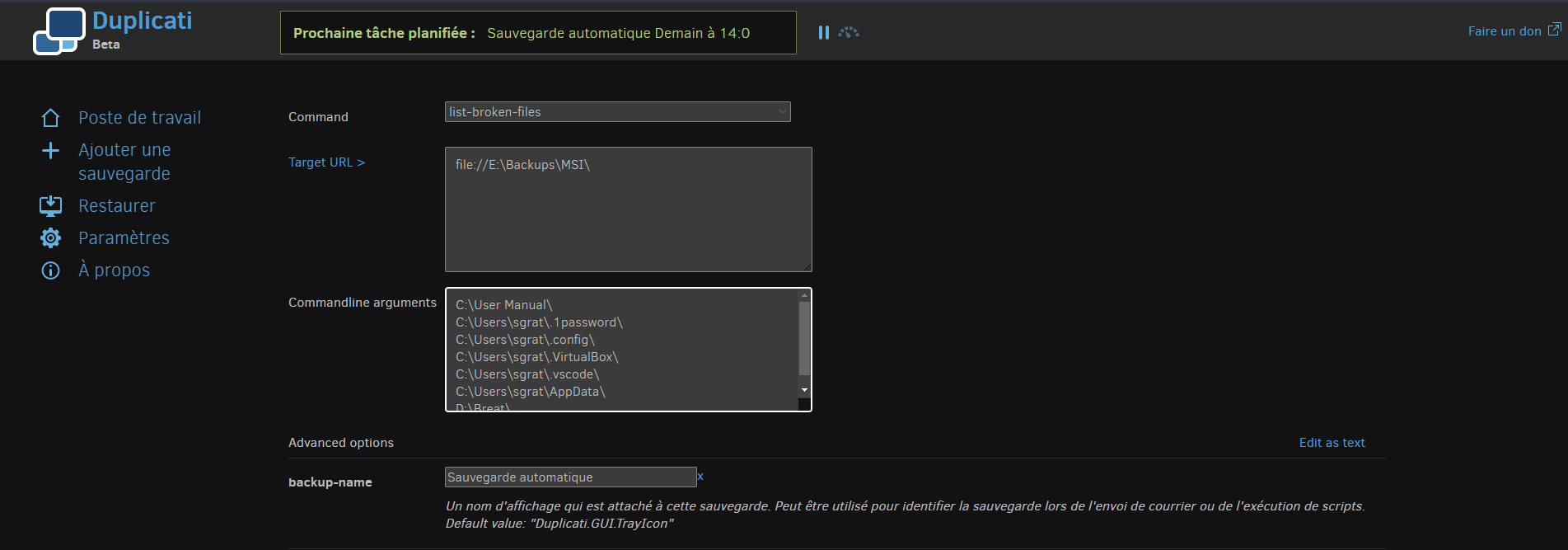
i have this when i click on command line:
---
### Author:  [@ts678](https://forum.duplicati.com/u/ts678)
#### Post date: [July 3, 2023, 2:18pm UTC](https://forum.duplicati.com/t/error-during-auto-backup/16437/15 "2023-07-03T14:18:30Z")
> [@Breat](#):
>
> i have this
> [@ts678](#):
>
> so source paths have to be removed.
> [@ts678](#):
>
> They are in `Commandline arguments` box, right?
Image confirms, so delete them from box.
---
### Author:  [@Breat](https://forum.duplicati.com/u/Breat)
#### Post date: [July 3, 2023, 2:20pm UTC](https://forum.duplicati.com/t/error-during-auto-backup/16437/16 "2023-07-03T14:20:38Z")
i need clean the “command line arguments” box ?
---
### Author:  [@ts678](https://forum.duplicati.com/u/ts678)
#### Post date: [July 3, 2023, 2:22pm UTC](https://forum.duplicati.com/t/error-during-auto-backup/16437/17 "2023-07-03T14:22:10Z")
> [@Breat](#):
>
> clean the “command line arguments” box ?
Yes. You didn’t show the whole box, but that’s exactly line-for-line what the errors were about, right?
---
### Author:  [@ts678](https://forum.duplicati.com/u/ts678)
#### Post date: [July 3, 2023, 2:25pm UTC](https://forum.duplicati.com/t/error-during-auto-backup/16437/18 "2023-07-03T14:25:35Z")
How did that Target URL of a local destination get there? You said it went to pCloud.
---
### Author:  [@Breat](https://forum.duplicati.com/u/Breat)
#### Post date: [July 3, 2023, 2:26pm UTC](https://forum.duplicati.com/t/error-during-auto-backup/16437/19 "2023-07-03T14:26:53Z")
ok i cleaned it and run and got this:
> ErrorID: FiltersAreNotSupportedForListBrokenFiles
> Filters are not supported for this operation
> Return code: 100
if i understand well, i need clean my exclude paths and files in backup job in command line view ?
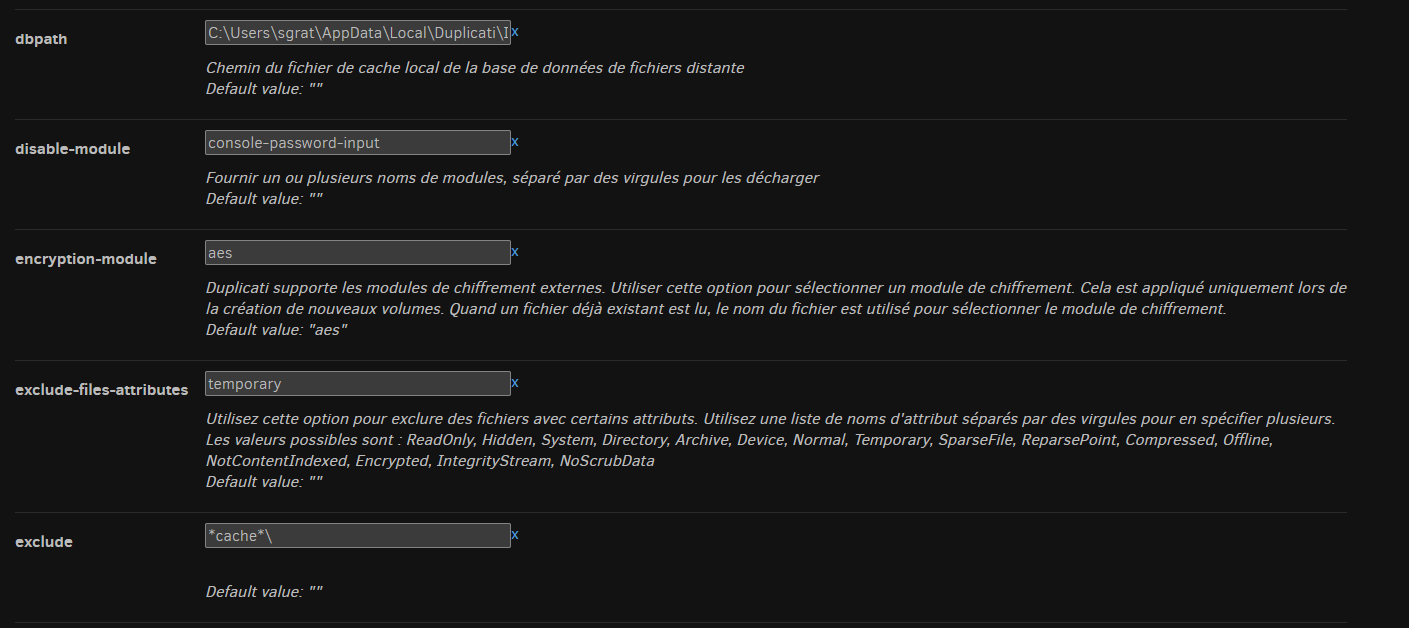
i have many more under theses ones
if i cleaned them, they stay in the real backup job ?
---
### Author:  [@ts678](https://forum.duplicati.com/u/ts678)
#### Post date: [July 3, 2023, 2:38pm UTC](https://forum.duplicati.com/t/error-during-auto-backup/16437/20 "2023-07-03T14:38:44Z")
> [@Breat](#):
>
> if i cleaned them, they stay in the real backup job ?
Nothing on the screen changes the backup job configuration. You need to edit the job to do that.
This is temporary setup for one time use to run a command. This one doesn’t like those options.
`file://E:\Backups\MSI\` in the Target URL was my prior question. Maybe it’s a pCloud drive?
I’d forgotten that there’s no direct support for pCloud, I think. So are all of your files visible there?
The one suspect file looks like it dates to the original backup on Jan 30. Nothing looks suspicious
looking at the DB bug report, some history has 30-days aged off, and yet file content may be bad.
You’ll have to decrypt if you want to confirm, but there’s a good chance it’s genuinely bad content.
EDIT:
Apparently [pCloud has both a Drive and a Sync](https://www.pcloud.com/help/drive-help-center/whats-the-difference-between-pcloud-drive-and-pcloud-sync). Regardless, one more step that may have failed.
[Next page](https://forum.duplicati.com/t/error-during-auto-backup/16437.md?page=2)