Hi. I’m trying to figure out how to use to use preload settings file to encrypt my database. According to this link, it says I can create a preload.json file. I found the Windows folder were my database file. Then do I
Right click and create a file named “preload.json” in this folder
Thank you for suggesting using a temp-preload.json file to test for encryption. I kept trying the temp-preload.json file to test and it wasn’t crashing. So I uninstalled it, reinstalled it, and added the preload.json file again. I finally found got a crash log to confirm the encryption was working.
I saw your suggestion to use SQlitebrowser to look for “Setting” table to check for encryption, but I didn’t see anything that said “Setting” when I opened it.
May I also second the suggestion creating some sort of GUI to add a server encryption in the Duplicati settings menu? I did find it kind of complicated trying to figure out how to encrypt my database.
I’m another user somewhat confused by this new setting and the explanation of the threat model.
I understand that a plain text DB is a potential vulnerability. However, if we encrypt the database but store the encryption key in a plain text preload.json file (or an environment variable) right next to it, aren’t we just moving the vulnerability one step to the left? It seems just as weak as a plain text DB against a local attacker.
For Windows, Credential Manager sounds like a viable option, but the documentation is quite sparse.
Do I simply add --secret-provider=wincred:// to my startup shortcut and that’s it? Does Duplicati handle the generation and storage of the keys/values automatically, or is there a manual setup step required?
How does using wincred affect moving to a new machine? Currently, I keep a secure note in Bitwarden vault with the plain text config of each backup set. If my computer dies, I simply reinstall Duplicati on a new machine, paste in the config, and (presumably ) rebuild the database from the backend files.
If the local database was encrypted with a key locked inside the old machine’s Windows Credential Manager, does that complicate a fresh install/restore on a new machine? Or is the local encryption key irrelevant in a DR scenario because I would be creating a fresh (empty) database anyway?
Finally, for a brand new user installing Duplicati for the first time: What is the default behavior? Will they be prompted to set this up, or will they receive the warning message and have to figure out these flags on their own?
From version 2.3 the default is to encrypt the configuration database, and you need to decrypt it before copying. If you have disabled database encryption, you can skip the decryption step.
was added, I think per my remark about it needing to be said for new plan.
Good advice, but it only works if you find it, plan ahead, and get that done.
highlights the settings risk that users now face by default. While the user
should probably keep at least enough somewhere else to be able to run Direct restore from backup files, having to recreate the jobs may be hard.
Arguably the restore is more important, and the settings loss isn’t all-new.
What’s new is the non-portable encryption-by-default makes it more likely.
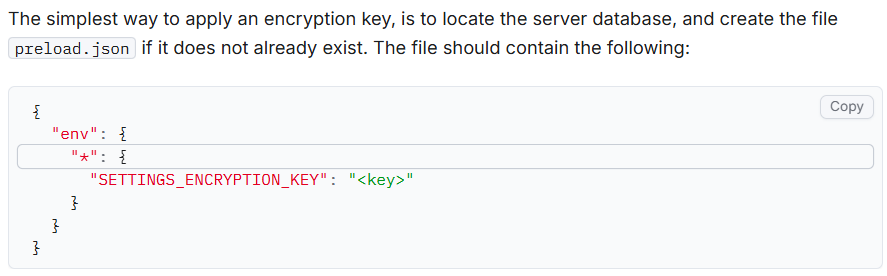
Everything between the quotation marks is the actual encryption key. The < and > are only included to show the value. Example with the key “batteryhorsestaple”:
The latest version is a bit more smooth in this regard, and automatically generates a key and stores it in the OS credential manager.
Yes, absolutely. If you place the password next to the database, you mostly protect against casual secret scanning. If you place a password in an environment variable, it is at least less likely that this will be leaked together with the database file itself.
Adding --secret-provider=wincred:// will instruct Duplicati to resolve values such as $some-value by looking in the Windows credential manager. So, you would need to also add --settings-encryption-key=$duplicati-server-encryption-key and then create a value in Windows Credential Manager with duplicati-server-encryption-key.
With the latest stable release, this is done automatically, and the SecretProvider tool can also write secrets now, so the default is to look for that key, and if it does not exist, create it with a random key, then use it going forward.
There are two kinds of database in Duplicati, usually called “Server” and “Local”. The “Server” database is basically a list of all the configurations, and this is the one that has encryption applied. The “Local” database is an index of the remote storage and can be rebuilt from the remote storage.
For Windows, the keys in WCM are encrypted with the users login credentials. This means that you cannot simply move the Duplicati-server.sqlite database to the new location. You need to first extract the encryption key from WCM on the current machine.
You can start Duplicati with --disable-db-encryption to have it rewrite the database without encryption so it can be moved.
If you loose access to WCM for some reason, the database is somewhat useless. You can manually edit it and replace the encrypted values (mostly destination URLs) or delete them (JWT keys etc), but for most purposes you can consider it lost.
For 2.3+, this is now automatic on most platforms. For those where a suitable secret provider does not exist, the fallback is to emit a warning on startup, like in 2.2.
Primary backup is outside Duplicati. Store the encryption passphrase in your password manager , vault, or similar location. The credentials to the storage are usually recoverable from elsewhere (storage admin console etc).
If you depend on being able to set up the backups exactly as before, then export the backup configurations to files and make backups of those.
Yes, it might be time we revisit that idea. If the backup is encrypted, I would say storing the backup config with the dlist seems like a minor overhead with very limited security risks.
 ) rebuild the database from the backend files.