# Encrypted SD card cannot be used as destination
**URL:** https://forum.duplicati.com/t/encrypted-sd-card-cannot-be-used-as-destination/8457
**Category:** Support
**Created:** [November 14, 2019, 3:50pm UTC](https://forum.duplicati.com/t/encrypted-sd-card-cannot-be-used-as-destination/8457 "2019-11-14T15:50:50Z")
**Posts on this page:** 6
**Page:** 1
### Author:  [@aschrage](https://forum.duplicati.com/u/aschrage)
#### Post date: [November 14, 2019, 3:50pm UTC](https://forum.duplicati.com/t/encrypted-sd-card-cannot-be-used-as-destination/8457/1 "2019-11-14T15:50:51Z")
Hello,
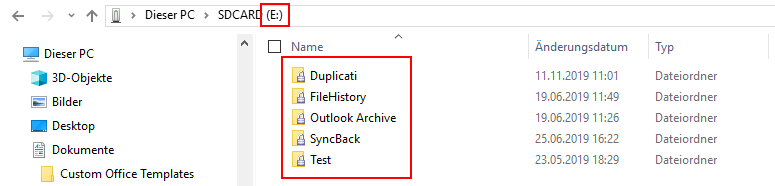
I try to make a backup to an encrypted SD card (encrypted with McAfee). In all programs this drive is shown simply as drive E: and access to it is no problem. The passphrase to encrypt it is entered after login and not part of a particular access.
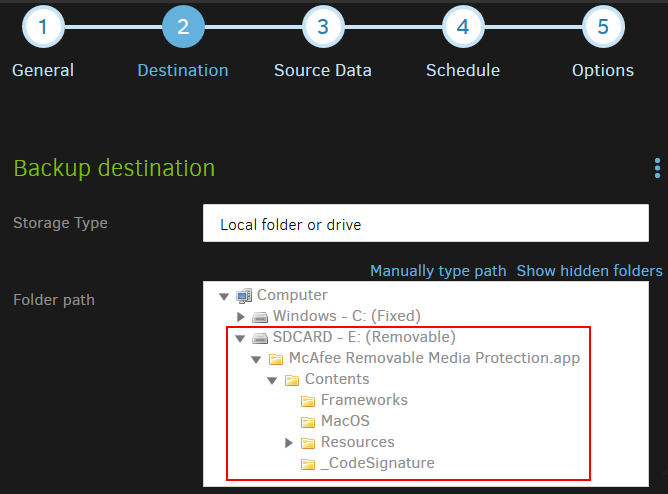
Now when I try to set it as a destination drive in Duplicati, the Duplicati web frontend (and also the Duplicati commandline) does not see the folders on the SD card, but the information of the encryption software. Please see attached screen shots.
---
### Author:  [@drwtsn32](https://forum.duplicati.com/u/drwtsn32)
#### Post date: [November 14, 2019, 4:22pm UTC](https://forum.duplicati.com/t/encrypted-sd-card-cannot-be-used-as-destination/8457/2 "2019-11-14T16:22:13Z")
How are you running Duplicati? Is it running in the default user mode where it launches at logon? Or are you running it as a service?
This is just a guess, but I’m thinking that if it runs as a service under a different user context (different account, or perhaps as LocalSystem), then it can’t access the secure contents of your SD Card – which may be unlocked only in your logged-in user context.
Duplicati does support its own encryption (AES256 standard - top notch), so an alternative is to let Duplicati do encryption instead of McAfee.
---
### Author:  [@aschrage](https://forum.duplicati.com/u/aschrage)
#### Post date: [November 14, 2019, 4:53pm UTC](https://forum.duplicati.com/t/encrypted-sd-card-cannot-be-used-as-destination/8457/3 "2019-11-14T16:53:05Z")
Thanks for the quick reply.
Actually your idea pointed me into the right direction.
I was running in user mode, but with administration rights on my Windows 10 notebook. When I start it in user mode without administration rights Duplicati sees the folders of the SD card and I could backup to them.
But this has a drawback. Because I also want to save files that are currently open (e.g. the Outlook archive.pst file). Therefore I want to use the volume shadow copy feature of Windows 10 (snapshot-policy=on) and this works only when I start with administrator rights.
For the encryption of the SD card this is due to a policy of my company, because I use it on my company notebook. Here it is mandatory that any external device is encrypted by the McAfee software on that notebook.
---
### Author:  [@drwtsn32](https://forum.duplicati.com/u/drwtsn32)
#### Post date: [November 14, 2019, 5:28pm UTC](https://forum.duplicati.com/t/encrypted-sd-card-cannot-be-used-as-destination/8457/4 "2019-11-14T17:28:24Z")
Yeah that’s tricky. If you could run McAfee elevated then elevated Duplicati should be able to see the SD Card and use VSS. But if McAfee is elevated then all your regular non-elevated programs probably won’t be able to see the secure contents of the SD card.
Not sure what else to suggest…
---
### Author:  [@aschrage](https://forum.duplicati.com/u/aschrage)
#### Post date: [November 18, 2019, 10:06am UTC](https://forum.duplicati.com/t/encrypted-sd-card-cannot-be-used-as-destination/8457/5 "2019-11-18T10:06:57Z")
Thanks for all the replies. Actually this encryption software cannot be changed by me. I guess I simply have to take care that no files are open. Because only Outlook should give me here trouble this can be handled. Although I cannot use an automated backup and have to start it manually.
---
### Author:  [@aschrage](https://forum.duplicati.com/u/aschrage)
#### Post date: [February 20, 2020, 1:10pm UTC](https://forum.duplicati.com/t/encrypted-sd-card-cannot-be-used-as-destination/8457/6 "2020-02-20T13:10:32Z")
Now after update to 2.0.5.1\_beta\_2020-01-18, my encrypted SD card now shows up as a standard drive and I can run Duplicati as a service. Therefore I’m now able to use the snapshot functionality 🙂