"
--send-mail-url="smtps://smtp.gmail.com:465?starttls=always"
--send-mail-username="Me@GMail.com"
--send-mail-password="MyGmailPwd"
```
---
### Author:  [@jamesfreeman959](https://forum.duplicati.com/u/jamesfreeman959)
#### Post date: [March 21, 2018, 11:31am UTC](https://forum.duplicati.com/t/e-mail-notification-problems-to-gmail/2904/6 "2018-03-21T11:31:49Z")
Thanks for this - sorry for the delay in replying - work kept me away from this for a few days.
It turns out the dash issue was a result of the copy and paste and it is correct in Duplicati. I have checked my settings against the above and am making some progress - in fact I have it working on my Raspberry Pi with Gmail!
However less luck on the Ubuntu (Intel) servers - I have the same configuration you listed above which is working on the Raspberry Pi, but on the Intel boxes I see the following results:
```
Failed to send email: System.IO.IOException: The authentication or decryption has failed.
--> System.IO.IOException: The authentication or decryption has failed.
--> Mono.Security.Protocol.Tls.TlsException: Invalid certificate received from server.
=> The authentication or decryption has failed.
Failed to send email: System.IO.IOException: The authentication or decryption has failed.
--> System.IO.IOException: The authentication or decryption has failed.
--> Mono.Security.Protocol.Tls.TlsException: Invalid certificate received from server.
=> The authentication or decryption has failed.
Return code: 0
```
Presumably I’ve not set up CA certs correctly for Mono or something similar? Getting closer…
---
### Author:  [@JonMikelV](https://forum.duplicati.com/u/JonMikelV)
#### Post date: [March 21, 2018, 9:02pm UTC](https://forum.duplicati.com/t/e-mail-notification-problems-to-gmail/2904/7 "2018-03-21T21:02:05Z")
> [@jamesfreeman959](#):
>
> Presumably I’ve not set up CA certs correctly for Mono
Yep. Now it’s looking like the “normal” Linux certificate issue. 🙂
Do you know if you have the ‘ca-certificates-mono’ package installed?
---
### Author:  [@jamesfreeman959](https://forum.duplicati.com/u/jamesfreeman959)
#### Post date: [March 23, 2018, 12:50pm UTC](https://forum.duplicati.com/t/e-mail-notification-problems-to-gmail/2904/8 "2018-03-23T12:50:49Z")
I was expecting that to be an easy fix and something I had overlooked, but dpkg reports that ca-certificates-mono is installed.
Where should I look next to resolve this?
Thanks for all your help 🙂
---
### Author:  [@JonMikelV](https://forum.duplicati.com/u/JonMikelV)
#### Post date: [March 23, 2018, 4:12pm UTC](https://forum.duplicati.com/t/e-mail-notification-problems-to-gmail/2904/9 "2018-03-23T16:12:38Z")
> [@jamesfreeman959](#):
>
> Where should I look next to resolve this?
Certain versions of mono came with an empty certificate store - perhaps yours is empty or stale?
- `cert-sync /etc/ssl/certs/ca-certificates.crt` #for Debian based systems - `cert-sync /etc/pki/tls/certs/ca-bundle.crt` #for RedHat derivatives
> [@Error in Updater](https://forum.duplicati.com/t/error-in-updater/502/4):
>
> Got it - I have an Ubuntu VM sitting around, I’ll see if I can replicate the problem. Just out of curiosity is it actually working OK even though it’s logging that error? And to what destination type are you pointing (S3, SFTP, WebDAV, etc.)? My uneducated GUESS is that the issue is related to certificates. Windows ships with a bunch of Root and Intermediate Certificate Authorities (CA) which I believe are kept fresh with Windows Update. Unfortunately, it appears Mono’s certificate store is…
---
### Author:  [@jamesfreeman959](https://forum.duplicati.com/u/jamesfreeman959)
#### Post date: [March 23, 2018, 5:01pm UTC](https://forum.duplicati.com/t/e-mail-notification-problems-to-gmail/2904/10 "2018-03-23T17:01:20Z")
Lots of useful stuff in that link - I’ll go through it in more detail over the weekend. As a quick test, I ran:
```
cert-sync /etc/ssl/certs/ca-certificates.crt
```
It reported:
```
Linux Cert Store Sync - version 4.2.1.0
Synchronize local certs with certs from local Linux trust store.
Copyright 2002, 2003 Motus Technologies. Copyright 2004-2008 Novell. BSD licensed.
I already trust 148, your new list has 148
Import process completed.
```
So initially it looks like no change. I think we’re on the right track - I was just expecting something really obvious (like a missing package) but perhaps this is will a bit more in-depth.
---
### Author:  [@jamesfreeman959](https://forum.duplicati.com/u/jamesfreeman959)
#### Post date: [March 25, 2018, 11:31am UTC](https://forum.duplicati.com/t/e-mail-notification-problems-to-gmail/2904/11 "2018-03-25T11:31:27Z")
Ok progress - I now have it working on my Ubuntu 16 host. I had to perform the following commands to manually import the SSL intermediate certs:
```
apt install mono-devel
mozroots --import --ask-remove --machine
certmgr -ssl -m smtps://smtp.gmail.com:465
```
I had tried the mozroots command by itself but this didn’t fix the issue - it was running the certmgr command that fixed the issue.
If this is the accepted fix then that’s fine - however just wanted to ask - is this expected or had I failed to perform something that lead up to this as an issue. The reason I ask is that I had with working on Raspbian 9 first without having to perform any of this, so I wonder if I missed something fundamental when I installed mono on my U16 boxes?
Thanks for all your help!
---
### Author:  [@JonMikelV](https://forum.duplicati.com/u/JonMikelV)
#### Post date: [March 28, 2018, 10:03pm UTC](https://forum.duplicati.com/t/e-mail-notification-problems-to-gmail/2904/12 "2018-03-28T22:03:52Z")
> [@jamesfreeman959](#):
>
> is this expected or had I failed to perform something that lead up to this as an issue
It’s not expected, but it’s not exactly unheard of either.
Unfortunately, Duplicati relies on `mono` when running in MacOS and Linux environments - and depending on the `mono` installation (as well as what else has been installed on the machine) it may or may not have up-to-date (or any) certificates.
Ideally we should probably look at something like getting Duplicati to somehow figure out if the certs are stale (or missing) and let the user know, but that’s not something I know how to do (or if it’s even possible).
---
### Author:  [@JonMikelV](https://forum.duplicati.com/u/JonMikelV)
#### Post date: [March 29, 2018, 9:10pm UTC](https://forum.duplicati.com/t/e-mail-notification-problems-to-gmail/2904/13 "2018-03-29T21:10:38Z")
A post was split to a new topic: [Notification overload](https://forum.duplicati.com/t/notification-overload/3053)
---
### Author:  [@jamesfreeman959](https://forum.duplicati.com/u/jamesfreeman959)
#### Post date: [March 29, 2018, 9:01am UTC](https://forum.duplicati.com/t/e-mail-notification-problems-to-gmail/2904/14 "2018-03-29T09:01:20Z")
Thanks for all your help! It’s been ages since I’ve touched .NET, and I can’t really say I know how my early .NET experience relates to mono. If I get some time I’ll have a look and see if I can find out anything to help. In the meantime the problem is solved.
Thank you again 🙂 I am loving Duplicati and the community here.
---
### Author:  [@tacioandrade](https://forum.duplicati.com/u/tacioandrade)
#### Post date: [March 30, 2018, 5:01pm UTC](https://forum.duplicati.com/t/e-mail-notification-problems-to-gmail/2904/15 "2018-03-30T17:01:38Z")
I already had problems with Gmail with several solutions of the type, for that reason I created a yahoo email that works perfectly with sendemail, duplicati, among other programs of the type that are considered insecure by Google.
---
### Author:  [@handyguy](https://forum.duplicati.com/u/handyguy)
#### Post date: [August 31, 2019, 11:07pm UTC](https://forum.duplicati.com/t/e-mail-notification-problems-to-gmail/2904/17 "2019-08-31T23:07:07Z")
I suddenly started having this problem this past week on a laptop that had been working perfectly well for several months. To make a very long story (and debugging effort) short, I found that the problem was cause by the anti-virus package on the laptop. I had just installed it recently (my son’s college requires that all student computers have A/V installed or they can’t connect to the campus network. And Windows Defender doesn’t count. Don’t get me started! 😡)
The package he is using is AVG and it has built-in (and default) “email protection.” This “protection” must intercept SMTP traffic and mangle it somehow, enough that SLL certificate checks on some systems (like GMail) will fail and cause the downstream error I was seeing in Duplicati. After turning off this feature, like so:
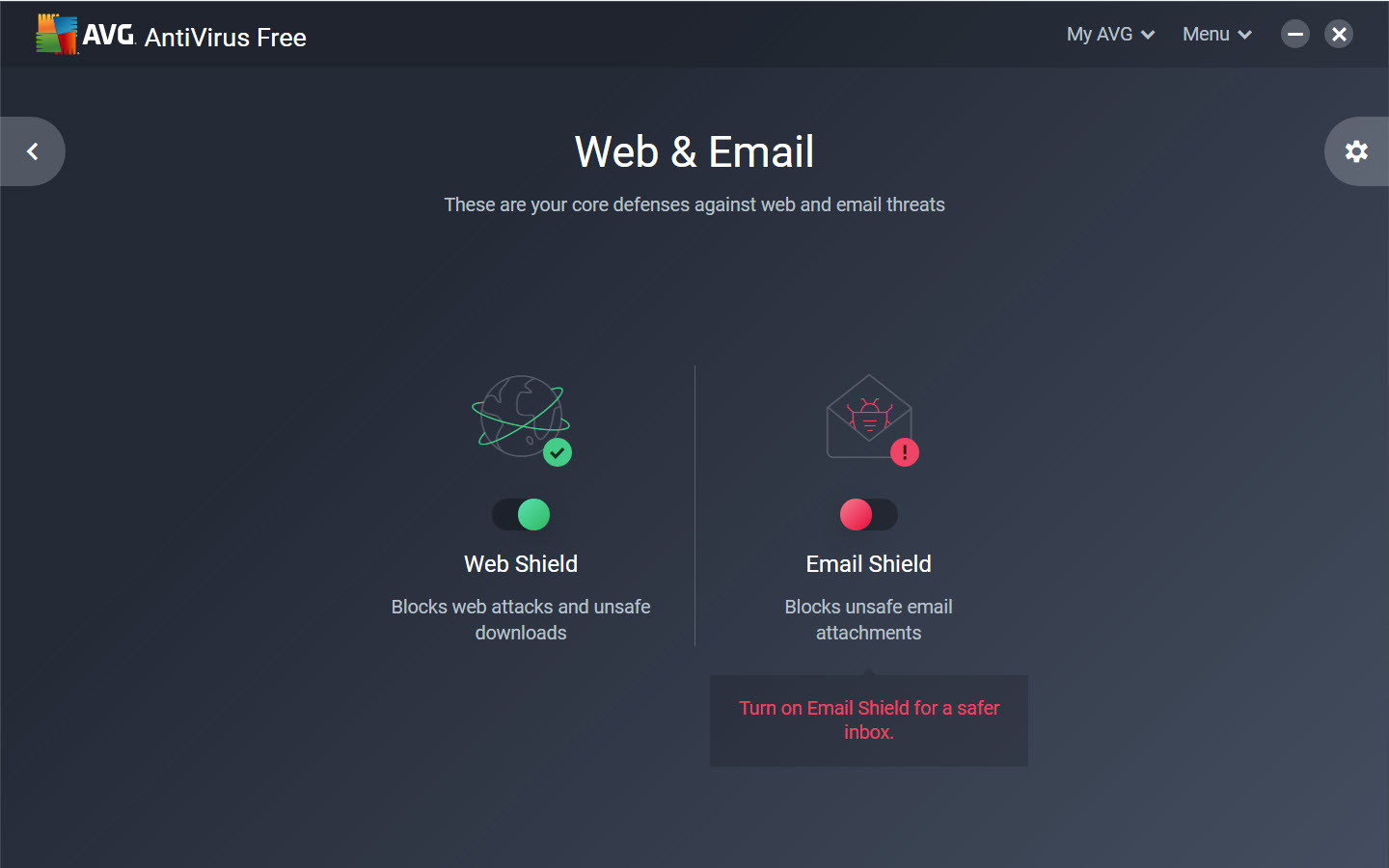
Duplicati started working again and email notices were being sent to GMail!
I’m not sure if this will solve all the problems that cause this error, but it sure solved mine!
HG
---
### Author:  [@irvinborder](https://forum.duplicati.com/u/irvinborder)
#### Post date: [October 14, 2019, 8:26pm UTC](https://forum.duplicati.com/t/e-mail-notification-problems-to-gmail/2904/18 "2019-10-14T20:26:42Z")
Log in to your Gmail account through a web browser and enable access through [less secure apps](http://net-informations.com/q/mis/secure.html) . Less secure apps can make your account more vulnerable, Google will automatically turn this setting off if it’s not being used. However, bypass this security setting with a configuration tweak within your Google Email Account .
How “more secure apps” help to protect your account?
Which level of access you’re giving the client before you connect your Account.
Client access only a relevant part of your Account, like your email or calendar.
Connect your Google Account to the client without exposing your password.
Disconnect your Google Account from the client at any time.
: > > Good day All, I stumbled onto this amazing tool today and i am really impressed with what it can do. I am stuck setting up mail notification when a backup run successfully see below: --send-mail-any-operation=false --send-mail-level=Success,Warning --send-mail-to= --send-mail-from="What email here" --send-mail-subject=%backup-name% - Backup Report --send-mail-body=%RESULT% Remote server url %LOCALPATH% --send-mail-url=smtp.gmail.com:465 - can you assist with the URL --send-mail-username= --se… --- ### Author:  [@JonMikelV](https://forum.duplicati.com/u/JonMikelV) #### Post date: [March 19, 2018, 8:10pm UTC](https://forum.duplicati.com/t/e-mail-notification-problems-to-gmail/2904/5 "2018-03-19T20:10:44Z") I still think the “not-really-a-dash” issue with your first parameter is what’s breaking it for you, but in case I’m wrong here’s what I’m using on one of my machines with gmail: ``` --send-mail-any-operation="true" --send-mail-from="Me" --send-mail-to="Me" --send-mail-url="smtps://smtp.gmail.com:465?starttls=always" --send-mail-username="Me@GMail.com" --send-mail-password="MyGmailPwd" ``` --- ### Author:  [@jamesfreeman959](https://forum.duplicati.com/u/jamesfreeman959) #### Post date: [March 21, 2018, 11:31am UTC](https://forum.duplicati.com/t/e-mail-notification-problems-to-gmail/2904/6 "2018-03-21T11:31:49Z") Thanks for this - sorry for the delay in replying - work kept me away from this for a few days. It turns out the dash issue was a result of the copy and paste and it is correct in Duplicati. I have checked my settings against the above and am making some progress - in fact I have it working on my Raspberry Pi with Gmail! However less luck on the Ubuntu (Intel) servers - I have the same configuration you listed above which is working on the Raspberry Pi, but on the Intel boxes I see the following results: ``` Failed to send email: System.IO.IOException: The authentication or decryption has failed. --> System.IO.IOException: The authentication or decryption has failed. --> Mono.Security.Protocol.Tls.TlsException: Invalid certificate received from server. => The authentication or decryption has failed. Failed to send email: System.IO.IOException: The authentication or decryption has failed. --> System.IO.IOException: The authentication or decryption has failed. --> Mono.Security.Protocol.Tls.TlsException: Invalid certificate received from server. => The authentication or decryption has failed. Return code: 0 ``` Presumably I’ve not set up CA certs correctly for Mono or something similar? Getting closer… --- ### Author:  [@JonMikelV](https://forum.duplicati.com/u/JonMikelV) #### Post date: [March 21, 2018, 9:02pm UTC](https://forum.duplicati.com/t/e-mail-notification-problems-to-gmail/2904/7 "2018-03-21T21:02:05Z") > [@jamesfreeman959](#): > > Presumably I’ve not set up CA certs correctly for Mono Yep. Now it’s looking like the “normal” Linux certificate issue. 🙂 Do you know if you have the ‘ca-certificates-mono’ package installed? --- ### Author:  [@jamesfreeman959](https://forum.duplicati.com/u/jamesfreeman959) #### Post date: [March 23, 2018, 12:50pm UTC](https://forum.duplicati.com/t/e-mail-notification-problems-to-gmail/2904/8 "2018-03-23T12:50:49Z") I was expecting that to be an easy fix and something I had overlooked, but dpkg reports that ca-certificates-mono is installed. Where should I look next to resolve this? Thanks for all your help 🙂 --- ### Author:  [@JonMikelV](https://forum.duplicati.com/u/JonMikelV) #### Post date: [March 23, 2018, 4:12pm UTC](https://forum.duplicati.com/t/e-mail-notification-problems-to-gmail/2904/9 "2018-03-23T16:12:38Z") > [@jamesfreeman959](#): > > Where should I look next to resolve this? Certain versions of mono came with an empty certificate store - perhaps yours is empty or stale? - `cert-sync /etc/ssl/certs/ca-certificates.crt` #for Debian based systems - `cert-sync /etc/pki/tls/certs/ca-bundle.crt` #for RedHat derivatives > [@Error in Updater](https://forum.duplicati.com/t/error-in-updater/502/4): > > Got it - I have an Ubuntu VM sitting around, I’ll see if I can replicate the problem. Just out of curiosity is it actually working OK even though it’s logging that error? And to what destination type are you pointing (S3, SFTP, WebDAV, etc.)? My uneducated GUESS is that the issue is related to certificates. Windows ships with a bunch of Root and Intermediate Certificate Authorities (CA) which I believe are kept fresh with Windows Update. Unfortunately, it appears Mono’s certificate store is… --- ### Author:  [@jamesfreeman959](https://forum.duplicati.com/u/jamesfreeman959) #### Post date: [March 23, 2018, 5:01pm UTC](https://forum.duplicati.com/t/e-mail-notification-problems-to-gmail/2904/10 "2018-03-23T17:01:20Z") Lots of useful stuff in that link - I’ll go through it in more detail over the weekend. As a quick test, I ran: ``` cert-sync /etc/ssl/certs/ca-certificates.crt ``` It reported: ``` Linux Cert Store Sync - version 4.2.1.0 Synchronize local certs with certs from local Linux trust store. Copyright 2002, 2003 Motus Technologies. Copyright 2004-2008 Novell. BSD licensed. I already trust 148, your new list has 148 Import process completed. ``` So initially it looks like no change. I think we’re on the right track - I was just expecting something really obvious (like a missing package) but perhaps this is will a bit more in-depth. --- ### Author:  [@jamesfreeman959](https://forum.duplicati.com/u/jamesfreeman959) #### Post date: [March 25, 2018, 11:31am UTC](https://forum.duplicati.com/t/e-mail-notification-problems-to-gmail/2904/11 "2018-03-25T11:31:27Z") Ok progress - I now have it working on my Ubuntu 16 host. I had to perform the following commands to manually import the SSL intermediate certs: ``` apt install mono-devel mozroots --import --ask-remove --machine certmgr -ssl -m smtps://smtp.gmail.com:465 ``` I had tried the mozroots command by itself but this didn’t fix the issue - it was running the certmgr command that fixed the issue. If this is the accepted fix then that’s fine - however just wanted to ask - is this expected or had I failed to perform something that lead up to this as an issue. The reason I ask is that I had with working on Raspbian 9 first without having to perform any of this, so I wonder if I missed something fundamental when I installed mono on my U16 boxes? Thanks for all your help! --- ### Author:  [@JonMikelV](https://forum.duplicati.com/u/JonMikelV) #### Post date: [March 28, 2018, 10:03pm UTC](https://forum.duplicati.com/t/e-mail-notification-problems-to-gmail/2904/12 "2018-03-28T22:03:52Z") > [@jamesfreeman959](#): > > is this expected or had I failed to perform something that lead up to this as an issue It’s not expected, but it’s not exactly unheard of either. Unfortunately, Duplicati relies on `mono` when running in MacOS and Linux environments - and depending on the `mono` installation (as well as what else has been installed on the machine) it may or may not have up-to-date (or any) certificates. Ideally we should probably look at something like getting Duplicati to somehow figure out if the certs are stale (or missing) and let the user know, but that’s not something I know how to do (or if it’s even possible). --- ### Author:  [@JonMikelV](https://forum.duplicati.com/u/JonMikelV) #### Post date: [March 29, 2018, 9:10pm UTC](https://forum.duplicati.com/t/e-mail-notification-problems-to-gmail/2904/13 "2018-03-29T21:10:38Z") A post was split to a new topic: [Notification overload](https://forum.duplicati.com/t/notification-overload/3053) --- ### Author:  [@jamesfreeman959](https://forum.duplicati.com/u/jamesfreeman959) #### Post date: [March 29, 2018, 9:01am UTC](https://forum.duplicati.com/t/e-mail-notification-problems-to-gmail/2904/14 "2018-03-29T09:01:20Z") Thanks for all your help! It’s been ages since I’ve touched .NET, and I can’t really say I know how my early .NET experience relates to mono. If I get some time I’ll have a look and see if I can find out anything to help. In the meantime the problem is solved. Thank you again 🙂 I am loving Duplicati and the community here. --- ### Author:  [@tacioandrade](https://forum.duplicati.com/u/tacioandrade) #### Post date: [March 30, 2018, 5:01pm UTC](https://forum.duplicati.com/t/e-mail-notification-problems-to-gmail/2904/15 "2018-03-30T17:01:38Z") I already had problems with Gmail with several solutions of the type, for that reason I created a yahoo email that works perfectly with sendemail, duplicati, among other programs of the type that are considered insecure by Google. --- ### Author:  [@handyguy](https://forum.duplicati.com/u/handyguy) #### Post date: [August 31, 2019, 11:07pm UTC](https://forum.duplicati.com/t/e-mail-notification-problems-to-gmail/2904/17 "2019-08-31T23:07:07Z") I suddenly started having this problem this past week on a laptop that had been working perfectly well for several months. To make a very long story (and debugging effort) short, I found that the problem was cause by the anti-virus package on the laptop. I had just installed it recently (my son’s college requires that all student computers have A/V installed or they can’t connect to the campus network. And Windows Defender doesn’t count. Don’t get me started! 😡) The package he is using is AVG and it has built-in (and default) “email protection.” This “protection” must intercept SMTP traffic and mangle it somehow, enough that SLL certificate checks on some systems (like GMail) will fail and cause the downstream error I was seeing in Duplicati. After turning off this feature, like so:  Duplicati started working again and email notices were being sent to GMail! I’m not sure if this will solve all the problems that cause this error, but it sure solved mine! HG --- ### Author:  [@irvinborder](https://forum.duplicati.com/u/irvinborder) #### Post date: [October 14, 2019, 8:26pm UTC](https://forum.duplicati.com/t/e-mail-notification-problems-to-gmail/2904/18 "2019-10-14T20:26:42Z") Log in to your Gmail account through a web browser and enable access through [less secure apps](http://net-informations.com/q/mis/secure.html) . Less secure apps can make your account more vulnerable, Google will automatically turn this setting off if it’s not being used. However, bypass this security setting with a configuration tweak within your Google Email Account . How “more secure apps” help to protect your account? Which level of access you’re giving the client before you connect your Account. Client access only a relevant part of your Account, like your email or calendar. Connect your Google Account to the client without exposing your password. Disconnect your Google Account from the client at any time.](https://forum.duplicati.com/uploads/default/original/1X/38ee273086c62464bae9889d16b2f6d350fa15ef.png)