### Author:  [@rdbox](https://forum.duplicati.com/u/rdbox)
#### Post date: [August 26, 2019, 3:08pm UTC](https://forum.duplicati.com/t/duplticati-and-vss-are-bad-friends/7884/1 "2019-08-26T15:08:03Z")
I do a lot of backup tests. I want to choose the perfect backup software.
But I have a problem, Duplticati is not copying the files occupied by the process correctly. I will be able to explain.
**Example:**
1. take for the test the duplicati itself and the source data is the whole folder of the Chrome browser
2. as a second program it will be another (free Backupper)
for backup. I will not call the program whatsoever an advertisement, I respect the developers of duplicati. The 2nd program that I provided as an example it also works with VSS technology.
**Final Duplicati: a copy made by duplicati in the working browser does not save any important data.**
**The outcome of another program Backupper:**
**it was able to save some important data and the User data folder. This way, I was able to restore a fully working session of the active Chrome browser in 5 minutes.
And Duplicati failed to do that**
I understand that my difficult question, Do I need to understand the reason, different copying technology? Or what’s the problem, because VSS technology is the only one in the system. Why duplicati failed and can’t copy all the files in the process
P.S. And I would also like to express my gratitude to the developers. CMS forum it is just perfect very convenient to interact with and write a +10 points reference 😊 😊 😊
---
### Author:  [@rdbox](https://forum.duplicati.com/u/rdbox)
#### Post date: [August 26, 2019, 3:17pm UTC](https://forum.duplicati.com/t/duplticati-and-vss-are-bad-friends/7884/2 "2019-08-26T15:17:48Z")
I’ll add my message.
I tried `VSS on` and `VSS auto` mode.
It didn’t help me
---
### Author:  [@drwtsn32](https://forum.duplicati.com/u/drwtsn32)
#### Post date: [August 26, 2019, 3:32pm UTC](https://forum.duplicati.com/t/duplticati-and-vss-are-bad-friends/7884/3 "2019-08-26T15:32:19Z")
You must run Duplicati elevated in order to use VSS. With VSS it will be able to back up open files.
---
### Author:  [@rdbox](https://forum.duplicati.com/u/rdbox)
#### Post date: [August 26, 2019, 3:52pm UTC](https://forum.duplicati.com/t/duplticati-and-vss-are-bad-friends/7884/4 "2019-08-26T15:52:52Z")
how do you do that? I have a shortcut configured to run with admin rights
---
### Author:  [@drwtsn32](https://forum.duplicati.com/u/drwtsn32)
#### Post date: [August 26, 2019, 5:44pm UTC](https://forum.duplicati.com/t/duplticati-and-vss-are-bad-friends/7884/5 "2019-08-26T17:44:00Z")
> [@rdbox](#):
>
> I have a shortcut configured to run with admin rights
You may be running it as Admin, but that doesn’t mean it’s Elevated. Close Duplicati and try running the shortcut again by right-clicking and “Run As Administrator”. You will get a UAC prompt asking you for permission to run it Elevated. Then try the VSS option again.
---
### Author:  [@xblitz](https://forum.duplicati.com/u/xblitz)
#### Post date: [August 26, 2019, 5:47pm UTC](https://forum.duplicati.com/t/duplticati-and-vss-are-bad-friends/7884/6 "2019-08-26T17:47:37Z")
Another way is run it as a service:
> [@Migrating from User to Service install on Windows](https://forum.duplicati.com/t/migrating-from-user-to-service-install-on-windows/660):
>
> Thanks to @martijnsmith for giving me the boost needed to “how-to” this! If you want to run Duplicati as a Windows service instead of under a specific user account OR maybe you find that you keep getting errors such as the following, it could be that you’re running Duplicati under a user install for a non-administrator user. System.UnauthorizedAccessException: Access to the path '\' is denied. Firstly, congratulations on not doing everyday work as an administrator! slight_smile …
As my little experience duplicati works fine with VSS even if a couple of times I obtain a warning from backkup job but this happen because the backup job start running while OS made a snapshot (in my system I scheduled a task who create new snapshot every hour - so duplicati should backup data up to date).
If I understand correctly duplicati can’t create a snapshot before start a backup job but only access to the most recent snapshot available. Can anyone confirm this?
---
### Author:  [@drwtsn32](https://forum.duplicati.com/u/drwtsn32)
#### Post date: [August 26, 2019, 5:50pm UTC](https://forum.duplicati.com/t/duplticati-and-vss-are-bad-friends/7884/7 "2019-08-26T17:50:14Z")
> [@xblitz](#):
>
> If I understand correctly duplicati can’t create a snapshot before start a backup job but only access to the most recent snapshot available.
Duplicati makes its own snapshot and removes it after the backup job is complete. It does not utilize snapshots you have scheduled yourself for System protection or previous versions.
You may get a VSS snapshot creation error if two programs try to create a new snapshot at the same time. If you get that error a lot, try staggering the schedule of one of the items. (Don’t have both start at exactly 12:00, for instance…) Delaying one by just a minute or two is usually sufficient.
---
### Author:  [@xblitz](https://forum.duplicati.com/u/xblitz)
#### Post date: [August 26, 2019, 6:25pm UTC](https://forum.duplicati.com/t/duplticati-and-vss-are-bad-friends/7884/8 "2019-08-26T18:25:43Z")
Realy? It explain because I can’t find any trace of snapshot in “recent versions tab”… Anyway I used workaround suggested and everything works fine.
I know, a snapshot every hour sounds “exaggerated” and VSS is not a backup, but this gimmick save me waste time nore than once.
---
### Author:  [@rdbox](https://forum.duplicati.com/u/rdbox)
#### Post date: [August 26, 2019, 6:34pm UTC](https://forum.duplicati.com/t/duplticati-and-vss-are-bad-friends/7884/9 "2019-08-26T18:34:00Z")
@drwtsn32 is there an additional way to find out what VSS is enabled?
I have disabled UAC, I have an admin account. All programs are run as admin by default.
I tried to install and run the Duplicati service, but I lost the configuration file where I had all the tasks. Where did they go?
`c:\Users\admin\AppData\Local\Duplicati\`
This folder contains sqlite files and config but my Duplicati running through the service does not see my tasks
---
### Author:  [@xblitz](https://forum.duplicati.com/u/xblitz)
#### Post date: [August 26, 2019, 6:49pm UTC](https://forum.duplicati.com/t/duplticati-and-vss-are-bad-friends/7884/10 "2019-08-26T18:49:03Z")
Read carefully the post who I linked before: it explain the migration procedure (the directory you should copy and where). Of course, first of all, you must stop duplicati-service.
---
### Author:  [@drwtsn32](https://forum.duplicati.com/u/drwtsn32)
#### Post date: [August 26, 2019, 6:53pm UTC](https://forum.duplicati.com/t/duplticati-and-vss-are-bad-friends/7884/11 "2019-08-26T18:53:20Z")
> [@xblitz](#):
>
> Realy? It explain because I can’t find any trace of snapshot in “recent versions tab”…
Ephemeral snapshots created by Duplicati or other backup programs won’t show up there.
---
### Author:  [@rdbox](https://forum.duplicati.com/u/rdbox)
#### Post date: [August 27, 2019, 1:44pm UTC](https://forum.duplicati.com/t/duplticati-and-vss-are-bad-friends/7884/12 "2019-08-27T13:44:16Z")
@drwtsn32 Unfortunately, the problem has not been solved, now I am running duplicati through a service with full rights. But browser files are not copied fully either.
I can’t figure out why.
I need an exact way to find out if VSS + Duplicati mode is working somewhere in the log files
---
### Author:  [@drwtsn32](https://forum.duplicati.com/u/drwtsn32)
#### Post date: [August 27, 2019, 2:58pm UTC](https://forum.duplicati.com/t/duplticati-and-vss-are-bad-friends/7884/13 "2019-08-27T14:58:01Z")
You have the snapshot option enabled in Duplicati, correct? Set [`--snapshot-policy`](https://duplicati.readthedocs.io/en/latest/06-advanced-options/#snapshot-policy) to `on` or `auto`.
---
### Author:  [@rdbox](https://forum.duplicati.com/u/rdbox)
#### Post date: [August 27, 2019, 3:15pm UTC](https://forum.duplicati.com/t/duplticati-and-vss-are-bad-friends/7884/14 "2019-08-27T15:15:14Z")
Yes, this option is enabled in `Auto mode`, I also tried to enable `On mode`

my config Duplicati
```
--auto-cleanup=true
--full-result=true
--use-block-cache=true
--log-retention=3D
--snapshot-policy=Auto
--allow-sleep=true
--number-of-retries=25
--thread-priority=low
--concurrency-max-threads=0
```
---
### Author:  [@rdbox](https://forum.duplicati.com/u/rdbox)
#### Post date: [August 27, 2019, 3:59pm UTC](https://forum.duplicati.com/t/duplticati-and-vss-are-bad-friends/7884/15 "2019-08-27T15:59:15Z")
found a mistake in the log files
```
2019-08-27 18:55:32 03 - [Warning-Duplicati.Library.Main.Operation.BackupHandler-SnapshotFailed]:
Failed to create a snapshot: Alphaleonis.Win32.Vss.VssObjectNotFoundException:
The requested object does not exist.
in Alphaleonis.Win32.Vss.VssBackupComponents.IsVolumeSupported (String volumeName)
in Duplicati.Library.Common.IO.VssBackupComponents.CheckSupportedVolumes (IEnumerable`1 sources)
in Duplicati.Library.CommonUmementary
in Duplicati.Library.Snapshots.WindowsSnapshot..ctor (IEnumerable`1 sources, IDictionary`2 options)
in Duplicati.Library.Snapshots.SnapshotUtility.CreateWindowsSnapshot (IEnumerable`1 folders, Dictionary`2 options)
in Duplicati.Library.ain. Operation.BackupHandler.GetSnapshot (String [] sources, Options options)
```
---
### Author:  [@drwtsn32](https://forum.duplicati.com/u/drwtsn32)
#### Post date: [August 27, 2019, 4:58pm UTC](https://forum.duplicati.com/t/duplticati-and-vss-are-bad-friends/7884/16 "2019-08-27T16:58:52Z")
> [@rdbox](#):
>
> Failed to create a snapshot: Alphaleonis.Win32.Vss.VssObjectNotFoundException
I think that error is caused by not having the “Microsoft Visual C++ 2017 Redistributable” package installed. Check to see if you have it installed…
---
### Author:  [@rdbox](https://forum.duplicati.com/u/rdbox)
#### Post date: [August 27, 2019, 5:16pm UTC](https://forum.duplicati.com/t/duplticati-and-vss-are-bad-friends/7884/17 "2019-08-27T17:16:54Z")
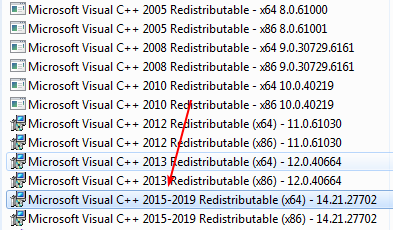
The Redistributable C++ package is installed
2015-2019
---
### Author:  [@drwtsn32](https://forum.duplicati.com/u/drwtsn32)
#### Post date: [August 27, 2019, 5:32pm UTC](https://forum.duplicati.com/t/duplticati-and-vss-are-bad-friends/7884/18 "2019-08-27T17:32:02Z")
Which version of Duplicati did you install?
---
### Author:  [@rdbox](https://forum.duplicati.com/u/rdbox)
#### Post date: [August 27, 2019, 5:33pm UTC](https://forum.duplicati.com/t/duplticati-and-vss-are-bad-friends/7884/19 "2019-08-27T17:33:15Z")
here’s a new version I downloaded 30 minutes ago from the official website. Removed the old one and put this version **v2.0.4.23-2.0.4.23\_beta\_2019-07-14**
log Recreating database:
```
Aug 27, 2019 8:33 PM: Backend event: Get - Retrying: duplicati-b0767b4ef8e76422d84b37c28cc6c5407.dblock.zip.aes (944.98 KB)
Aug 27, 2019 8:33 PM: Operation Get with file duplicati-b0767b4ef8e76422d84b37c28cc6c5407.dblock.zip.aes attempt 4 of 25 failed with message: Remote server returned an error: (404) Not found.
Aug 27, 2019 8:33 PM: Backend event: Get - Started: duplicati-b0767b4ef8e76422d84b37c28cc6c5407.dblock.zip.aes (944.98 KB)
Aug 27, 2019 8:33 PM: Backend event: Get - Retrying: duplicati-b0767b4ef8e76422d84b37c28cc6c5407.dblock.zip.aes (944.98 KB)
Aug 27, 2019 8:33 PM: Operation Get with file duplicati-b0767b4ef8e76422d84b37c28cc6c5407.dblock.zip.aes attempt 3 of 25 failed with message: The remote server returned an error: (404) Not found.
```
---
### Author:  [@drwtsn32](https://forum.duplicati.com/u/drwtsn32)
#### Post date: [August 27, 2019, 5:45pm UTC](https://forum.duplicati.com/t/duplticati-and-vss-are-bad-friends/7884/20 "2019-08-27T17:45:57Z")
Why are you recreating the database? What version did you have before? If it was \> 2.0.4.5 then you actually downgraded. 2.0.4.23 has an unfortunate version number. It is basically the same as 2.0.4.5 plus a very minor change. It has confused a lot of people.
[Next page](https://forum.duplicati.com/t/duplticati-and-vss-are-bad-friends/7884.md?page=2)