# Duplicati service does not automatically start in windows 7
**URL:** https://forum.duplicati.com/t/duplicati-service-does-not-automatically-start-in-windows-7/8240
**Category:** Support
**Created:** [October 14, 2019, 8:29am UTC](https://forum.duplicati.com/t/duplicati-service-does-not-automatically-start-in-windows-7/8240 "2019-10-14T08:29:31Z")
**Posts on this page:** 11
**Page:** 1
### Author:  [@rdbox](https://forum.duplicati.com/u/rdbox)
#### Post date: [October 14, 2019, 8:29am UTC](https://forum.duplicati.com/t/duplicati-service-does-not-automatically-start-in-windows-7/8240/1 "2019-10-14T08:29:31Z")
I read all the forum threads with this problem but could not find a solution. After restarting the system, the service does not start automatically, although I set the service to automatic mode.
Duplicati is installed in my system as a full-fledged service, not a portable version. What do I need to do to start Duplicati right away? And so in
---
### Author:  [@ts678](https://forum.duplicati.com/u/ts678)
#### Post date: [October 15, 2019, 11:33am UTC](https://forum.duplicati.com/t/duplicati-service-does-not-automatically-start-in-windows-7/8240/2 "2019-10-15T11:33:43Z")
> [@rdbox](#):
>
> I set the service to automatic mode
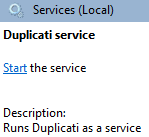
What about “Automatic (Delayed Start)”? What happens if you click the “Start the service” link?
---
### Author:  [@rdbox](https://forum.duplicati.com/u/rdbox)
#### Post date: [October 15, 2019, 11:55am UTC](https://forum.duplicati.com/t/duplicati-service-does-not-automatically-start-in-windows-7/8240/3 "2019-10-15T11:55:43Z")
If I press this button, Duplicati starts up all right. But Duplicati should itself start automatically after rebooting the system.Then I can not control the process of creating backups on a schedule, if I always click on the start of the service every time
---
### Author:  [@ts678](https://forum.duplicati.com/u/ts678)
#### Post date: [October 15, 2019, 11:57am UTC](https://forum.duplicati.com/t/duplicati-service-does-not-automatically-start-in-windows-7/8240/4 "2019-10-15T11:57:50Z")
> [@rdbox](#):
>
> Duplicati should itself start automatically after rebooting the system.
So…
> [@ts678](#):
>
> What about “Automatic (Delayed Start)”?
which would avoid the need to click every time, although it does add a few minutes to the startup.
---
### Author:  [@rdbox](https://forum.duplicati.com/u/rdbox)
#### Post date: [October 15, 2019, 12:26pm UTC](https://forum.duplicati.com/t/duplicati-service-does-not-automatically-start-in-windows-7/8240/5 "2019-10-15T12:26:36Z")
I have automatic mode configured, but Duplicati ignores it when the system is turned on, Duplicati every time I manually press the start of the service when I reboot the system.It creates a lot of difficulties.
That’s why I turned to you for help. What should I do?
---
### Author:  [@ts678](https://forum.duplicati.com/u/ts678)
#### Post date: [October 15, 2019, 12:31pm UTC](https://forum.duplicati.com/t/duplicati-service-does-not-automatically-start-in-windows-7/8240/6 "2019-10-15T12:31:02Z")
> [@rdbox](#):
>
> What should I do?

is not the same as “automatic mode” which you say you are running. I assume you are now at:

so please try “Automatic (Delayed Start)” which has Duplicati start AFTER the big startup rush.
---
### Author:  [@rdbox](https://forum.duplicati.com/u/rdbox)
#### Post date: [October 15, 2019, 12:46pm UTC](https://forum.duplicati.com/t/duplicati-service-does-not-automatically-start-in-windows-7/8240/7 "2019-10-15T12:46:41Z")
I now understood, did not carefully read your message, changed the setting.It takes time to test, and I will write about the result
---
### Author:  [@rdbox](https://forum.duplicati.com/u/rdbox)
#### Post date: [October 19, 2019, 12:08pm UTC](https://forum.duplicati.com/t/duplicati-service-does-not-automatically-start-in-windows-7/8240/8 "2019-10-19T12:08:56Z")
I tested your advice, it does not work, restarted the laptop. Duplicati did not automatically boot.And I had to manually start the serviceWhat to do?
---
### Author:  [@ts678](https://forum.duplicati.com/u/ts678)
#### Post date: [October 19, 2019, 12:24pm UTC](https://forum.duplicati.com/t/duplicati-service-does-not-automatically-start-in-windows-7/8240/9 "2019-10-19T12:24:46Z")
> [@rdbox](#):
>
> What to do?
The next step is probably to see how much of Duplicati starts. You can practice with manual start and stop, sorting processes alphabetically in Task Manager (Sysinternals Process Explorer gives a better view), then seeing what processes beginnning with Duplicati come and go. One reason for the server not staying up is that Windows by default only allows a service 30 seconds for start. Duplicati does a huge amount of disk reads at a time when a system is stressed with everything else trying to start up. Delayed start puts it in a later group, but it might still not be enough if your disk is still overloaded then.
[Windows service not starting - “Service did not respond in time” message](https://forum.duplicati.com/t/windows-service-not-starting-service-did-not-respond-in-time-message/2645/4) shows how to raise timeout, however it’s a registry edit and also has a limited range. Possible the maximum is 120. I’m not certain.
[Windows Service fails to start #2717](https://github.com/duplicati/duplicati/issues/2717#issuecomment-401916516) is further technical explanation behind what might be happening.
If we can determine from your process watching that the issue is Duplicati not being able to validate an update quickly enough despite all adjustments, you can go to not using the updater mechanism, but to always install updates by hand from a .msi after uninstalling the previous Duplicati. This keeps settings.
Do you know if you are running a Duplicati-installed update? Some places to check are in following link:
[Downgrading / reverting to a lower version](https://forum.duplicati.com/t/downgrading-reverting-to-a-lower-version/3393)
---
### Author:  [@rdbox](https://forum.duplicati.com/u/rdbox)
#### Post date: [October 19, 2019, 12:45pm UTC](https://forum.duplicati.com/t/duplicati-service-does-not-automatically-start-in-windows-7/8240/10 "2019-10-19T12:45:22Z")
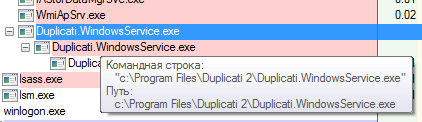
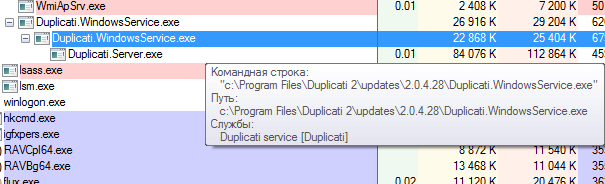
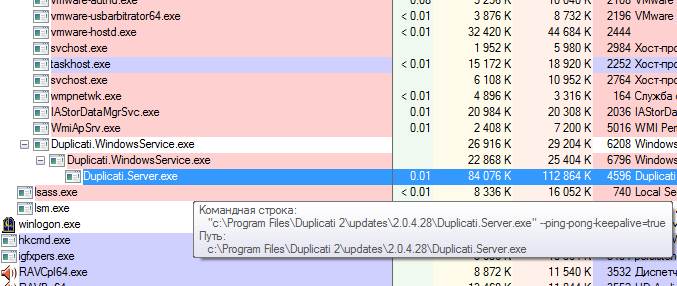
Am I what sysinternals found here? Should it be so?
**screenshonts 1**
**screenshonts 2**
**screenshonts 3**
---
### Author:  [@ts678](https://forum.duplicati.com/u/ts678)
#### Post date: [October 19, 2019, 6:43pm UTC](https://forum.duplicati.com/t/duplicati-service-does-not-automatically-start-in-windows-7/8240/11 "2019-10-19T18:43:51Z")
Thanks for hovering over the processes to show the full path of the programs. That’s exactly right for a situation where you have a base version (can’t tell what it is – you can look at changelog.txt if you want the version) then 2.0.4.28 update applied by the Duplicati autoupdater. The base version in C:\Program Files\Duplicati 2 will look for an update, validate it by reading all of its files – this is the read-heavy part, then run updated code. Child WindowsService process then starts Server unless Windows times it out (default of 30 seconds) first, and the Server that runs is the same version as the child WindowsService.
[[SOLVED] Is it ok that I see 5 processes of Duplicati in Windows Task manager?](https://forum.duplicati.com/t/solved-is-it-ok-that-i-see-5-processes-of-duplicati-in-windows-task-manager/3948) explains the process.
[A service does not start, and events 7000 and 7011 are logged in the Windows event log](https://support.microsoft.com/en-us/help/922918/a-service-does-not-start-and-events-7000-and-7011-are-logged-in-window) gives events.
[How to increase Windows service startup timeout period](https://www.morgantechspace.com/2018/06/how-to-increase-windows-service-startup-timeout-period.html) gives them too and says how to raise timeout.
If you were on beta, it’d be easier to just do a .msi install every now and then, but if you stay on canary then the automatic update might make it worth adjusting the startup parameters until it starts and stays.