# Duplicati freezes on file deletion process
**URL:** https://forum.duplicati.com/t/duplicati-freezes-on-file-deletion-process/8753
**Category:** Support
**Tags:** canary
**Created:** [December 30, 2019, 7:16am UTC](https://forum.duplicati.com/t/duplicati-freezes-on-file-deletion-process/8753 "2019-12-30T07:16:48Z")
**Posts on this page:** 3
**Page:** 1
### Author:  [@rdbox](https://forum.duplicati.com/u/rdbox)
#### Post date: [December 30, 2019, 7:16am UTC](https://forum.duplicati.com/t/duplicati-freezes-on-file-deletion-process/8753/1 "2019-12-30T07:16:48Z")
**You are currently running Duplicati - 2.0.4.28\_canary\_2019-09-05**
Duplicati freezes on file deletion process.
It can measure 2 hours, it is awfully long my time is wasted quickly.
What can be done?
The problem is this duration every time you copy.
Why can’t Duplicati remove everything at once, and not 1 pc each time?
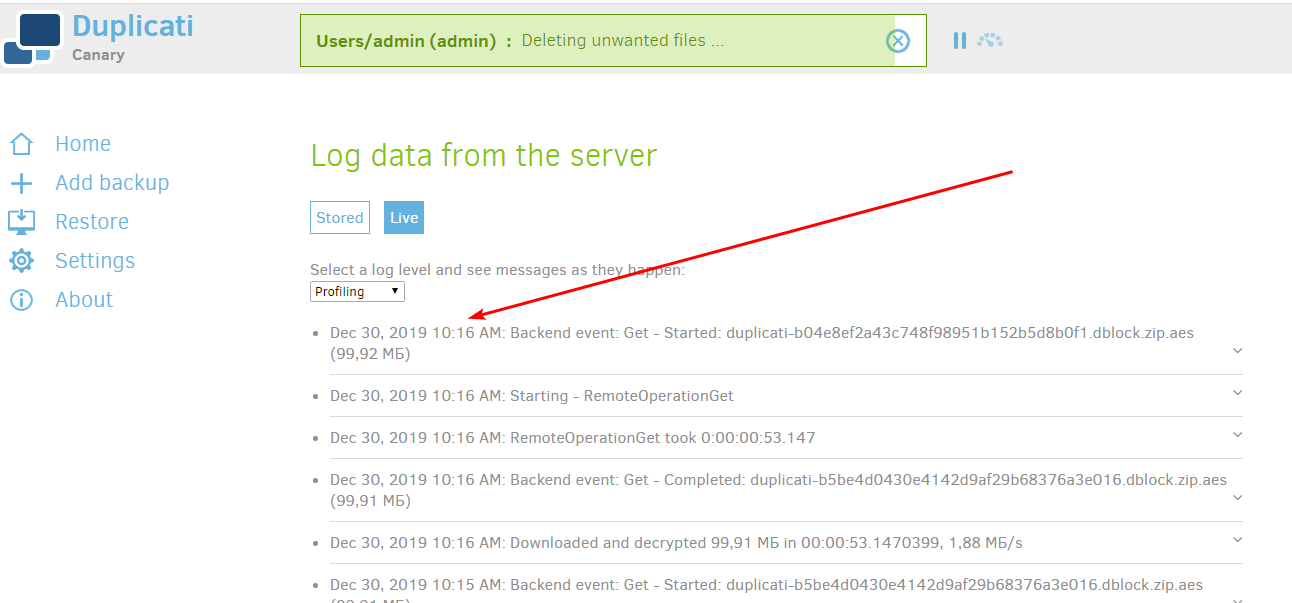
My backup started at 8 in the morning, and for more than 2 hours it deletes files is horrible.
I am very angry because of this slow work
---
### Author:  [@rdbox](https://forum.duplicati.com/u/rdbox)
#### Post date: [December 30, 2019, 7:37am UTC](https://forum.duplicati.com/t/duplicati-freezes-on-file-deletion-process/8753/2 "2019-12-30T07:37:41Z")
P.S. more than 2.5 hours is the process is a nightmare 😡 !!!
I download an 11 GB movie faster. The stability of Duplicati has become very weak in new versions. This was not before
---
### Author:  [@ts678](https://forum.duplicati.com/u/ts678)
#### Post date: [December 30, 2019, 6:02pm UTC](https://forum.duplicati.com/t/duplicati-freezes-on-file-deletion-process/8753/3 "2019-12-30T18:02:03Z")
> [@rdbox](#):
>
> every time you copy.
What does “copy” refer to? Do you mean backup (which is not copy)? Maybe this meant [compact](https://duplicati.readthedocs.io/en/latest/03-using-the-graphical-user-interface/#compacting-files-at-the-backend)? Status bar labels don’t show all step details, but I think [compact](https://duplicati.readthedocs.io/en/latest/04-using-duplicati-from-the-command-line/#the-compact-command) is consistent with your screenshot, because I think it runs under “Deleting unwanted files” and does Get operations. More detail below.
> [@rdbox](#):
>
> Why can’t Duplicati remove everything at once, and not 1 pc each time?
What does this mean? Duplicati only runs on 1 PC at a time. Below it, you point to a `Get` which is a download. Deleting a file would say `Delete`. Or does `pc` mean `piece` not Personal Computer? The remote deletes are done one at a time because many destinations can only do one delete at a time.
When running compact, the downloads probably take longer than the deletes, as it’s a data transfer. There are also uploads, which again need time. Compact runs periodically and has several [settings](https://duplicati.readthedocs.io/en/latest/04-using-duplicati-from-the-command-line/#the-compact-command) which can be adjusted to make it more frequent and faster, or less frequent but slower (more to do).
Sometimes compact only has to do deletes, but commonly it does downloads and uploads as well.
Here’s one of mine with the new log screen. If you have old screen, data is in log, but not as nicely:
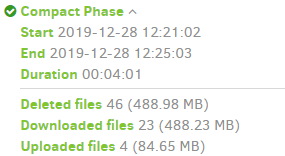
The less pretty version, which I think is what beta users have:
```plaintext
"CompactResults": {
"DeletedFileCount": 46,
"DownloadedFileCount": 23,
"UploadedFileCount": 4,
"DeletedFileSize": 512728374,
"DownloadedFileSize": 511942187,
"UploadedFileSize": 88763042,
"Dryrun": false,
"VacuumResults": null,
"MainOperation": "Compact",
"ParsedResult": "Success",
"Version": "2.0.4.37 (2.0.4.37_canary_2019-12-12)",
"EndTime": "2019-12-28T17:25:03.1547519Z",
"BeginTime": "2019-12-28T17:21:02.0645027Z",
"Duration": "00:04:01.0902492",
```
> [@rdbox](#):
>
> P.S. more than 2.5 hours
Please say something about what you’re seeing. You have a log running, right? Running at Profiling level is quite a lot of output, but Information level should show the sequence of operations very well.
I forget the exact details, but I think compact (which runs under the status line banner of `Deleting unwanted files` and is basically the cleanup of newly-waste space caused by the version deletes)
should look like downloads of dblock files that got too empty, uploads of new dblock after repacking, then deletes of old dblocks that are now totally not needed because their blocks are in new dblocks.
You should be able to see a repeating rhythm, but I can’t tell what you see from the one screenshot. [Compact - Limited / Partial](https://forum.duplicati.com/t/compact-limited-partial/3543) is a feature request to add yet more settings in order to fine-tune the run.
> [@rdbox](#):
>
> The stability of Duplicati has become very weak in new versions.
What’s your update history? Did you just install a four-month-old Canary and start seeing a problem? Canary channel is named because it’s a way to test for breakage, and sometimes it does find them…
[Release: 2.0.4.38 (canary) 2019-12-29](https://forum.duplicati.com/t/release-2-0-4-38-canary-2019-12-29/8752) is the latest Canary, and they have become very stable lately. Problems which actually exist should be looked at, but chasing issues that are already fixed is waste.
> [@rdbox](#):
>
> This was not before
What does “before” mean? If you forget your version history, you might be able to get some clues in the updates installed on the drive. [Downgrading / reverting to a lower version](https://forum.duplicati.com/t/downgrading-reverting-to-a-lower-version/3393) shows where yours might live. [Duplicati backup job log](https://duplicati.readthedocs.io/en/latest/03-using-the-graphical-user-interface/#viewing-the-log-files-of-a-backup-job) also logs the version, but the logs [age away](https://duplicati.readthedocs.io/en/latest/06-advanced-options/#log-retention). If you keep [reports](https://duplicati.readthedocs.io/en/latest/06-advanced-options/#reporting-options), look there too.
Sometimes it’s difficult to tell the cause of changed results. It might be the version, usage, or external…
EDIT:
I don’t read topic titles literally after seeing your [Duplicati broke completely, the terminator came to life](https://forum.duplicati.com/t/duplicati-broke-completely-the-terminator-came-to-life/8755), however if what happened was it sat at that exact screenshot without moving even if you refreshed the browser page then went back to Profiling log, then you could try adding [–http-operation-timeout](https://duplicati.readthedocs.io/en/latest/06-advanced-options/#http-operation-timeout) with a value higher than you think a normal upload or download has any reason to take. But this is not normal and possibly is a networking issue, or (less likely) something wrong at remote (which is Google Drive?).
EDIT 2:
If you’re going to be on Canary, please test a new one, especially if the problem repeats. Is it common?