# Duplicati and Windows Server 2012
**URL:** https://forum.duplicati.com/t/duplicati-and-windows-server-2012/13999
**Category:** Support
**Created:** [February 23, 2022, 4:03pm UTC](https://forum.duplicati.com/t/duplicati-and-windows-server-2012/13999 "2022-02-23T16:03:19Z")
**Posts on this page:** 20
**Page:** 1
### Author:  [@towerman](https://forum.duplicati.com/u/towerman)
#### Post date: [February 23, 2022, 4:03pm UTC](https://forum.duplicati.com/t/duplicati-and-windows-server-2012/13999/1 "2022-02-23T16:03:19Z")
Hello guys,
since some days, I’m seeing that I cannot connect Duplicati using webdav because I get an error about the connection SSL/TLS.
I’m experiencing it on servers with Windows Server 2012 installed (and I’ve seen the same on a computer with Windows 8), while a computer with Windows 10, is working fine.
Is it something related to the old versions of the OS?
Thanks in advance.
Stefano
---
### Author:  [@drwtsn32](https://forum.duplicati.com/u/drwtsn32)
#### Post date: [February 23, 2022, 11:21pm UTC](https://forum.duplicati.com/t/duplicati-and-windows-server-2012/13999/2 "2022-02-23T23:21:59Z")
Hello and welcome!
Yes, it could have something to do with 2012 being an older OS, and perhaps the OS certificate store is out of date compared to the Win10 machine.
What happens if you use a web browser like IE on your 2012 server and go to `https://webdavserver:port/` ? Do you get a certificate warning there, too?
Was this a self-signed certificate or was it issued by a certificate authority?
---
### Author:  [@towerman](https://forum.duplicati.com/u/towerman)
#### Post date: [February 24, 2022, 10:02am UTC](https://forum.duplicati.com/t/duplicati-and-windows-server-2012/13999/3 "2022-02-24T10:02:39Z")
Hello!
I don’t get any error about the certificate, I’ve got a certificate issued by a certificare authority.
I just get this error on the browser
```nohighlight
Not Found
The requested URL / was not found on this server.
```
I was trying to connect via WebDAV to a Synology NAS.
I’ve seen that on the NAS the WebDAV Server app has been updated few days ago, it can be the problem, maybe they have increased something about SSL/TLS connections.
---
### Author:  [@drwtsn32](https://forum.duplicati.com/u/drwtsn32)
#### Post date: [February 24, 2022, 3:32pm UTC](https://forum.duplicati.com/t/duplicati-and-windows-server-2012/13999/4 "2022-02-24T15:32:00Z")
Is your Synology running DSM 7.x? If so can you check Control Panel → Security → Advanced → TLS/SSL Profile level? What is it set to?
On DSM 6.x I used to have it set to the most strict, but I noticed on DSM 7.x that causes WebDAV to fail with Duplicati. I didn’t really dig too deep, but my guess is because it forced TLS 1.3 and mono has issues with it.
So for DSM 7.x you might need to set that to “Intermediate Compatibility”
---
### Author:  [@towerman](https://forum.duplicati.com/u/towerman)
#### Post date: [February 24, 2022, 5:03pm UTC](https://forum.duplicati.com/t/duplicati-and-windows-server-2012/13999/5 "2022-02-24T17:03:48Z")
I’m not 100% convinced about upgrading to version 7.x, so I’m still on the latest 6.x version.
I’ve set MODERN COMPATIBILITY and it’s working with WebDAV Server 2.2, but I had to get back to that version for making it works.
If I will upgrade it to 2.4.2, it will stop working.
Have you got any other suggestion?
Thanks so much!
---
### Author:  [@drwtsn32](https://forum.duplicati.com/u/drwtsn32)
#### Post date: [February 24, 2022, 8:09pm UTC](https://forum.duplicati.com/t/duplicati-and-windows-server-2012/13999/6 "2022-02-24T20:09:16Z")
I only have access to one Synology and it’s running DSM 7, so I can’t do any testing with DSM 6. (Well maybe I could with Virtual DSM…hmmm)
Can you try setting it to “intermediate compatibility” and see if the problem goes away with the newer 2.4.2 WebDAV server?
---
### Author:  [@towerman](https://forum.duplicati.com/u/towerman)
#### Post date: [March 8, 2022, 5:03pm UTC](https://forum.duplicati.com/t/duplicati-and-windows-server-2012/13999/7 "2022-03-08T17:03:00Z")
Hey @drwtsn32!
I’ve tried with a DSM 7 and latest version of WebDAV server; it’s not working even with intermediate compatibility.
I made it work with “obsolete version compatibility” on my DSM 7 and with “accept-any-ssl-certificate” option on Duplicati.
---
### Author:  [@drwtsn32](https://forum.duplicati.com/u/drwtsn32)
#### Post date: [March 9, 2022, 12:36am UTC](https://forum.duplicati.com/t/duplicati-and-windows-server-2012/13999/8 "2022-03-09T00:36:23Z")
Strange, works for me with “intermediate” but I don’t have any Server 2012 machines.
---
### Author:  [@towerman](https://forum.duplicati.com/u/towerman)
#### Post date: [March 9, 2022, 5:12pm UTC](https://forum.duplicati.com/t/duplicati-and-windows-server-2012/13999/9 "2022-03-09T17:12:05Z")
I’ve seen that problem on Windows Server 2012 / Windows 7 - 8 machines.
Have you got one of them for testings?
Thanks!
---
### Author:  [@ts678](https://forum.duplicati.com/u/ts678)
#### Post date: [March 9, 2022, 7:20pm UTC](https://forum.duplicati.com/t/duplicati-and-windows-server-2012/13999/10 "2022-03-09T19:20:38Z")
> [@drwtsn32](#):
>
> my guess is because it forced TLS 1.3
FWIW after web searching didn’t help, I found Synology [documents them](https://kb.synology.com/en-uk/DSM/help/DSM/AdminCenter/connection_security_advanced?version=7) for DSM 7 but not 6.2.
It looks like you have to ask for “Modern” before TLS 1.3 is required (don’t ask for that on `mono`).
> [@towerman](#):
>
> I made it work with “obsolete version compatibility” on my DSM 7
If that meant “Old backward compatibility” then it drops TLS 1.2 need, and maybe that’s enough.
Getting TLS 1.2 was a problem for Windows 7 and older versions of `mono`. Recent ones are fine.
Occasionally [allowed-ssl-versions](https://duplicati.readthedocs.io/en/latest/06-advanced-options/#allowed-ssl-versions) used to be used, but that’s subject to what OS/mono supports.
---
### Author:  [@drwtsn32](https://forum.duplicati.com/u/drwtsn32)
#### Post date: [March 9, 2022, 10:29pm UTC](https://forum.duplicati.com/t/duplicati-and-windows-server-2012/13999/11 "2022-03-09T22:29:11Z")
> [@towerman](#):
>
> I’ve seen that problem on Windows Server 2012 / Windows 7 - 8 machines.
> Have you got one of them for testings?
I have the ability to spin up test VMs. If I get some time I’ll try to do some testing.
---
### Author:  [@towerman](https://forum.duplicati.com/u/towerman)
#### Post date: [May 4, 2022, 10:11am UTC](https://forum.duplicati.com/t/duplicati-and-windows-server-2012/13999/12 "2022-05-04T10:11:37Z")
Hey @drwtsn32, did you manage to make some tests?
Thanks!
---
### Author:  [@drwtsn32](https://forum.duplicati.com/u/drwtsn32)
#### Post date: [May 4, 2022, 3:43pm UTC](https://forum.duplicati.com/t/duplicati-and-windows-server-2012/13999/13 "2022-05-04T15:43:23Z")
Sorry, I didn’t get a chance and then I forgot about it! Can you confirm which Windows 2012 you are using: original release or R2? What service pack level?
---
### Author:  [@drwtsn32](https://forum.duplicati.com/u/drwtsn32)
#### Post date: [May 4, 2022, 11:26pm UTC](https://forum.duplicati.com/t/duplicati-and-windows-server-2012/13999/14 "2022-05-04T23:26:27Z")
I am testing with 2012 original release and was able to reproduce your issue. I’ll do more troubleshooting now…
---
### Author:  [@drwtsn32](https://forum.duplicati.com/u/drwtsn32)
#### Post date: [May 5, 2022, 1:04am UTC](https://forum.duplicati.com/t/duplicati-and-windows-server-2012/13999/15 "2022-05-05T01:04:36Z")
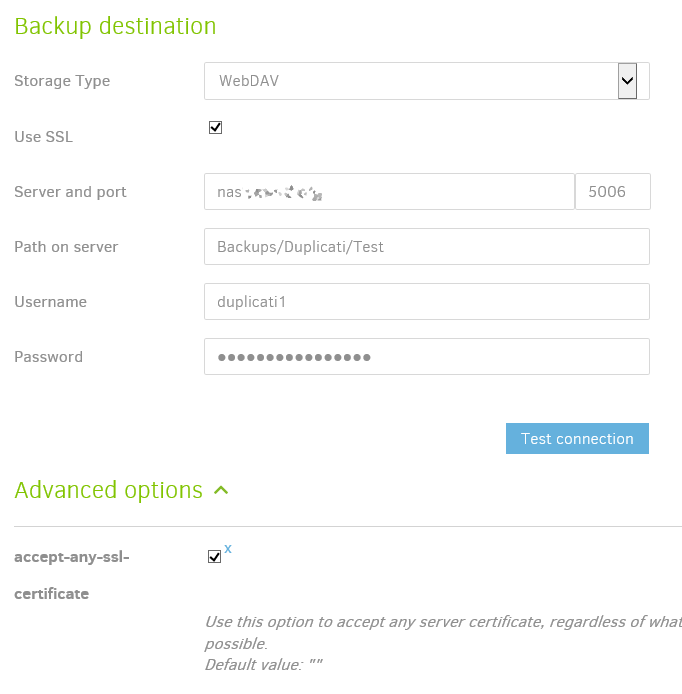
I got it to work by going to the Control Panel on the NAS, Security section, Advanced, and setting custom setting for WebDAV to “Old backward compatibility”:

Then Duplicati connection test worked. (I did check the option to accept any SSL cert, but you should be able to set it to accept a specific SSL hash, or not set this at all if you’re using a public CA.)
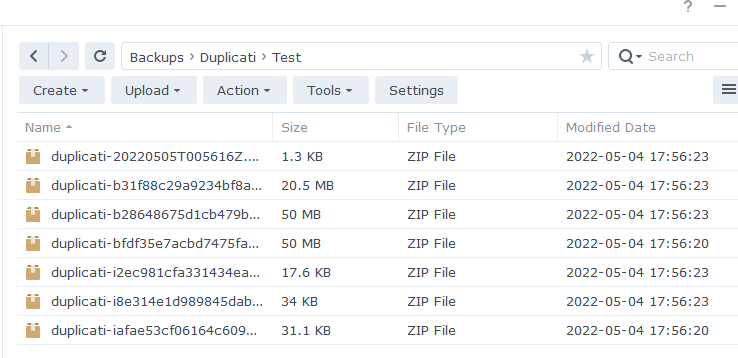
Backup works, files uploaded to the NAS via WebDAV:
---
### Author:  [@towerman](https://forum.duplicati.com/u/towerman)
#### Post date: [May 5, 2022, 6:49am UTC](https://forum.duplicati.com/t/duplicati-and-windows-server-2012/13999/16 "2022-05-05T06:49:49Z")
Thanks @drwtsn32
Just one more question, is it safe to use that configuration?
Thanks!
---
### Author:  [@drwtsn32](https://forum.duplicati.com/u/drwtsn32)
#### Post date: [May 5, 2022, 2:43pm UTC](https://forum.duplicati.com/t/duplicati-and-windows-server-2012/13999/17 "2022-05-05T14:43:54Z")
> [@towerman](#):
>
> is it safe to use that configuration
If your NAS only exposes WebDAV to your trusted internal network then I personally don’t think it’s a big deal but you may have a different security tolerance.
I would not expose WebDAV to the internet with this setting. TLS 1.0 and 1.1 are considered security risks.
I’m not really sure why Duplicati isn’t using TLS 1.2 in this situation. I will try digging deeper into that. If we can solve it then you can put the DSM security back to intermediate security.
---
### Author:  [@drwtsn32](https://forum.duplicati.com/u/drwtsn32)
#### Post date: [May 5, 2022, 3:41pm UTC](https://forum.duplicati.com/t/duplicati-and-windows-server-2012/13999/18 "2022-05-05T15:41:25Z")
For the record I had followed Microsoft’s instructions for enabling TLS 1.2 support in the OS and .net client applications:
> **[How to enable Transport Layer Security (TLS) 1.2 on clients - Configuration...](https://docs.microsoft.com/en-us/mem/configmgr/core/plan-design/security/enable-tls-1-2-client#bkmk_net)**
>
> Information about how to enable TLS 1.2 for Configuration Manager clients.
But I still can’t get it to work.
---
### Author:  [@towerman](https://forum.duplicati.com/u/towerman)
#### Post date: [May 5, 2022, 4:52pm UTC](https://forum.duplicati.com/t/duplicati-and-windows-server-2012/13999/19 "2022-05-05T16:52:49Z")
Thanks for all your help!
I had tried the same, I didn’t managed to make it.
I know that Windows Server 2012 is old, but I still have clients with that.
Same problem with Windows 7 😅
---
### Author:  [@drwtsn32](https://forum.duplicati.com/u/drwtsn32)
#### Post date: [May 5, 2022, 6:51pm UTC](https://forum.duplicati.com/t/duplicati-and-windows-server-2012/13999/20 "2022-05-05T18:51:21Z")
One option may be to not use TLS at all. You could use a protocol like SFTP. Would require reconfiguring the NAS a bit, not sure if it’s worth it to you.
But yeah it is a mystery why Server 2012 can’t talk to Synology properly using TLS 1.2. Maybe they can’t agree on a cipher.
[Next page](https://forum.duplicati.com/t/duplicati-and-windows-server-2012/13999.md?page=2)