# Does not backup "%userprofile%\\scripts\\"
**URL:** https://forum.duplicati.com/t/does-not-backup-userprofile-scripts/12944
**Category:** Support
**Created:** [August 25, 2021, 4:27pm UTC](https://forum.duplicati.com/t/does-not-backup-userprofile-scripts/12944 "2021-08-25T16:27:18Z")
**Posts on this page:** 8
**Page:** 1
### Author:  [@Tapio](https://forum.duplicati.com/u/Tapio)
#### Post date: [August 25, 2021, 4:27pm UTC](https://forum.duplicati.com/t/does-not-backup-userprofile-scripts/12944/1 "2021-08-25T16:27:18Z")
Hi,
I have included “%userprofile%\scripts” in a backup. It’s a folder full of .cmd scripts. I just realized, it does not backup them. I have set filters to exclude \*.avi and \*.mp4 (“ending is avi”). I have not set any exclusion filters. Still, from my scripts folder, it included 2 files, from around 60 to the backup. They are no hidden/system files. I have no idea.
In the backup definitions folder view there is an exclamation mark at the scripts folder, what does Duplicati think? SYSTEM, ADMINISTRATORS and the user have full access rights.
???
Also, it makes me nervous.
“Source: 8,93 MB
Backup 4,81 GB / 8 Versions”
Well, the source files are more like 1 Gig.
In the restore I find crazy branches by case… like:
c:
C:
And in each of them:
c:\users
c:\Users\
Seems like once again I can nuke it all away and start over again.
---
### Author:  [@drwtsn32](https://forum.duplicati.com/u/drwtsn32)
#### Post date: [August 25, 2021, 8:04pm UTC](https://forum.duplicati.com/t/does-not-backup-userprofile-scripts/12944/2 "2021-08-25T20:04:42Z")
> [@Tapio](#):
>
> I have set filters to exclude \*.avi and \*.mp4 (“ending is avi”). I have not set any exclusion filters.
Can you clarify? Sounds contradictory to say you set filters to exclude, but that you have not set any exclusion filters.
Filters can be really tricky, and if not careful it can be easy to exclude or include more than you intend.
Not really sure how you’d end up with “c:” and “C:” in your restore file browse screen.
---
### Author:  [@drwtsn32](https://forum.duplicati.com/u/drwtsn32)
#### Post date: [August 25, 2021, 8:09pm UTC](https://forum.duplicati.com/t/does-not-backup-userprofile-scripts/12944/3 "2021-08-25T20:09:24Z")
> [@drwtsn32](#):
>
> Not really sure how you’d end up with “c:” and “C:” in your restore file browse screen.
Looks like this happens if you are inconsistent with the case when manually entering Source Data paths. I manually entered one with a lower case “c:” and saw the problem you did:
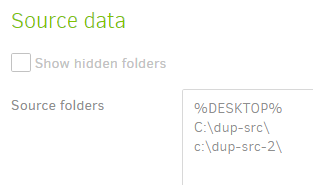
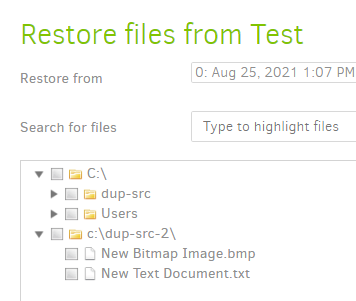
---
### Author:  [@Tapio](https://forum.duplicati.com/u/Tapio)
#### Post date: [September 1, 2021, 11:43am UTC](https://forum.duplicati.com/t/does-not-backup-userprofile-scripts/12944/4 "2021-09-01T11:43:19Z")
I found out, it basically does not backup most of my files. It’s not a surprise it tells about 8 MByte of backup size, where it should be a few Gigs.
I’ve uploaded a screenshot where the weirdness can be seen. So here you can see the filters, which should be unrelated. There is just one file in this screenshot which gets uploaded. I have re-inherited/applied access rights in that folder. Full access for administrators, the current user, and SYSTEM. I have double checked on file level. Same access rights, same owner of the files. Still it does not backup most of them.

---
### Author:  [@Tapio](https://forum.duplicati.com/u/Tapio)
#### Post date: [September 1, 2021, 11:51am UTC](https://forum.duplicati.com/t/does-not-backup-userprofile-scripts/12944/5 "2021-09-01T11:51:41Z")
I created a test backup, there it was possible to include all files. So there must be something wrong with the existing backup definitions. Recreating db did not help here.
---
### Author:  [@Tapio](https://forum.duplicati.com/u/Tapio)
#### Post date: [September 1, 2021, 11:58am UTC](https://forum.duplicati.com/t/does-not-backup-userprofile-scripts/12944/6 "2021-09-01T11:58:29Z")
SOLVED! Exclude files which contain… That “foobar2000\running” filter. I don’t know, why I/Duplicati added “[” and “]” there. But those caused the problem.
---
### Author:  [@drwtsn32](https://forum.duplicati.com/u/drwtsn32)
#### Post date: [September 1, 2021, 1:07pm UTC](https://forum.duplicati.com/t/does-not-backup-userprofile-scripts/12944/7 "2021-09-01T13:07:46Z")
The brackets made it a regex pattern, and probably caused the unpredicted results. Glad you figured it out.
---
### Author:  [@Tapio](https://forum.duplicati.com/u/Tapio)
#### Post date: [September 1, 2021, 5:34pm UTC](https://forum.duplicati.com/t/does-not-backup-userprofile-scripts/12944/8 "2021-09-01T17:34:55Z")
Haha, probably matched if one of the characters between the brackets was in the file name 😃