g__EnumerableToArray|324_0[TSource](IEnumerable`1 source)
at Duplicati.Server.Database.Connection.ReadFromDb[T](Func`2 f, Action`1 prep)
at Duplicati.Server.Database.Connection.get_Backups()
at Duplicati.Server.Program.GetMaxVolumeSize(Connection connection, Dictionary`2 commandlineOptions)
at Duplicati.Server.Program.CheckTempDirFreeSpace(Connection connection, Dictionary`2 commandlineOptions)
at Duplicati.Server.Program.EmitWarningsForConfigurationIssues(Connection connection, IApplicationSettings applicationSettings, Dictionary`2 commandlineOptions)
at Duplicati.Server.Program.Main(IApplicationSettings applicationSettings, String[] _args)
--- End of inner exception stack trace ---
at Duplicati.Server.Program.Main(IApplicationSettings applicationSettings, String[] _args)
at Duplicati.GUI.TrayIcon.HostedInstanceKeeper.<>c __DisplayClass5_0.<.ctor>b__ 0(Object _)
--- End of inner exception stack trace ---
at Duplicati.GUI.TrayIcon.HostedInstanceKeeper..ctor(IApplicationSettings applicationSettings, String[] args)
at Duplicati.GUI.TrayIcon.Program.RunMain(String[] _args)
at Duplicati.GUI.TrayIcon.Program.Main(String[] _args)
```
I can’t even copy this error message from the error window as it closes as soon as I want to copy it. Found this on `AppData\Local\Duplicati\Duplicati.GUI.TrayIcon-crashlog.txt`
There was a different error message before about not being able to create a backup database as the file could not be accessed, but I wasn’t able to copy this and can’t find it in a log file anymore.
What shall I do?
---
### Author:  [@kenkendk](https://forum.duplicati.com/u/kenkendk)
#### Post date: [September 14, 2026, 7:50pm UTC](https://forum.duplicati.com/t/database-error-after-upgrade-to-2-4-0/22694/2 "2026-09-14T19:50:21Z")
> [@dpstef](#):
>
> ```plaintext
> Microsoft.Data.Sqlite.SqliteException (0x80004005): SQLite Error 1: 'no such column: "OperationType" - should this be a string literal in single-quotes?'.
>
> ```
That indicates that the database upgrader has not started for some odd reason.
Not sure how this can happen, as the upgrade is done as part of opening the database.
Do you have any clue as to how this could have happened?
I suggest using some kind of SQLite tool, possibly [SQLiteBrowser](https://sqlitebrowser.org) to open `Duplicati-server.sqlite`.
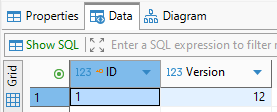
If you can look in the table “Version” you should see the number “12”.
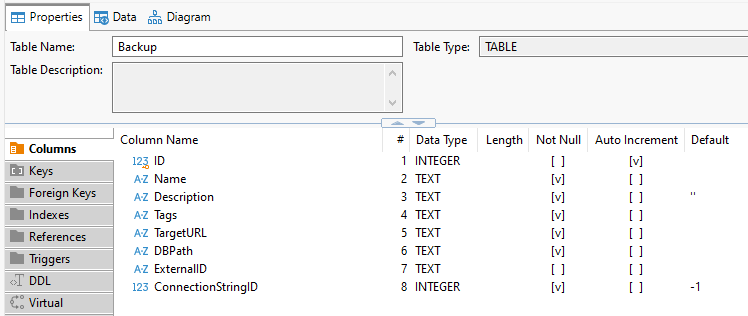
Then look at the table “Backup” and see if it is really missing the column “OperationType”.
Both of these should not be possible at the same time, so I would like to hear what you see.
If the column is missing, and the version is 12 as the message suggests, then you can fix it by running the upgrade command manually:
```plaintext
ALTER TABLE "Backup" ADD COLUMN "OperationType" TEXT NOT NULL DEFAULT 'Backup';
```
---
### Author:  [@dpstef](https://forum.duplicati.com/u/dpstef)
#### Post date: [September 22, 2026, 7:08pm UTC](https://forum.duplicati.com/t/database-error-after-upgrade-to-2-4-0/22694/3 "2026-09-22T19:08:32Z")
Thanks for the detailed help!
I used DBeaver, as I already had this tool installed.
This is the content of the `Version` table:
And this is the scheme of the `Backup` table
I executed the query you gave me, and now Duplicati is running again (and currently doing my scheduled backup).
I don’t really have a clue how this could have happened. That’s what I did:
- My Windows 10 wanted reboot to install [KB5126256](https://support.microsoft.com/en-us/servicing/os/windows-10/2026/09/kb5126256-windows-10-21h2-22h2-standalone-cbs)
- I decided to do some software upgrades beforehand (as these sometimes also requre a reboot, so I only need to reboot once)
- I ran `choco outdated` (from [Chocolatey](https://chocolatey.org/)) to see which packages are outdated
- I figured that Duplicati has version 2.4.0 released, and decided to upgrade it
- I stopped Duplicati through the tray icon
- I upgraded Duplicati through Chocolatey (besides other unrelated software as `autohotkey cmake graphviz pandoc procexp temurin vscodium winscp`)
- I finally rebooted my computer and Duplicati didn’t start anymore.
Then the mentioned first error which I couldn’t copy happened.
Chocolatey itself for the Duplicati package only automates downloading of the `duplicati-2.4.0.0_stable_2026-09-03-win-x86-gui.msi` and running it with `/quiet /qn /norestart` parameters - nothing more (see [chocolateyinstall.ps1](https://github.com/afischer211/my-chocolatey/blob/master/duplicati/tools/chocolateyinstall.ps1) for details).
So I don’t know what could have caused this error.
Edit: I had another computer still on Duplicati 2.3.0.4 and upgraded this to 2.4.0.0 using Chocolatey (without reboot and stuff), this worked as expected - no problems.