# Commandline Compare issues?
**URL:** https://forum.duplicati.com/t/commandline-compare-issues/663
**Category:** Features
**Created:** [September 16, 2017, 5:09am UTC](https://forum.duplicati.com/t/commandline-compare-issues/663 "2017-09-16T05:09:56Z")
**Posts on this page:** 1
**Showing post:** 5
### Author:  [@JonMikelV](https://forum.duplicati.com/u/JonMikelV)
#### Post date: [September 17, 2017, 2:04am UTC](https://forum.duplicati.com/t/commandline-compare-issues/663/5 "2017-09-17T02:04:56Z")
> [@kenkendk](#):
>
> As pointed out by @dgcom it thinks the second parameter is the target url, and since you supply a filename, it thinks you are pointing to a folder.
Ah, I see now - I didn’t understand how the parameters where used and incorrectly assumed the second parameter was purely to point to somewhere with backup info (such as destination OR dbpath). Indeed ADDING `–dbpath=“C:\xxxxx\ABCDEF.sqlite” as the 3rd parameter sped it up and removed the “Listing remote folder” message. Yay!
* * *
> [@kenkendk](#):
>
> Can you try again with --debug-output --verbose, I would like to see where the crash happens so we can give a better error message.
Sure thing!
> **Summary**
>
> ```plaintext
> duplicati.commandline compare C:\Windows\System32\config\systemprofile\AppData\Local\Duplicati\ --debug-output --verbose
>
> Input command: compare
> Input arguments:
> C:\Windows\System32\config\systemprofile\AppData\Local\Duplicati\
>
> Input options:
> debug-output:
> verbose:
>
> Enter encryption passphrase: **********
> No local database, accessing remote store
> Listing remote folder ...
>
> Duplicati.Library.Interface.UserInformationException: Need at least two backups to show differences, database contains 0 backups
> at Duplicati.Library.Main.Operation.ListChangesHandler.Run(String baseVersion, String compareVersion, IEnumerable`1 filterstrings, IFilter compositefilter, Action`2 callback)
> at Duplicati.Library.Main.Controller.<>c __DisplayClass31_0.b__ 0(ListChangesResults result)
> at Duplicati.Library.Main.Controller.RunAction[T](T result, String[]& paths, IFilter& filter, Action`1 method)
> at Duplicati.CommandLine.Commands.ListChanges(TextWriter outwriter, Action`1 setup, List`1 args, Dictionary`2 options, IFilter filter)
> at Duplicati.CommandLine.Program.RunCommandLine(TextWriter outwriter, TextWriter errwriter, Action`1 setup, String[] args)
>
> Update "2.0.2.6_canary_2017-09-16" detected
>
> ```
* * *
> [@kenkendk](#):
>
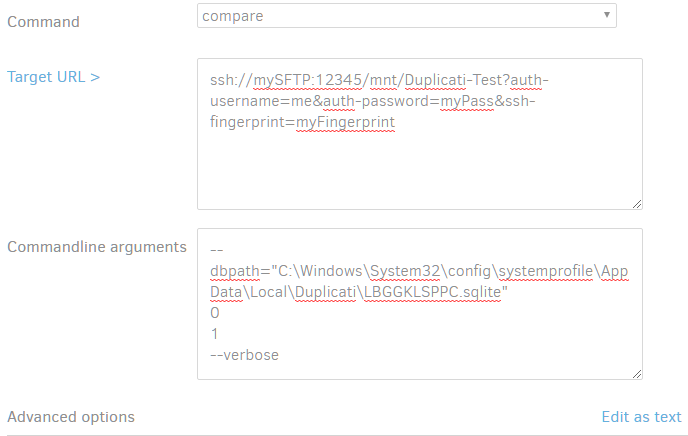
> If you open the commandline UI, you should be able to keep the --dbpath parameter, and clear the rest, except the target url. Then in the “arguments” field type 0 and 7 on two lines.
Huzzah! I understand now how the Commandline UI works, thank-you!
While using the “dbpath” Advanced Option worked, for me what worked BEST was to put everything in the “Commandline Arguments” field, then use “Edit as text” to remove ALL “Advanced options” (leaving any in seemed to cause unexpected results).
---
_[View the full topic](https://forum.duplicati.com/t/commandline-compare-issues/663)._