" 0 7`
And adding `--verbose` gets me the full listing instead of just a summary.
Oddly, I can’t seem to use the local database by referencing my local .sqlite (dbpath) file - are only remote folder based listings supported?
Equally oddly, I still can’t seem to get it to run from the Commandline UI.
---
### Author:  [@kenkendk](https://forum.duplicati.com/u/kenkendk)
#### Post date: [September 16, 2017, 7:16pm UTC](https://forum.duplicati.com/t/commandline-compare-issues/663/4 "2017-09-16T19:16:56Z")
> [@JonMikelV](#):
>
> The parameter is expected to be in quotes!
Not really, but if you do not have quotes, the shell tends to treat various characters to be escape characters (i.e. `&` and `?` have different meanings). Putting quotes around suppresses most escape characters, so the export routine always does it.
> [@JonMikelV](#):
>
> ```plaintext
> No local database, accessing remote store
>
> Listing remote folder …
>
> Operation List with file attempt 1 of 5 failed with message: The folder C:\Windows\System32\config\systemprofile\AppData\Local\Duplicati\LBGGKLSPPC.sqlite does not exist => The folder C:\Windows\System32\config\systemprofile\AppData\Local\Duplicati\LBGGKLSPPC.sqlite does not exist
>
> ```
As pointed out by @dgcom it thinks the second parameter is the target url, and since you supply a filename, it thinks you are pointing to a folder.
> [@JonMikelV](#):
>
> If I remove the file name (how does it know which backup I want??) and try I get:
>
> ```plaintext
> No local database, accessing remote store
> Listing remote folder …
> Need at least two backups to show differences, database contains 0 backups
> Update “2.0.2.5_canary_2017-09-14” detected
>
> ```
Yes, that does sound strange, it should say something like “invalid number of arguments”.
> [@JonMikelV](#):
>
> But only get:
>
> ```plaintext
> No local database, accessing remote store
> Listing remote folder …
> Operation List with file attempt 1 of 5 failed with message: String reference not set to an instance of a String.
> Parameter name: s => String reference not set to an instance of a String.
> Parameter name: s
>
> ```
Can you try again with `--debug-output --verbose`, I would like to see where the crash happens so we can give a better error message.
> [@JonMikelV](#):
>
> Oddly, I can’t seem to use the local database by referencing my local .sqlite (dbpath) file - are only remote folder based listings supported?
That should work with `--dbpath=...` ?
> [@JonMikelV](#):
>
> Equally oddly, I still can’t seem to get it to run from the Commandline UI.
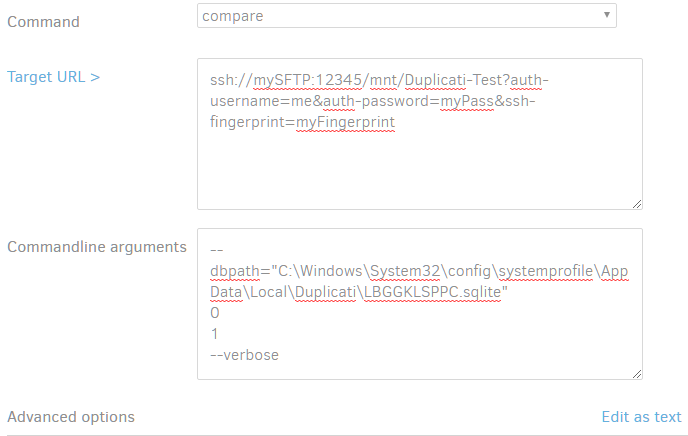
If you open the commandline UI, you should be able to keep the `--dbpath` parameter, and clear the rest, except the target url. Then in the “arguments” field type `0` and `7` on two lines.
---
### Author:  [@JonMikelV](https://forum.duplicati.com/u/JonMikelV)
#### Post date: [September 17, 2017, 2:04am UTC](https://forum.duplicati.com/t/commandline-compare-issues/663/5 "2017-09-17T02:04:56Z")
> [@kenkendk](#):
>
> As pointed out by @dgcom it thinks the second parameter is the target url, and since you supply a filename, it thinks you are pointing to a folder.
Ah, I see now - I didn’t understand how the parameters where used and incorrectly assumed the second parameter was purely to point to somewhere with backup info (such as destination OR dbpath). Indeed ADDING `–dbpath=“C:\xxxxx\ABCDEF.sqlite” as the 3rd parameter sped it up and removed the “Listing remote folder” message. Yay!
* * *
> [@kenkendk](#):
>
> Can you try again with --debug-output --verbose, I would like to see where the crash happens so we can give a better error message.
Sure thing!
> **Summary**
>
> ```plaintext
> duplicati.commandline compare C:\Windows\System32\config\systemprofile\AppData\Local\Duplicati\ --debug-output --verbose
>
> Input command: compare
> Input arguments:
> C:\Windows\System32\config\systemprofile\AppData\Local\Duplicati\
>
> Input options:
> debug-output:
> verbose:
>
> Enter encryption passphrase: **********
> No local database, accessing remote store
> Listing remote folder ...
>
> Duplicati.Library.Interface.UserInformationException: Need at least two backups to show differences, database contains 0 backups
> at Duplicati.Library.Main.Operation.ListChangesHandler.Run(String baseVersion, String compareVersion, IEnumerable`1 filterstrings, IFilter compositefilter, Action`2 callback)
> at Duplicati.Library.Main.Controller.<>c __DisplayClass31_0.b__ 0(ListChangesResults result)
> at Duplicati.Library.Main.Controller.RunAction[T](T result, String[]& paths, IFilter& filter, Action`1 method)
> at Duplicati.CommandLine.Commands.ListChanges(TextWriter outwriter, Action`1 setup, List`1 args, Dictionary`2 options, IFilter filter)
> at Duplicati.CommandLine.Program.RunCommandLine(TextWriter outwriter, TextWriter errwriter, Action`1 setup, String[] args)
>
> Update "2.0.2.6_canary_2017-09-16" detected
>
> ```
* * *
> [@kenkendk](#):
>
> If you open the commandline UI, you should be able to keep the --dbpath parameter, and clear the rest, except the target url. Then in the “arguments” field type 0 and 7 on two lines.
Huzzah! I understand now how the Commandline UI works, thank-you!
While using the “dbpath” Advanced Option worked, for me what worked BEST was to put everything in the “Commandline Arguments” field, then use “Edit as text” to remove ALL “Advanced options” (leaving any in seemed to cause unexpected results).
---
### Author:  [@kenkendk](https://forum.duplicati.com/u/kenkendk)
#### Post date: [September 18, 2017, 8:50am UTC](https://forum.duplicati.com/t/commandline-compare-issues/663/6 "2017-09-18T08:50:27Z")
> [@JonMikelV](#):
>
> Can you try again with --debug-output --verbose, I would like to see where the crash happens so we can give a better error message.
>
> Sure thing!
That does not give the error with `Parameter name: s`. According to your original post, the command the produced it was:
```plaintext
Duplicati.CommandLine compare ssh://mySSH//mnt/user/Duplicati/TestBackup?auth-username=me&auth-password=mypassword&ssh-fingerprint=ssh-rsa%myfinger
```
I tried that on my machine, and it did not give the error message.
> [@JonMikelV](#):
>
> Huzzah! I understand now how the Commandline UI works, thank-you!
Awesome!
> [@JonMikelV](#):
>
> While using the “dbpath” Advanced Option worked, for me what worked BEST was to put everything in the “Commandline Arguments” field, then use “Edit as text” to remove ALL “Advanced options” (leaving any in seemed to cause unexpected results).
Yes, there is some overlap in the arguments and options. If you know what you want, it is easier to just use the “commandline arguments” field. For lack of time I skimped on the argument splitting and just use each line as an argument, but maybe we should fix that so it works like a normal commandline where spaces also delimit arguments.
---
### Author:  [@JonMikelV](https://forum.duplicati.com/u/JonMikelV)
#### Post date: [September 19, 2017, 10:05pm UTC](https://forum.duplicati.com/t/commandline-compare-issues/663/7 "2017-09-19T22:05:04Z")
It looks like the issue is not having quotes around the “ssh://” causes a parsing issue in the parmeters.
This exact command (nothing obfuscated) recreates the issue (put anything but blank in for the passphrase).
```
"C:\Program Files\Duplicati 2\Duplicati.CommandLine.exe" compare ssh://a
Enter encryption passphrase: *
No local database, accessing remote store
Listing remote folder ...
Operation List with file attempt 1 of 5 failed with message: String reference not set to an instance of a String.
Parameter name: s => String reference not set to an instance of a String.
Parameter name: s
Listing remote folder ...
Operation List with file attempt 2 of 5 failed with message: String reference not set to an instance of a String.
Parameter name: s => String reference not set to an instance of a String.
Parameter name: s
...
```
---
### Author:  [@kenkendk](https://forum.duplicati.com/u/kenkendk)
#### Post date: [September 20, 2017, 8:17pm UTC](https://forum.duplicati.com/t/commandline-compare-issues/663/8 "2017-09-20T20:17:04Z")
> [@JonMikelV](#):
>
> This exact command (nothing obfuscated) recreates the issue
Ok, I’ve found it. It is the SSH library that expects either a key or a password, but gets a null password and that throws the rather cryptic error message.