# Clearing DB encryption error message automatically
**URL:** https://forum.duplicati.com/t/clearing-db-encryption-error-message-automatically/21804
**Category:** Installation
**Created:** [January 15, 2026, 11:21pm UTC](https://forum.duplicati.com/t/clearing-db-encryption-error-message-automatically/21804 "2026-01-15T23:21:31Z")
**Posts on this page:** 9
**Page:** 1
### Author:  [@DeLinuxCo](https://forum.duplicati.com/u/DeLinuxCo)
#### Post date: [January 15, 2026, 11:21pm UTC](https://forum.duplicati.com/t/clearing-db-encryption-error-message-automatically/21804/1 "2026-01-15T23:21:31Z")
Greetings all,
I am in the process of adding Duplicati as a default and running app on my Manjaro Cinnamon Spin called DeLinuxCo (see here: [Including Duplicati in my ISO - Allowed?](https://forum.duplicati.com/t/including-duplicati-in-my-iso-allowed/21796) )
So far I have:
- compiled my own Duplicati package using the AUR as a template.
- created a launcher and icon
- created a script that generates a base64 14 character db key, which places it in the preload.json file.
- set the application to start at user login
The issue I am having is that I want Duplicati to be initially running in an error free state. In other words, the Tray icon in black not yellow.
Using my script, I can restart Duplicati but the error message is still there. It appears that as long as the error message has not been dismissed, the tray icon will always show yellow.
Any ideas on how to have it black if the the db encryption is indeed there at startup?
-John
---
### Author:  [@kenkendk](https://forum.duplicati.com/u/kenkendk)
#### Post date: [January 16, 2026, 9:05am UTC](https://forum.duplicati.com/t/clearing-db-encryption-error-message-automatically/21804/2 "2026-01-16T09:05:33Z")
> [@DeLinuxCo](#):
>
> Any ideas on how to have it black if the the db encryption is indeed there at startup?
That should be fixed in 2.2.0.1 IIRC.
If the database is encrypted on startup, it will dismiss the error message.
Is the problem that the logic retains the state for the icon? (The message is no longer showing in the UI, but the TrayIcon is still showing the warning state).
PS: For the next stable release the plan is to automatically provide database encryption on desktops (using libsecret for Linux). If you use the key name `duplicati-server-encryption-key` you will be compatible with the next stable, in that you can remove the setup for the secret provider and it will “just work”.
You can try it out with the latest canary build.
---
### Author:  [@DeLinuxCo](https://forum.duplicati.com/u/DeLinuxCo)
#### Post date: [January 16, 2026, 4:34pm UTC](https://forum.duplicati.com/t/clearing-db-encryption-error-message-automatically/21804/3 "2026-01-16T16:34:26Z")
Hi Ken
> [@kenkendk](#):
>
> Is the problem that the logic retains the state for the icon? (The message is no longer showing in the UI, but the TrayIcon is still showing the warning state).
As far as I can tell, the first run will (currently), generate a caution error, which will turn the icon yellow, “no db encryption” etc. My script, will run after shortly after the first boot, the script does a series of other configs for the user. Once Duplicati has run for the first time, it creates the ~/.config/Duplicati directory and my script it generate the key, add it to the preload.json file inside the Duplicatin directory etc. I then have the script restart Duplicati using; `systemctl --user restart duplicati `and it restarts Duplicati just fine, but even though the key is there, the tray icon is still yellow because the error/warning message about the encryption key being missing is still there.
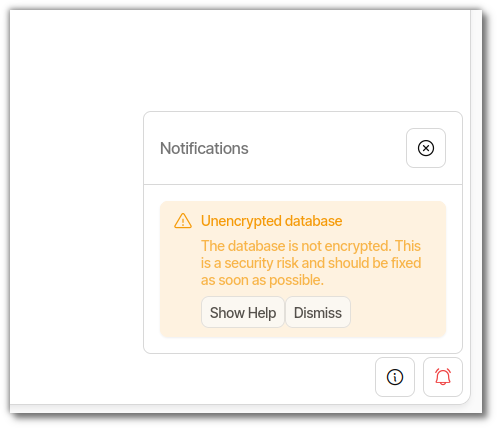
As long as this message is not Dismissed, the tray icon will stay yellow even though the encryption key is there. Once dismissed, black icon and it stays that way.
> [@kenkendk](#):
>
> PS: For the next stable release the plan is to automatically provide database encryption on desktops (using libsecret for Linux). If you use the key name `duplicati-server-encryption-key` you will be compatible with the next stable, in that you can remove the setup for the secret provider and it will “just work”.
So just insert “`duplicati-server-encryption-key`" into the preload.json file instead of my generated key?
-John
---
### Author:  [@DeLinuxCo](https://forum.duplicati.com/u/DeLinuxCo)
#### Post date: [January 16, 2026, 6:09pm UTC](https://forum.duplicati.com/t/clearing-db-encryption-error-message-automatically/21804/4 "2026-01-16T18:09:10Z")
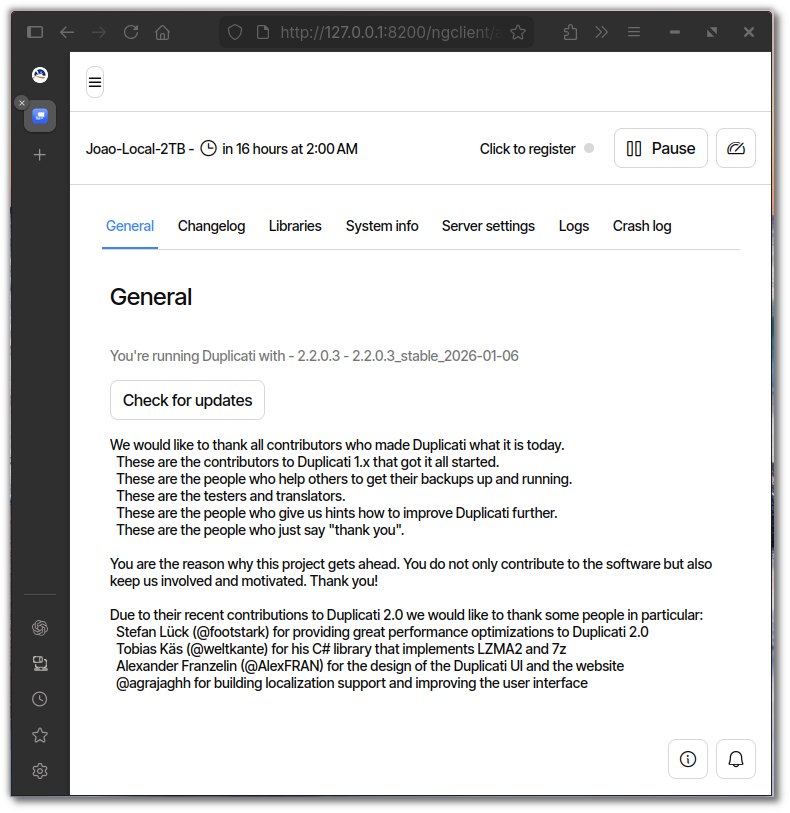
It looks like I am already running the latest ?
---
### Author:  [@ts678](https://forum.duplicati.com/u/ts678)
#### Post date: [January 17, 2026, 2:27pm UTC](https://forum.duplicati.com/t/clearing-db-encryption-error-message-automatically/21804/5 "2026-01-17T14:27:02Z")
> [@DeLinuxCo](#):
>
> It looks like I am already running the latest ?
You are running the latest stable, but developer spoke of “next stable”.
Dev’s request said “latest canary build” which you are not running, but
[Release channels and versions](https://docs.duplicati.com/installation-details/release-channels-and-versions) should be read. Canary are the latest.
That means you are encouraged to cautiously test the latest additions.
[https://duplicati.com/download](https://duplicati.com/download) page is a way to get the latest versions.
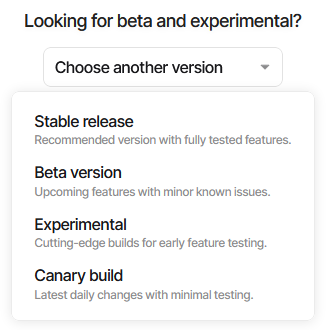
looks like it should get 2.2.0.103, and you can read about it in the
[Change to default database encryption](https://forum.duplicati.com/t/release-2-2-0-102-canary-2025-12-12/21727#p-80857-change-to-default-database-encryption-3) and see migration worries.
Never got a reply to my concern about getting the secret back out.
It might vary OS to OS anyway, but Windows looked concerning…
Here’s your offer to continue from where this left off, if you choose:
> [@Release: 2.2.0.102 (Canary) 2025-12-12](https://forum.duplicati.com/t/release-2-2-0-102-canary-2025-12-12/21727/13):
>
> Viewing server DB as not a primary source reduces worry about it. It’s not clear if random encryption password can even be obtained, but if one moves onto a new system or account, one should be able to import config using its export password.
>
> Maybe the people who are available to try out scenarios can find “best practices”, which maybe eventually will be passed on to users in docs and the release notes.
> [@DeLinuxCo](#):
>
> using the AUR as a template
changes things, as Duplicati doesn’t do those. Latest AUR Canary looks like
[https://aur.archlinux.org/packages/duplicati-canary-bin](https://aur.archlinux.org/packages/duplicati-canary-bin)
AUR used to do things differently, e.g. providing `duplicati` user and group.
This is more secure than running as root, but needs workarounds for access.
Last I knew, they didn’t explain setup well. I don’t know if they have changed.
---
### Author:  [@DeLinuxCo](https://forum.duplicati.com/u/DeLinuxCo)
#### Post date: [January 18, 2026, 5:21pm UTC](https://forum.duplicati.com/t/clearing-db-encryption-error-message-automatically/21804/6 "2026-01-18T17:21:05Z")
I am a bit confused… the canary versions numbers are lower than the release version numbers?
Also, I installed 2.2.0.3 stable on a new system, without adding the ~/.config/Duplicati/preload.json file and although it did give the warning message about the db encryption on first start, once the message was cleared, it never returned. So it sounds/looks like it is already implemented?
---
### Author:  [@kenkendk](https://forum.duplicati.com/u/kenkendk)
#### Post date: [January 19, 2026, 1:14pm UTC](https://forum.duplicati.com/t/clearing-db-encryption-error-message-automatically/21804/7 "2026-01-19T13:14:38Z")
> [@DeLinuxCo](#):
>
> I am a bit confused
There is a bit much going on in this thread now 😕
When Duplicati starts, it checks if encryption is applied, and if not sets the warning message.
If you then setup encryption, this is not applied and will not cause the messages to go away.
However, if you configure database encryption and then restart Duplicati, the changes will be applied and the message will go away.
> [@DeLinuxCo](#):
>
> So just insert “`duplicati-server-encryption-key`" into the preload.json file instead of my generated key?
No! That would use the value literal as the key, not very secure.
I assumed (my fault) that you were building a distro with a Desktop, and that this environment has DBus + libsecret. I then assumed you would store the encryption key in libsecret, and if you do that, you should use `duplicati-server-encryption-key` as the key name inside `libsecret` for forward compatibility.
Reading the new messages, it does not look like you are doing this, so just ignore that suggestion.
> [@DeLinuxCo](#):
>
> the canary versions numbers are lower than the release version numbers?
Not really. The canary has `2.2.0.102` and the stable has `2.2.0.3`.
---
### Author:  [@DeLinuxCo](https://forum.duplicati.com/u/DeLinuxCo)
#### Post date: [January 19, 2026, 3:36pm UTC](https://forum.duplicati.com/t/clearing-db-encryption-error-message-automatically/21804/8 "2026-01-19T15:36:09Z")
Thank you @kenkendk , that makes all of the sense in the world now. I have not needed to work much with libsecret but I will focus on that process. I will test out the canary version first and see if it just mey be easier to wait for the stable version.
I very much appreciate the help and clarification from you @ts678
-John
---
### Author:  [@DeLinuxCo](https://forum.duplicati.com/u/DeLinuxCo)
#### Post date: [January 19, 2026, 7:38pm UTC](https://forum.duplicati.com/t/clearing-db-encryption-error-message-automatically/21804/9 "2026-01-19T19:38:41Z")
UPDATE:
I built the package for the duplicati-canary-bin-2.2.103 and it works perfectly, I created a launcher and added it to startup and built an ISO for testing. Booted perfect in live mode, started right up and turned TrayIcon black about a minute later but never turned yellow and no warnings.
I think I will just wait for this version to be pushed to stable, thank you all for your help.
-John