# Cannot connect to minio s3 server
**URL:** https://forum.duplicati.com/t/cannot-connect-to-minio-s3-server/1573
**Category:** Support
**Created:** [November 27, 2017, 8:49pm UTC](https://forum.duplicati.com/t/cannot-connect-to-minio-s3-server/1573 "2017-11-27T20:49:16Z")
**Posts on this page:** 12
**Page:** 1
### Author:  [@richard\_d](https://forum.duplicati.com/u/richard_d)
#### Post date: [November 27, 2017, 8:49pm UTC](https://forum.duplicati.com/t/cannot-connect-to-minio-s3-server/1573/1 "2017-11-27T20:49:16Z")
Setup: minio (2017-11-22T19:55:46Z) on Windows 10
duplicati 2.0.2.1\_beta\_2017-08-01 on Windows 10
Both on local subnet.
If I connect directly to minio via the minio browser connection, I can see, create, and delete buckets. I can upload and delete files.
I am unable to get duplicati to successfully connect to minio, however. It is not a dns failure, I have the ForcePathStyle option checked. Screenshot of connection settings :
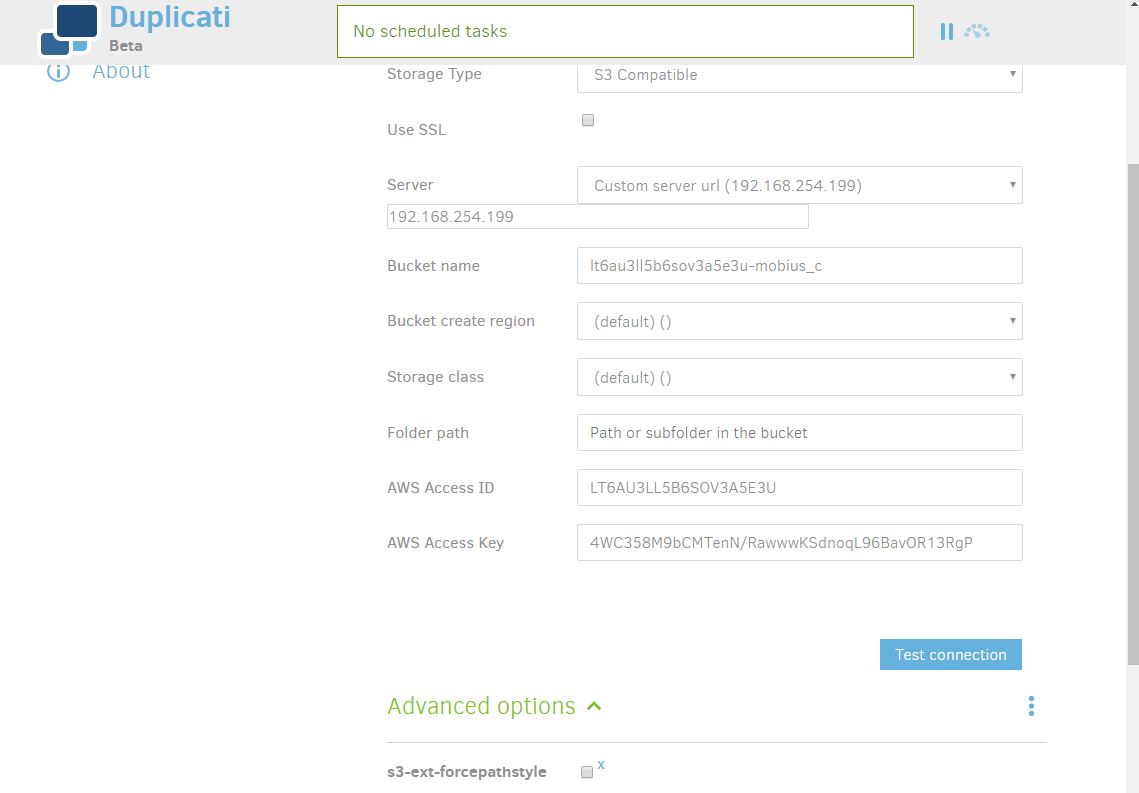
It makes the initial handshake fine. Then, no matter what I have in the folder setting (blank, specify one, it doesn’t matter) duplicati gives me a dialog box: “The folder does not exist Create it now?” When I click yes, the following error occurs:
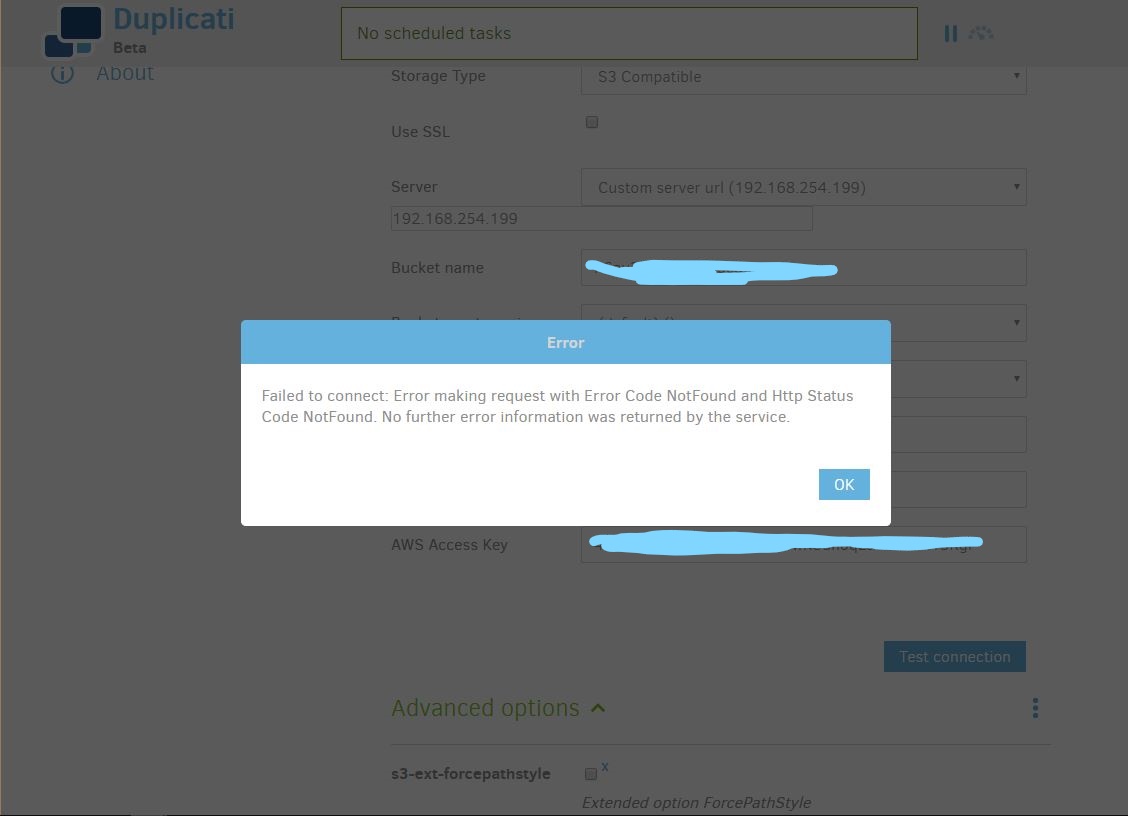
I have tested this both with minio running as a service, and with minio running in a command line window. I’m not seeing any log messages on the minio console. I am not using SSL.
---
### Author:  [@JonMikelV](https://forum.duplicati.com/u/JonMikelV)
#### Post date: [November 27, 2017, 9:32pm UTC](https://forum.duplicati.com/t/cannot-connect-to-minio-s3-server/1573/2 "2017-11-27T21:32:38Z")
Welcome to the Duplicati Forum, @richard_d!
In your screen shot it looks like the `s3-ext-forcepathstyle` parameter has been added but NOT checked which would mean you’re getting `--s3-ext-forcepathstyle=FALSE`.
Is that just an artifact of your screen shot or are you running it unchecked?
---
### Author:  [@richard\_d](https://forum.duplicati.com/u/richard_d)
#### Post date: [November 27, 2017, 9:43pm UTC](https://forum.duplicati.com/t/cannot-connect-to-minio-s3-server/1573/3 "2017-11-27T21:43:28Z")
Checking or unchecking makes no difference.
Without the option present, I get a DNS lookup failure. With the option present, checked or unchecked, it connects but then fails as described.
---
### Author:  [@JonMikelV](https://forum.duplicati.com/u/JonMikelV)
#### Post date: [November 27, 2017, 10:48pm UTC](https://forum.duplicati.com/t/cannot-connect-to-minio-s3-server/1573/4 "2017-11-27T22:48:59Z")
> [@richard\_d](#):
>
> Checking or unchecking makes no difference.
Unfortunately, I’ve not used Minio - I was just hoping it was a simple “checkbox” issue. Hopefully somebody else who has used it can help out.
---
### Author:  [@priller](https://forum.duplicati.com/u/priller)
#### Post date: [November 28, 2017, 1:36am UTC](https://forum.duplicati.com/t/cannot-connect-to-minio-s3-server/1573/5 "2017-11-28T01:36:21Z")
I use minio locally and was never able to make Duplicati work with an IP address. So, I added an entry to the computer host file. Use that host name and the minio port number, by default it is 9000.
Example:
host file entry: minio 192.168.254.199
Duplicati Custom server URL: minio:9000
EDIT: I see in your screenshot that you have s3-ext-forcepathstyle, but it is not checked.
---
### Author:  [@dcurrey](https://forum.duplicati.com/u/dcurrey)
#### Post date: [November 28, 2017, 3:46am UTC](https://forum.duplicati.com/t/cannot-connect-to-minio-s3-server/1573/6 "2017-11-28T03:46:18Z")
I will have to double check tomorrow but I think I needed the port in the url
192 168 254.199:9000
---
### Author:  [@richard\_d](https://forum.duplicati.com/u/richard_d)
#### Post date: [November 28, 2017, 10:35pm UTC](https://forum.duplicati.com/t/cannot-connect-to-minio-s3-server/1573/7 "2017-11-28T22:35:06Z")
As I mentioned in the previous reply, in my installation it doesn’t matter if the option is checked or unchecked. If it’s present at all, duplicati makes the initial connection to the minio server on the default port of 9000. If it’s not present, there’s a DNS lookup failure.
Duplicati is successfully connecting to the server initially, then failing somehow midway through.
I’ll try the hostfiles entries and see if that fixes things. If it does, great, but it should work the way I have it set up.
---
### Author:  [@kenkendk](https://forum.duplicati.com/u/kenkendk)
#### Post date: [December 10, 2017, 3:37pm UTC](https://forum.duplicati.com/t/cannot-connect-to-minio-s3-server/1573/8 "2017-12-10T15:37:36Z")
If you can get some logs from Minio, then maybe that can explain why it fails?
---
### Author:  [@richard\_d](https://forum.duplicati.com/u/richard_d)
#### Post date: [January 4, 2018, 12:29am UTC](https://forum.duplicati.com/t/cannot-connect-to-minio-s3-server/1573/9 "2018-01-04T00:29:08Z")
The minio client for windows doesn’t seem to log. I’ve run wireshark and looked at the data, and it’s just as duplicati says - there’s a 404 returned from minio. When testing the connection, Duplicati connects, asks me “the folder “test1” does not exist (in the “duplicati-test” bucket): Create it now?” I click yes, and the 404 gets returned.
If I manually create a test1 directory in the duplicati-test directory of the directory tree for the minio installation, the above still holds true. It says it doesn’t exist, asks if I want to create it, then receives a 404.
At this point I’ve moved on to having duplicati use a network file share from the server I am running minio on. Not as cool, but it works.
I will leave everything installed. If there’s anything I can do or capture to pursue debugging this, I’m happy to do so.
I have some spare hardware, I will set up a linux minio installation and see what happens.
Edit: I did make sure to set the bucket within minio to read/write.
Thanks
---
### Author:  [@richard\_d](https://forum.duplicati.com/u/richard_d)
#### Post date: [January 4, 2018, 2:49am UTC](https://forum.duplicati.com/t/cannot-connect-to-minio-s3-server/1573/10 "2018-01-04T02:49:46Z")
So looking at the packet trace, I’m not seeing where duplicati is authenticating itself to the minio server? I get the same 404 result independent of what I put into the access and secret keys field. The packet trace only shows me a GET /duplicati-test, which gets a 404, and then a PUT /duplicati-test, which also gets a 404. Seems like I should be seeing the authentication handshake in there somewhere?
Edit: do I need to enable SSL? Since it’s entirely contained within my home network, I hadn’t bothered to set ssl up.
---
### Author:  [@richard\_d](https://forum.duplicati.com/u/richard_d)
#### Post date: [January 4, 2018, 2:59am UTC](https://forum.duplicati.com/t/cannot-connect-to-minio-s3-server/1573/11 "2018-01-04T02:59:07Z")
Ok. This has been resolved. When using the custom url option, :9000 has to be appended to the server name or IP address; it doesn’t automatically connect to the default port, it instead defaults to port 80. The test connection works now.
Also, adding the IP of the server to the local hosts file does nothing, there is still a DNS timeout unless the forcepathstyle option is enabled.
---
### Author:  [@JonMikelV](https://forum.duplicati.com/u/JonMikelV)
#### Post date: [January 4, 2018, 3:04am UTC](https://forum.duplicati.com/t/cannot-connect-to-minio-s3-server/1573/12 "2018-01-04T03:04:59Z")
> [@richard\_d](#):
>
> This has been resolved.
Glad to hear you figured it out!
I hope you don’t mind but I went ahead and flagged your post as the solution in case others search this topic.