# Backup Runtime after 2.0.7.1 update
**URL:** https://forum.duplicati.com/t/backup-runtime-after-2-0-7-1-update/16378
**Category:** Support
**Created:** [June 13, 2023, 12:54am UTC](https://forum.duplicati.com/t/backup-runtime-after-2-0-7-1-update/16378 "2023-06-13T00:54:02Z")
**Posts on this page:** 20
**Page:** 3
### Author:  [@ts678](https://forum.duplicati.com/u/ts678)
#### Post date: [June 16, 2023, 6:09pm UTC](https://forum.duplicati.com/t/backup-runtime-after-2-0-7-1-update/16378/41 "2023-06-16T18:09:11Z")
> [@tkohhh](#):
>
> Am I missing something?
The code snippet shown above looks like it runs at database opening. The job database is normally not open, but is opened as needed. Looking at a job log is just a very safe way of trying to get the message from the database open, as seen in About → Show log → Live → Verbose. Or do some other operation.
---
### Author:  [@tkohhh](https://forum.duplicati.com/u/tkohhh)
#### Post date: [June 16, 2023, 6:16pm UTC](https://forum.duplicati.com/t/backup-runtime-after-2-0-7-1-update/16378/42 "2023-06-16T18:16:01Z")
> [@ts678](#):
>
> The code snippet shown above looks like it runs at database opening.
Here’s what I tried:
1. Navigate to the Job Log
2. Expand a Job Log
3. Navigate to About \> Show Log \> Live
4. Change the Level to “Verbose”
5. Look for a `"Setting custom SQLite option '{0}'."` entry. (nope, nothing except the message from 10:21am posted previously)
Then, I tried:
1. Leaving the Live Log window open, and opening a new browser tab for Duplicati
2. In the new tab, navigate to the Job Log
3. Expand a Job Log
4. Return to other tab with the Live Log
5. Look for additional log messages (no, there are no new entries)
---
### Author:  [@ts678](https://forum.duplicati.com/u/ts678)
#### Post date: [June 16, 2023, 6:18pm UTC](https://forum.duplicati.com/t/backup-runtime-after-2-0-7-1-update/16378/43 "2023-06-16T18:18:29Z")
Your environment variable might not be set up as well as you think, but `ps` will show what Duplicati got. Meanwhile, I guess I can play with this, but it’ll probably be on Windows. Still, I can test logging output.
---
### Author:  [@tkohhh](https://forum.duplicati.com/u/tkohhh)
#### Post date: [June 16, 2023, 6:25pm UTC](https://forum.duplicati.com/t/backup-runtime-after-2-0-7-1-update/16378/44 "2023-06-16T18:25:48Z")
> [@ts678](#):
>
> Your environment variable might not be set up as well as you think
That may be, but it’s set up the same way as the dozen+ other Environment Variables I have set up across 13 containers, all of which work as expected. If there’s a trick to this one, I’d love to know it!
---
### Author:  [@ts678](https://forum.duplicati.com/u/ts678)
#### Post date: [June 16, 2023, 6:42pm UTC](https://forum.duplicati.com/t/backup-runtime-after-2-0-7-1-update/16378/45 "2023-06-16T18:42:38Z")
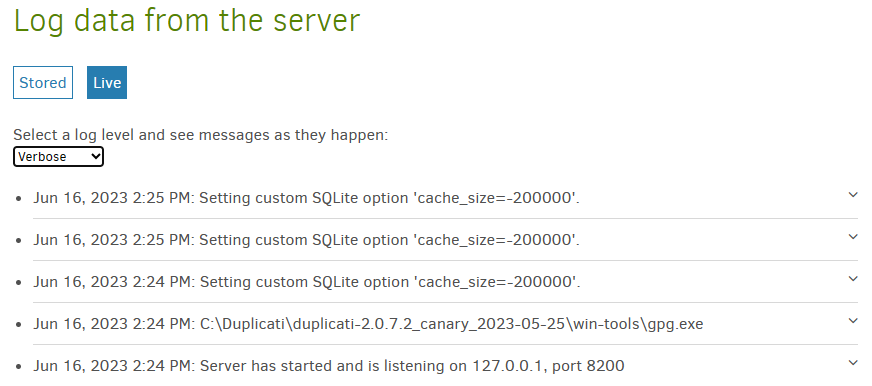
I think live log actually did somehow manage to pick up the server database open.
I then waited until 2:25 then played with job logs. Didn’t even open one, just listed.
> [@tkohhh](#):
>
> all of which work as expected
Do they have to make their way through systemd which might chop prior ones off?
> [@tkohhh](#):
>
> If there’s a trick to this one, I’d love to know it!
Directions and methods were previously posted. Can you say how you’re doing it?
Some systemd background, which may or may not fit what your container is using:
```plaintext
$ cat /lib/systemd/system/duplicati.service
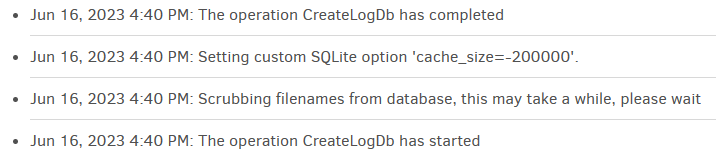
[Unit]
Description=Duplicati web-server
After=network.target
[Service]
Nice=19
IOSchedulingClass=idle
EnvironmentFile=-/etc/default/duplicati
ExecStart=/usr/bin/duplicati-server $DAEMON_OPTS
Restart=always
[Install]
WantedBy=multi-user.target
```
[https://www.freedesktop.org/software/systemd/man/systemd.exec.html](https://www.freedesktop.org/software/systemd/man/systemd.exec.html)
```plaintext
EnvironmentFile=
Similar to Environment=, but reads the environment variables from a text file.
```
I don’t personally use Docker, so am not terribly expert. There are also several Duplicati image makers.
---
### Author:  [@tkohhh](https://forum.duplicati.com/u/tkohhh)
#### Post date: [June 16, 2023, 7:28pm UTC](https://forum.duplicati.com/t/backup-runtime-after-2-0-7-1-update/16378/46 "2023-06-16T19:28:50Z")
> [@ts678](#):
>
> Do they have to make their way through systemd which might chop prior ones off?
I have absolutely no idea.
> [@ts678](#):
>
> Can you say how you’re doing it?
This is what Environment Variable definition looks like in Unraid:
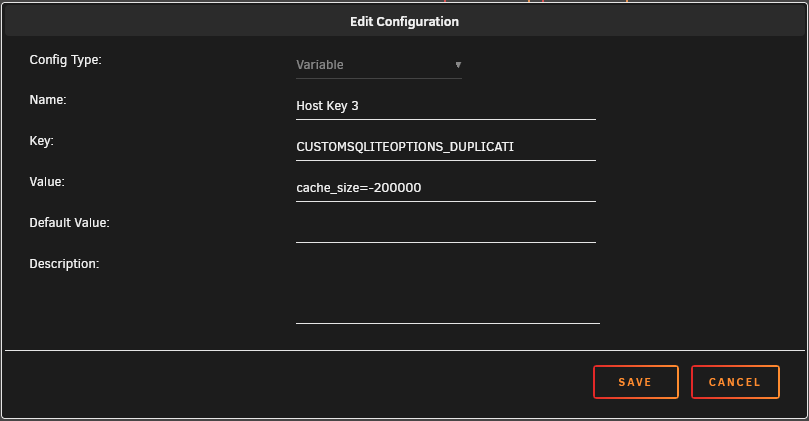
I’ve only ever interacted with containers using Unraid, so this is the only method I know of to define an Environment Variable to be used by the application.
---
### Author:  [@ts678](https://forum.duplicati.com/u/ts678)
#### Post date: [June 16, 2023, 7:42pm UTC](https://forum.duplicati.com/t/backup-runtime-after-2-0-7-1-update/16378/47 "2023-06-16T19:42:22Z")
[Docker Management](https://docs.unraid.net/unraid-os/manual/docker-management#environment-variables) in the Unraid manual isn’t of much help.
Unraid subreddit being private (joining protest?) hurts as well. Maybe a Docker person will stop by.
Meanwhile there’s probably a `ps` command (of some sort) that a `docker exec` could probably use.
---
### Author:  [@tkohhh](https://forum.duplicati.com/u/tkohhh)
#### Post date: [June 16, 2023, 7:48pm UTC](https://forum.duplicati.com/t/backup-runtime-after-2-0-7-1-update/16378/48 "2023-06-16T19:48:03Z")
I asked in the linuxserver discord (they publish the container that I use), and this is the commentary so far:
```plaintext
me: I'm trying to implement the CUSTOMSQLITEOPTIONS_DUPLICATI
environment variable, and it does not appear to be working.
Is there some reason why the linuxserver.io container might
not expose that variable to the application?
them: Depends if it can actually read system variables
me: I'm not really sure what that means... are you saying
"Depending on how the duplicati application is written, it may
or may not be able to use the Environment Variables defined
in the container."?
them: Yea
them: Some containers we have automatically pick them up
them: Others need to be manually set
```
Edit: They asked this: `Check their documentation to see if what you're trying to do can be set as a startup option`
Can this be set as a startup option rather than an Environment Variable?
---
### Author:  [@ts678](https://forum.duplicati.com/u/ts678)
#### Post date: [June 16, 2023, 7:57pm UTC](https://forum.duplicati.com/t/backup-runtime-after-2-0-7-1-update/16378/49 "2023-06-16T19:57:18Z")
I’m not a systemd expert either (on top of not being a Docker expert), but after some more searching, possibly Docker’s (and so perhaps Unraid’s) idea of passing in an environment variable means giving variable to initial process i.e. PID 1, which might be systemd and can either discard it or pass it along.
From the previously linked systemd page:
```plaintext
PassEnvironment=
Pass environment variables set for the system service manager to executed processes. Takes a space-separated list of variable names.
```
[Environment Variables in Spawned Processes](https://www.freedesktop.org/software/systemd/man/systemd.exec.html#Environment%20Variables%20in%20Spawned%20Processes)
> Processes started by the system service manager generally do not inherit environment variables set for the service manager itself (but this may be altered via `PassEnvironment=`)
---
### Author:  [@ts678](https://forum.duplicati.com/u/ts678)
#### Post date: [June 16, 2023, 8:01pm UTC](https://forum.duplicati.com/t/backup-runtime-after-2-0-7-1-update/16378/50 "2023-06-16T20:01:20Z")
> [@tkohhh](#):
>
> Edit: They asked this: `Check their documentation to see if what you're trying to do can be set as a startup option`
>
> Can this be set as a startup option rather than an Environment Variable?
> [@ts678](#):
>
> ```plaintext
> EnvironmentFile=-/etc/default/duplicati
> ExecStart=/usr/bin/duplicati-server $DAEMON_OPTS
>
> ```
Guessing that they’re talking about the second line, and there is no equivalent Duplicati option.
How about using the first line (as suggested)? Unless they changed the unit file, it should work.
---
### Author:  [@tkohhh](https://forum.duplicati.com/u/tkohhh)
#### Post date: [June 16, 2023, 8:19pm UTC](https://forum.duplicati.com/t/backup-runtime-after-2-0-7-1-update/16378/51 "2023-06-16T20:19:19Z")
The container file structure does not have `/etc/default/duplicati`
I can create it, but is `duplicati` a file or a directory? What’s the format for defining variables in the file?
---
### Author:  [@gpatel-fr](https://forum.duplicati.com/u/gpatel-fr)
#### Post date: [June 16, 2023, 8:21pm UTC](https://forum.duplicati.com/t/backup-runtime-after-2-0-7-1-update/16378/52 "2023-06-16T20:21:29Z")
> [@tkohhh](#):
>
> Can this be set as a startup option rather than an Environment Variable
No.
Here is how it should appear in the log (slightly edited)
```plaintext
export CUSTOMSQLITEOPTIONS_DUPLICATI=cache_size=-200000
(py311) gp@mono:/shared/duplicati$ mono Duplicati/CommandLine/bin/Debug/Duplicati.CommandLine.exe list "ssh://ftp.site.com//fichiers/titi?auth-username=xxx&auth-password=xxx" --no-encryption=true --console-log-level=verbose
The operation List has started
No local database, accessing remote store
Setting custom SQLite option 'cache_size=-200000'.
Backend event: List - Started: ()
(...)
```
I have barely used Docker but the only use I have found for it I needed to access the innards of the container and it was quite possible by doing
docker exec -it 1ae0acbdf51d bash
(the hash was obtained through docker ps)
Then in bash printenv should be available.
The use of bash was possible because the container was based on Debian - AFAIR the default Duplicati docker is based on Debian.
This said in my tests adding cache memory had barely an impact on this particular query execution time anyway. You would use your time more productively producing a bug report IMO.
---
### Author:  [@tkohhh](https://forum.duplicati.com/u/tkohhh)
#### Post date: [June 16, 2023, 8:24pm UTC](https://forum.duplicati.com/t/backup-runtime-after-2-0-7-1-update/16378/53 "2023-06-16T20:24:14Z")
Looks like it IS defined, but it’s not reflected in the logs, so I don’t know.
I’ll export a bug report and send it to you.
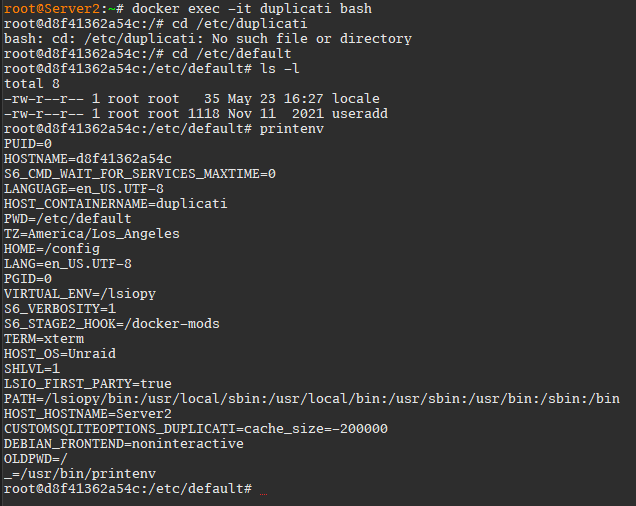
EDIT: after I started the Bug Report job, I got an entry in the live log:
```plaintext
Jun 16, 2023 1:26 PM: Setting custom SQLite option 'cache_size=-200000'.
```
---
### Author:  [@ts678](https://forum.duplicati.com/u/ts678)
#### Post date: [June 16, 2023, 8:33pm UTC](https://forum.duplicati.com/t/backup-runtime-after-2-0-7-1-update/16378/54 "2023-06-16T20:33:31Z")
> [@tkohhh](#):
>
> I can create it, but is `duplicati` a file or a directory? What’s the format for defining variables in the file?
It’s a file that you edit. Here’s its source, with one environment variable already set to an empty string.
>
and you can see the passing of variable on the ExecStart line of duplicati-server that was shown earlier.
Regarding /etc/default, my non-Docker has a locale and useradd too – and 37 others including duplicati.
Maybe you could just make a `duplicati` file, but checking their unit file to see if it’s used might be wise.
`systemctl status duplicati` should show where the unit file is.
---
### Author:  [@gpatel-fr](https://forum.duplicati.com/u/gpatel-fr)
#### Post date: [June 16, 2023, 8:35pm UTC](https://forum.duplicati.com/t/backup-runtime-after-2-0-7-1-update/16378/55 "2023-06-16T20:35:29Z")
> [@tkohhh](#):
>
> EDIT: after I started the Bug Report job, I got an entry in the live log:
Could it be that you expected to see it when Duplicati was starting up ?
---
### Author:  [@tkohhh](https://forum.duplicati.com/u/tkohhh)
#### Post date: [June 16, 2023, 8:36pm UTC](https://forum.duplicati.com/t/backup-runtime-after-2-0-7-1-update/16378/56 "2023-06-16T20:36:57Z")
> [@gpatel-fr](#):
>
> Could it be that you expected to see it when Duplicati was starting up ?
@ts678 indicated that I would see it pop up when browsing to “Show Log” on the Job Definition.
---
### Author:  [@ts678](https://forum.duplicati.com/u/ts678)
#### Post date: [June 16, 2023, 8:41pm UTC](https://forum.duplicati.com/t/backup-runtime-after-2-0-7-1-update/16378/57 "2023-06-16T20:41:32Z")
> [@tkohhh](#):
>
> when browsing to “Show Log” on the Job Definition
and many other operations, and [creating the bug report](https://duplicati.readthedocs.io/en/latest/04-using-duplicati-from-the-command-line/#the-create-report-command) qualifies. But what did you change to get it?
---
### Author:  [@tkohhh](https://forum.duplicati.com/u/tkohhh)
#### Post date: [June 16, 2023, 8:46pm UTC](https://forum.duplicati.com/t/backup-runtime-after-2-0-7-1-update/16378/58 "2023-06-16T20:46:01Z")
I didn’t change anything. It’s still not showing up when I play around with the job log files.
---
### Author:  [@ts678](https://forum.duplicati.com/u/ts678)
#### Post date: [June 16, 2023, 8:53pm UTC](https://forum.duplicati.com/t/backup-runtime-after-2-0-7-1-update/16378/59 "2023-06-16T20:53:13Z")
It shows up here when I expand the job, go to the Reporting section, and use Show log.
Starting elsewhere, I also get it as soon as I hit the Restore button. I don’t know why it’s
inconsistent (and maybe some Docker/systemd theories just got blown up), but the time
you really want to see it is during a backup or delete, to see if it speeds up slow deletes.
I guess. Your inconsistent result worries me a little…
EDIT:
I’m less worried that it showed up when you went in with a shell. That’s not likely systemd
which was the question: does it pass the variable to Duplicati or does it not? Was unclear.
---
### Author:  [@tkohhh](https://forum.duplicati.com/u/tkohhh)
#### Post date: [June 16, 2023, 8:58pm UTC](https://forum.duplicati.com/t/backup-runtime-after-2-0-7-1-update/16378/60 "2023-06-16T20:58:19Z")
> [@gpatel-fr](#):
>
> You would use your time more productively producing a bug report IMO.
Bug report failed:
```plaintext
Jun 16, 2023 1:57 PM: The operation CreateLogDb has failed with error: Attempted to write a stream that is larger than 4GiB without setting the zip64 option
```
[Previous page](https://forum.duplicati.com/t/backup-runtime-after-2-0-7-1-update/16378.md?page=2)
[Next page](https://forum.duplicati.com/t/backup-runtime-after-2-0-7-1-update/16378.md?page=4)