# After 2 years: a new try with Duplicati
**URL:** https://forum.duplicati.com/t/after-2-years-a-new-try-with-duplicati/10634
**Category:** Praise
**Created:** [August 30, 2020, 9:44am UTC](https://forum.duplicati.com/t/after-2-years-a-new-try-with-duplicati/10634 "2020-08-30T09:44:07Z")
**Posts on this page:** 4
**Page:** 1
### Author:  [@usefulvid](https://forum.duplicati.com/u/usefulvid)
#### Post date: [August 30, 2020, 9:44am UTC](https://forum.duplicati.com/t/after-2-years-a-new-try-with-duplicati/10634/1 "2020-08-30T09:44:07Z")
2 Years ago I was very disappointed from duplicati:
> [@My experience with Duplicati as backup solution](https://forum.duplicati.com/t/my-experience-with-duplicati-as-backup-solution/3687):
>
> Duplicati looked for me like the perfect Backup solution: Lots of options Lots of protocols supported Lots of Cloud services supported encryption versioning I started backing up 500Gb of files to JottaCloud. This took some days. Sometimes duplicati crashed and I had to restart the process. After that I tried to start the restore proccess. And here the catastrophe started: Duplicati needed 8 hours on my QNAP to create its database Duplicati is not able to download the backuped files in para…
That time I chose duplicacy as my backup software. I now had a full data loss and I had to recover ~1TB of files. Unfortunately one of my 2 Backups was corrupt and duplicacy offers no useful way to check backup integrity.
> **[Restore failed: Failed to decrypt the chunk cipher: message authentication...](https://forum.duplicacy.com/t/restore-failed-failed-to-decrypt-the-chunk-cipher-message-authentication-failed-retrying/4130)**
>
> Downloaded chunk 130150 size 4158898, 13.52MB/s 03:12:32 78.3% Failed to decrypt the chunk 4f5bb437441b6e7235375d5b3d00c039fb8678721866c491c6257441150c0c02: cipher: message authentication failed; retrying Downloaded chunk 130154 size 5864871,...
I could recover my files from a second duplicacy backup but for the future I do not want to rely on a single backup solution. So I am back at Duplicati.
My goal is to save my files on my second (local) NAS via SFTP.
I was not able to achieve this.
- In the wizard I am not asked to approve the SSH fingerprint → backup fails
- After adding the ssh fingerprint in the “expert” options backup still does not work
It creates some files on the target but then stops with
`Session operation has timed out`
In the logs the backup attempt is completely missing
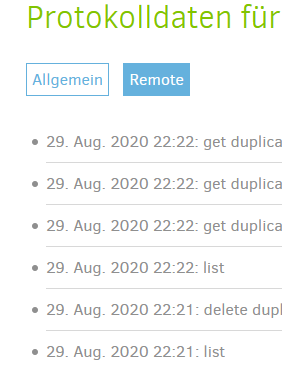
The attempt is from today (30. Aug.)
Yes you can tell me know to enable debug and so on but this all kills the idea of having an easy to use gui. I will now look for a command line alternative.
The worst thing is what Duplicati reports a successful backup:
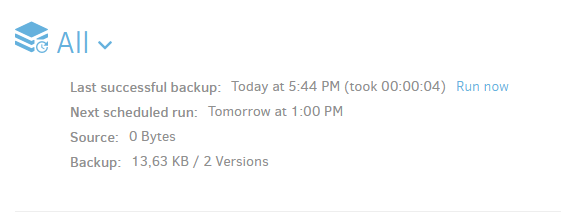
But there is no backup at all (13,63 KB / 2 Versions) The source files exceed 1TB
Why I am writing this? Duplicati could be a great backup software but my problems already start while creating a backup and I am forced to use “advanced” options to get around. I am very disappointed to see similar issues 2 years after my first try.
---
### Author:  [@drwtsn32](https://forum.duplicati.com/u/drwtsn32)
#### Post date: [August 30, 2020, 4:44pm UTC](https://forum.duplicati.com/t/after-2-years-a-new-try-with-duplicati/10634/2 "2020-08-30T16:44:21Z")
Hello,
What kind of NAS is this? I searched the forum for this timeout error and see several threads on varying targets.
I have a Synology NAS at home but I use WebDAV protocol with Duplicati. I did experiment with SFTP for a short while. It worked for me but I ended up going back to WebDAV.
---
### Author:  [@usefulvid](https://forum.duplicati.com/u/usefulvid)
#### Post date: [August 30, 2020, 5:51pm UTC](https://forum.duplicati.com/t/after-2-years-a-new-try-with-duplicati/10634/3 "2020-08-30T17:51:30Z")
> [@drwtsn32](#):
>
> What kind of NAS is this?
QNAP NAS TS-231P
😀
---
### Author:  [@ts678](https://forum.duplicati.com/u/ts678)
#### Post date: [September 2, 2020, 5:07pm UTC](https://forum.duplicati.com/t/after-2-years-a-new-try-with-duplicati/10634/4 "2020-09-02T17:07:34Z")
> [@usefulvid](#):
>
> But there is no backup at all (13,63 KB / 2 Versions) The source files exceed 1TB
One way that people get this is by setting up a `Filter` on the `Source Data` screen that filters everything.
This can also result in:
> [@usefulvid](#):
>
> Duplicati reports a successful backup
because it successfully backed up everything it was told to, which (after filtering) happened to be no files.
[Filters](https://duplicati.readthedocs.io/en/latest/appendix-d-filters/) can be complicated, and the GUI filter builder also has some bugs fixed in Canary, but not in Beta.
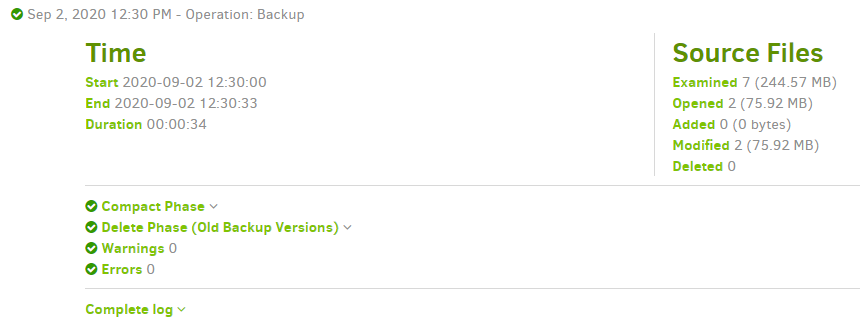
[Viewing the log files of a backup job](https://duplicati.readthedocs.io/en/latest/03-using-the-graphical-user-interface/#viewing-the-log-files-of-a-backup-job) gives another view of source files. If zero got examined, check filters.
> [@usefulvid](#):
>
> It creates some files on the target
Your 13,63 KB on the home page should reflect the total file size, meaning it’s probably not much. You can see more detailed stats in the `BackendStatistics` section in the `Complete log` if you like . One example:
```plaintext
"KnownFileCount": 29,
"KnownFileSize": 261787837,
```
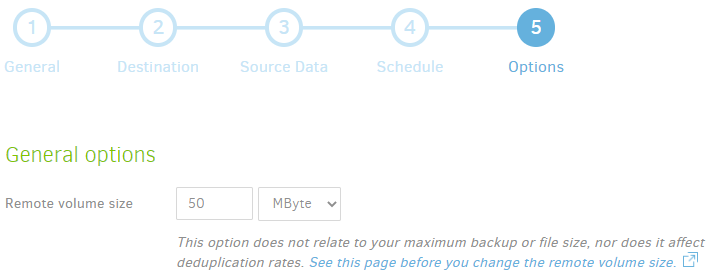
but more interesting might be what sort of files you actually got. Each backup should upload a `dlist` and a variable number of dblock and dindex files (paired). Also make sure you don’t have a huge size set up here:
> [@usefulvid](#):
>
> Yes you can tell me know to enable debug and so on
It might come to that, but let’s consider above first steps.