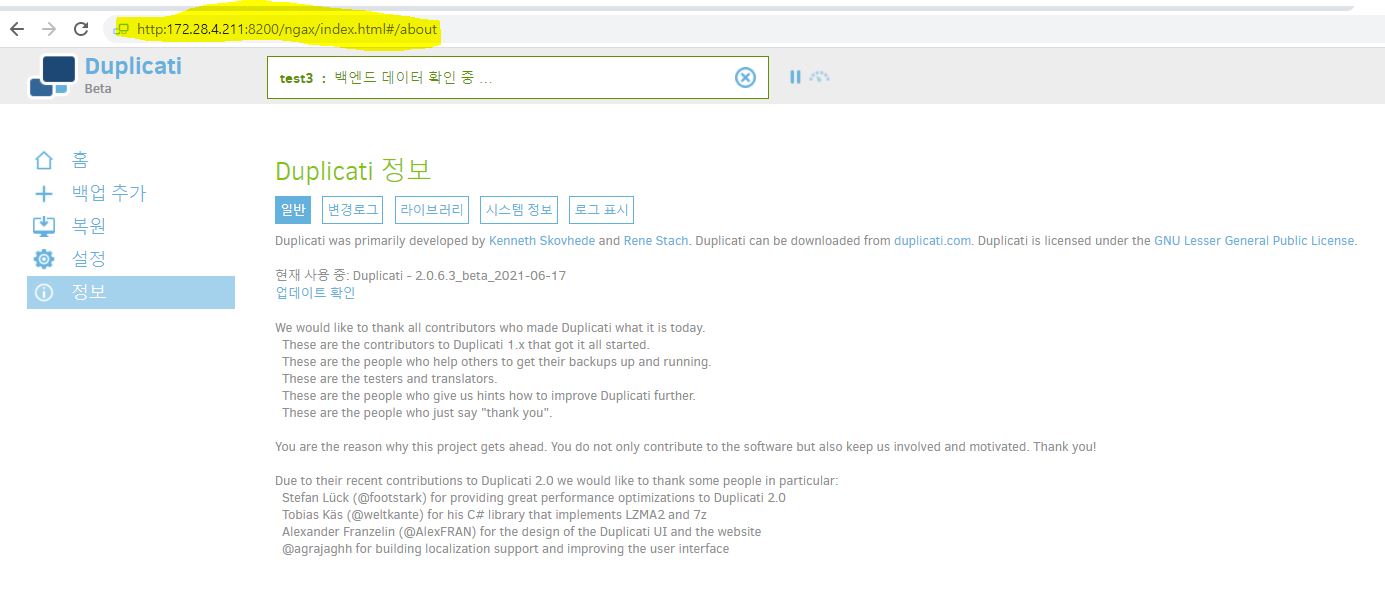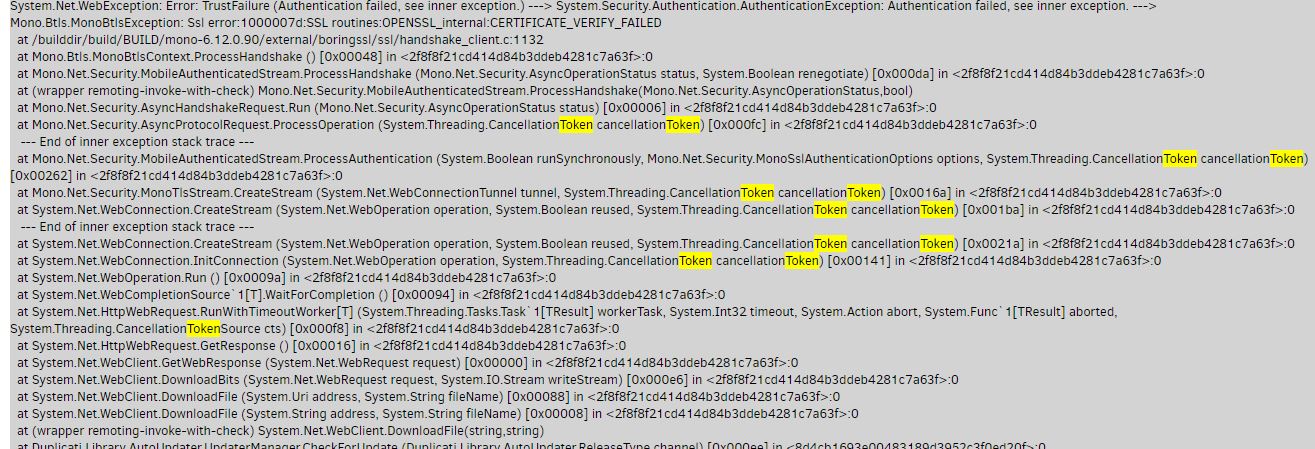
As shown in the picture, authentication failure, referencing inner exception error still occurs.
As discussed above, it still happens even if I enable the accept any ssl Certification option.
Is there any solution?? How do I fix a certificate?
I’m not sure… I’ll download CentOS 6 and see if I can reproduce your problem.
I messed around with this for a while but was unable to get a fresh install of CentOS 6 to be able to update. You might want to consider moving to a newer OS since this one is past end of life anyway.
I just want to point out that this is likely the same issue with certificates being discussed in this thread: Http send report errors / duplicati-monitoring - #49 by Chuhtra
@rmsehfdoal is this possible? It will probably also get Linux security fixes you should install.
If you must stay on CentOS 6 for a bit, does certificate issue cause issues besides log noise?
There are worse things to lose than Duplicati updates, and cert issues can have wider effects.
Which CentOS 6.x dot-release? 6.0 in 2011 may still be missing the ISRG Root X1 from 2015.
I’m thinking it might be time to use higher-level tools in diagnostics, for example something like:
$ certmgr -list -certificate -m Trust | egrep --context 2 'ISRG Root X1|DST Root CA X3'
Self-signed X.509 v3 Certificate
  Serial Number: 008B8263BBE0634459E340D2B0CF108200
  Issuer Name:   C=US, O=Internet Security Research Group, CN=ISRG Root X1
  Subject Name:  C=US, O=Internet Security Research Group, CN=ISRG Root X1
  Valid From:    6/4/2015 11:04:38 AM
  Valid Until:   6/4/2035 11:04:38 AM
$
“seems” like it should work, however if this also shows up then mono will likely say TrustFailure:
Self-signed X.509 v3 Certificate
  Serial Number: 6B40F82E86393089BA27A3D680B0AF44
  Issuer Name:   O=Digital Signature Trust Co., CN=DST Root CA X3
  Subject Name:  O=Digital Signature Trust Co., CN=DST Root CA X3
  Valid From:    9/30/2000 9:12:19 PM
  Valid Until:   9/30/2021 2:01:15 PM
EDIT:
RHEL/CentOS 6 OpenSSL client compatibility after DST Root CA X3 expiration has a big discussion, including how to get an OpenSSL that’s even more ancient than mono’s BoringSSL to work correctly.
Solution seems to be that one can’t, however one can try to rebuild a newer OpenSSL on their own…
Duplicati doesn’t require OpenSSL to work (but other things on the obsolete system might need that).
One novel but kind of ugly workaround here is to do a sed edit to extend the 9/30/2021 expiration date.
It is an intranet server used internally by the company, so OS change is not possible.
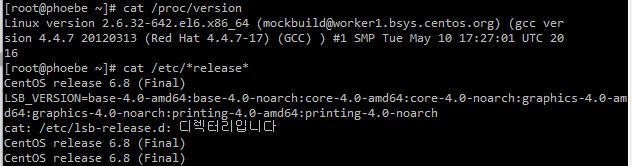
It is version 6.8 as shown in the picture.
Is there currently no way to use Duplicate?
I haven’t been able to back up the server for 3 months.
It was 6.8. No access to the repositories to install additional packages. I tried these instructions but it still wouldn’t work for me.
https://wiki.centos.org/Download looks like they have 6.10, however can you instead try the certmgr test?
That “seems” like it should directly show what sort of trouble mono is going to run into with the certificates.
It seems like should be technically possible, but if you mean there’s no budget, time, etc., sorry about that. That software is a decade old now, out of support, at increasing risk, etc. – and with no recent backups…
A possible workaround would be to run a current Duplicati in a Docker container, if CentOS 6 can do that. This needs a manual fix for the same certificate expiration, but at least it has a solution. Yours doesn’t yet.
You could also try using Rclone as the Storage Type on the Destination screen - if you can get Rclone up.
which maybe means no Duplicati and no mono, and if true that prevents running certmgr from mono.
It might also limit @rmsehfdoal from installing things (is your repository access also discontinued?).
Potentialy programs written in Go have fewer dependencies, as Go provides lots of its own libraries…
Rclone is written in Go, but there’s no testing it with Duplicati on a system without Duplicati or mono…
Is continuous availablity the concern? Is the data important? Important data deserve live OS + backup.
Is there a newer server available where you could keep a local backup of this one to rclone to Google?
You would likely seed the newer server or destination with files from the current one to keep continuity.
Do you need to keep old versions of source files, or is was the goal current versions for disaster use?
What does this server contact the Internet for? The less the better, when you’re missing security fixes.
Trying to edit SSL/TLS certificates “blind” also has potential to affect other programs using the Internet.
Because you must already have mono, can you run above certmgr test and see what certs you have?
My assumption based on symptoms is you do have the expired one, but is the one you want there yet?
Yep exactly. I see you have a link to 6.10, I might try that if I have time, but honestly this OS is EOL and I don’t know if it makes sense to spend a lot of time troubleshooting.
I agree it’s a poor place to put time, especially if it’s so dead that software installs are hard.
If the organization can’t be bothered to provide non-EOL systems, that’s also a concern…
The counter-argument may be that known-for-later-CentOS cert fixes might work on 6 too.
This gets somewhat high-risk and puts more responsibility on the sysadmin of old system.
Your CentOS 6 OS came with such certificates, and used to update them before support ended.
By the way, this system has maybe not updated in over 4 years if you’re still using CentOS 6.8…
Or at least from what I read, CentOS updates update the point-release automatically when done.
Duplicati does not directly manage certificates, but it uses mono which uses OS certificate store:
Starting with Mono 3.12.0 a new tool called
cert-syncis included which syncs Mono’s certificate store with the system certificate store.
They always expire sometime. Some browsers do their own cert store. Look at dates on Mozilla at:
Mozilla Included CA Certificate List
Included CA Certificates (HTML) might be easiest to read, but look at whichever form you like.
Top websites see outages as Let’s Encrypt’s CA certificate expires has more details on certificates.
No. It uses encrypted, certificate-validated HTTPS for program updates and other important things.
Doing anything else over the Internet is risky. Is your HTTP local storage? What Storage Type is it?
EDIT:
Then what exactly was “currently http” about? Google Drive only does HTTPS because it’s secure.
If previous post clarified certificates, I ask you to run the certmgr test so we know where things are.
This is the third ask, and it is getting to the point where it’s not a productive use of very scarce time.
Relevant logs may be missing. Please watch About → Show → Live → Retry to see backup failure.
Updater error of original post is probably not stopping backup, but is due to same expired certificate.
There is a small chance of a server certificate workaround, but evidence is needed.before pursuing.
That won’t change the fact that this system is dangerously outdated, so please pursue upgrading it.
Currently, I don’t know why, but it’s going very well.